
You are using an out of date browser. It may not display this or other websites correctly.
You should upgrade or use an alternative browser.
You should upgrade or use an alternative browser.
iPad Mini - Issue
- Thread starter babylon78
- Start date
More options
Who Replied?i have the same problem. deplete the battery till it shuts itself and it stops charging at 91%. few days later when the battery is at 5%, charge it, same thing again, stops at 91%. contacted the apple support, told me to do a hard reset. battery jumped from 96% to 100%.
weird?
weird?

palmtungsten
Senior Member
- Joined
- Oct 18, 2003
- Messages
- 2,018
- Reaction score
- 89
thus far, can charge to 100% using iPhone 5 and iPad 2 chargers and 3rd party 2A batteery charger..
But will not hit 100% (ie ard 91%) if I were to use the charger of latest generation of iPod Nano and iPhone 4 chargers
But will not hit 100% (ie ard 91%) if I were to use the charger of latest generation of iPod Nano and iPhone 4 chargers
noticed something on ipad mini
whenever i surf via safari or chrome.. i will normally double tap so all the text will align nicely for easy reading..but when i scroll up down left right, a black line will appear across the screen as if to tell me how much more to the left and right..
is tat a bug or a feature?.. or my screen spoil?
whenever i surf via safari or chrome.. i will normally double tap so all the text will align nicely for easy reading..but when i scroll up down left right, a black line will appear across the screen as if to tell me how much more to the left and right..
is tat a bug or a feature?.. or my screen spoil?

skipper
Arch-Supremacy Member
- Joined
- Jan 1, 2000
- Messages
- 11,198
- Reaction score
- 0
noticed something on ipad mini
whenever i surf via safari or chrome.. i will normally double tap so all the text will align nicely for easy reading..but when i scroll up down left right, a black line will appear across the screen as if to tell me how much more to the left and right..
is tat a bug or a feature?.. or my screen spoil?
are you talking about the scroll bar at the right side and the bottom ? or you mean across the center of the screen ? if center of the screen then something is not right.
are you talking about the scroll bar at the right side and the bottom ? or you mean across the center of the screen ? if center of the screen then something is not right.
nope.. its across the screen.. not consistent but looks professional
palmtungsten
Senior Member
- Joined
- Oct 18, 2003
- Messages
- 2,018
- Reaction score
- 89
you mean landscape view?just a quick question.. did any one faces ocassional app crashes? my fb and sg next bus keep crashing when i change my ipad to horizontal view..
you mean landscape view?
yep! landscape view
noticed something on ipad mini
whenever i surf via safari or chrome.. i will normally double tap so all the text will align nicely for easy reading..but when i scroll up down left right, a black line will appear across the screen as if to tell me how much more to the left and right..
is tat a bug or a feature?.. or my screen spoil?
Try clearing the cache and cookies for both browsers. After which reboot ur ipad mini. try again to see if the issue persist. likelihood is that after clearing the cache and cookies, the line would not appear again.
skipper
Arch-Supremacy Member
- Joined
- Jan 1, 2000
- Messages
- 11,198
- Reaction score
- 0
nope.. its across the screen.. not consistent but looks professional
if that is the case i have not encounter anything like that before.
Try clearing the cache and cookies for both browsers. After which reboot ur ipad mini. try again to see if the issue persist. likelihood is that after clearing the cache and cookies, the line would not appear again.
havent tried clearing cache and cookies.. but now no more line.. trying to find out how this thing appear.. perhaps i'l wait a week and see if more ppl experience this issue..
the black line looks pro though thus i wonder if its a function but couldnt find this detail in ios changelog
skipper
Arch-Supremacy Member
- Joined
- Jan 1, 2000
- Messages
- 11,198
- Reaction score
- 0
managed to make the line appear again
posted image
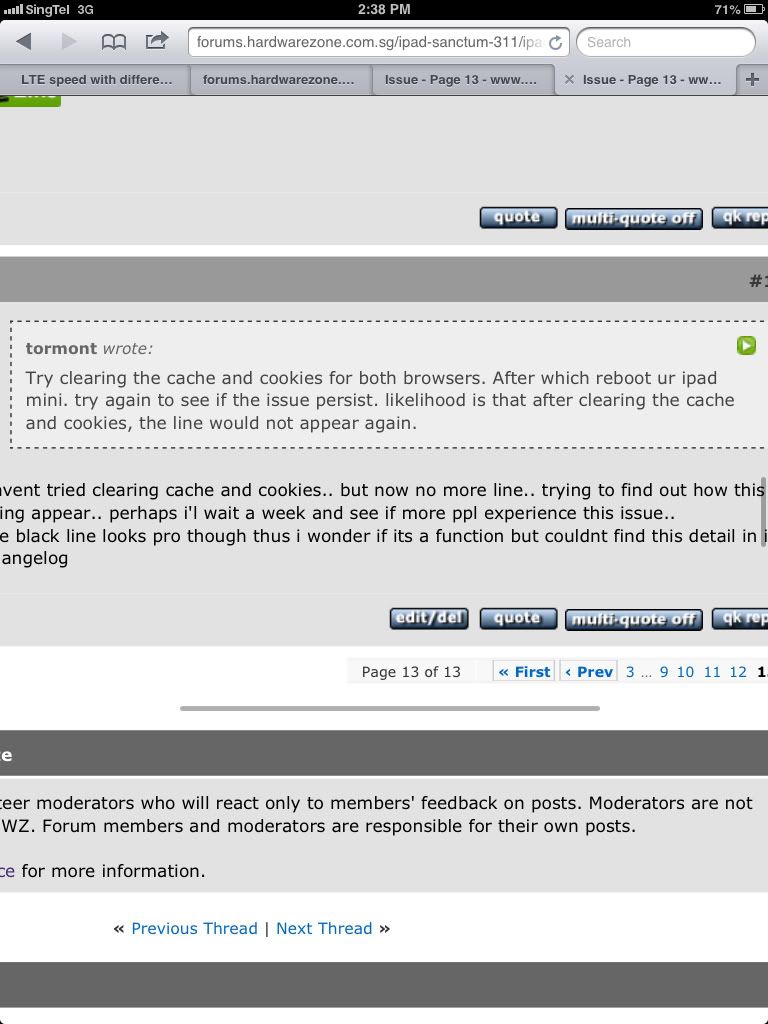
scroll bar mah this one but it seems to be at the wrong location it should be at the bottom of the screen and at the right side of the screen as i have mention in my previous reply.
The line is there to tell you that you can scroll the section above left/right - are you able to scroll the upper section left/right when it appears?
ya tats what I thought so too... I am able to scroll left and right and do everything else..
just tat I do not know when will this line appear.. apparently this is not reported by others neither did any1 else experience this.. wondering if its normal and how I can off it? wats the use of it anyway?
this line is somewat similar to android default browser on note2..but on note2.. the line is right at the bottom and rather discreet
scroll bar mah this one but it seems to be at the wrong location it should be at the bottom of the screen and at the right side of the screen as i have mention in my previous reply.
ya so its ios bug?
not screen problem then
skipper
Arch-Supremacy Member
- Joined
- Jan 1, 2000
- Messages
- 11,198
- Reaction score
- 0
ya so its ios bug?
not screen problem then
is not a hardware problem but i have not heard or seen such problem too if it is an iOS bug then it should have been mention everywhere else but so far nothing about this problem.
ya so its ios bug?
not screen problem then
Probably just the way the HWZ forum site is designed.
If you zoom back out, I believe the line should disappear.
Important Forum Advisory Note
This forum is moderated by volunteer moderators who will react only to members' feedback on posts. Moderators are not employees or representatives of HWZ Forums. Forum members and moderators are responsible for their own posts.
Please refer to our Community Guidelines and Standards and Terms and Conditions for more information.
