Let's DELL

Status
Not open for further replies.

kimsix

Arch-Supremacy Member
Joined
Jan 6, 2009
Messages
19,949
Reaction score
9,924
Another area alienware can consider reviving and improving is putting water cooling inside the laptop again. Alienware was the first to do it before

http://www.asetek.com/press-room/ne...liquid-cooling-for-laptop-and-all-in-one-pcs/
notebookwithlc_thumb.jpg
 

jtec14

Supremacy Member
Joined
Dec 5, 2001
Messages
8,957
Reaction score
662
I also search and google about Dell Alienware R2 and R3. It is v complex. The pic look alike for some of them. If it is really 17 R3 then I will research some more haha
Thanks for the thumbs up
No problem, the laptop in the video looked really too bulky for 13 or 15 inches..
 

MoneyFace =p

High Supremacy Member
Joined
Dec 17, 2010
Messages
35,374
Reaction score
401
Normally will buy those clear transparent type of silicone (avoid colorful type) covers to protect any unused port, who knows those colourful silicone covers may content some acidic substance that will may corrode the ports. ;) As this Alienware machine is so expensive, so better get a premium grade for the protection. :)
But note that the Amplifier port is a proprietary one. It will not have its port cover readily available on the market, unlike those other motherboard connectors. I feel it is important, more important than other connectors to have one protective cover as it is a PCIe based port that can push up to 75W of power through the bus. Not sure can a tiny droplet of liquid has the potential to even produce electric spark between those internal metal contacts. Not surprising if it really happens.
 

mosmos

High Honorary Member
Joined
Feb 25, 2001
Messages
174,760
Reaction score
8,183
not exactly. the intention of Alienware is to allow laptop users to have the graphics power of a desktop and also the experience of using your laptop as a desktop as the Graphics Amplifer has 4 Usb ports where you can connect a mouse as well as a keyboard and a desktop monitor. users can then choose to fix the desktop graphics card of their own choice be it a GTX Titan X or 980.

this corresponds to the Hwz video which ask desktop or laptop but you can have both the experience if you choose Alienware Graphics Amplifer.

most laptops in the market does not allow one to upgrade its own graphics card. they usually have to purchase a new laptop. same goes for Alienware laptops so they come out with this Alienware Graphics Amplifier where you do not need to buy a new laptop just to get the latest graphics card.

you got a laptop with i5 or i7 which is enough to play most if not all the games in the market but your laptop graphics card is GTX 960M or 980M and you want the Titan X/980 so Alienware Graphics Amplifer is the solution.

Since Dell Alienware 17 R2 was made to be portable, why are there an Alienware Graphics Amplifer to made the whole experience of portable gaming not portable~? :s22:

They should have input a powerful GPU inside Dell Alienware 17 R2 without the need of any external source or not asking consumers to topup to buy a huge device~
 

wadsad

Greater Supremacy Member
Joined
Jun 15, 2006
Messages
79,927
Reaction score
6,396
Since Dell Alienware 17 R2 was made to be portable, why are there an Alienware Graphics Amplifer to made the whole experience of portable gaming not portable~? :s22:

They should have input a powerful GPU inside Dell Alienware 17 R2 without the need of any external source or not asking consumers to topup to buy a huge device~

guess price and technology bah. and so called future proof.
 

mosmos

High Honorary Member
Joined
Feb 25, 2001
Messages
174,760
Reaction score
8,183
Boss reporting in.

Hope everyone had a good holiday.

We see so many discussions out there so our question to everyone is this:
What do you guys love about Alienware? And if you have a choice, what parts would you change to make your Dell Alienware 17 R2 more awesome? :o

Dell Alienware 17 R2 weight a whopping 3.8KG, I suggest Dell to change the laptop casing material to make it more lightweight and durable.

Dell as an american company can easily borrow NASA ultra light weight material for the laptop casing, who knows, the weight of Alienware 17 R2 can be shed by 50% to 2kg?

Link: http://phys.org/news/2015-04-nasa-ultra-lightweight-materials-journey-mars.html
 

mosmos

High Honorary Member
Joined
Feb 25, 2001
Messages
174,760
Reaction score
8,183
Yes having the amplifier reduces some complexity and hassle but it is still too huge for a small table like mine. :s13:
The size has to be reduced maybe like changing to a SFF PSU like what you said.

Dell Alienware Graphics Amplifier not really suitable for small and neat table.

I guess I would rather get a dell inspiron 24 7000
 

wadsad

Greater Supremacy Member
Joined
Jun 15, 2006
Messages
79,927
Reaction score
6,396
Dell Alienware Graphics Amplifier not really suitable for small and neat table.

I guess I would rather get a dell inspiron 24 7000

yup. the aio desktop is more for those with less space and dont really game that fierce.
 

MoneyFace =p

High Supremacy Member
Joined
Dec 17, 2010
Messages
35,374
Reaction score
401
slashgear_alienware_0005-580x251.jpg


I_aw_usb3_powershare_mr_v1a.png


This seems to be the USB charging port Alienware branded as USB PowerShare. Touted to charge your USB devices even when system is off. This can leads people into thinking that they can actually shutdown their Alienware laptop entirely and still charge from that special port.

I was rather skeptical of their claim as i haven't really come across any laptop or desktop that can actually charge USB device in cold shutdown mode. My own laptops and ASUS and ASRock desktop motherboards were only able to charge either when PC is on or USB device must be plugged in before putting PC into sleep mode. They do not work when i tried to do a cold shutdown or plug in after sleep, USB devices simply loses the charging mode.

After taking a deeper look into their technology, I was right. USB PowerShare will not be able to charge your USB device when system is doing cold shutdown in battery mode. Their info on web support mentioned that you can only charge devices after shutdown only in AC mode. That also doesn't imply you can plug in to charge after shutdown completed, you have to plug it in before shutting down. And battery charge capacity level must be more than 25%.

Their claim is simply too vague and rather misleading. This charging function also doesn't work out of the box, where you need to enable it from BIOS first before you can use. So users ought to take note that this USB PowerShare feature is no different from other USB sleep charging technology found on other laptops and motherboards.

And I will not encourage anyone to use it for charging in off mode as it is not any more convenient than your standalone USB wall adapter or powerbanks. With USB port active also means part of your PC motherboard circuitry will be powered as well, consuming more power to run it than a standalone USB powerbank/adapter will do.

http://www.dell.com/support/article/us/en/19/SLN116179/EN

http://www.dell.com/support/article/us/en/04/SLN155147/EN

http://forum.notebookreview.com/threads/help-with-usb-powershare.747338/
 
Last edited:

mosmos

High Honorary Member
Joined
Feb 25, 2001
Messages
174,760
Reaction score
8,183
Why not switch off the air-con. Is it true the Dell Alienware Graphics Amplifier generate that much heat?

:s22: If Dell Alienware Graphics Amplifier generate that much heat generate so much heat and needs an aircon room, I guess this system would be a failed product.

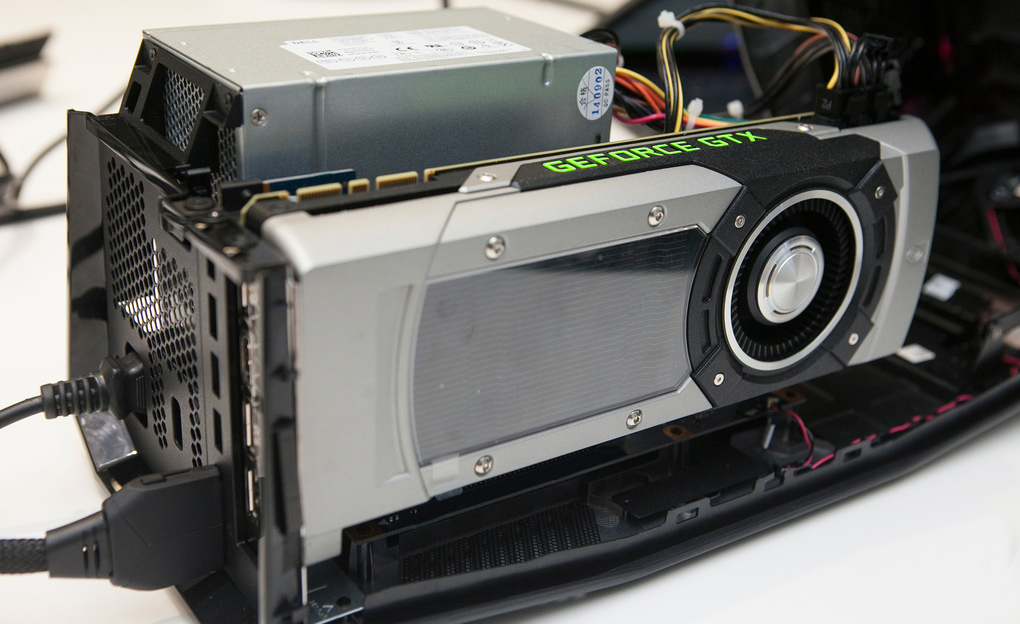
As you can see Dell Alienware Graphics Amplifier has multiple vents and fans to dissipate the hot air away from the GPU. But with so many fan units, there maybe buzzing noise if this unit was placed in a quiet environment~ :s22:

So end of day, you want quiet device not so powerful. Want powerful, noise~

alienware_graphics_amplifier_4_theverge.jpg
 

wadsad

Greater Supremacy Member
Joined
Jun 15, 2006
Messages
79,927
Reaction score
6,396
:s22: If Dell Alienware Graphics Amplifier generate that much heat generate so much heat and needs an aircon room, I guess this system would be a failed product.

As you can see Dell Alienware Graphics Amplifier has multiple vents and fans to dissipate the hot air away from the GPU. But with so many fan units, there maybe buzzing noise if this unit was placed in a quiet environment~ :s22:

So end of day, you want quiet device not so powerful. Want powerful, noise~

alienware_graphics_amplifier_4_theverge.jpg

this AGA is it on display at funan? can go see?

but i think the chances of it on display quite low. maybe those IT Show or exhibition then will have bah? then like that cant gauge the noise and heat generated liao.
 
Last edited:

Ohayo!

Great Supremacy Member
Joined
Mar 10, 2011
Messages
55,368
Reaction score
3,761
But note that the Amplifier port is a proprietary one. It will not have its port cover readily available on the market, unlike those other motherboard connectors. I feel it is important, more important than other connectors to have one protective cover as it is a PCIe based port that can push up to 75W of power through the bus. Not sure can a tiny droplet of liquid has the potential to even produce electric spark between those internal metal contacts. Not surprising if it really happens.

If a person touch such metal contacts with his wet hands, he only have himself to blame. This is a user problem and have definitely nothing to do with Alienware. Might as well make the whole laptop waterproof in this case.

I dont think it matters much really regarding the oxidation part. Most people change their laptops at least every 3~5 years. By then the battery shouldnt be able to hold that long battery life and the performance will surely slow compared to new gaming laptops which will be more powerful.

By then the user should have replaced his old Alienware laptop for a newer one. This is true especially for notebooks which cannot be compared with DIY desktops which parts can be easily replaceable.
 

jtec14

Supremacy Member
Joined
Dec 5, 2001
Messages
8,957
Reaction score
662
Take note that there are still physical limitation for choices of gaming graphics card to be installed in this Alienware Graphics Amplifier as it cannot take in cards any more than 2 slots wide and GTX 980 Ti as it is simply too long, despite power supply having enough horsepower to power it.
What?! First was limitation to Alienware 13 laptop and now this? Is the compatible graphics card for sales in Dell website as well? =:p

Btw how much is the Graphics Amplifier? Seems can't find anywhere in dell website.
 

mosmos

High Honorary Member
Joined
Feb 25, 2001
Messages
174,760
Reaction score
8,183
Alienware for gamer to love but non gamer wont love it~ if got choice ofcause make it lighter cheaper faster :s13::s13:


lighter => alienware 15/17 series heavy for portable usage

cheaper => who dont want buy it at cheaper price?

Faster => gaming is about fast processing :)

Yah, non-gamer would not prefer Alienware 17 R2, not even consider a portable at 3.8kg. I guess Dell tried to stuff all good stuff in without consider the Asian market.

Asian young children already smaller built and height, carry such heavy weight wii not grow any taller.
 

jtec14

Supremacy Member
Joined
Dec 5, 2001
Messages
8,957
Reaction score
662
The alienware 13 laptop design is so much nicer than dell inspiron 15, I like how the keyboard is being spread out and it is the most compact and lightest at avg 2.058kg in the alienware laptop family. But most will probably complain, screen so small for gaming?! :s22:
 
Status
Not open for further replies.
Important Forum Advisory Note
This forum is moderated by volunteer moderators who will react only to members' feedback on posts. Moderators are not employees or representatives of HWZ Forums. Forum members and moderators are responsible for their own posts. Please refer to our Community Guidelines and Standards and Terms and Conditions for more information.
Top