Let's DELL

Status
Not open for further replies.

wadsad

Greater Supremacy Member
Joined
Jun 15, 2006
Messages
79,927
Reaction score
6,396
for the "which part i would like to change" part, i will focus on the laptop.

i think if i can make a change to the laptop, i would like it to have the intel realsense 3d camera instead of just a standard web cam.

gaming on the intel realsense 3d camera may be a reality soon, and alienware being known for making gaming PC, definitely shouldnt miss out on this.

Imagine the intel realsense making real progress say 2 years down, an AAA game comes along, and there you have a supposedly gaming PC that is not able to play the game... it will really be an embarrassment and something that their competitors will be sure to take advantage of.
 

MoneyFace =p

High Supremacy Member
Joined
Dec 17, 2010
Messages
35,374
Reaction score
401
There’s another prominent feature I believe everyone seemed to have missed out. i.e. Dynamic overclocking on the Alienware 17 R3. Despite Alienware offers quad core Core i7-6700HQ in their default configuration for Alienware 17 R3, there is actually an option to upgrade CPU to the the K series Core i7-6820HK where you can overclock it just like desktop Core i7-6700K.

Users can attempt with the provided Intel Extreme Tuning Utility in a (less) traditional manner, but Alienware also commit a step further to make this overclocking experience much simple, with several overclock profile presets available from their UEFI firmware. This is similar to the 1-click overclocking from desktop branded motherboards like ASUS and MSI. I can just choose and click for the certain speed profile, load it and reboot. And I am very well done with overclocking and harness the full performance potential from my processor in just a matter of seconds!

Unfortunately Alienware UEFI firmware doesn’t allow manual fine tuning overclock option. In fact, I feel that this is a necessary evil, given limited cooling capability on such laptop, to prevent users from potentially frying their motherboard and processor (and impacting other parts which are closely packed) with excessive voltage and multiplier figures, which is unknown to newbies. This offers a necessary fail-safe to those target users who are new to overclocking, and offering an easy start for those keen to understanding more about processor overclocking.

This is also great for those who don’t wish to meddle around with all the sophisticated list of options, as traditional overclocking is very time and electricity power consuming, since you need to conduct stress test for every configuration to ensure system stability. And also saves time for those who need more performance on demand, but don't have the luxury of time to figure things out. This also otherwise means that your processor won’t be able to perform to its own maximum capability with higher possible clocks. But as mentioned earlier, there’s still Intel XTU for manual fine tuning on software basis! Though many a time settings do not stick well upon reboot...

With dynamic overclocking on hand, gamers can use it to alleviate potential CPU bottleneck in the otherwise low CPU clock speed on mobile quad core processors. And also improve rendering speed, should users need to do media creation on their Alienware laptops. And it will have been even better if they were to include optional external watercooling unit liken to ASUS ROG's solution, to further overclock the CPU and internal discrete graphics. Providing more options on how users can improve their laptop's performance.

asus-gx700-laptop-0656-005.jpg
 
Last edited:

MoneyFace =p

High Supremacy Member
Joined
Dec 17, 2010
Messages
35,374
Reaction score
401
Only certain height GPU can fit the Alienware Graphics Amplifier. Next Gen GPU should be made smaller and with better cooling system.

Height doesn't seemed to be a issue as seen from the pic, but rather thickness and length where it only accepts strictly 2 slots wide and 10.5 inches long.

alienware_graphics_amplifier_b_0943_0.jpg
 

xiaowhois

Arch-Supremacy Member
Joined
Jun 5, 2005
Messages
15,984
Reaction score
123
Height doesn't seemed to be a issue as seen from the pic, but rather thickness and length where it only accepts strictly 2 slots wide and 10.5 inches long.

alienware_graphics_amplifier_b_0943_0.jpg

maybe those more professional can take out all the electronic parts from the casing and build it on a bigger casing to allow bigger GPU provided the Alienware Graphics Amplifier systemboard & PSU support it
 

MoneyFace =p

High Supremacy Member
Joined
Dec 17, 2010
Messages
35,374
Reaction score
401
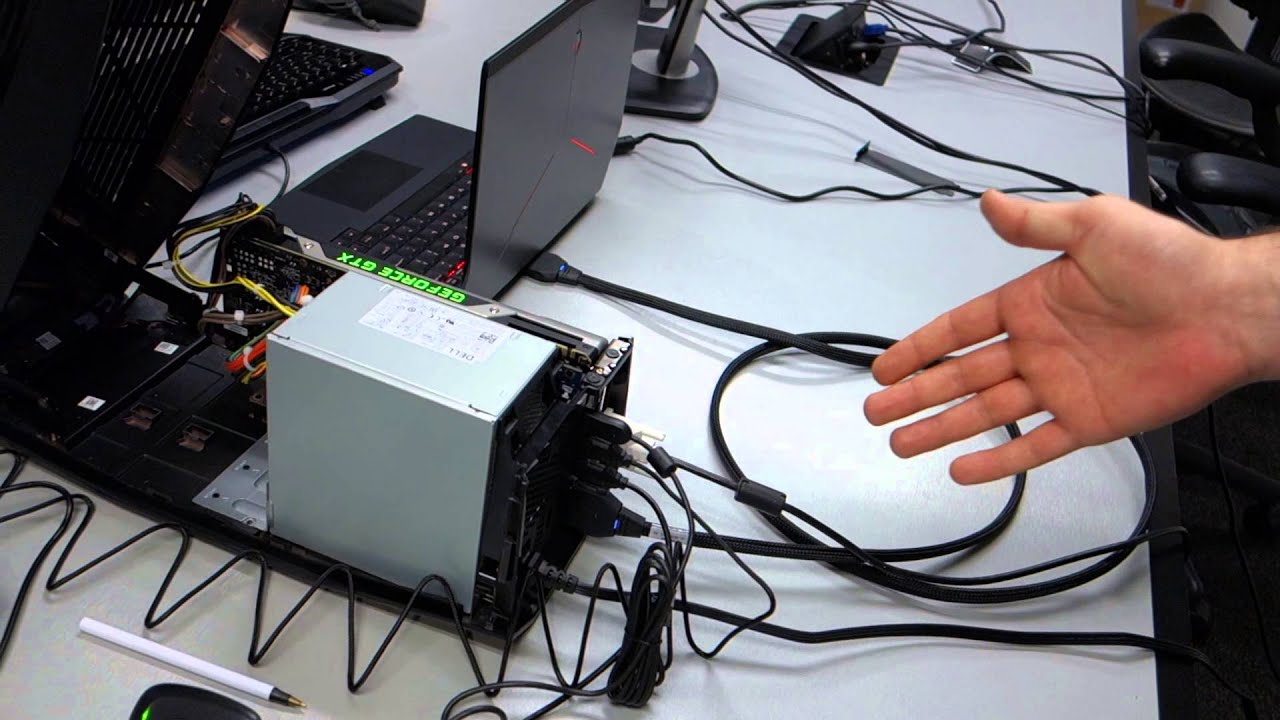
Dell Alienware Graphic Amplifier external wiring connection was too messy, I wonder how many would bother to plug in and out the cables everyday for 365 days a year.

Maybe a better solution would be using a ultra fast 5G wireless connection at 1Tbps between the laptop and Graphics Amplifier


maxresdefault.jpg


Link: http://www.ibtimes.co.uk/5g-researchers-achieve-1tbps-record-connection-speed-uk-1489525

Though it seemed messy down there, it can in fact be rather neat implementation if you plan out your connections well. As mentioned previously, these additional US ports from the amplifier should be better used for your desktop peripherals rather than external disk drives due to bandwidth limitation.

Let say, when on-the-go or at other people's place, you make use of the internally provided keyboard and mouse for gaming. Whereas at home, you can simply leave the desktop peripherals, i.e. mechanical gaming keyboard and mouse, connected to the amplifier USB ports all the while. All you need to do is to simply plug the amplifier proprietary cable into the Alienware laptop and you can straight away switch to using those desktop peripherals right away. With a bit of cable management, the implementation can actually be simple and neat.

Alienware laptop <- Amplifier - desktop gaming keyboard & mouse
 

MoneyFace =p

High Supremacy Member
Joined
Dec 17, 2010
Messages
35,374
Reaction score
401
maybe those more professional can take out all the electronic parts from the casing and build it on a bigger casing to allow bigger GPU provided the Alienware Graphics Amplifier systemboard & PSU support it
Then that seriously defeats the purpose of having this graphics amplifier being smaller than many full fledge PCs... :s22:
 

xiaowhois

Arch-Supremacy Member
Joined
Jun 5, 2005
Messages
15,984
Reaction score
123
Then that seriously defeats the purpose of having this graphics amplifier being smaller than many full fledge PCs... :s22:

Maybe got Dell fanboys lo want all dell brand products

but too bad look like cannot since the sideway PCB restricted blocked the extension even you custom build ur casing


Look like the PSU is generic Desktop PSU which possible you can change to your own PSU to power more effective/power

alienware_graphics_ampflifier_test-08.jpg
 

MoneyFace =p

High Supremacy Member
Joined
Dec 17, 2010
Messages
35,374
Reaction score
401
Apple never did this.

External GPUs for Mac are all third-party solutions.

Apple only 'provided' the bandwidth connection in the form of thunderbolt.

Just that Dell and MSI adopted this concept for their laptops.

Alienware made the damn right decision to include Thunderbolt 3 on USB 3.1 Gen2 Type-C offering, instead of merely a plain jane USB 3.1 Gen2 port. Thunderbolt 3 offers a whopping 40Gb/s bandwidth, even more than that offered by the Graphics Amplifier's proprietary cable at 32Gb/s from PCIe 3.0 x4 lanes.

With Thunderbolt 3 onboard the Alienware 17 R3 laptop, this Alienware laptop not only have the current choice of its own in-house Graphics Amplifier, but also the upcoming newest MSI external graphics solution over Thunderbolt 3!

MicroStar International is working on two external graphics processing solutions for mobile and small form-factor personal computers with Thunderbolt 3 interface. The details about the products are scarce, but we do know that one is called “Thunderbolt Card Chassis” and another is described as the “Thunderbolt Graphics Dock”. Both products will feature Intel Corp.’s “Alpine Ridge” controller. While it is logical to expect MSI’s external graphics devices to hit the market before the end of the year, MSI does not reveal any launch dates at present.

http://www.kitguru.net/components/g...phics-solutions-with-thunderbolt-3-interface/


So Alienware laptop owners can have more choices of external graphics solution and this MSI offering may also lessen the performance penalty from the bandwidth bottleneck. It is a win-win situation for both Alienware and its users.
 

MoneyFace =p

High Supremacy Member
Joined
Dec 17, 2010
Messages
35,374
Reaction score
401
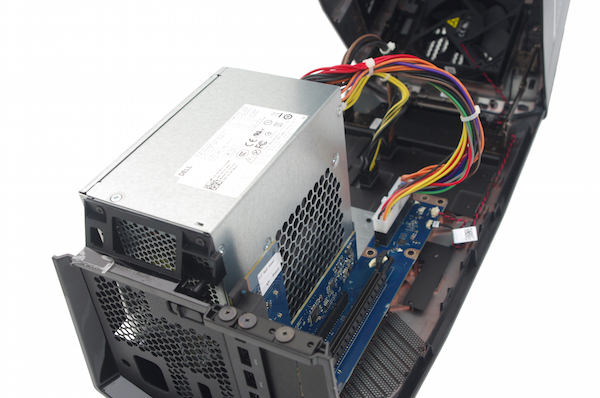
Upon deeper inspection at the parts layout inside the Graphics Amplifier, i noticed a small yet major flaw, i.e. the orientation of the bundled power supply box.

alienware-graphics-amplifier-psu.jpg


Notice in the above image that the power supply fan mount is directed inwards towards the back of the graphics card PCB. I do not understand the rationale of such orientation as the power supply fan is drawing in air through that tiny gap between the PSU and graphics card, in a rather hot environment within the amplifier chassis.

Being moderately verse in PC airflow personally, i seriously find this certainly unfavourable to the PSU as it will shorten its lifespan at increasing rate down the years by constantly drawing warm-hot air to 'cool' the PSU innards. This is the very same reason why PC chassis with top PSU mount is much less desirable to bottom mounted ones, as PSU can draw in fresh, dedicated cooler air from the bottom of chassis, isolated from the rest of the PC system within.

With this amplifier PSU running on high load with a high-top end, power hungry graphics card, the PSU wattage capacity will also drop faster and sooner that it may not be sufficient for the same power hungry graphics card within 2-3 years. That will require a PSU replacement more frequent if the user know how to do it, or worse still replacement of the entire pricey amplifier in just a short matter of time, diluting its benefits and value otherwise seen higher when initially bought.

One thing Alienware R&D team should consider is to simply turn the PSU around to face (the otherwise underutilised) vent openings on the other side of the amplifier chassis, similar to the vents on the graphics card side to let graphics card draw in fresh air through it. This simple tweak will actually let the PSU draw in fresh air from the side and improve its longevity that it should have been enjoying.

And one more thing. Not sure if it was decided due to cost cutting, notice there is no 80 Plus certification on the Dell amplifier PSU. R&D team should have chosen a PSU with higher energy efficiency, preferably with 80 Plus Gold certification, that also comes with efficient and quietly running fluid bearing fan, and also on the external sole running fan, in an attempt to reduce power consumption waste from the lower energy-efficient power supply and also reduce the overall acoustics level.

Such improvements will be greatly appreciated by buyers of this amplifier since they have spend quite an amount of cash for it and should expect and enjoy better quality product. The current implementation has been rather noisy from the accounts of some reviewers and users.

alienware-graphics-amplifier-front-open-1500x1000.jpg


http://www.techspot.com/review/944-alienware-13-graphics-amplifier/page5.html

https://www.reddit.com/r/Alienware/comments/2yhtrs/graphics_amplifier_anyone_have_one_thoughts/

https://eu.alienwarearena.com/forum...phics-amplifier-fan-speed-any-way-to-lower-it
 

MoneyFace =p

High Supremacy Member
Joined
Dec 17, 2010
Messages
35,374
Reaction score
401
If a person touch such metal contacts with his wet hands, he only have himself to blame. This is a user problem and have definitely nothing to do with Alienware. Might as well make the whole laptop waterproof in this case.

I dont think it matters much really regarding the oxidation part. Most people change their laptops at least every 3~5 years. By then the battery shouldnt be able to hold that long battery life and the performance will surely slow compared to new gaming laptops which will be more powerful.

By then the user should have replaced his old Alienware laptop for a newer one. This is true especially for notebooks which cannot be compared with DIY desktops which parts can be easily replaceable.

Self-inflicted wet hands is user problem for sure. But as pointed out previously, what if the user has a natural sweaty palm? 'Moisturising' the laptop with such sweaty hands is inevitable.

There is also a significant portion of Alienware owners who may not be willing to replace their laptops that soon, who could have saved many months to afford their Alienware laptops, given how pricey they are. As a owner of every product you use, you will certainly appreciate that the product last you very long, which correlates to its product quality. With the aim of providing high solid quality product, i don't think they will want to mar user experience with such a careless flaw which can potentially drive them away to other competing laptop brands.

Silicone port covers also won't exist on the market if users do not care about their own laptops. Since such product exists, there means a demand for it and this shows that people do care to protect their expensive gadgets. This is very same for expensive smartphone owners, to protect their beloved Gorilla Glass screen and chassis with yet expensive, great quality Spigen screen protectors and external cases.

With a strong gaming branding and reputation at stake, and a lucrative business with high profits margin ahead, they won't want to lose business do they?
 
Last edited:

bosssaizo

Senior Moderator
Senior Moderator
Joined
Jun 2, 2015
Messages
19,557
Reaction score
39
Hokay. Bonus Points given out :s22:

Hope everyone is happy. Please keep posting quality posts.
 

kimsix

Arch-Supremacy Member
Joined
Jan 6, 2009
Messages
19,949
Reaction score
9,924
Why do the video put up to gtx980, but alienware website do not allow for this selection? Typo or a new option is coming soon? It could be the first gtx980 laptop in Singapore, wonder how it will cost?

I also see alienware 17 has the option of selecting 6820hk i7, that is the first overclocking mobile i7! Dell states it can dynamically overclock to 4.1ghz. But we can use Intel xtu software to further the overclock in Windows! This is fun that laptop users can join in the silicon lottery and will push alienware cooling qualities to its max!
 

wadsad

Greater Supremacy Member
Joined
Jun 15, 2006
Messages
79,927
Reaction score
6,396
ohayo jialat liao. cannot slack liao. :s13:

if no freak bonus points received by others, i should be able to claim the monitor liao. :s13:

gum xia gum xia.
 

wadsad

Greater Supremacy Member
Joined
Jun 15, 2006
Messages
79,927
Reaction score
6,396
@boss, ask u ah. how come the bonus points there put my points is given for example #3333, but when i look for post #3333, is not i post one.

issit cause got ppl delete post, so the post # not accurate liao?
 
Status
Not open for further replies.
Important Forum Advisory Note
This forum is moderated by volunteer moderators who will react only to members' feedback on posts. Moderators are not employees or representatives of HWZ Forums. Forum members and moderators are responsible for their own posts. Please refer to our Community Guidelines and Standards and Terms and Conditions for more information.
Top