M1 FIBRE BROADBAND DISCUSSION - Part 2

Extremme

Master Member
Joined
Nov 20, 2002
Messages
3,327
Reaction score
42
Most likely no improvement with the coverage and only speed improvement. Both are the lowest end AX router from Asus with only 256MB of RAM.

I am probably biased but I do not recommend using RT-AX3000P or RT-AX55 as the main router, but I guess you only have a few devices and do not use much of the Asus router features.

You may want to post your floor plan. Many 4 room HDB will require two nodes due to placement constraints. For example, for new BTO flats, one may often need to put a router in the DB box to have the room LAN ports working. And then often another node is needed as the DB box will often not located in the central location.
My main router is RT-AX88U which is at the living room while the additional node is at my son's room (via wifi mesh).

My current plan is M1 1gbps which is due for recontracting. I am currently paying about $40 which it seems if I renew the new plan is only $36 for 1gbps.

Contemplating if its worth to upgrade to 1+1 without much configuration for the same cost now. Otherwise I am fine to stick to 1gbps at a lower cost

My son's PC is connected to LAN in his room (Room 2).


xiaofan

High Supremacy Member
Joined
Sep 16, 2018
Messages
31,431
Reaction score
8,846
My main router is RT-AX88U which is at the living room while the additional node is at my son's room (via wifi mesh).

My current plan is M1 1gbps which is due for recontracting. I am currently paying about $40 which it seems if I renew the new plan is only $36 for 1gbps.


RT-AX88U as the main router -- that is good.

But are you using wireless backhaul in this case? RT-AX3000P will not be much better in this case.

1) One potential improvement is to pull another cable to the RT-AX88U location (two LAN ports next to each other).

In that case you can use Ethernet backhaul which will increase the speed of your Bedroom 2 and main bedroom significantly.

ONT in DB box -- living room LAN port 1 -- RT-AX88U as main router -- living room LAN port 2 -- cheap switch in DB box like TP-Link TL-SG105 at about S$30 -- room LAN ports

Bedroom 2 LAN port -- RT-AX55 or RT-AX3000P

This is documented as Option 2 in the FAQ write-up.
https://forums.hardwarezone.com.sg/...home-networking.6653421/page-3#post-149431568

2) Another option is to use two VLAN capable switches like two TP-Link TL-SG105E (Option 3 in the FAQ).
 

Extremme

Master Member
Joined
Nov 20, 2002
Messages
3,327
Reaction score
42
RT-AX88U as the main router -- that is good.

But are you using wireless backhaul in this case? RT-AX3000P will not be much better in this case.

1) One potential improvement is to pull another cable to the RT-AX88U location (two LAN ports next to each other).

In that case you can use Ethernet backhaul which will increase the speed of your Bedroom 2 and main bedroom significantly.

ONT in DB box -- living room LAN port 1 -- RT-AX88U as main router -- living room LAN port 2 -- cheap switch in DB box like TP-Link TL-SG105 at about S$30 -- room LAN ports

Bedroom 2 LAN port -- RT-AX55 or RT-AX3000P

This is documented as Option 2 in the FAQ write-up.
https://forums.hardwarezone.com.sg/...home-networking.6653421/page-3#post-149431568

2) Another option is to use two VLAN capable switches like two TP-Link TL-SG105E (Option 3 in the FAQ).

ONT in DB box -- living room LAN port 1 -- RT-AX88U as main router -- living room LAN port 2 -- cheap switch in DB box like TP-Link TL-SG105 at about S$30 -- room LAN ports
This is already done and is the current setup.

Bedroom 2 LAN port -- RT-AX55 or RT-AX3000P
This is not done. The current RT-AX55 node is done via wireless. The lan port in Room 2 is used by my son to connect directly to his PC.
 

Extremme

Master Member
Joined
Nov 20, 2002
Messages
3,327
Reaction score
42
Then there is a easy solution.

Bedroom 2 LAN port -- RT-AX55U (or RT-AX3000P) -- your son's PC
Thanks Xiaofan.

So meaning instead of plugging the lan into the son's PC, I will plug it into AX55 and then use another lan cable to plug from AX55 to Son's PC? Will it get 1gbps too?

Is there any configuration needed to be done on the AX55 router?
 

xiaofan

High Supremacy Member
Joined
Sep 16, 2018
Messages
31,431
Reaction score
8,846
Thanks Xiaofan.

So meaning instead of plugging the lan into the son's PC, I will plug it into AX55 and then use another lan cable to plug from AX55 to Son's PC? Will it get 1gbps too?

Is there any configuration needed to be done on the AX55 router?

Yes.

Nothing to change from the RT-AX55 side.

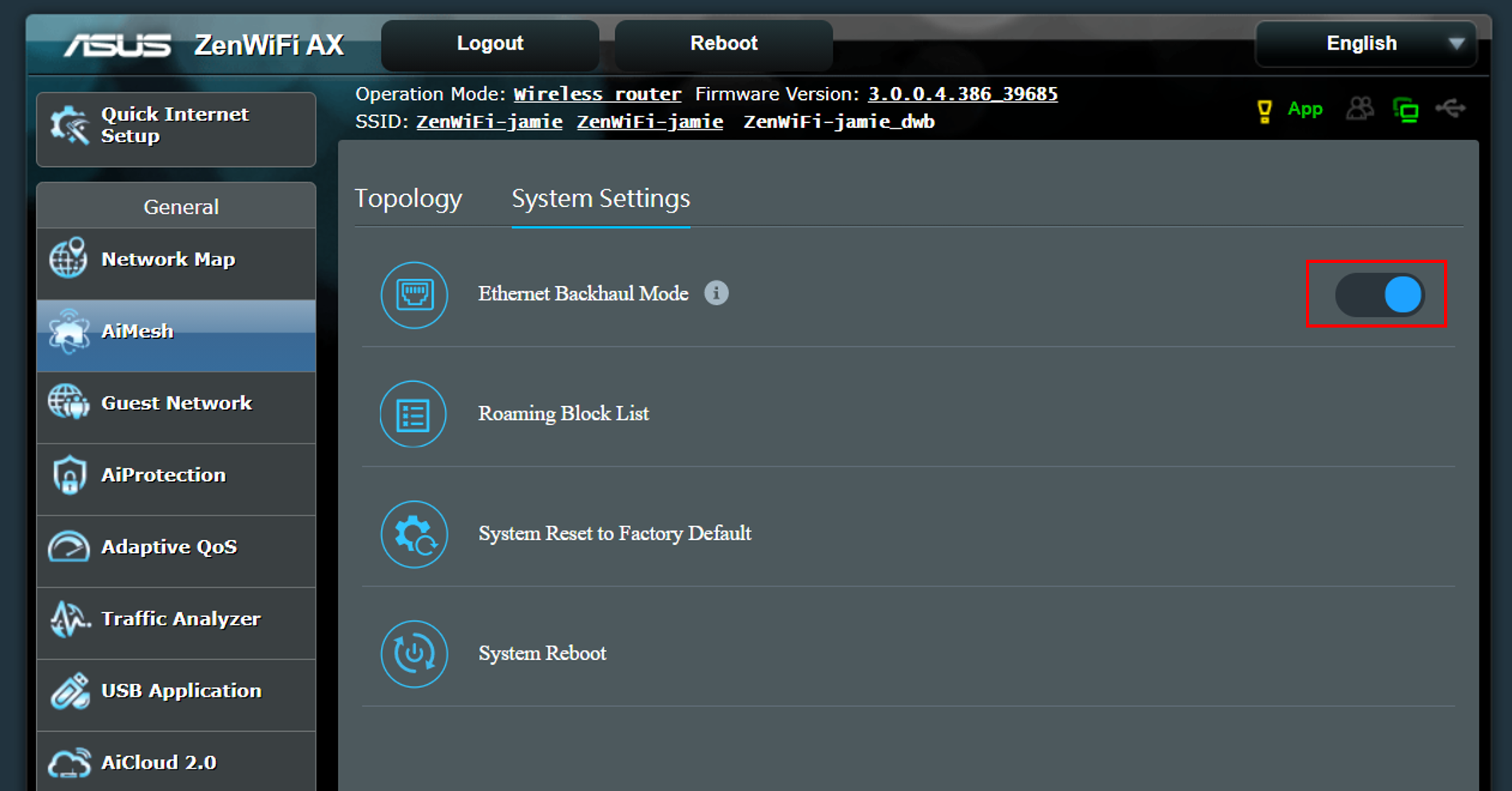
On the main RT-AX88U side, you may need to change the AImesh backhaul type to Ethernet. Please read the following FAQ.
https://www.asus.com/sg/support/faq/1044184/
c6adf71d-c997-48a3-9a62-e49dfbab2165.png
 

Extremme

Master Member
Joined
Nov 20, 2002
Messages
3,327
Reaction score
42
Yes.

Nothing to change from the RT-AX55 side.

On the main RT-AX88U side, you may need to change the AImesh backhaul type to Ethernet. Please read the following FAQ.
https://www.asus.com/sg/support/faq/1044184/
c6adf71d-c997-48a3-9a62-e49dfbab2165.png
Thanks. I read the FAQ and there was mentioning of wireless smart connect. I dont think its needed right? Trying not to mess up more configuration.

I will just recontract to get the lower monthly subscription and sell away the AX3000 then since not much use
 

Mach3.2

Great Supremacy Member
Joined
Apr 8, 2011
Messages
72,405
Reaction score
2,464
I went down to the shop the staff say no need renew. Can jump anytime. So I'm thinking of jumping as advised.
jump where? peering and capacity wise imo m1 is pretty good already. I'm not experiencing any of the peak hour ping spikes myrepublic and starhub users seem to be experiencing.

but if really looking for something cheaper then probably will be whizzcomms liao if you don't have any specific requirements.
 

belmont_a

Member
Joined
Jun 6, 2008
Messages
442
Reaction score
39
Thanks. I read the FAQ and there was mentioning of wireless smart connect. I dont think its needed right? Trying not to mess up more configuration.

I will just recontract to get the lower monthly subscription and sell away the AX3000 then since not much use

I turn off smart connect and keep both 2.4 and 5 ghz channel active.

my consideration is both channels have strong signal on all places in the house.

Pros of turning that off is we have clear network segregation:
1. Newer devices to connect on 5 ghz channel
2. Older devices stay on 2.4 ghz channel

With this approach, theoritically:
- less computation on router to decide if the client should switch channel.
- devices on 5ghz channel can maximise the speed and not accidentally throttled due to being connected on 2.4 channel.
- less congention on 2.4 channel.

Recommending this approach only if you have strong 5ghz signal all over your house.
Otherwise smartconnect might be better where it can help your devices automatically switch between 2.4/5ghz channels based on the signal strength.
 

Extremme

Master Member
Joined
Nov 20, 2002
Messages
3,327
Reaction score
42
I turn off smart connect and keep both 2.4 and 5 ghz channel active.

my consideration is both channels have strong signal on all places in the house.

Pros of turning that off is we have clear network segregation:
1. Newer devices to connect on 5 ghz channel
2. Older devices stay on 2.4 ghz channel

With this approach, theoritically:
- less computation on router to decide if the client should switch channel.
- devices on 5ghz channel can maximise the speed and not accidentally throttled due to being connected on 2.4 channel.
- less congention on 2.4 channel.

Recommending this approach only if you have strong 5ghz signal all over your house.
Otherwise smartconnect might be better where it can help your devices automatically switch between 2.4/5ghz channels based on the signal strength.
Thats a valid and good point. I have never toggle around such things.
 

xiaofan

High Supremacy Member
Joined
Sep 16, 2018
Messages
31,431
Reaction score
8,846
I turn off smart connect and keep both 2.4 and 5 ghz channel active.

my consideration is both channels have strong signal on all places in the house.

Pros of turning that off is we have clear network segregation:
1. Newer devices to connect on 5 ghz channel
2. Older devices stay on 2.4 ghz channel

With this approach, theoritically:
- less computation on router to decide if the client should switch channel.
- devices on 5ghz channel can maximise the speed and not accidentally throttled due to being connected on 2.4 channel.
- less congention on 2.4 channel.

Recommending this approach only if you have strong 5ghz signal all over your house.
Otherwise smartconnect might be better where it can help your devices automatically switch between 2.4/5ghz channels based on the signal strength.

Very well written.

For users who have two home networks (eg: dual 1Gbps plan), you may even turn off 2.4GHz in one network. That is what I am doing (Singtel 1Gbps plan, ONT user, using VLAN switch trick to get two networks with two public IPv4 addresses).

Network 1 -- Asus RT-AX86U, 2.4GHz band disabled, only using 5GHz band.
Network 2 -- pfSense/OpenWRT + Asus TUF-6500, 2.4GHz band enabled, using both 2.4GHz/5GHz band.
 

MrClubbie

Banned
Joined
Feb 9, 2024
Messages
1,569
Reaction score
798
Very well written.

For users who have two home networks (eg: dual 1Gbps plan), you may even turn off 2.4GHz in one network. That is what I am doing (Singtel 1Gbps plan, ONT user, using VLAN switch trick to get two networks with two public IPv4 addresses).

Network 1 -- Asus RT-AX86U, 2.4GHz band disabled, only using 5GHz band.
Network 2 -- pfSense/OpenWRT + Asus TUF-6500, 2.4GHz band enabled, using both 2.4GHz/5GHz band.
don't hog too much ipv4 address, it's in shortage
 

xiaofan

High Supremacy Member
Joined
Sep 16, 2018
Messages
31,431
Reaction score
8,846
don't hog too much ipv4 address, it's in shortage

Singtel got many...

FYI, quite some people bridge Singtel ONR and WC ONR for the 2Gbps/2.5Gbps plan, they will get two IPv4 addresses as well.

Same for those who bridge the ZTE ONR for Singtel 5Gbps/10Gbps plan.

Singtel has no issues with that (people getting two public IPv4 addresses) even though they do not accept ONR bridge request.
 
Last edited:

twosix

High Supremacy Member
Joined
Nov 27, 2000
Messages
27,193
Reaction score
7,308
...
I turn off smart connect and keep both 2.4 and 5 ghz channel active.

my consideration is both channels have strong signal on all places in the house.

Pros of turning that off is we have clear network segregation:
1. Newer devices to connect on 5 ghz channel
2. Older devices stay on 2.4 ghz channel

With this approach, theoritically:
- less computation on router to decide if the client should switch channel.
- devices on 5ghz channel can maximise the speed and not accidentally throttled due to being connected on 2.4 channel.
- less congention on 2.4 channel.

Recommending this approach only if you have strong 5ghz signal all over your house.
Otherwise smartconnect might be better where it can help your devices automatically switch between 2.4/5ghz channels based on the signal strength.
Can do this to individual router(s) in a mesh network too. I only have 1 router with 2.4ghz for the IoTs, the rest r 5ghz only.
 

Arandalo

Master Member
Joined
Feb 22, 2014
Messages
3,942
Reaction score
1,130
I've got the email too. Will M1 chut stunt and cancel/charge non-contracted customers more?
I have been out of contract since September 2022. If cancel or charge more then I just terminate and sign up SIMBA fibre broadband lor, can even save more money. Just that have to give up home fixed voice and 500 MB mobile line.
 

xiaofan

High Supremacy Member
Joined
Sep 16, 2018
Messages
31,431
Reaction score
8,846
I have been out of contract since September 2022. If cancel or charge more then I just terminate and sign up SIMBA fibre broadband lor, can even save more money. Just that have to give up home fixed voice and 500 MB mobile line.

You give up much more than that.

As of now I can not recommend SIMBA except as a backup.

SIMBA -- CGNAT, no public IPv4 address, no IPv6, bad speed, unproven stability, ...
 

Mach3.2

Great Supremacy Member
Joined
Apr 8, 2011
Messages
72,405
Reaction score
2,464
You give up much more than that.

As of now I can not recommend SIMBA except as a backup.

SIMBA -- CGNAT, no public IPv4 address, no IPv6, bad speed, unproven stability, ...
sometimes I'm tempted to recommend simba, just to see what will happen (scream test) :crazy:
 
Important Forum Advisory Note
This forum is moderated by volunteer moderators who will react only to members' feedback on posts. Moderators are not employees or representatives of HWZ. Forum members and moderators are responsible for their own posts.

Please refer to our Community Guidelines and Standards, Terms of Service and Member T&Cs for more information.
Top