

You are using an out of date browser. It may not display this or other websites correctly.
You should upgrade or use an alternative browser.
You should upgrade or use an alternative browser.
M50W repair thread
- Thread starter wwenze
- Start date
More options
Who Replied?Oh thank you so much, I'll disassemble the subwoofer and take a look.
https://imgur.com/ZLn4tfO
Mine seems to be slightly different, I cant see my fuse anywhere which can be clearly seen in your picture and the power supply indicator LED is not connected to the board like the red arrow picture.
The rest looks the same tho.
if I replace the 6800uF 25V capacitors and 4700uF 50V capacitors is there a chance to fix the chipping issue?
https://imgur.com/ZLn4tfO
Mine seems to be slightly different, I cant see my fuse anywhere which can be clearly seen in your picture and the power supply indicator LED is not connected to the board like the red arrow picture.
The rest looks the same tho.
if I replace the 6800uF 25V capacitors and 4700uF 50V capacitors is there a chance to fix the chipping issue?
Last edited:

FandiAhmad17
Senior Member
- Joined
- Aug 30, 2004
- Messages
- 1,927
- Reaction score
- 151
Bought a M50W recently and I kept hearing a "thud" sound whenever I change songs or when there's nothing playing in the background, very irritating.
Did anyone of you face this issue too?
Did anyone of you face this issue too?
FandiAhmad17
Senior Member
- Joined
- Aug 30, 2004
- Messages
- 1,927
- Reaction score
- 151
Is yours the new or the old one
Using BT?
New one. Using the analog cables (red and white).
FandiAhmad17
Senior Member
- Joined
- Aug 30, 2004
- Messages
- 1,927
- Reaction score
- 151
It's probably the power saving mode kicking in then. See if that happens with BT or digital inputs.
Issue is my pc doesn't have digital input (optical), is there anyway to resolve this?

wwenze
Greater Supremacy Member
- Joined
- Dec 2, 2002
- Messages
- 87,148
- Reaction score
- 30,724
USB to SPDIF
https://shopee.sg/【Ready-Stock】-USB...SPDIF-Laptop-PC-【REEU】-i.226782940.7151813698
What's your motherboard? So weird.
You can also use HDMI audio extractor. Might be more useful to have.
https://shopee.sg/【FULL】HDMI-Audio-...tereo-SPDIF-3.5mm-TOSLI-i.40204779.3451683453
https://shopee.sg/【Ready-Stock】-USB...SPDIF-Laptop-PC-【REEU】-i.226782940.7151813698
What's your motherboard? So weird.
You can also use HDMI audio extractor. Might be more useful to have.
https://shopee.sg/【FULL】HDMI-Audio-...tereo-SPDIF-3.5mm-TOSLI-i.40204779.3451683453
FandiAhmad17
Senior Member
- Joined
- Aug 30, 2004
- Messages
- 1,927
- Reaction score
- 151
USB to SPDIF
https://shopee.sg/【Ready-Stock】-USB...SPDIF-Laptop-PC-【REEU】-i.226782940.7151813698
What's your motherboard? So weird.
You can also use HDMI audio extractor. Might be more useful to have.
https://shopee.sg/【FULL】HDMI-Audio-...tereo-SPDIF-3.5mm-TOSLI-i.40204779.3451683453
My PC is an old PC, 8+ years already...
Thanks! Will try it out.
FandiAhmad17
Senior Member
- Joined
- Aug 30, 2004
- Messages
- 1,927
- Reaction score
- 151
USB to SPDIF
https://shopee.sg/【Ready-Stock】-USB...SPDIF-Laptop-PC-【REEU】-i.226782940.7151813698
What's your motherboard? So weird.
You can also use HDMI audio extractor. Might be more useful to have.
https://shopee.sg/【FULL】HDMI-Audio-...tereo-SPDIF-3.5mm-TOSLI-i.40204779.3451683453
Hi,
I need help here. I bought both the converters from the above 2 links and both are not working.
I borrowed a SMSL X-USB from my friend and it is working but it's hard to find another X-USB and it's also expensive.
Do you think this can work? - https://www.lazada.sg/products/zzooi-prozor-usb-dac-audio-converter-with-headphone-amplifier-coaxial-spdif-converter-digital-to-analog-usb-audio-sound-card-i1179566302-s4692800527.html?exlaz=d_1:mm_150050845_51350205_2010350205::12:1025267241!54483208270!!!pla-297963845945!c!297963845945!4692800527!239459995&gclid=Cj0KCQjwk8b7BRCaARIsAARRTL6952qYjawbchmz2r_RTc3ux8gHhCDP1w8L6RYipkSebGF5jhvU_RUaAg5EEALw_wcB
All I want is to use USB (input from PC) and optical output through my M50W speakers through the converted as my PC does not have the optical port.
Thank you.
FandiAhmad17
Senior Member
- Joined
- Aug 30, 2004
- Messages
- 1,927
- Reaction score
- 151
wwenze
Greater Supremacy Member
- Joined
- Dec 2, 2002
- Messages
- 87,148
- Reaction score
- 30,724
Not sure what is the error you're encountering so pardon me if I cover things you already know
For this
You need to let Windows auto install the drivers, then right click the speaker icon, open sound settings, select the usb soundcard SPDIF interface. In some cases the USB soundcard may not have separate settings for SPDIF and speakers, in which case selecting any will do.

For this,
The USB is just a power supply. You have to connect your screen's HDMI cable through this device. Then go into sound settings like above. In my case I have my monitor VG252Q connected to my graphics card NVIDIA High Definition Audio. You should select your monitor/graphics card.
Oh and also the switch needs to be set to either 2.0 / 2.1 or passthrough.
The other two you've linked, are just more USB soundcards. Funny why the first doesn't work but the SMSL X-USB does.
ADD:
Perhaps it's my bad for recommending something that uses C-Media chipset since that one may be more complicated, driver-wise, compared to the typical stereo USB soundcards.
C-Media drivers can be found here.
https://www.cmedia.com.tw/support/download_center
The CM1xx and CM6xxx are USB devices. Your soundcard should be CM6206-LX or CM6120XL so just get both and let Windows pick.
It says Windows 8 but that's the driver you want to use for Windows 10.
BTW if you see this screen and a press-able button besides "SPDIF output", you may need to press that down
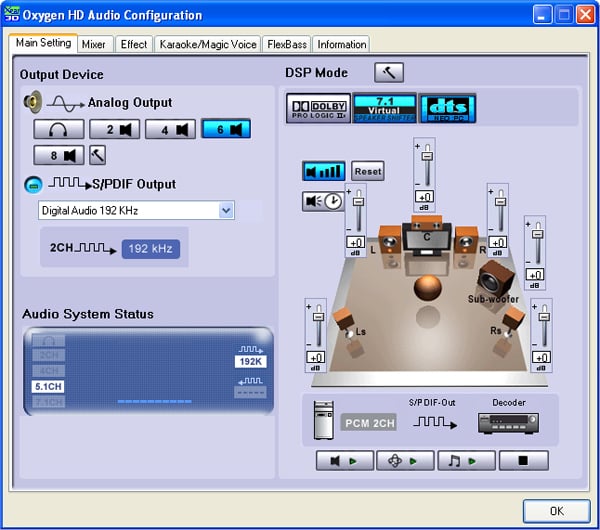
For this
You need to let Windows auto install the drivers, then right click the speaker icon, open sound settings, select the usb soundcard SPDIF interface. In some cases the USB soundcard may not have separate settings for SPDIF and speakers, in which case selecting any will do.
For this,
The USB is just a power supply. You have to connect your screen's HDMI cable through this device. Then go into sound settings like above. In my case I have my monitor VG252Q connected to my graphics card NVIDIA High Definition Audio. You should select your monitor/graphics card.
Oh and also the switch needs to be set to either 2.0 / 2.1 or passthrough.
The other two you've linked, are just more USB soundcards. Funny why the first doesn't work but the SMSL X-USB does.
ADD:
Perhaps it's my bad for recommending something that uses C-Media chipset since that one may be more complicated, driver-wise, compared to the typical stereo USB soundcards.
C-Media drivers can be found here.
https://www.cmedia.com.tw/support/download_center
The CM1xx and CM6xxx are USB devices. Your soundcard should be CM6206-LX or CM6120XL so just get both and let Windows pick.
It says Windows 8 but that's the driver you want to use for Windows 10.
BTW if you see this screen and a press-able button besides "SPDIF output", you may need to press that down
Last edited:
FandiAhmad17
Senior Member
- Joined
- Aug 30, 2004
- Messages
- 1,927
- Reaction score
- 151
Not sure what is the error you're encountering so pardon me if I cover things you already know
For this
You need to let Windows auto install the drivers, then right click the speaker icon, open sound settings, select the usb soundcard SPDIF interface. In some cases the USB soundcard may not have separate settings for SPDIF and speakers, in which case selecting any will do.
For this,
The USB is just a power supply. You have to connect your screen's HDMI cable through this device. Then go into sound settings like above. In my case I have my monitor VG252Q connected to my graphics card NVIDIA High Definition Audio. You should select your monitor/graphics card.
Oh and also the switch needs to be set to either 2.0 / 2.1 or passthrough.
The other two you've linked, are just more USB soundcards. Funny why the first doesn't work but the SMSL X-USB does.
ADD:
Perhaps it's my bad for recommending something that uses C-Media chipset since that one may be more complicated, driver-wise, compared to the typical stereo USB soundcards.
C-Media drivers can be found here.
https://www.cmedia.com.tw/support/download_center
The CM1xx and CM6xxx are USB devices. Your soundcard should be CM6206-LX or CM6120XL so just get both and let Windows pick.
It says Windows 8 but that's the driver you want to use for Windows 10.
Thanks for the quick reply. For the first one, how do I let windows auto install the driver? I plugged it in and it showed as "USB Soundcard" under Output Device but I did not install any drivers.
wwenze
Greater Supremacy Member
- Joined
- Dec 2, 2002
- Messages
- 87,148
- Reaction score
- 30,724
Thanks for the quick reply. For the first one, how do I let windows auto install the driver? I plugged it in and it showed as "USB Soundcard" under Output Device but I did not install any drivers.
Means windows already auto installed the drivers. If you don't see SPDIF option and there is no sound from SPDIF you may need to play around with the Device Properties --> Additional Device Settings buttons
Or install the C-Media drivers so you get that control panel above.
Means windows already auto installed the drivers. If you don't see SPDIF option and there is no sound from SPDIF you may need to play around with the Device Properties --> Additional Device Settings buttons
Or install the C-Media drivers so you get that control panel above.
Hi Wwenze,
I still have my m50 but not use it for long time. I am interested in learning
soldering.
Do you have any recommendations on a starter solder set and amp/volt meter?
wwenze
Greater Supremacy Member
- Joined
- Dec 2, 2002
- Messages
- 87,148
- Reaction score
- 30,724
I use Vichy VC97 multimeter
For soldering iron, I use a goot tq-95 which is 20W continuous and 100W temp high power mode
Both are pretty beginner, price-wise. You can use KX60R for 60W continuous which is cheaper than tq-95
Brass wool is very good to have.
Also desoldering pump. Third hand is good helper tool, although not 100% necessary.
For solder, any 63/37 leaded solder with flux core will do. Then when you get better then change to 60/40, and finally unleaded solder if you want. General consensus is that leaded gives better joints.
For soldering iron, I use a goot tq-95 which is 20W continuous and 100W temp high power mode
Both are pretty beginner, price-wise. You can use KX60R for 60W continuous which is cheaper than tq-95
Brass wool is very good to have.
Also desoldering pump. Third hand is good helper tool, although not 100% necessary.
For solder, any 63/37 leaded solder with flux core will do. Then when you get better then change to 60/40, and finally unleaded solder if you want. General consensus is that leaded gives better joints.
I use Vichy VC97 multimeter
For soldering iron, I use a goot tq-95 which is 20W continuous and 100W temp high power mode
Both are pretty beginner, price-wise. You can use KX60R for 60W continuous which is cheaper than tq-95
Brass wool is very good to have.
Also desoldering pump. Third hand is good helper tool, although not 100% necessary.
For solder, any 63/37 leaded solder with flux core will do. Then when you get better then change to 60/40, and finally unleaded solder if you want. General consensus is that leaded gives better joints.
thanks for the response.
Important Forum Advisory Note
This forum is moderated by volunteer moderators who will react only to members' feedback on posts. Moderators are not employees or representatives of HWZ Forums. Forum members and moderators are responsible for their own posts.
Please refer to our Community Guidelines and Standards and Terms and Conditions for more information.
