[Maylyn - Networking] ASUS RT-AC88U

rogue_strider

Senior Member
Joined
May 17, 2009
Messages
1,193
Reaction score
0
I'm looking to upgrade from ac87u to either ac88u or ac5300.

Aside from the usual 87u problems, the wifi signal in my sister's room is quite bad where she has to be on the 2.4ghz connection to get a decent but noticeably slower internet connection when compared to the rest of the house.
And the current solution for her is to point 3 out of the 4 antennas in the direction of her room but that just screws up the connection in my room and the kitchen. Fyi, the router is place in the living room and my sis's room is like 4 walls away.

Would upgarding to a ac88u generally help or would getting a ac5300 with its 5ghz additional band be better than the ac88u?
 

jackycar

Master Member
Joined
Aug 20, 2014
Messages
4,897
Reaction score
129
I'm looking to upgrade from ac87u to either ac88u or ac5300.

Aside from the usual 87u problems, the wifi signal in my sister's room is quite bad where she has to be on the 2.4ghz connection to get a decent but noticeably slower internet connection when compared to the rest of the house.
And the current solution for her is to point 3 out of the 4 antennas in the direction of her room but that just screws up the connection in my room and the kitchen. Fyi, the router is place in the living room and my sis's room is like 4 walls away.

Would upgarding to a ac88u generally help or would getting a ac5300 with its 5ghz additional band be better than the ac88u?

If it's range issue ac88u more than enough I believe
 

daniel_83

Arch-Supremacy Member
Joined
Dec 8, 2001
Messages
17,018
Reaction score
539
I'm looking to upgrade from ac87u to either ac88u or ac5300.

Aside from the usual 87u problems, the wifi signal in my sister's room is quite bad where she has to be on the 2.4ghz connection to get a decent but noticeably slower internet connection when compared to the rest of the house.
And the current solution for her is to point 3 out of the 4 antennas in the direction of her room but that just screws up the connection in my room and the kitchen. Fyi, the router is place in the living room and my sis's room is like 4 walls away.

Would upgarding to a ac88u generally help or would getting a ac5300 with its 5ghz additional band be better than the ac88u?


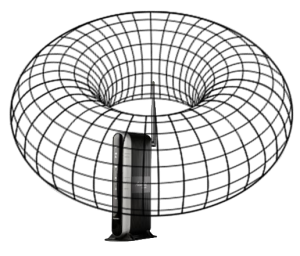
The signal emitted from the antenna is in a donut shape

Therefore pointing it at a direction actually not useful

wi-fi-signal-torus-with-FIOS-router-in-center-300x256.png


thats why for single storey homes, all antennas should be upright (no need to slant 45deg)
 

evildoctor

Senior Member
Joined
Mar 3, 2012
Messages
1,046
Reaction score
4
Thank you for your advice! But I'm afraid that the RT88U is a bit bigger and heavier then the RT87. When i tried to hang it on the wall, the rt88 will fall backwards.

Didn't check, but found this:

http://www.smallnetbuilder.com/wire...-band-wireless-ac3100-gigabit-router-reviewed

The bottom also has two mounting screw slots revealed by removing their rubber plugs. The slots are toward the rear, which will point the connectors up if you hang the router on a wall.
 

vagus1978

Senior Member
Joined
Aug 29, 2004
Messages
677
Reaction score
0
Help needed on Guest Wifi setting.

I am currently on the latest AC88U official firmware.

I am trying to set up a Guest Wifi network on schedule: eg 1200-1600H daily.
How do I do that?

I do not want to use parental control because that will mean I have to tie the device's MAC to a particular schedule. I want the freedom to log onto non-guest wifi whenever I want.


Anyone has a solution?
 

a562140

Supremacy Member
Joined
Mar 12, 2004
Messages
6,412
Reaction score
3
The signal emitted from the antenna is in a donut shape

Therefore pointing it at a direction actually not useful

wi-fi-signal-torus-with-FIOS-router-in-center-300x256.png


thats why for single storey homes, all antennas should be upright (no need to slant 45deg)

how about this one - does it help range? beamforming?
41mb3kHZSwL.jpg
 

evildoctor

Senior Member
Joined
Mar 3, 2012
Messages
1,046
Reaction score
4
Just set up my new RT88U and found out that it is slower than my RT87U. On 5ghz wifi, managed to get it to 200 download while upload 400 and for my RT88U. On my RT87U, managed to get higher around 400 or 300 plus. My router is on the latest official firmware.
 

lawkoh

Junior Member
Joined
Mar 25, 2001
Messages
51
Reaction score
0
Anyone has a solution?

There's a scheduler for the main WiFi under the professional tab, think should work as what you need.
But for non schedule connection, you need to log into the guest network instead.
 

renfred89

Arch-Supremacy Member
Joined
Nov 11, 2007
Messages
17,520
Reaction score
19
There's a scheduler for the main WiFi under the professional tab, think should work as what you need.
But for non schedule connection, you need to log into the guest network instead.

Anyone has a solution?

in guest network, there is an option to restrict the time for user to use guest network..

however, for wireless scheduler, its only for the normal ssid..
 

renfred89

Arch-Supremacy Member
Joined
Nov 11, 2007
Messages
17,520
Reaction score
19
Just set up my new RT88U and found out that it is slower than my RT87U. On 5ghz wifi, managed to get it to 200 download while upload 400 and for my RT88U. On my RT87U, managed to get higher around 400 or 300 plus. My router is on the latest official firmware.

which device are you using to test the speed?

If you mention official firmware, i presume its 1354?
 

ckh98258

Senior Member
Joined
Feb 23, 2002
Messages
820
Reaction score
0
Just set up my new RT88U and found out that it is slower than my RT87U. On 5ghz wifi, managed to get it to 200 download while upload 400 and for my RT88U. On my RT87U, managed to get higher around 400 or 300 plus. My router is on the latest official firmware.

Me too just got my RT88U since Sunday night. From all the speedtest conducted indeed 5ghz speed seems slower than RT87U and in fact same speed as my 2.4ghz. I'm on M1 Fibre Broadband 1Gbps and on lan only able to fetch around 860mbps but wireless obviously much lower.

However there's few plus points from this router. Loading huge file email from my email client, web browser and accessing IP cam from outside all appears to be much faster than RT87U. Since there's significantly improved in performance I'm not too bother on the speed.
 

renfred89

Arch-Supremacy Member
Joined
Nov 11, 2007
Messages
17,520
Reaction score
19
Me too just got my RT88U since Sunday night. From all the speedtest conducted indeed 5ghz speed seems slower than RT87U and in fact same speed as my 2.4ghz. I'm on M1 Fibre Broadband 1Gbps and on lan only able to fetch around 860mbps but wireless obviously much lower.

However there's few plus points from this router. Loading huge file email from my email client, web browser and accessing IP cam from outside all appears to be much faster than RT87U. Since there's significantly improved in performance I'm not too bother on the speed.

Just set up my new RT88U and found out that it is slower than my RT87U. On 5ghz wifi, managed to get it to 200 download while upload 400 and for my RT88U. On my RT87U, managed to get higher around 400 or 300 plus. My router is on the latest official firmware.

Happy New Year to everyone :)

New firmware for Chinese new year!

RT-AC88U - 3.0.0.4_380_2064
Download : Click Here

*Require restore to factory default setting, after update the firmware.

- Added Smart Connect feature
- Fixed bugs

You guys might wanna try the latest beta firmware launched during the CNY period.

The download link is attached as above.

You guys might wanna give it a try? Its kinda stable, apart from the mu-mimo feature which is still in alpha phase. I'm using similar firmware for my ac5300 and wireless are decent, i assume its the same as this firmware too..
 

daniel_83

Arch-Supremacy Member
Joined
Dec 8, 2001
Messages
17,018
Reaction score
539
how about this one - does it help range? beamforming?
41mb3kHZSwL.jpg

I'm using this for the middle antenna of my AC68U

it is bi-directional (from and back)

i use it to point towards my furthest and weakest area (MBR)

As for beamforming, i readup abit and most sources say it is not much difference?
 

renfred89

Arch-Supremacy Member
Joined
Nov 11, 2007
Messages
17,520
Reaction score
19
I'm using this for the middle antenna of my AC68U

it is bi-directional (from and back)

i use it to point towards my furthest and weakest area (MBR)

As for beamforming, i readup abit and most sources say it is not much difference?

Nope. What you are showing is WL-ANT157. This antenna is directional.. Beamforming won't work if the device is behind the antenna..
 

a562140

Supremacy Member
Joined
Mar 12, 2004
Messages
6,412
Reaction score
3
Nope. What you are showing is WL-ANT157. This antenna is directional.. Beamforming won't work if the device is behind the antenna..

can i clarify that the asus logo is the back part, the non non-logo part should be pointing to device?
 

renfred89

Arch-Supremacy Member
Joined
Nov 11, 2007
Messages
17,520
Reaction score
19
meaning directional antenna does not improve range or does not help beamforming or both?

directional antennas improve range, but doesn't help in beam forming due to the physics, i.e.: device doesn't receive signal at the back of the antenna.

can i clarify that the asus logo is the back part, the non non-logo part should be pointing to device?

asus logo side is the front..
 
Last edited:

daniel_83

Arch-Supremacy Member
Joined
Dec 8, 2001
Messages
17,018
Reaction score
539
asus logo side is the front..


why are you so sure?

there's mixed opinions in Amazon reviews:

"You aim the logo AWAY from the area you're trying to boost. I've tested this using speedtest.net and..."

"Aim the logo side towards your target for boosting"

"In my tests the Asus side is the back and blank side is forward for signal direction"

etc etc

equal number of opinions
 
Important Forum Advisory Note
This forum is moderated by volunteer moderators who will react only to members' feedback on posts. Moderators are not employees or representatives of HWZ Forums. Forum members and moderators are responsible for their own posts. Please refer to our Community Guidelines and Standards and Terms and Conditions for more information.
Top