
[Maylyn - Networking] ASUS RT-AC88U

Kyubi

Great Supremacy Member
Joined
Jun 2, 2002
Messages
61,161
Reaction score
575
there's two units for the Wi-Fi mesh.

The first unit - you need to connect to the router (hence it must be beside it).
The second unit - place it in your bedroom or study room for extended coverage.

http://info.singtel.com/personal/wifi-mesh/faq

doesn't seem complicated or chim from this FAQ.
Ic ya just read up. But how this device connects to singtel tv? Or singtel tv still needs to connect to the main router?
 

renfred89

Arch-Supremacy Member
Joined
Nov 11, 2007
Messages
17,520
Reaction score
19
Ic ya just read up. But how this device connects to singtel tv? Or singtel tv still needs to connect to the main router?

nope, singtel tv goes straight to the wifi mesh node. basically the wifi mesh needs 2 nodes to work. one node goes to the router and another node can be placed anywhere within the coverage of the 1st node. once the 2nd node established a secured wifi with the first node, it expands the coverage as well as supporting singtel tv.

so in a way, singtel tv streams over wifi from the first node, if the stb is connected to the 2nd node. even if singtel tv is operating, the 2nd node can still act as an access point for other wireless clients.
 

WWE_Fan

Senior Member
Joined
Apr 4, 2004
Messages
2,063
Reaction score
0
Yes, the good thing about wifi mesh and you can freely move the 2nd unit (that is connected to set top box) to anywhere to get the best connection. Each unit has 2 ports. It needs a power outlet as well.
 

Kyubi

Great Supremacy Member
Joined
Jun 2, 2002
Messages
61,161
Reaction score
575
nope, singtel tv goes straight to the wifi mesh node. basically the wifi mesh needs 2 nodes to work. one node goes to the router and another node can be placed anywhere within the coverage of the 1st node. once the 2nd node established a secured wifi with the first node, it expands the coverage as well as supporting singtel tv.

so in a way, singtel tv streams over wifi from the first node, if the stb is connected to the 2nd node. even if singtel tv is operating, the 2nd node can still act as an access point for other wireless clients.
so like what you say,
1st node (2 ports) 1 port must be plug in to the main router (Asus any port?)
2nd node (2 ports) 1 port plug into STB, the other port can it be plug to other device to receive internet? or to AP / switch for broadcast or multiple devices? or it can also act as an AP but not sure what is the coverage.

Will there be drop of speed?
 

renfred89

Arch-Supremacy Member
Joined
Nov 11, 2007
Messages
17,520
Reaction score
19
so like what you say,
1st node (2 ports) 1 port must be plug in to the main router (Asus any port?)
2nd node (2 ports) 1 port plug into STB, the other port can it be plug to other device to receive internet? or to AP / switch for broadcast or multiple devices? or it can also act as an AP but not sure what is the coverage.

Will there be drop of speed?

If u intend to use wifi mesh, you cannot use ac88u as the router. Anyway, if u intend to use mesh, then u can keep your 7009.

Wifi mesh works best if ur router has wireless turned off.. this way the mesh will not compete with your wireless router for airspace.

If u intend to use mesh with ac88u, then the mesh is useless cos u can either choose to use the mesh for internet, or singtel tv, mutually exclusive.

Otherwise assuming you are using with 7009, then the above u wrote is ideal..
 

Kyubi

Great Supremacy Member
Joined
Jun 2, 2002
Messages
61,161
Reaction score
575
If u intend to use wifi mesh, you cannot use ac88u as the router. Anyway, if u intend to use mesh, then u can keep your 7009.

Wifi mesh works best if ur router has wireless turned off.. this way the mesh will not compete with your wireless router for airspace.

If u intend to use mesh with ac88u, then the mesh is useless cos u can either choose to use the mesh for internet, or singtel tv, mutually exclusive.

Otherwise assuming you are using with 7009, then the above u wrote is ideal..
Icic Ok....
 

cajun22

Member
Joined
Jul 1, 2000
Messages
273
Reaction score
0
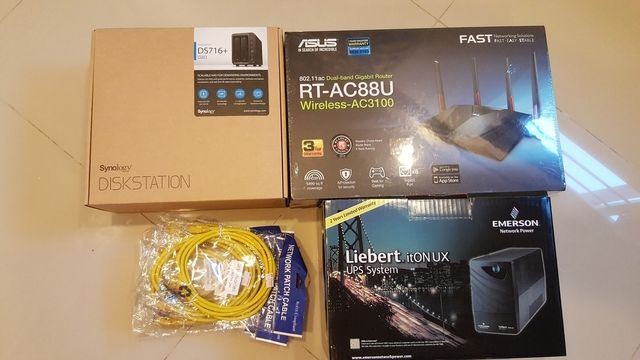
f2d56e80-a5db-46f7-83fb-8aee138e6c1b.jpg


Got the RT-AC88 to try out the link aggregation with the Synology DS716+

Also got the Emerson Liebert UPS 600 as it ha a USB funciton to tell the NAs to shutdown in case of a power outage.
 

Farish

Member
Joined
Sep 23, 2008
Messages
388
Reaction score
20
f2d56e80-a5db-46f7-83fb-8aee138e6c1b.jpg


Got the RT-AC88 to try out the link aggregation with the Synology DS716+

Also got the Emerson Liebert UPS 600 as it ha a USB funciton to tell the NAs to shutdown in case of a power outage.

Im using the AC88 with a DS1515+, link aggregation works beautifully.

APC UPS via USB works without issues too.
 

evildoctor

Senior Member
Joined
Mar 3, 2012
Messages
1,046
Reaction score
4
Just Gotten the RT-88U. Was an old firmware. Btw guys, do i have to restore to factory defaults after updating the software? The router did an automatic update for me. And if i set the Tx-power low, will it affect any performance?
 

poor_poor

Senior Member
Joined
Jul 7, 2012
Messages
1,480
Reaction score
1
Just Gotten the RT-88U. Was an old firmware. Btw guys, do i have to restore to factory defaults after updating the software? The router did an automatic update for me. And if i set the Tx-power low, will it affect any performance?

- Recommended to do an restore to factory default after update.

- Lower Tx power will degree the wireless range and it might affect the wireless performance if your wireless device is far away.
 
Last edited:

evildoctor

Senior Member
Joined
Mar 3, 2012
Messages
1,046
Reaction score
4
- Recommended to do an restore to factory default after update.

- Lower Tx power will degree the wireless range and it might affect the wireless performance if your wireless device is far away.

Okay thank so much! Then any recommended settings. Planning to use my RT87U as an Access Point. Could I use the same SSID? And does both the router comes with the free Roaming thingy?
 

xonix

Arch-Supremacy Member
Joined
Mar 24, 2001
Messages
17,592
Reaction score
1,688
Okay thank so much! Then any recommended settings. Planning to use my RT87U as an Access Point. Could I use the same SSID? And does both the router comes with the free Roaming thingy?

You can use the same but recommended to set different SSID for easier network management and troubleshooting.
 

poor_poor

Senior Member
Joined
Jul 7, 2012
Messages
1,480
Reaction score
1
Okay thank so much! Then any recommended settings. Planning to use my RT87U as an Access Point. Could I use the same SSID? And does both the router comes with the free Roaming thingy?

You can find [Roaming assistant - Enable/Disable] menu under Wireless Professional tab 2.4Ghz and 5Ghz.

For Roaming you can set same SSID and you can tweak the Roaming setting - [Disconnect clients with RSSI lower than -70dBm]

RT-AC87U can set as Access Point and please update to the latest firmware.
 

evildoctor

Senior Member
Joined
Mar 3, 2012
Messages
1,046
Reaction score
4
Thank you very much! Noted! Btw, can anyone advice on how to hang against the wall? Cause I find out that the design of the base is different from RT87 as rt87 I can hang it against the wall
 

lawkoh

Junior Member
Joined
Mar 25, 2001
Messages
51
Reaction score
0
Thank you very much! Noted! Btw, can anyone advice on how to hang against the wall? Cause I find out that the design of the base is different from RT87 as rt87 I can hang it against the wall


Didn't check, but found this:

http://www.smallnetbuilder.com/wireless/wireless-reviews/32910-asus-rt-ac88u-dual-band-wireless-ac3100-gigabit-router-reviewed

The bottom also has two mounting screw slots revealed by removing their rubber plugs. The slots are toward the rear, which will point the connectors up if you hang the router on a wall.
 
Important Forum Advisory Note
This forum is moderated by volunteer moderators who will react only to members' feedback on posts. Moderators are not employees or representatives of HWZ. Forum members and moderators are responsible for their own posts.

Please refer to our Community Guidelines and Standards, Terms of Service and Member T&Cs for more information.
Top