[Maylyn's Preview ~ Networking] ASUS RT-AC68U

Gribber

Banned
Joined
Apr 6, 2012
Messages
11,562
Reaction score
0
Im having the exact same issue, max i can get via wireless no matter how near i am to the router is 90mb/s

Sounds like wireless configuration issue on router or drivers issue on wireless adapter.

Post the settings that you've configured on both devices
 

CrazyBlue

Senior Member
Joined
Jun 26, 2007
Messages
761
Reaction score
5
More to be reveal this coming Monday :D :eek:

Stay tuned for extensive findings from RMerlin on the next ASUS RT-AC87R/U AC2400 4x4 MU-MIMO router ;)

Any ETA on AC87? Need a new router for new house, might as well get this instead of AC67...if coming out soon.
 

maylyn

Master Member
Joined
Jul 12, 2007
Messages
4,861
Reaction score
77
Any ETA on AC87? Need a new router for new house, might as well get this instead of AC67...if coming out soon.

ASUS RT-AC87U for Singapore market are coming soon ;)

Just wait for the ASUS Singapore official announcements here as well on their Facebook from ASUS Singapore.
 
Last edited:

wilflare

Supremacy Member
Joined
Jun 1, 2002
Messages
9,889
Reaction score
21
anyone else still having speed issues with their 68U?
tried merlin, tried latest official firmware... all the same
MR 1Gbps - behind router still 350Mbps, direct ONT 950Mbps
 

maserluv

Senior Member
Joined
Jun 25, 2000
Messages
1,254
Reaction score
3
I suggest you to try the Merlin 4422 firmware.

Cheers!

anyone else still having speed issues with their 68U?
tried merlin, tried latest official firmware... all the same
MR 1Gbps - behind router still 350Mbps, direct ONT 950Mbps
 

Wolve34

Junior Member
Joined
Oct 15, 2006
Messages
74
Reaction score
0
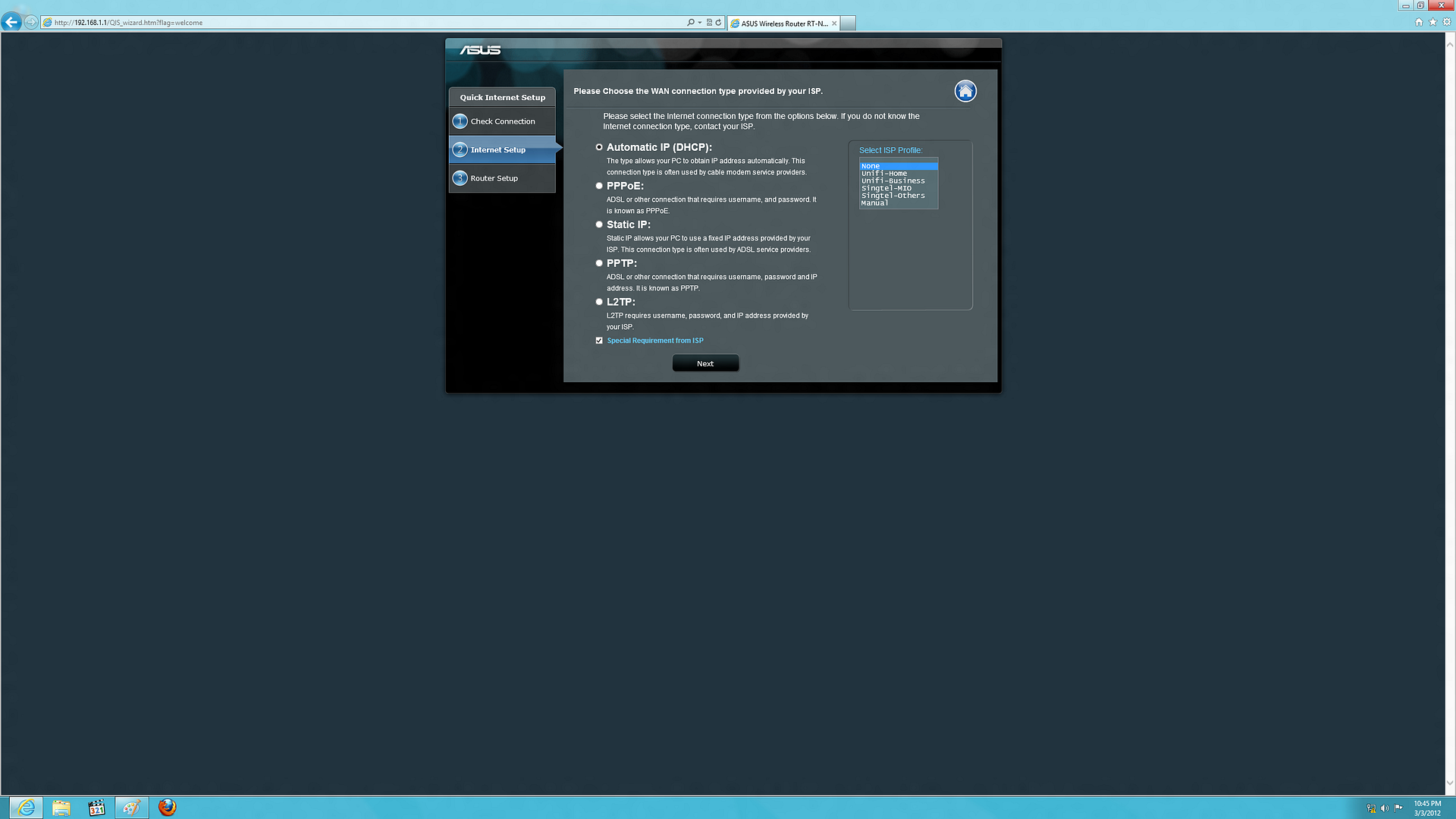
You need to tick the special requirements from ISP and select either SingTel MIO or SingTel others depending on your setup.

ASUSRT-N66U-5.png


Code:
Singtel-MIO Preset
 TP
 l
 ONT
 l
 Asus RT-N66U /N56U
 l
 l--Port1--> Computer
 l--Port2--> Computer
 l--Port3--> 2Wire --> mioVoice
 l--Port4--> mioTV
 

Singtel-Others Preset
 TP
 l
 ONT
 l
 Asus RT-N66U /N56U
 l
 l--Port1--> Computer
 l--Port2--> Computer
 l--Port3--> Computer
 l--Port4--> mioTV

Diagram by ngbc

Thinking of upgrading my router, and need to ask experts here.
If i Choose Singtel Mio present, can i use both Digital voice and mioTV??
 

maylyn

Master Member
Joined
Jul 12, 2007
Messages
4,861
Reaction score
77
Thinking of upgrading my router, and need to ask experts here.
If i Choose Singtel Mio present, can i use both Digital voice and mioTV??

No one uses SingTel Mio profile these days, you can call up SingTel Customer Support to request to have your digital voice to be move to your ONT, thus freeing up the LAN3 for normal use.
 
Last edited:

aaragore

Supremacy Member
Joined
Dec 27, 2006
Messages
8,518
Reaction score
81
just wondering if there are any guide of setting up the ac68u? thanks in advance =)
 

maylyn

Master Member
Joined
Jul 12, 2007
Messages
4,861
Reaction score
77
just wondering if there are any guide of setting up the ac68u? thanks in advance =)

Setting up a router to access the Internet is very easy these days, the Quick Internet Setup Wizard inside the firmware will guide you through various steps, SSID setup etc.

You can follow my thread on ASUS RT-N66U Black Knight for example as well.

http://forums.hardwarezone.com.sg/i...review]-asus-rt-n66u-dark-knight-3631836.html

QIS ~> http://forums.hardwarezone.com.sg/64617548-post4.html
 
Last edited:

aaragore

Supremacy Member
Joined
Dec 27, 2006
Messages
8,518
Reaction score
81

maylyn

Master Member
Joined
Jul 12, 2007
Messages
4,861
Reaction score
77
ASUS RT-AC87U for Singapore market are coming soon ;)

Just wait for the official announcements here as well on their Facebook from ASUS Singapore.

Too fast too furious on releases until i got no time to play my toys .... :s22:

We officially released an updated firmware package for the RT-AC87R router today. This is firmware version 3.0.0.4.376.2044 that includes GUI updates, minor bug fixes and general performance enhancements over the first release 1779 firmware. This firmware will be available via the update function within 24 hours.

We will have another public release firmware late next week (if quality testing passes the current beta) that incorporates Quantenna’s performance pack firmware for additional 5GHz throughput and range.

One additional note about this new firmware: it should also resolve issues people were having with VoIP when enabling Intrusion Detection.

And wireless printing with certain printer models. :)
 

vagus1978

Senior Member
Joined
Aug 29, 2004
Messages
677
Reaction score
0
Link Aggregation 802.3ad Setup

Anyone managed to setup their RT-AC68U to use Link Aggregation 802.3ad protocol (LACP/LAG/Port Trunking) using Merlin's firmware?

I read through the Merlin's setup instruction but the setup requires some scripting which to me takes a bit of getting used to.

So before I embark on this, just want some ground feedback successful setup before I brick my router.

I am intending to Link Aggregate from AC68U to my Netgear GS108Tv2 switch

Background info:
I have successfully setup Link Aggregation between my Synology 1511+ and Netgear GS108Tv2 switch. So now I am thinking of relieving off the last potential bottleneck from my router to my NAS. I have 2 IP cams on wireless with constant feed through the AC68U to my NAS. I torrent/download via the AC68U to my NAS directly and I frequently access my NAS from the internet while I am away from home. So I figure that with the multi-user kind of traffic in that single LAN, I might benefit from Link Aggregation there.

Anyone?
 

aptget

Supremacy Member
Joined
May 6, 2001
Messages
8,427
Reaction score
1
anyone else still having speed issues with their 68U?
tried merlin, tried latest official firmware... all the same
MR 1Gbps - behind router still 350Mbps, direct ONT 950Mbps

Very likely its your network card.

This is what happened to mine

For weeks I had the same issue as you, I took a look at my network card and it says its CAPABLE of 1Gbps. Tried to troubleshoot for daysss, even changed router to AC68U and still the same issue.

I took my LAN cable out, and plugged it into my onboard network and I GOT FULL SPEED
 

wilflare

Supremacy Member
Joined
Jun 1, 2002
Messages
9,889
Reaction score
21
Very likely its your network card.

This is what happened to mine

For weeks I had the same issue as you, I took a look at my network card and it says its CAPABLE of 1Gbps. Tried to troubleshoot for daysss, even changed router to AC68U and still the same issue.

I took my LAN cable out, and plugged it into my onboard network and I GOT FULL SPEED

I'm using my onboard Intel Gigabit NIC :/

and as mentioned earlier, direct ONT is 950+ Mbps
 

maylyn

Master Member
Joined
Jul 12, 2007
Messages
4,861
Reaction score
77
ASUSWRT-MERLIN 376.44 Beta 1

From RMerlin :D

Howdy folks,

Asuswrt-Merlin 376.44-Beta1 is now available for download for all supported models.

IMPORTANT: Make a backup of your JFFS partition if upgrading an RT-AC56U or RT-AC68U!

The two highlights of this new build is the merge with Asus GPL 3.0.0.4.376_1779, which brings various enhancements. This is also the first public release of Asuswrt-Merlin with full support for the RT-AC87U (thanks to Asus for providing an early development sample).

There's been a lot of code changes by Asus since the last release, so merging required more work than usual. This is why I will need this beta tested for a while.

The biggest changes since 374.43:

Code merge with GPL 3.0.0.4.376_1779. This new version includes a redesigned Networkmap, which lets you edit device names for easier identification. For uniformity, Asuswrt-Merlin will now also use this list for identifying devices on the webui. You can still define actual, valid hostnames on the DHCP reservation list.

Official support for the RT-AC87U. Everything should work, except one known issue with the Ethernet Port Status display on the Sysinfo page. The same quirk also happens with Broadcom's own "et" userspace tool, so at this point I don't know if it's a bug with 376_1779, or an architecture limitation of the hybrid Broadcom/Quantenna implementation. If I can't find a fix, I will disable the Ethernet port state display on the AC87U with the final release.

With 376_1779 Asus started to switch from Paragon to Tuxera as the provider of their NTFS/HFS+ filesystem driver. Asus has done the switch with the RT-AC87U, however I have done it for all other router models as well (except for the RT-N16 for now). The Tuxera driver should bring enhanced performance and reliability. It should also eventually allow adding HFS+ support to the older MIPS devices (and potentially Time Machine support as well). However I want to wait for a future test release before adding this, as there is already a lot in need of testing in this first beta.

Recent changes by Asus on the ARM devices forced me to remove support for IPSEC on the RT-AC87U, and L7 filtering on all ARM routers. This is a compatibility issue caused by the new proprietary kernel modules added by Asus, there is nothing that can be done about it.

You will notice that the AC56 and AC68 FW have a reduced size. This is normal. Download Master installers are no longer included, as the firmware was getting too big to fit on the router's 32 MB partition. This won't have any real side-effect, the packages will be downloaded from Asus's servers the first time you install Download Master. It was already going through their servers to update it anyway, as built-in versions were often out of date.


Things that will require special testing:

RT-AC87U: pretty much everything. Note that while this FW is based on 1779 (which means it lacks certain fixes from the just-released 376_2044), it does contain the updated TrendMicro signature which resolves VoIP issues, as well as the WPS webui fix.

Check SMB sharing stability and performance. Initial reports from testers reported improvements both for MIPS and ARM devices.

IPv6 functionality. Asus made a lot of changes to that code, which forced me to revert most of the patches Asuswrt-Merlin had applied on that part of the code.

AiCloud (both MIPS and ARM platforms). I've done very limited testing there. Just confirm that it starts normally and that you are able to log in.

DLNA sharing. Asus upgraded to 1.1.3, please confirm there is no regression. Once I get confirmation this is looking at least as good as the last release, I will see if there are additional unmerged patches required.
3G/4G sharing - I'm curious to see if Asus's 376_1779 resolved the recent regressions there.

I did a few experiments for the RT-N66U wifi, including re-implementing some code Asus had removed a few months ago. Just let me know if you notice any increase in overall range/performance if you had a drop in 374.42/374.43.


This will probably get asked, so here it is: you do not need to do a factory default reset if upgrading from 374.43 or 374.42. Older than that - feel free to try without a reset, but be prepared to do one if you run into odd wireless issues.

And one more time:

IMPORTANT: Make a backup of your JFFS partition if upgrading an RT-AC56U or RT-AC68U!

Thanks everyone for testing this and posting your feedback here!

Changelog is here.
Downloads are here.
More details can be found in the complete changelog.

Code:
9a78d6c78643174cb6f4f172c6b466b8  RT-AC56U_3.0.0.4_376.44_beta1.trx
44f6d8e692b67658ebac0fb48a613e9a  RT-AC66U_3.0.0.4_376.44_beta1.trx
1b2ae03798245bf0b3028294556ec012  RT-AC68U_3.0.0.4_376.44_beta1.trx
ea2b0081576deac33990b9e82b2824b1  RT-AC87U_3.0.0.4_376.44_beta1.trx
20dc809b4dfadce6e704d9599bac089a  RT-N16_3.0.0.4_376.44_beta1.trx
1e64bae8117831e22a7565c2e037eb6a  RT-N66U_3.0.0.4_376.44_beta1.trx

 
Last edited:

aptget

Supremacy Member
Joined
May 6, 2001
Messages
8,427
Reaction score
1
I'm using my onboard Intel Gigabit NIC :/

and as mentioned earlier, direct ONT is 950+ Mbps

have you tried to upgrade your mobo NIC driver yet ?

same as mine, direct ONT is 950+ but with standalone it hit only 300+ , onboard NIC however gave me 950+
 

wilflare

Supremacy Member
Joined
Jun 1, 2002
Messages
9,889
Reaction score
21
have you tried to upgrade your mobo NIC driver yet ?

same as mine, direct ONT is 950+ but with standalone it hit only 300+ , onboard NIC however gave me 950+

yes I upgraded.
same thing direct ONT 950+
with router 300+ :/
 
Important Forum Advisory Note
This forum is moderated by volunteer moderators who will react only to members' feedback on posts. Moderators are not employees or representatives of HWZ. Forum members and moderators are responsible for their own posts.

Please refer to our Community Guidelines and Standards, Terms of Service and Member T&Cs for more information.
Top