
It will come always with firmware upgrades. Overall usage is ok, just some lagging issues for Note 4 and S6 edge. And dropping out of 5ghz band for some devices
that actually sounds quite bad imho
a decent router shouldn't have all this problem
It will come always with firmware upgrades. Overall usage is ok, just some lagging issues for Note 4 and S6 edge. And dropping out of 5ghz band for some devices

that actually sounds quite bad imho
a decent router shouldn't have all this problem


Found another "tiny" bug...
Firmware Version:3.0.0.4.378_5134.
Under Adaptive QoS -> Traffic Monitor -> Last 24 Hours, tab for Wireless (5GHz) is missing...

Can only see it on Real-time...got restart the router and see if it appears? I think it will not appear if your 5Ghz is disabled. At least it happened on my ac87u on 5134.

Hi,
PMed you alr.

Any ETA date for the new firmware?Dear voltech & thiamhui,
Sorry for late reply. i was on MC past few days.
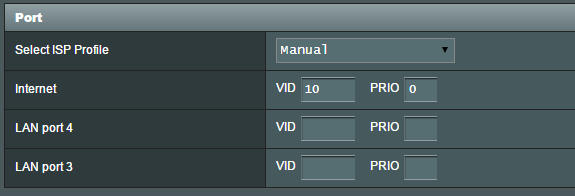
Singtel ISP using vlan 10 in LAN – IPTV setting? From yours setting file, you guys uses IPTV vlan10 for wan.
DSL also use vlan as VDSL setting and I have tested in your cases, we don’t have any issue on this.
I don’t have vlan10’s Singtel ISP for setting, I use switch to build a vlan500 for Internet.
My testing steps:
1. Loading user’s profile
2. Change LAN IP and change login name / password
3. Change IPTV from vlan10 to vlan500 (Internet VID 500)
4. Enable AiProtection : Malicious sites and Vulnerability protection
5. Enable Adaptive QoS : 30 / 30 mbps
6. Check all modules and setting are fine
7. Produce traffic using BT and FTP
8. No found any dead loop in system log or console log
Do you know how to duplicate?
If any suggestion or feedback, please let me know, thanks a lot!
*Update* - 6/5/2015 - 11:28AM
Dead loop issue can be duplicate, IPTV + AiProtection + USB plugin will occur.
We will fix it urgently
Thank you both of you
Best regard,
JK

Dear voltech & thiamhui,
Sorry for late reply. i was on MC past few days.
Singtel ISP using vlan 10 in LAN – IPTV setting? From yours setting file, you guys uses IPTV vlan10 for wan.
DSL also use vlan as VDSL setting and I have tested in your cases, we don’t have any issue on this.
I don’t have vlan10’s Singtel ISP for setting, I use switch to build a vlan500 for Internet.
My testing steps:
1. Loading user’s profile
2. Change LAN IP and change login name / password
3. Change IPTV from vlan10 to vlan500 (Internet VID 500)
4. Enable AiProtection : Malicious sites and Vulnerability protection
5. Enable Adaptive QoS : 30 / 30 mbps
6. Check all modules and setting are fine
7. Produce traffic using BT and FTP
8. No found any dead loop in system log or console log
Do you know how to duplicate?
If any suggestion or feedback, please let me know, thanks a lot!
*Update* - 6/5/2015 - 11:28AM
Dead loop issue can be duplicate, IPTV + AiProtection + USB plugin will occur.
We will fix it urgently
Thank you both of you
Best regard,
JK
Any ETA date for the new firmware?
Hi,
do take care of your health
yes i am using the singtel iptv settings. i too have an external harddisk plugged in. i seldom use the miotv.
hope to hear good news from you soon! though no significant performance affected but its just irritating to see it there bah i think?
I have problem with my 5 ghz too.
Initially ok with wifi speed of 200 plus mbps.
Suddenly slowed down and shows that I'm connected but the speed is like disconnected less than 10 mbps
My device are s6 edge and ip6 plus.
On singtel 500 mbps
Will the new update fixed this issue?
2.4ghz no issue at all.
BF already off.
Thanks
I found this post by one media.
This is perhaps the most disappointing news with iOS 8.3: it at last acknowledged the existence of a bug which has spawned the largest iOS thread on Apple Support Communities, but one week later the attempted fix has proved hit and miss – at best.
The thread (which has now amassed nearly 850,000 views and 3,000 replies) has been flooded by users angry that it still persists after upgrading to iOS 8.3 despite it being referenced in the release: “Addresses an issue where some devices disconnect intermittently from Wi-Fi networks”
This is something of a turnaround after early posts from affected users suggested the issue had been solved, but now the unfixed comments strongly outweigh the fixed.
For a bug first spotted on September 20th – within a few days of the original iOS 8 release – this really isn’t good enough given the problem renders WiFi connectivity almost useless. Furthermore the tone of the Apple Support Communities thread is getting ugly with as much discussion about angry users getting kicked off the board as the issue itself.
http://www.forbes.com/sites/gordonkelly/2015/04/17/apple-ios-8-3-nasty-bugs/
Apple official forums feedback: https://discussions.apple.com/thread/6546549?start=2910&tstart=0
Tons of user complaining IOS wifi issue until page 197 and Apple still unable to resolve.
I have problem with my 5 ghz too.
Initially ok with wifi speed of 200 plus mbps.
Suddenly slowed down and shows that I'm connected but the speed is like disconnected less than 10 mbps
My device are s6 edge and ip6 plus.
On singtel 500 mbps
Will the new update fixed this issue?
2.4ghz no issue at all.
BF already off.
Thanks
His device includes a Samsung S6 Edge...Dear woshi,
Someone posted regard of apple issue in Apple thread.
Best regard,
JK
His device includes a Samsung S6 Edge...
For your testing, can you try using applications which don't transmit/receive large amount of data continuously, for example like Whatsapp... It might take hours for it to occur...Dear all,
Anyone have Samsung S6 & Edge smartphone?
We tested Samsung S6 with the latest build and unable to duplicate the issue.
Best regard,
JK


eaz said: Just wanted to jump in and share that I have finally resolved my AirPlay not working/Apple TV not waking from sleep with iOS remote issues that have been bothering me on and off for the last month or two (always running latest Merlin), I was convinced my Apple TV was the problem but after setting NAT loopback to Asus the device works perfectly for the last few days (tried disabling first with no joy).
I went through a lot of trial an error with router settings and saw the issue regardless if the device was connected via cable or wifi.
I would expect this to be affecting quite a few others, but if you don't have an Apple TV then sorry for the spam!
kvic said: Thanks! I experienced the same Apple TV issue. This resolves my problem.
Since Apple introduced many network problems in Yosemite/iOS 8 release, I didn't bother to track down the issue. Resorted to a remote for waking up Apple TV.
So great that you figured out the cause.
On an anecdotal note, this seems to also resolve another wake up from sleep issue. I have mounted a Mac folder to RT-AC56U using NFS. The router runs a script periodically to write data to this folder. Once the Mac enters sleep, data write to the folder won't wake it up. After change to Asus mode, the Mac wakes up and data write succeeds. Still watching. Not 100% sure since the script only runs a few times after change.
Dear all,
Anyone have Samsung S6 & Edge smartphone?
We tested Samsung S6 with the latest build and unable to duplicate the issue.
Best regard,
JK
Hi JK,
Can try this test at your side?
Try downloading from internet using a PC connected by WiFi and save directly to a mapped network drive of another PC/NAS.
The network of the PC will sometimes become like having a traffic jam although the file is only a few hundred KB in size.
Yes, no need big files. Small one will do.Dear Thiamhui,
You mean download file directly from the internet and save it from network drive?
Best regard,
JK
