

You are using an out of date browser. It may not display this or other websites correctly.
You should upgrade or use an alternative browser.
You should upgrade or use an alternative browser.
Microsoft Surface
- Thread starter Letovv
- Start date
More options
Who Replied?Bought with student discount
Ordered mine with i5 256GB on Wednesday. can't wait. gonna use as laptop replacement, though could have gotten ultrabook at lower price, but paying for the form factor and mobility I guess. The student price helps mitigate that for me.
I think i still can buy at student price up to a limit (does anyone know?), so if anyone wants me to help buy for that price, PM me.
Ordered mine with i5 256GB on Wednesday. can't wait. gonna use as laptop replacement, though could have gotten ultrabook at lower price, but paying for the form factor and mobility I guess. The student price helps mitigate that for me.
I think i still can buy at student price up to a limit (does anyone know?), so if anyone wants me to help buy for that price, PM me.

eyz
Arch-Supremacy Member
- Joined
- Jul 10, 2002
- Messages
- 12,218
- Reaction score
- 2,218
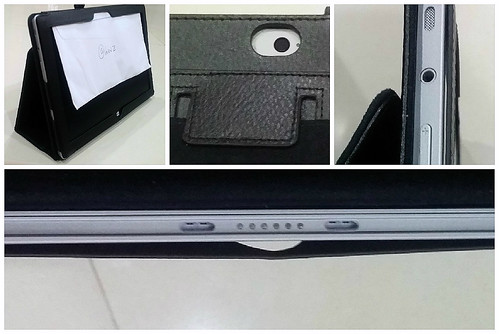
i'm using this hard casing.
Qoo10 - Flip silk bling leather pouch Surface Pro 3
but you wouldn't be able to use the kickstand or access the micro sd slot conveniently.
Qoo10 - Flip silk bling leather pouch Surface Pro 3
but you wouldn't be able to use the kickstand or access the micro sd slot conveniently.
Hello.
I need some advice.
I'm a uni student, currently using a laptop in school. I use it mostly for schoolwork, and occasional dota. I'll be gng abroad for exchange and am considering changing my laptop to a microsoft surface pro 3.
I've read about issues on the i7 models. Would it still be recommended, or is the i5 model sufficient?
thanks!
I need some advice.
I'm a uni student, currently using a laptop in school. I use it mostly for schoolwork, and occasional dota. I'll be gng abroad for exchange and am considering changing my laptop to a microsoft surface pro 3.
I've read about issues on the i7 models. Would it still be recommended, or is the i5 model sufficient?
thanks!

- Joined
- Jan 1, 2000
- Messages
- 105,336
- Reaction score
- 3,864
Hello.
I need some advice.
I'm a uni student, currently using a laptop in school. I use it mostly for schoolwork, and occasional dota. I'll be gng abroad for exchange and am considering changing my laptop to a microsoft surface pro 3.
I've read about issues on the i7 models. Would it still be recommended, or is the i5 model sufficient?
thanks!
i7 provides no benefit to gaming. You go either you will still have some problems with gaming.
Thanks for the heads up.i7 provides no benefit to gaming. You go either you will still have some problems with gaming.
I'm not really getting it for gaming though. I need to run some heavy apps for my course that involves 3D apps and stuff like photoshop. Would the i5 256gb 8gb ram be sufficient?
- Joined
- Jan 1, 2000
- Messages
- 105,336
- Reaction score
- 3,864
Thanks for the heads up.
I'm not really getting it for gaming though. I need to run some heavy apps for my course that involves 3D apps and stuff like photoshop. Would the i5 256gb 8gb ram be sufficient?
I wonder if the Surface is even the right laptop for 3D apps. Don't you need a proper GPU for that?

E_T
Master Member
- Joined
- Aug 28, 2000
- Messages
- 3,097
- Reaction score
- 0
Thanks for the heads up.
I'm not really getting it for gaming though. I need to run some heavy apps for my course that involves 3D apps and stuff like photoshop. Would the i5 256gb 8gb ram be sufficient?
If your 3D app requires some realtime rendering then I suggest you get the i7 due to a more robust GPU. Below are some of the differences between the SP3 Core i5 & i7.
- SP3 i5 has 3MB L3 cache while i7 has 4MB L3 cache, better for large data-sets
- SP3 i5 has HD4400 (GT2) while i7 has HD5000 (GT3) which is 5-25% faster in DirectX 3D
- SP3 i5 has a higher base clock speed but a lower burst speed. This means it's less likely to overheat even though both are 15Watt TDP parts. For 3D rendering, a higher burst speed is good
- Generally GPU performance is better than current-gen AMD integrated APU based on thermal performance but of course, cannot compete with dedicated GPUs (with GDDR4/5 ram) found on much heavier gaming laptops
I think the i7-256GB SSD is a good choice if you have budget. Or you can get the 512GB if you have extra $.

Yeah there are some real-life tendering. But so far I only need it one class. Not sure if I will need it in the future.If your 3D app requires some realtime rendering then I suggest you get the i7 due to a more robust GPU. Below are some of the differences between the SP3 Core i5 & i7.
- SP3 i5 has 3MB L3 cache while i7 has 4MB L3 cache, better for large data-sets
- SP3 i5 has HD4400 (GT2) while i7 has HD5000 (GT3) which is 5-25% faster in DirectX 3D
- SP3 i5 has a higher base clock speed but a lower burst speed. This means it's less likely to overheat even though both are 15Watt TDP parts. For 3D rendering, a higher burst speed is good
- Generally GPU performance is better than current-gen AMD integrated APU based on thermal performance but of course, cannot compete with dedicated GPUs (with GDDR4/5 ram) found on much heavier gaming laptops
I think the i7-256GB SSD is a good choice if you have budget. Or you can get the 512GB if you have extra $.
I'm really worried about the overheating issue though. Seems real bad from all the reads I've done.
E_T
Master Member
- Joined
- Aug 28, 2000
- Messages
- 3,097
- Reaction score
- 0
Check the article dates. The overheating issue was reported many months ago & so far I have not seen any reports after the recent firmware updates.
When you're using on battery it shouldn't overheat. The only worry if you do rendering for many many hours on AC power when the CPU can run at full speed.
From what I read last time, the overheating came when people play games on AC Power although there was a few which overheat when watching video but I think those are exceptional cases.
When you're using on battery it shouldn't overheat. The only worry if you do rendering for many many hours on AC power when the CPU can run at full speed.
From what I read last time, the overheating came when people play games on AC Power although there was a few which overheat when watching video but I think those are exceptional cases.

~大.芒.果~
High Supremacy Member
- Joined
- Nov 23, 2007
- Messages
- 27,407
- Reaction score
- 22
Firmware update for the Samsung SSD on your SP3
https://www.reddit.com/r/Surface/comments/2umtp9/samsung_ssd_firmware_update_for_surface_pro_3/
Samsung posts (and then pulls) SSD update for Surface Pro 3 that improves performance - Neowin
Download has been removed but I managed to get a copy of it
https://www.reddit.com/r/Surface/comments/2umtp9/samsung_ssd_firmware_update_for_surface_pro_3/
Samsung posts (and then pulls) SSD update for Surface Pro 3 that improves performance - Neowin
Download has been removed but I managed to get a copy of it

knightshaz
High Honorary Member
- Joined
- Mar 26, 2008
- Messages
- 170,894
- Reaction score
- 11,945
Mine is Hynix
Dunno what it does but upgraded my pro. So far so good.Firmware update for the Samsung SSD on your SP3
https://www.reddit.com/r/Surface/comments/2umtp9/samsung_ssd_firmware_update_for_surface_pro_3/
Samsung posts (and then pulls) SSD update for Surface Pro 3 that improves performance - Neowin
Download has been removed but I managed to get a copy of it
Sent from Sony SGP621 using GAGT


edcruz
Senior Member
- Joined
- Jun 2, 2007
- Messages
- 548
- Reaction score
- 2
edcruz
Senior Member
- Joined
- Jun 2, 2007
- Messages
- 548
- Reaction score
- 2
i went to Challenger Tampines ONE to test their display unit.
and got the JAGGED LINES too!
anyone else?
View image: challenger tampines one test
and got the JAGGED LINES too!
anyone else?
View image: challenger tampines one test
edcruz
Senior Member
- Joined
- Jun 2, 2007
- Messages
- 548
- Reaction score
- 2
just spoke to MS CSO. he confirmed that it's an existing problem for ALL sp3 are like this. Are not limited to different batches. All are like that. no solution for now.
my jagged lines only happen when:
(1) plugged in - charging (unplugged not so often)
(2) draw fast curves (e.g. drawing circle)
(3) palm on screen
sorry for few post all at once, couldn't get response on another thread. thx~
my jagged lines only happen when:
(1) plugged in - charging (unplugged not so often)
(2) draw fast curves (e.g. drawing circle)
(3) palm on screen
sorry for few post all at once, couldn't get response on another thread. thx~
I just realised that my unit has the same issue: never bothered me before as you really had to zoom in close to see it!
I tested mine with different sized nibs (from the 'draw' tab) and circle sizes - and small and medium nibs + medium sized circles seem to produce the noticeable 'jagged edges'.
I tested mine with different sized nibs (from the 'draw' tab) and circle sizes - and small and medium nibs + medium sized circles seem to produce the noticeable 'jagged edges'.
just spoke to MS CSO. he confirmed that it's an existing problem for ALL sp3 are like this. Are not limited to different batches. All are like that. no solution for now.
my jagged lines only happen when:
(1) plugged in - charging (unplugged not so often)
(2) draw fast curves (e.g. drawing circle)
(3) palm on screen
sorry for few post all at once, couldn't get response on another thread. thx~
Important Forum Advisory Note
This forum is moderated by volunteer moderators who will react only to members' feedback on posts. Moderators are not employees or representatives of HWZ Forums. Forum members and moderators are responsible for their own posts.
Please refer to our Community Guidelines and Standards and Terms and Conditions for more information.
