motherboard problem?

dota667

Member
Joined
Mar 31, 2011
Messages
117
Reaction score
7
have a b450 msi gaming pro carbon ac and ryzen 3600. yesterday it went to sleep and couldn't wake so i forced restart but was unable to post.

gpu, fans, ram, cpu fans, mobo, all lights up and run normally when powered on then after that monitor says no signal. also my keyboard the capslock, scroll lock and num lock lights are stuck permanently on once I power up the 3 lights immediately show up together. the motherboard led debug doesn't show any error.

I have tried:
Resetting cmos removing the battery and jbat.
Removing all the ram, changing slots,using one stick only.
Removed gpu and rams to boot.
Flashed to stable and then to latest beta bios successfully.
Removed all ssd sata connections.
Changed to a new higher powered psu and with different cpu, motherboard and gpu cable.
Turned off all power and psu and drain electricity with power button.

all of it and not a single time I manage to post. am kinda running out of idea. I feel like if I can get the 3 lights of the keyboard to off it might be different but nothing I did has changed it. it feels like the motherboard is just stuck or something since everything seems to be working. any help would be appreciated
 
Last edited:

dota667

Member
Joined
Mar 31, 2011
Messages
117
Reaction score
7
You can try disconnecting the keyboard and boot.
ah yes tried that too i tried without all the other peripherals usb removed and still the same. even tried without monitor then after it lighted up plug in to see still the same
 

soreloser

Senior Member
Joined
Feb 26, 2024
Messages
642
Reaction score
250
ah yes tried that too i tried without all the other peripherals usb removed and still the same. even tried without monitor then after it lighted up plug in to see still the same
Could it be a bad hdmi/dp cable? I dont really know what else could be the issue if you literally switched out everything, it shouldn't follow you across platforms unless the issue was the monitor itself.
 

dota667

Member
Joined
Mar 31, 2011
Messages
117
Reaction score
7
Could it be a bad hdmi/dp cable? I dont really know what else could be the issue if you literally switched out everything, it shouldn't follow you across platforms unless the issue was the monitor itself.
i tried switching a new dp cable too from hdmi still the same no signal. if its the monitor it shouldnt be affecting the keyboard lights too then cause before this issue whenever i restart the keyboard lights will go off
 

soreloser

Senior Member
Joined
Feb 26, 2024
Messages
642
Reaction score
250
i tried switching a new dp cable too from hdmi still the same no signal. if its the monitor it shouldnt be affecting the keyboard lights too then cause before this issue whenever i restart the keyboard lights will go off
i agree as well, just that it seems strange that you have changed almost every single part but still no signal from the monitor. I think at this point u should save yourself the trouble and send it to a shop for diagnosing the issue.

Maybe try change the bios from beta bios to stable bios(bios version with no letters), could possibly be a bug with the beta bios.
 

tsteo77

Senior Member
Joined
Oct 28, 2011
Messages
1,542
Reaction score
216
have a b450 msi gaming pro carbon ac and ryzen 3600. yesterday it went to sleep and couldn't wake so i forced restart but was unable to post.

gpu, fans, ram, cpu fans, mobo, all lights up and run normally when powered on then after that monitor says no signal. also my keyboard the capslock, scroll lock and num lock lights are stuck permanently on once I power up the 3 lights immediately show up together. the motherboard led debug doesn't show any error.

I have tried:
Resetting cmos removing the battery and jbat.
Removing all the ram, changing slots,using one stick only.
Removed gpu and rams to boot.
Flashed to stable and then to latest beta bios successfully.
Removed all ssd sata connections.
Changed to a new higher powered psu and with different cpu, motherboard and gpu cable.
Turned off all power and psu and drain electricity with power button.

all of it and not a single time I manage to post. am kinda running out of idea. I feel like if I can get the 3 lights of the keyboard to off it might be different but nothing I did has changed it. it feels like the motherboard is just stuck or something since everything seems to be working. any help would be appreciated
Seem like your mothrboard is faulty.
 

dota667

Member
Joined
Mar 31, 2011
Messages
117
Reaction score
7
so far I have tested the gpu ram psu to be working on another com. lastly I removed the cpu fan and cpu. Unfortunately I have no spares to test for those.

but i saw a difference when I removed the cpu and just powered on the motherboard, my keyboard the 3 lights (caps, scroll, num) did not come on at all and on the motherboard led debug it shows the cpu red light error.

when I placed my cpu back in and powered on the 3 keyboard lights instantly came back on again and stayed on again while the motherboard debug showed no error.

so now I totally can't tell if it is the motherboard spoil or the cpu spoil. don't know which to get to replace
 

86technie

High Supremacy Member
Joined
Jun 8, 2006
Messages
40,336
Reaction score
5,930
1) Remove the motherboard CMOS battery.
This is to reset the motherboard BIOS setting.
*PC must be turn off
2)

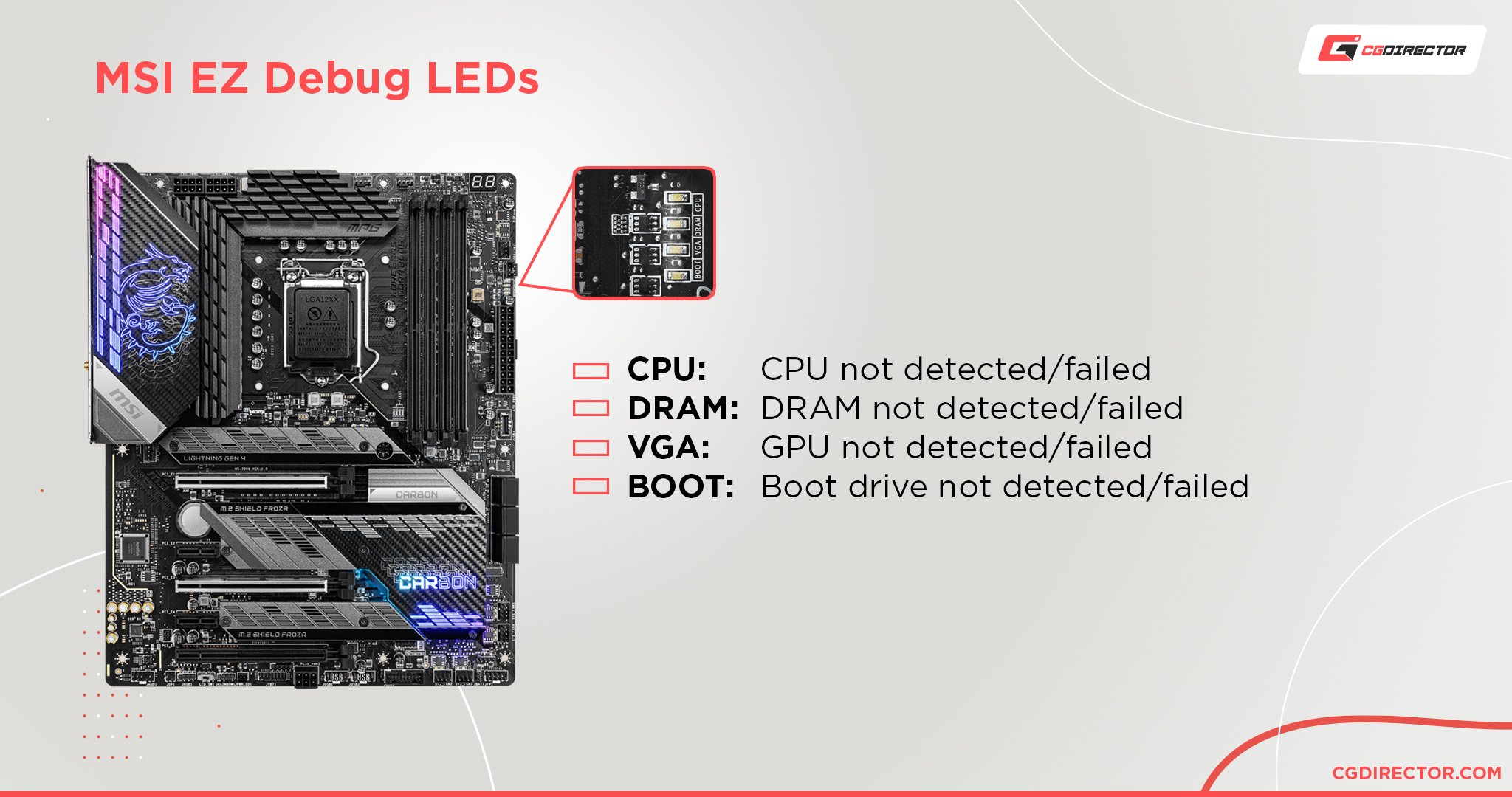
Where-is-the-EZ-Debug-LED-located.jpg


When the PC is booting, usually is CPU -> DRAM -> VGA -> Boot
If what you are encountering is totally nothing, it can be faulty motherboard.
3) Try use BIOS Flashback, take note try to avoid updating to MSI BETA BIOS.
Example 7B85v1G which is stable release, download it onto a thumbdrive.
Rename the file to MSI.ROM Than insert the thumbdrive into BIOS flashport.
Press the flashback, once it start flashing means it is updating.
If it is sucessful it will stop flashing than try booting it.

If all these fails, either you can bring the motherboard to a shop to check.
Take note nowadays AMD B550 Motherboard are quite limited so higher end mobo
like this may not have.
 

dota667

Member
Joined
Mar 31, 2011
Messages
117
Reaction score
7
1) Remove the motherboard CMOS battery.
This is to reset the motherboard BIOS setting.
*PC must be turn off
2)

Where-is-the-EZ-Debug-LED-located.jpg


When the PC is booting, usually is CPU -> DRAM -> VGA -> Boot
If what you are encountering is totally nothing, it can be faulty motherboard.
3) Try use BIOS Flashback, take note try to avoid updating to MSI BETA BIOS.
Example 7B85v1G which is stable release, download it onto a thumbdrive.
Rename the file to MSI.ROM Than insert the thumbdrive into BIOS flashport.
Press the flashback, once it start flashing means it is updating.
If it is sucessful it will stop flashing than try booting it.

If all these fails, either you can bring the motherboard to a shop to check.
Take note nowadays AMD B550 Motherboard are quite limited so higher end mobo
like this may not have.

I have tried cmos battery reset alot of times. i also tried jbat pins reset each time i try a new solution.

I have also tried bios flashback to the most recent beta version, to the earliest stable version and now its on the latest stable non beta version all have been successful in flashing but still no post.

when i remove the cpu the debug does show that there is no cpu with the red led, i tested without putting any ram also show correctly the red light of dram, then i removed gpu also shows that it detects that gpu is not there with the red light. and when all are in doesnt show any red debug led light.

if its motherboard spoil at least can still replace with a cheap mobo and just continue. but if its cpu spoil then i feel like maybe ill need to move onto maybe am5
 

86technie

High Supremacy Member
Joined
Jun 8, 2006
Messages
40,336
Reaction score
5,930
I have tried cmos battery reset alot of times. i also tried jbat pins reset each time i try a new solution.

I have also tried bios flashback to the most recent beta version, to the earliest stable version and now its on the latest stable non beta version all have been successful in flashing but still no post.

when i remove the cpu the debug does show that there is no cpu with the red led, i tested without putting any ram also show correctly the red light of dram, then i removed gpu also shows that it detects that gpu is not there with the red light. and when all are in doesnt show any red debug led light.

if its motherboard spoil at least can still replace with a cheap mobo and just continue. but if its cpu spoil then i feel like maybe ill need to move onto maybe am5
Best bring to a shop to confirm unless you have another cpu to test the board.
If CPU spoil I rather you get a AMD 5000 series.

AM5 wise you need new cpu, motherboard and DDR5 ram.
DDR4 can't be reused.
 

soreloser

Senior Member
Joined
Feb 26, 2024
Messages
642
Reaction score
250
Best bring to a shop to confirm unless you have another cpu to test the board.
If CPU spoil I rather you get a AMD 5000 series.

AM5 wise you need new cpu, motherboard and DDR5 ram.
DDR4 can't be reused.
Agreed. Personally I went with my friend down to SLS to diagnose when his pc got issue, cost about $40. I think it was VII PC. If you dont really want to pay the $40, might as well just upgrade, it's clear that either the motherboard or the CPU is faulty, and you cant tell unless you bring it down to a repair shop to check
 

dota667

Member
Joined
Mar 31, 2011
Messages
117
Reaction score
7
thanks for all the help thats all i could do. its like at a weird spot if change cpu 5600 like not here not there if not go up to 5800x3d also kind of out of place. then yes if go am5 means mostly everything else need change along lose lose lose situation
 

nakedtons

Banned
Joined
May 31, 2010
Messages
5,219
Reaction score
1,832
Seems like a faulty motherboard. CPU rarely spoil so easily. It can happen too like in my case. I went down a few trips for rma as I suspected the other components. I was at my wits' end. Then what's left to test were just the PSU and motherboard. Used the PSU tester provided. It worked fine. Then what's left was the motherboard. I took the motherboard for RMA. The guy immediately told me that the motherboard was scratched which was why it couldn't boot. He showed me the scratches and then rejected the rma request. I had to buy a new motherboard.

https://forums.hardwarezone.com.sg/threads/pc-suddenly-stop-posting-but-fans-spinning.6979769/
 
Last edited:

86technie

High Supremacy Member
Joined
Jun 8, 2006
Messages
40,336
Reaction score
5,930
thanks for all the help thats all i could do. its like at a weird spot if change cpu 5600 like not here not there if not go up to 5800x3d also kind of out of place. then yes if go am5 means mostly everything else need change along lose lose lose situation

It depend what you are using the PC for, Ryzen 5 5600X or Ryzen 7 5800X will do fine.
AM5 wise means change everything, take note that also mean Windows have to install
from scratch.
 

dota667

Member
Joined
Mar 31, 2011
Messages
117
Reaction score
7
Seems like a faulty motherboard. CPU rarely spoil so easily. It can happen too like in my case. I went down a few trips for rma as I suspected the other components. I was at my wits' end. Then what's left to test were just the PSU and motherboard. Used the PSU tester provided. It worked fine. Then what's left was the motherboard. I took the motherboard for RMA. The guy immediately told me that the motherboard was scratched which was why it couldn't boot. He showed me the scratches and then rejected the rma request. I had to buy a new motherboard.

https://forums.hardwarezone.com.sg/threads/pc-suddenly-stop-posting-but-fans-spinning.6979769/
mine ran out of warranty long ago. did not change any parts at all so cant physically damage anything. was running fine till it went to sleep and never woke up after.

just finding a spare cpu to test before i pull the trigger on part replacement or overhaul
 

dota667

Member
Joined
Mar 31, 2011
Messages
117
Reaction score
7
bought a new motherboard b550m msi pro vdh and moved everything onto it. thought finally problem will be solved. turned it on and still the same **** no post and keyboard 3 lights still up. the exact same problem as the previous motherboard. now i am totally mindfked. is it the cpu then?
 

Phen8210

High Supremacy Member
Joined
Jul 29, 2011
Messages
29,027
Reaction score
8,284
bought a new motherboard b550m msi pro vdh and moved everything onto it. thought finally problem will be solved. turned it on and still the same **** no post and keyboard 3 lights still up. the exact same problem as the previous motherboard. now i am totally mindfked. is it the cpu then?

does your fan spin full speed
 

86technie

High Supremacy Member
Joined
Jun 8, 2006
Messages
40,336
Reaction score
5,930
bought a new motherboard b550m msi pro vdh and moved everything onto it. thought finally problem will be solved. turned it on and still the same **** no post and keyboard 3 lights still up. the exact same problem as the previous motherboard. now i am totally mindfked. is it the cpu then?

For this board there is a Dignoastic LED, any of these LED are lit?

Where-is-the-EZ-Debug-LED-located.jpg


If CPU + DRAM Error = Motherboard/CPU faulty
If DRAM Error = RAM issue
If VGA Error = BIOS setting issue *If this flash may not be accurate
Encounter few time show VGA error end up is something else.
 

dota667

Member
Joined
Mar 31, 2011
Messages
117
Reaction score
7
does your fan spin full speed

yes the 2 system fan, cpu fan all spinning at full speed.

For this board there is a Dignoastic LED, any of these LED are lit?

Where-is-the-EZ-Debug-LED-located.jpg


If CPU + DRAM Error = Motherboard/CPU faulty
If DRAM Error = RAM issue
If VGA Error = BIOS setting issue *If this flash may not be accurate
Encounter few time show VGA error end up is something else.

when i boot up with all the parts in the led light just cycle through cpu and ram then doesnt show anymore. when i remove the ram and boot up the dram led will be on permanently. i also added a motherboard buzzer which the beeping sound came on too when i removed the ram. otherwise normal boot with everything in no sound.
 
Important Forum Advisory Note
This forum is moderated by volunteer moderators who will react only to members' feedback on posts. Moderators are not employees or representatives of HWZ Forums. Forum members and moderators are responsible for their own posts. Please refer to our Community Guidelines and Standards and Terms and Conditions for more information.
Top