[Official] DVB-T2 USB/PCI-E/PCI TV Tuner Thread

Status
Not open for further replies.

cybertech

Arch-Supremacy Member
Joined
Dec 3, 2000
Messages
16,601
Reaction score
1,574
Talking about Video and Audio Codec, actually which one is most prefer?
Video Codec there are:
Microsoft
FFDShow
LAV Video Decoder

Audio Codec there are:
Microsoft
AC3Filter
Microsoft MPEG
FFDShow
LAV Audio Decoder

Video Renderer and Audio Renderer the most confusing part to me.
There are:
Generic Video Renderer
Overlay Video Renderer
Video Mixing Renderer 7
Video Mixing Renderer 9
Enhanced Video Renderer

I usually trial and error.
 

myfifa888

Supremacy Member
Joined
Aug 16, 2010
Messages
9,335
Reaction score
0
Your PC probably do not have the necessary video decoder.
Download and install LAV filters.

You probably need to install MPEG2 (?) video decoders. If some of your HD channels have video but no audio, install the AC3 audio decoder. Probably can install all..

Hope this helps. I not using T230 so you need to test out.. :(

Hi bro Mike_Lim, you are right, i am able to view all non-HD channels after installing the Lav Filters. THanks!
 

kun1he2

Master Member
Joined
Dec 29, 2004
Messages
3,750
Reaction score
182
Does the DVB-C work too?

I just received mine today... :)

DVB-C works very well via Starhub cable point... *happy* :)

However, using the bundled ArcSoft TotalMedia 3.5 software, all free-to-air channels are detected except for HD5... *sad* :(

.... anyone else encountering the same?

DVB-T2 on the other hand detects zero channels using the bundled antenna at my location near Admiralty MRT. Not really a concern coz the intent was to use DVB-C only.

Other than TotalMedia, any other good PVR software to recommend? Tried SichboPVR - but it can't seem to detect any channels via the Starhub point.

Many thanks to batuchka for this great value-for-money recommendation! :)
 

Kiwi8

Honorary Member
Deluxe Member
Joined
May 3, 2001
Messages
139,216
Reaction score
17,457
I just received mine today... :)

DVB-C works very well via Starhub cable point... *happy* :)

However, using the bundled ArcSoft TotalMedia 3.5 software, all free-to-air channels are detected except for HD5... *sad* :(

.... anyone else encountering the same?

DVB-T2 on the other hand detects zero channels using the bundled antenna at my location near Admiralty MRT. Not really a concern coz the intent was to use DVB-C only.

Other than TotalMedia, any other good PVR software to recommend? Tried SichboPVR - but it can't seem to detect any channels via the Starhub point.

Many thanks to batuchka for this great value-for-money recommendation! :)

For DVB-C's CH5_HD (HD5) u need to tune to 370Mhz manually in whichever program u use. This frequency is often not on the default frequencies that the typical programs tune to.

U can try NextPVR too, it's freeware. Or if u have some budget to pay, can use DVBViewer Pro too.
 

albertlee

Supremacy Member
Joined
Jan 1, 2000
Messages
9,619
Reaction score
196
I just received mine today... :)

DVB-C works very well via Starhub cable point... *happy* :)

However, using the bundled ArcSoft TotalMedia 3.5 software, all free-to-air channels are detected except for HD5... *sad* :(

.... anyone else encountering the same?

DVB-T2 on the other hand detects zero channels using the bundled antenna at my location near Admiralty MRT. Not really a concern coz the intent was to use DVB-C only.

Other than TotalMedia, any other good PVR software to recommend? Tried SichboPVR - but it can't seem to detect any channels via the Starhub point.

Many thanks to batuchka for this great value-for-money recommendation! :)

Can you kindly confirm if you have the same problem as mine since you're also using DVB-C as the source. Refer to my earlier posting here. TIA.
 

kun1he2

Master Member
Joined
Dec 29, 2004
Messages
3,750
Reaction score
182
For DVB-C's CH5_HD (HD5) u need to tune to 370Mhz manually in whichever program u use. This frequency is often not on the default frequencies that the typical programs tune to.

U can try NextPVR too, it's freeware. Or if u have some budget to pay, can use DVBViewer Pro too.

Problem with TotalMedia is that there doesn't seem to be any obvious config file to add the frequency.

With NextPVR, it only shows the DVB-T device - no DVB-C device selection. Looks like I may need to add the HD5 frequency into the DVB-T tuning directory instead of the DVB-C directory.

Can you kindly confirm if you have the same problem as mine since you're also using DVB-C as the source. Refer to my earlier posting here. TIA.

Haven't encountered your problem yet - perhaps you might want to try installing the drivers from the CD (actually, I installed the web downloaded driver, then realized that the CD files are dated later than the downloaded files - so installed from the CD as well).
 

albertlee

Supremacy Member
Joined
Jan 1, 2000
Messages
9,619
Reaction score
196
Problem with TotalMedia is that there doesn't seem to be any obvious config file to add the frequency.

With NextPVR, it only shows the DVB-T device - no DVB-C device selection. Looks like I may need to add the HD5 frequency into the DVB-T tuning directory instead of the DVB-C directory.

Yup, can only import/export the channel list which is not a text file. As for NextPVR, the device is always detected as DVB-T whether the source is from SH cable or using the provided antennae.


Haven't encountered your problem yet - perhaps you might want to try installing the drivers from the CD (actually, I installed the web downloaded driver, then realized that the CD files are dated later than the downloaded files - so installed from the CD as well).

Thanks for the feedback. Are you using the stick on a PC or laptop?

BTW, I have tried both drivers, initially from the website and later from CD after doing a clean Windows install, both with the same result. Well, look like it's just bad luck that I ended up with a lemon set. :(

IMO, this product is already quite old with no new update (Totalmedia) from Arcsoft or the manufacturer - Mygica/Geniatech. Tech support is non existence which is not surprising from a MIC product.
 
Last edited:

Kiwi8

Honorary Member
Deluxe Member
Joined
May 3, 2001
Messages
139,216
Reaction score
17,457
Problem with TotalMedia is that there doesn't seem to be any obvious config file to add the frequency.

With NextPVR, it only shows the DVB-T device - no DVB-C device selection. Looks like I may need to add the HD5 frequency into the DVB-T tuning directory instead of the DVB-C directory.

I see... in that case it seems that the workings of this device is similar to one of my older card TBS6280 which the drivers map DVB-C signals into DVB-T signals too.

U know how to edit the INI files in the tuning directory right? If not do let me know and I will post an example. I recommend not editing the INI file, but instead, making a copy of the existing INI file, rename it as something like "Singapore channel.ini" and edit the new file. :o
 

i1magic

Arch-Supremacy Member
Joined
Dec 11, 2002
Messages
22,366
Reaction score
117
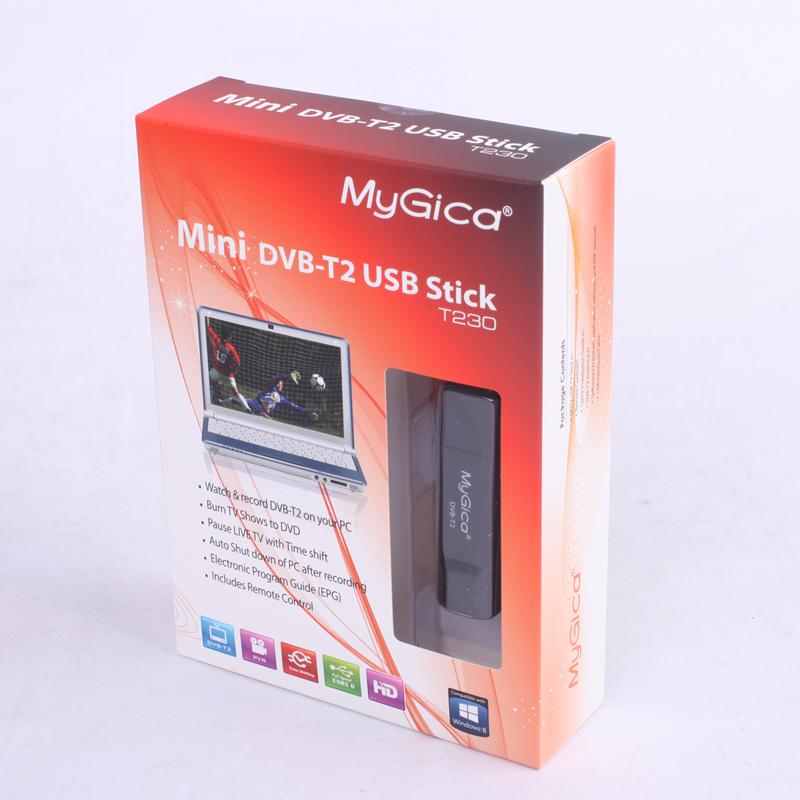
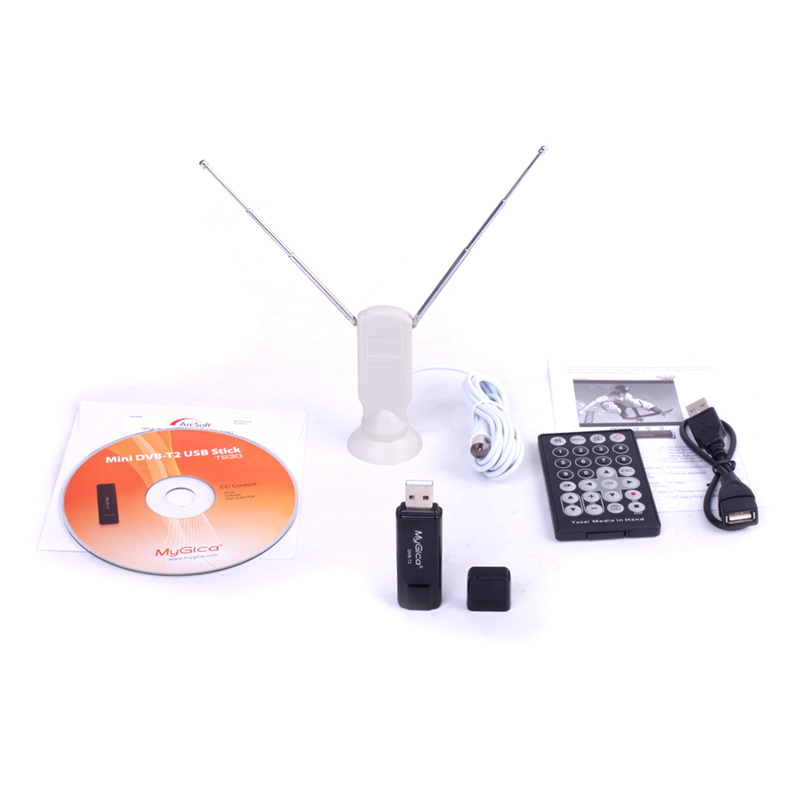
Item : MyGica DVB-T2 Receiver GeniaTech T230 DVB-T2/DVB-T USB TV Stick for Russia / Thailand / Singapore
Price : About SGD$29.50 (Limited time)

This image has been resized.Click to view original image


This image has been resized.Click to view original image

Source :
http://www.aliexpress.com/item/DVB-T...857742736.html

Ordered on 29 Jun 2015. Receive it on 13 Jul. Supposed to get it on 10 Jul 2015 but missed the delivery.

Tried it already. Can receive all the local HD channels + SD channels via :

1. Antenna supplied
2. Old TV antenna point on the wall

I managed to try out on the Starhub DVB-C TV antenna point. Scan and found 52 channels but cannot watch at all. CANNOT watch local channel at all.

Overall, still good buy.

Does the DVB-C work too?

I just run a normal scan, cannot.
 

Kiwi8

Honorary Member
Deluxe Member
Joined
May 3, 2001
Messages
139,216
Reaction score
17,457
Guys, I have a problem with my quad tuner card TBS6285 where it fails after about an hour or so if I use all 4 tuners to record/view something.

I got in touch with the TBS customer support and they remote-controlled into my PC to troubleshoot using TransEdit and tested only 20 minutes and now they are not engaging with me liao, I am angry.

I tested the TransEdit myself and discovered the failure happening just as I described, u can see the video here (between the 20th and 21st minute around the 30 second mark):


Any suggestions on what I can do to publicise the matter to put public pressure on the company? I would gladly appreciate any such suggestions, thank you.
 
Last edited:

myfifa888

Supremacy Member
Joined
Aug 16, 2010
Messages
9,335
Reaction score
0
Hi all, currently using MyGica DVB-T2 Receiver GeniaTech T230. I am using NextPVR as the recording software. However i am encountering problems recording HD shows, the video recorded got stuck and then play, throughout the whole video. Any bro knows whats wrong. The file format recorded is .ts and i am opening using windows media player. Any other PVR software to recommend? Thanks

Ps: got no prob recording non HD channel.
 
Last edited:

albertlee

Supremacy Member
Joined
Jan 1, 2000
Messages
9,619
Reaction score
196
Hi all, currently using MyGica DVB-T2 Receiver GeniaTech T230. I am using NextPVR as the recording software. However i am encountering problems recording HD shows, the video recorded got stuck and then play, throughout the whole video. Any bro knows whats wrong. The file format recorded is .ts and i am opening using windows media player. Any other PVR software to recommend? Thanks!

So far I only tried recording using the provided software which record in MPG format. Have you try WMC?
 

liangtam

High Supremacy Member
Joined
Aug 20, 2002
Messages
38,903
Reaction score
255
Has anyone gotton new driver for T230? Geniatech email support refuse to reply.

1.31.1145.0 so far only works with supplied TotalMedia 3.5 with no DVB-C support. Tried progdvb, altdvb, smartdvb, dvbdream all will BSOD and crash. DVBViewer does not but has display problems.
 

Sambuca78

Supremacy Member
Joined
Apr 14, 2001
Messages
6,994
Reaction score
478
Anyone managed to get mygica PT360 work in windows 8.1?

My Asus T100 crashed immediately after I installed it Using T230 window driver. :(
 

albertlee

Supremacy Member
Joined
Jan 1, 2000
Messages
9,619
Reaction score
196
Anyone managed to get mygica PT360 work in windows 8.1?

My Asus T100 crashed immediately after I installed it Using T230 window driver. :(

Why are you installing T230 driver for PT360? Driver should be auto-detect by Windows since none was provided, cmiiw.
 

Sambuca78

Supremacy Member
Joined
Apr 14, 2001
Messages
6,994
Reaction score
478
Why are you installing T230 driver for PT360? Driver should be auto-detect by Windows since none was provided, cmiiw.

PT360 r for Android device , I read from some Russian forum that it will work in windows if install with T230 driver ma. :(
 

JackeJR

Junior Member
Joined
Dec 23, 2014
Messages
80
Reaction score
0
Hi all, I am using the PCTV 292e USB TV tuner with NextPVR through DVB-C. I manage to get all the local channels. My problems:

1. EPG is available only for non-HD channels. The only HD with EPG is 5 HD.
2. The EPG for chinese channels shows garbled text, any workarounds?

Thanks!
 
Status
Not open for further replies.
Important Forum Advisory Note
This forum is moderated by volunteer moderators who will react only to members' feedback on posts. Moderators are not employees or representatives of HWZ Forums. Forum members and moderators are responsible for their own posts. Please refer to our Community Guidelines and Standards and Terms and Conditions for more information.
Top