[Official] Home Automation Thread

Devilsire

Arch-Supremacy Member
Joined
Jan 9, 2007
Messages
11,801
Reaction score
4,539
oh ya now u guys reminded me.
some, or a very few rare wifi devices have LAN control feature inbuilt.
eg. my ceiling yeelights


i guess its thru router's local network instead of cloud? But still will need a local "trigger" device for the control i guess
 

hkchew03

Master Member
Joined
Aug 20, 2010
Messages
2,593
Reaction score
556
oh ya now u guys reminded me.
some, or a very few rare wifi devices have LAN control feature inbuilt.
eg. my ceiling yeelights


i guess its thru router's local network instead of cloud? But still will need a local "trigger" device for the control i guess
Technically both cloud and local are possible as they are all connect to the router either directly or via gateway(zigbee). But most system like Tuya/Aqara etc uses cloud so users can still access the app server and control them when they are out. For HA is a little difference since the server is local by default and comes with pretty much most zigbee integration, where as certain wifi devices (universal remote) are lacking the local integration and require HA to communicate with the device native app server (Tuya) via alternative method such as scene.

To properly test if it is local, you need to disable your router WAN, it should still work if the system is local, but very unlikely since your phone need to access to the app server via internet (cloud).
 

daniel_83

Arch-Supremacy Member
Joined
Dec 8, 2001
Messages
17,109
Reaction score
608
Screenshot-2024-03-07-152453.png


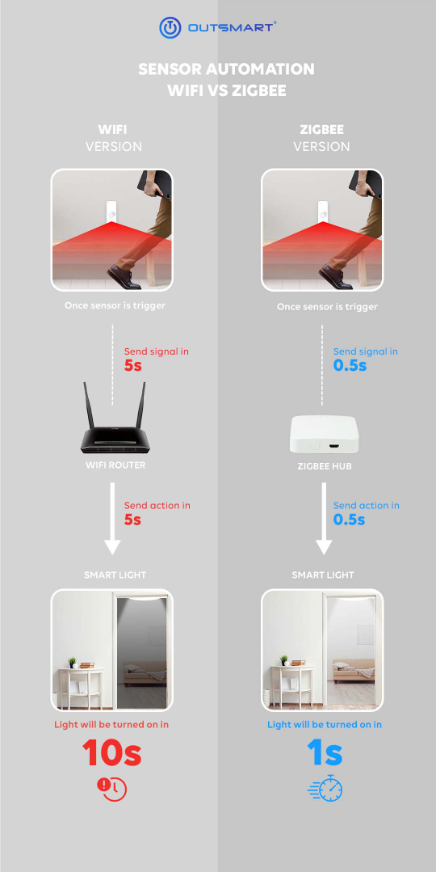
I was talking about open/close sensor from Outsmart, a local brand selling OEM products with their logo
 

xxnewbiexx

Junior Member
Joined
Jul 24, 2021
Messages
98
Reaction score
16
For folks using relays in switches and in a new home where there is no broadband yet.
Do u
1) ask your electrician to put in the relays in switches when they setup the wiring (electricity) in your place or

2) Do you engage an electrician to put it in after all the broadband and internet setup is done so that once he put the smart relay in the switches, u could start configuring them.

For option 1, sometimes it could be weeks after the electrician put the smart relay in the switches before the broadband is in.

Anyone has experience to share?
 

hkchew03

Master Member
Joined
Aug 20, 2010
Messages
2,593
Reaction score
556
For folks using relays in switches and in a new home where there is no broadband yet.
Do u
1) ask your electrician to put in the relays in switches when they setup the wiring (electricity) in your place or

2) Do you engage an electrician to put it in after all the broadband and internet setup is done so that once he put the smart relay in the switches, u could start configuring them.

For option 1, sometimes it could be weeks after the electrician put the smart relay in the switches before the broadband is in.

Anyone has experience to share?
Relay? as in smart switch? They will still work as physical switch even without connection.
Get them sort out first, as some multi-gang might require deeper mounting box.
 

ezihome

Junior Member
Joined
Feb 4, 2024
Messages
34
Reaction score
12
For folks using relays in switches and in a new home where there is no broadband yet.
Do u
1) ask your electrician to put in the relays in switches when they setup the wiring (electricity) in your place or

2) Do you engage an electrician to put it in after all the broadband and internet setup is done so that once he put the smart relay in the switches, u could start configuring them.

For option 1, sometimes it could be weeks after the electrician put the smart relay in the switches before the broadband is in.

Anyone has experience to share?
You mean installing smart relays behind regular dumb switch?

I did mine via option 1 as didn't want the wall switch to be opened up after everything is done up (wall painting touch up etc) as it may peel off the paint surrounding it. Actually, I already had my initial router/network in around 1 week after electrician installed the relays and switches.

Though I caution that the relays may run into connectivity issue, which may require re-configuring after the initial configuration. I'm using Shelly relays, in which hard reset (or pairing mode) can be activated by flipping the physical rocker switch 5x or power cycle the relays 5x (by on/off the breaker).

In anyhow, I did a complete re-configuration of all the relays as I changed my router and network settings later on. So, it's important to know how to enable pairing mode for the particluar relay you are using.

Before purchasing the actual quantities of relays required, I purchased single pieces of the relays I planned to used to test its usage and simulate actual usage conditions. Did this at my old place with fibre network already present. This helps me a lot in understanding the wiring between the relay and the dumb switch. I installed the relays to the dumb switch myself, and passed the whole set to electrician to connect it to live, load and neutral wiring in the wall. Had to do that as my electrician wasn't familiar with the relays. So you'd have to take note of this as well. Unless you hire a smart home service provider, where the provider will set up everything for you.

If you go with option 2, will you be configuring the relays seperately first before getting electrician to install them inside the switch? Other than that, I don't see any difference between option 1 & 2.

 

xxnewbiexx

Junior Member
Joined
Jul 24, 2021
Messages
98
Reaction score
16
You mean installing smart relays behind regular dumb switch?

I did mine via option 1 as didn't want the wall switch to be opened up after everything is done up (wall painting touch up etc) as it may peel off the paint surrounding it. Actually, I already had my initial router/network in around 1 week after electrician installed the relays and switches.

Though I caution that the relays may run into connectivity issue, which may require re-configuring after the initial configuration. I'm using Shelly relays, in which hard reset (or pairing mode) can be activated by flipping the physical rocker switch 5x or power cycle the relays 5x (by on/off the breaker).

In anyhow, I did a complete re-configuration of all the relays as I changed my router and network settings later on. So, it's important to know how to enable pairing mode for the particluar relay you are using.

Before purchasing the actual quantities of relays required, I purchased single pieces of the relays I planned to used to test its usage and simulate actual usage conditions. Did this at my old place with fibre network already present. This helps me a lot in understanding the wiring between the relay and the dumb switch. I installed the relays to the dumb switch myself, and passed the whole set to electrician to connect it to live, load and neutral wiring in the wall. Had to do that as my electrician wasn't familiar with the relays. So you'd have to take note of this as well. Unless you hire a smart home service provider, where the provider will set up everything for you.

If you go with option 2, will you be configuring the relays seperately first before getting electrician to install them inside the switch? Other than that, I don't see any difference between option 1 & 2.
Thanks this is good feedback. The comment on paint peeling off is valid, don't want the wife to be upset as the renovation will be new. Resetting the relay via 5 on off procedure is a good tip.

Do you have issues with coverage? My relay is going to be hiden in the switch and I have quite a number of them in my new place? I am using zigbee for my relays
 

xxnewbiexx

Junior Member
Joined
Jul 24, 2021
Messages
98
Reaction score
16
Relay? as in smart switch? They will still work as physical switch even without connection.
Get them sort out first, as some multi-gang might require deeper mounting box.
Done that we electrician already, electrician is confident on putting the relay in the switch as I have both relay that is very small.
 

ezihome

Junior Member
Joined
Feb 4, 2024
Messages
34
Reaction score
12
Thanks this is good feedback. The comment on paint peeling off is valid, don't want the wife to be upset as the renovation will be new. Resetting the relay via 5 on off procedure is a good tip.

Do you have issues with coverage? My relay is going to be hiden in the switch and I have quite a number of them in my new place? I am using zigbee for my relays
I'm using Shelly WiFi relays for wall switches. Installed ceiling mounted WiFi access point in the middle of the house to ensure good coverage throughout the house. No issue with coverage so far, quite rock solid.

Doesnt matter WiFi or Zigbee, it's paramount importance to ensure good coverage of the respective wireless protocol. I do have 30+ zigbee devices as well, mixture of relays, bulbs, plugs, LED controllers. Initially had coverage issue for one LED controller in the master toilet as its the furthest one from coordinator, through thick toilet walls and I don't have a zigbee router in the master room. Bought a couple more zigbee plugs, spread it evenly across the house and one in the master room to strengthen the mesh network. Thereafter, no more connectivity issue.

Does your zigbee relay also function as router? If it does, then lesser chance of coverage issue as it will be spread across the house. One thing I tried is that pairing zigbee( that can function as router) devices nearest to coordinator first, then outwards towards the furthest location does help in ensuring good coverage (though the network will eventually self heal for the best route). Zigbee sensors and wireless devices will be the last to be paired.
 

xxnewbiexx

Junior Member
Joined
Jul 24, 2021
Messages
98
Reaction score
16
I'm using Shelly WiFi relays for wall switches. Installed ceiling mounted WiFi access point in the middle of the house to ensure good coverage throughout the house. No issue with coverage so far, quite rock solid.

Doesnt matter WiFi or Zigbee, it's paramount importance to ensure good coverage of the respective wireless protocol. I do have 30+ zigbee devices as well, mixture of relays, bulbs, plugs, LED controllers. Initially had coverage issue for one LED controller in the master toilet as its the furthest one from coordinator, through thick toilet walls and I don't have a zigbee router in the master room. Bought a couple more zigbee plugs, spread it evenly across the house and one in the master room to strengthen the mesh network. Thereafter, no more connectivity issue.

Does your zigbee relay also function as router? If it does, then lesser chance of coverage issue as it will be spread across the house. One thing I tried is that pairing zigbee( that can function as router) devices nearest to coordinator first, then outwards towards the furthest location does help in ensuring good coverage (though the network will eventually self heal for the best route). Zigbee sensors and wireless devices will be the last to be paired.
Good to know that, I am using a zigbee hub, a few zigbee devices only. So I a got a zigbee repeater and may get a few more if connectivity is bad. Most of my smarthome devices are on wifi but for light switches using relay I choose zigbee to cater to case where in the unlikely case my wifi is down, the lights still could be control via remote app or buttons.

New place also using ceiling AP to have better coverage.
 

JustDoLor

Senior Member
Joined
Dec 6, 2016
Messages
1,573
Reaction score
80
Hi, anyone using Google nest mini? My friend want to get one to use as smart radio to listen to SG radio stations 😄

I googled and it seem that the Google Nest is installed with TuneIn, but some forums mention it was not working. Some more I tried the free TuneIn app version on my phone will play advertisements in the first 1 min or so.

Anyone can help to confirm, Tunein is still supported? Thanks.
 

kun1he2

Master Member
Joined
Dec 29, 2004
Messages
3,784
Reaction score
201
Hi, anyone using Google nest mini? My friend want to get one to use as smart radio to listen to SG radio stations 😄

I googled and it seem that the Google Nest is installed with TuneIn, but some forums mention it was not working. Some more I tried the free TuneIn app version on my phone will play advertisements in the first 1 min or so.

Anyone can help to confirm, Tunein is still supported? Thanks.
Yes, just tested Class 95 FM - the Google Nest Mini will stream from Tunein - with advert at the start (not sure about in between).
 

Devilsire

Arch-Supremacy Member
Joined
Jan 9, 2007
Messages
11,801
Reaction score
4,539
Hi, anyone using Google nest mini? My friend want to get one to use as smart radio to listen to SG radio stations 😄

I googled and it seem that the Google Nest is installed with TuneIn, but some forums mention it was not working. Some more I tried the free TuneIn app version on my phone will play advertisements in the first 1 min or so.

Anyone can help to confirm, Tunein is still supported? Thanks.
buy the mi smart speaker more value for money (equivalent to a google nest with better sound at mini's price)
just tested radio @ tunein, works fine too
 
Last edited:

wacko

Arch-Supremacy Member
Joined
Jan 1, 2000
Messages
15,546
Reaction score
267
I listen to the radio via Nest devices daily, most of the time there isn't any non-radio advertisements, the radio channel starts streaming right away after "Streaming XXX from Tune in. This is Tune in" announcement.
 

jas663

Member
Joined
Jul 11, 2010
Messages
108
Reaction score
7
Anyone using xiaomi app? I have some device under sg setting but intend to buy a china version device that requires to use China region setting. Is there any way to bypass this or changing all my other device to china setting? is it possible?
 

Billyboo

Junior Member
Joined
Sep 6, 2022
Messages
64
Reaction score
6
Hi all! First time looking into home automation for my new place, thinking of reaching out to homesmart for solutions- any reviews on engaging them or recommendations to share? Thank you!
 

hkchew03

Master Member
Joined
Aug 20, 2010
Messages
2,593
Reaction score
556
Anyone using xiaomi app? I have some device under sg setting but intend to buy a china version device that requires to use China region setting. Is there any way to bypass this or changing all my other device to china setting? is it possible?
nope
 

hkchew03

Master Member
Joined
Aug 20, 2010
Messages
2,593
Reaction score
556
Hi all! First time looking into home automation for my new place, thinking of reaching out to homesmart for solutions- any reviews on engaging them or recommendations to share? Thank you!
Not review, if you are savvy enough to change your own switch, you should do fine with DIY. Most of the automation starts with switches unless you looking at more advance stuff. Beside you still need to get your hands on automation in the future to do adjustments and fine tuning etc, chances are they not going to assist you for free.
 

Billyboo

Junior Member
Joined
Sep 6, 2022
Messages
64
Reaction score
6
Not review, if you are savvy enough to change your own switch, you should do fine with DIY. Most of the automation starts with switches unless you looking at more advance stuff. Beside you still need to get your hands on automation in the future to do adjustments and fine tuning etc, chances are they not going to assist you for free.
Thank you! No just looking at simple stuff like light switches and aircon/ fan- would you recommend starting with Aqara switches? Saw a local online retailer called seconds that seems ok too
 

hkchew03

Master Member
Joined
Aug 20, 2010
Messages
2,593
Reaction score
556
Thank you! No just looking at simple stuff like light switches and aircon/ fan- would you recommend starting with Aqara switches? Saw a local online retailer called seconds that seems ok too
Not familiar with Aqara, but generally most company that claimed "smart" implementation of AC or fans with remote is only semi-smart. It basically just a additional universal remote to issue control. It allow you to control the device outside of the room/home/wifi network, but does not reflect the actual state of the device (AC temp/fan speed etc). ie to say, if there is a missed remote command (object blocking IR signal for remote), the smart system will not tell you the device isn't switched on. Generally it work fine, but is not 100% reliable.

The real smart AC are those implemented by manufacturer (with Wifi control etc) with AC connecting to your wifi network and tells you the actual state of the AC and not the stats of the issued IR command.

Things are much less complex with simple devices like light and fan that does not utilize remote or have physical toggle for speed/etc, all these can be controlled by switch on/off state.
 
Important Forum Advisory Note
This forum is moderated by volunteer moderators who will react only to members' feedback on posts. Moderators are not employees or representatives of HWZ Forums. Forum members and moderators are responsible for their own posts. Please refer to our Community Guidelines and Standards and Terms and Conditions for more information.
Top