
Thanks for the info! Can I ask what switches/ hub you are using currently?Not familiar with Aqara, but generally most company that claimed "smart" implementation of AC or fans with remote is only semi-smart. It basically just a additional universal remote to issue control. It allow you to control the device outside of the room/home/wifi network, but does not reflect the actual state of the device (AC temp/fan speed etc). ie to say, if there is a missed remote command (object blocking IR signal for remote), the smart system will not tell you the device isn't switched on. Generally it work fine, but is not 100% reliable.
The real smart AC are those implemented by manufacturer (with Wifi control etc) with AC connecting to your wifi network and tells you the actual state of the AC and not the stats of the issued IR command.
Things are much less complex with simple devices like light and fan that does not utilize remote or have physical toggle for speed/etc, all these can be controlled by switch on/off state.
You are using an out of date browser. It may not display this or other websites correctly.
You should upgrade or use an alternative browser.
You should upgrade or use an alternative browser.
[Official] Home Automation Thread
- Thread starter Yureak
- Start date
More options
Who Replied?on HAThanks for the info! Can I ask what switches/ hub you are using currently?
xxnewbiexx
Junior Member
- Joined
- Jul 24, 2021
- Messages
- 98
- Reaction score
- 16
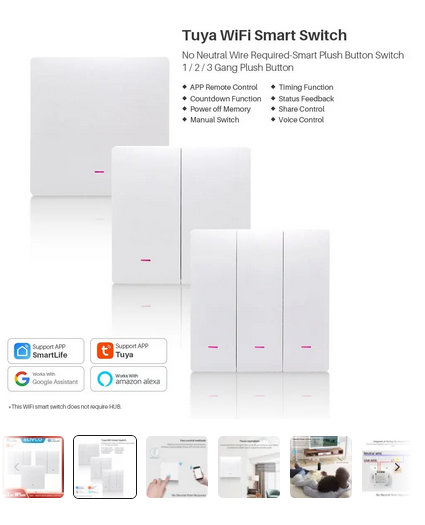
Bought one of these online and have electrician to install it for me. After he install it, (not setup yet) the switch cannot turn on the lights, is there any tip to resolve this?
From the manual, it seem to be even without app configuration, the switch should still be able to work in manual mode. What could be wrong?
From the manual, it seem to be even without app configuration, the switch should still be able to work in manual mode. What could be wrong?
Wiring correct?Bought one of these online and have electrician to install it for me. After he install it, (not setup yet) the switch cannot turn on the lights, is there any tip to resolve this?
From the manual, it seem to be even without app configuration, the switch should still be able to work in manual mode. What could be wrong?
How many pieces you bought? All pieces not working?
The physical button press should work for normal on/off, without any setup.
xxnewbiexx
Junior Member
- Joined
- Jul 24, 2021
- Messages
- 98
- Reaction score
- 16
Thanks for confirmation, new at this and electrician is also new to this device. Bought will go onsite tomorrow and check and perhaps try the other unitWiring correct?
How many pieces you bought? All pieces not working?
The physical button press should work for normal on/off, without any setup.

Arandalo
Master Member
- Joined
- Feb 22, 2014
- Messages
- 4,145
- Reaction score
- 1,286
This type of smart switch I think need to install the capacitor at the lighting connection, if your wiring don’t have neutral wire.Bought one of these online and have electrician to install it for me. After he install it, (not setup yet) the switch cannot turn on the lights, is there any tip to resolve this?
From the manual, it seem to be even without app configuration, the switch should still be able to work in manual mode. What could be wrong?
Im guessingBought one of these online and have electrician to install it for me. After he install it, (not setup yet) the switch cannot turn on the lights, is there any tip to resolve this?
From the manual, it seem to be even without app configuration, the switch should still be able to work in manual mode. What could be wrong?
- You bought the wrong type/seller send wrong type (neutral/no neutral)
- Electrican installed wrongly (very unlikely since its just 2 wires for 1 gang.
- Product DOA.
Switch should still work without linking to wifi/hub.
xxnewbiexx
Junior Member
- Joined
- Jul 24, 2021
- Messages
- 98
- Reaction score
- 16
Hi when my electrician install my relay, I can't control igd via manual switch. Internet not working at my place yet so no configuration is done.I'm using Shelly WiFi relays for wall switches. Installed ceiling mounted WiFi access point in the middle of the house to ensure good coverage throughout the house. No issue with coverage so far, quite rock solid.
Doesnt matter WiFi or Zigbee, it's paramount importance to ensure good coverage of the respective wireless protocol. I do have 30+ zigbee devices as well, mixture of relays, bulbs, plugs, LED controllers. Initially had coverage issue for one LED controller in the master toilet as its the furthest one from coordinator, through thick toilet walls and I don't have a zigbee router in the master room. Bought a couple more zigbee plugs, spread it evenly across the house and one in the master room to strengthen the mesh network. Thereafter, no more connectivity issue.
Does your zigbee relay also function as router? If it does, then lesser chance of coverage issue as it will be spread across the house. One thing I tried is that pairing zigbee( that can function as router) devices nearest to coordinator first, then outwards towards the furthest location does help in ensuring good coverage (though the network will eventually self heal for the best route). Zigbee sensors and wireless devices will be the last to be paired.
What could be our error? The installation manual show is quite simple and I am using a relay with neutral connection
What relay are you using? Do you have the wiring diagram of the relay to be connected to the switch? Confirm its wired correctly?Hi when my electrician install my relay, I can't control igd via manual switch. Internet not working at my place yet so no configuration is done.
What could be our error? The installation manual show is quite simple and I am using a relay with neutral connection
Can the relay on/off be triggered by physical switch connected to it? Different relay have different configuration and features. Not all relay can be connected to a physical switch
For mine, Shelly WiFi relay, by default the physical switch will trigger toggle and follow on/off according to the switch. So gotta check for the particular relay you using.
xxnewbiexx
Junior Member
- Joined
- Jul 24, 2021
- Messages
- 98
- Reaction score
- 16
Those using relays are the device I manual mode when you first install it?
xxnewbiexx
Junior Member
- Joined
- Jul 24, 2021
- Messages
- 98
- Reaction score
- 16
I suspect the error I am getting is because the electrician has set up 2 switches to control a set of lights. Do u have such a scenario in your setup, if u do, how do you resolve it?What relay are you using? Do you have the wiring diagram of the relay to be connected to the switch? Confirm its wired correctly?
Can the relay on/off be triggered by physical switch connected to it? Different relay have different configuration and features. Not all relay can be connected to a physical switch
For mine, Shelly WiFi relay, by default the physical switch will trigger toggle and follow on/off according to the switch. So gotta check for the particular relay you using.
You mean it's set up as 2 way switch?I suspect the error I am getting is because the electrician has set up 2 switches to control a set of lights. Do u have such a scenario in your setup, if u do, how do you resolve it?
I don't set up my relays as 2-way as it's not capable to do so. Gotten my electrician to close down any 2-way wiring of original switches. You can try to set up as normal 1-way first to eliminate that doubt.
Last edited:
username03
Senior Member
- Joined
- Apr 14, 2021
- Messages
- 936
- Reaction score
- 231
Few questions for smart switches for lights etc.
1. For heater, have to be above 20A and must have neutral wire capability? This is what my electrician advised.
2. For normal lighting or fans, is it no need for neutral? The switch I'm looking at can work with or without neutral.
1. For heater, have to be above 20A and must have neutral wire capability? This is what my electrician advised.
2. For normal lighting or fans, is it no need for neutral? The switch I'm looking at can work with or without neutral.
Arandalo
Master Member
- Joined
- Feb 22, 2014
- Messages
- 4,145
- Reaction score
- 1,286
For 2. it actually depends on your existing wiring. Even if you use a smart switch that can work both with or without neutral wire, if your wiring no neutral you will need to install the additional capacitor at the wiring near near the light or fan, which is not easy to do given that it’s located high up at the ceiling and also the existing wiring may not be easy to modify to add in the additional capacitor.Few questions for smart switches for lights etc.
1. For heater, have to be above 20A and must have neutral wire capability? This is what my electrician advised.
2. For normal lighting or fans, is it no need for neutral? The switch I'm looking at can work with or without neutral.
I personally tried to change my switch to a smart switch but because the existing wiring has no neutral wire, there will be constant flickering and the only way to resolve is to install the capacitor at the wiring near the light. But the light is those LED tube light which connects by rotating the pins at the end into the LED tube light holder/fixture, making it quite tedious to install an additional capacitor for a layman.
Last edited:
username03
Senior Member
- Joined
- Apr 14, 2021
- Messages
- 936
- Reaction score
- 231
My lights or fans not up yet as still in the midst of reno. All cables exposed. So adding capacitor shouldn't be an issue?For 2. it actually depends on your existing wiring. Even if you use a smart switch that can work both with or without neutral wire, if your wiring no neutral you will need to install the additional capacitor at the wiring near near the light or fan, which is not easy to do given that it’s located high up at the ceiling and also the existing wiring may not be easy to modify to add in the additional capacitor.
I personally tried to change my switch to a smart switch but because the existing wiring has no neutral wire, there will be constant flickering and the only way to resolve is to install the capacitor at the wiring near the light. But the light is those LED tube light which connects by rotating the pins at the end into the LED tube light holder/fixture, making it quite tedious to install an additional capacitor for a layman.
Capacitor usually only required for lights or whichever items requiring less than 10w right?
All will be installed by electrician of course as I'm not savvy and wouldn't want to gamble my life with electrical stuffs.
1.yes have to be above 20A. Heater switches usually double pole, so would already have neutral.Few questions for smart switches for lights etc.
1. For heater, have to be above 20A and must have neutral wire capability? This is what my electrician advised.
2. For normal lighting or fans, is it no need for neutral? The switch I'm looking at can work with or without neutral.
2.non-neutral smart switch can work. But like what others mentioned, have a chance of light flickering depending on your circuitry. I had mine non neutral switch in bomb shelter, do observe light flickering sometimes when it's switched off.
Make sure to show electrician of the circuit diagram for capacitor installation. Many electricians have limited experience on smart devices. Or just get switches that does not require capacitor.My lights or fans not up yet as still in the midst of reno. All cables exposed. So adding capacitor shouldn't be an issue?
Capacitor usually only required for lights or whichever items requiring less than 10w right?
All will be installed by electrician of course as I'm not savvy and wouldn't want to gamble my life with electrical stuffs.
Last edited:
Arandalo
Master Member
- Joined
- Feb 22, 2014
- Messages
- 4,145
- Reaction score
- 1,286
There are switches with no neutral (wire) and no capacitor required but they require a hub (usually Zigbee) to function. Currently in the market like don’t have smart switch with no neutral, no capacitor and no hub (connect directly to router).Make sure to show electrician of the circuit diagram for capacitor installation. Many electricians have limited on smart devices. Or just get switches that does not require capacitor.
Neutral or no neutral with or without capacitor isn't dependant on zigbee/wifi/bluetooth/thread. If you don't want hub, only wifi is applicable. And without knowing what system, it is impossible to advice...There are switches with no neutral (wire) and no capacitor required but they require a hub (usually Zigbee) to function. Currently in the market like don’t have smart switch with no neutral, no capacitor and no hub (connect directly to router).
And yes, there no no-neutral, no-capacitor WIFI switches in the market, you just have to look harder.
Last edited:
Arandalo
Master Member
- Joined
- Feb 22, 2014
- Messages
- 4,145
- Reaction score
- 1,286
Looking for Tuya/Smart Life touch screen smart switch with no neutral, no capacitor, no hub. I have been checking the market every now and then and such a product does not exist yet.Neutral or no neutral with or without capacitor isn't dependant on zigbee/wifi/bluetooth/thread. If you don't want hub, only wifi is applicable. And without knowing what system, it is impossible to advice...
Important Forum Advisory Note
This forum is moderated by volunteer moderators who will react only to members' feedback on posts. Moderators are not employees or representatives of HWZ Forums. Forum members and moderators are responsible for their own posts.
Please refer to our Community Guidelines and Standards and Terms and Conditions for more information.
