PC freeze without bsod

Informant

Senior Member
Joined
Dec 18, 2015
Messages
1,347
Reaction score
598
Specs as below:
Ryzen 5 5600x
silverstone va 650w psu gold
rtx 3050
corsair 16gb ram
asus b550m-a wifi ii
1tb samsung ssd
1tb wd hdd

this pc was purchase from mansa on september 2022. symptom start way back early March 2023, every single month will freeze 1 time for literally no reason. pc start up around 3-5min will freeze already. between march 2023 ~ september 2023. Mansa change each every component inclusive of psu & mobo plus clean windows installation. the freezing issues still occurs. october 2023 then change the RAM. surprisingly the freeze issue resolved.

now jan this year the freezing issue came back again. this time round is every 1.5 week freeze once while on idle (e.g have a 30min lunch/dinner).

can any expert let me know whats the possible root causes of pc freeze? or anyway to trigger a bsod for easier identifying the root cause of pc freeze??????

mouse(cursor still can move. cannot click anything) and keyboard(numlock still can toggle) still working when it freeze. replug again then no led light already.

my usages is pretty mild, youtube & some light gaming with android emulator only.
 
Last edited:

Informant

Senior Member
Joined
Dec 18, 2015
Messages
1,347
Reaction score
598
Checked, no integrity violation was found. what alternative way can i find the root causes?
 

liewhl

Senior Member
Joined
Mar 23, 2012
Messages
1,605
Reaction score
60
Specs as below:
Ryzen 5 5600x
silverstone va 650w psu gold
rtx 3050
corsair 16gb ram
asus b550m-a wifi ii
1tb samsung ssd
1tb wd hdd

this pc was purchase from mansa on september 2022. symptom start way back early March 2023, every single month will freeze 1 time for literally no reason. pc start up around 3-5min will freeze already. between march 2023 ~ september 2023. Mansa change each every component inclusive of psu & mobo plus clean windows installation. the freezing issues still occurs. october 2023 then change the RAM. surprisingly the freeze issue resolved.

now jan this year the freezing issue came back again. this time round is every 1.5 week freeze once while on idle (e.g have a 30min lunch/dinner).

can any expert let me know whats the possible root causes of pc freeze? or anyway to trigger a bsod for easier identifying the root cause of pc freeze?????? mouse and keyboard still working when it freeze. replug again then no led light already.

my usages is pretty mild, youtube & some light gaming with android emulator only.

Freeze can be alot of thing but normally the main suspect I think is psu. You can try to download some gpu/cpu and psu stress test software and try to run your pc with it at full load for 15-30 min. If it is really serious, normally it will just freeze within min.

One good software is OCCT

However, your pc part is still quite new, I think you still can rma them. You can try to send in your main component to rma like cpu, motherboard and psu if you are free
 
Last edited:

Informant

Senior Member
Joined
Dec 18, 2015
Messages
1,347
Reaction score
598
I contact the vendors they change the PSU before. so it's likely psu again? OCCT will cover psu stress test also? Can let me know whats the set up for OCCT? or just run by default can already
 
Last edited:

liewhl

Senior Member
Joined
Mar 23, 2012
Messages
1,605
Reaction score
60
I contact the vendors they change the PSU before. so it's likely psu again? OCCT will cover psu stress test also? Can let me know whats the set up for OCCT? or just run by default can already
Normally, a faulty psu with unstable power output will freeze the computer randomly is the main suspect. However, a faulty cpu, GPU and motherboard can also lead to this but they are less likely

Yes, it will cover psu, GPU and cpu stress test.

There different option on the tool with label. You click on the the type of test you want. Like full stress test or psu stress test or other part stress test

Basically in default setting, you are just running your components at 100% load so the default will be fine
 

TanKianW

Supremacy Member
Joined
Apr 21, 2005
Messages
6,666
Reaction score
3,319
Specs as below:
Ryzen 5 5600x
silverstone va 650w psu gold
rtx 3050
corsair 16gb ram
asus b550m-a wifi ii
1tb samsung ssd
1tb wd hdd

this pc was purchase from mansa on september 2022. symptom start way back early March 2023, every single month will freeze 1 time for literally no reason. pc start up around 3-5min will freeze already. between march 2023 ~ september 2023. Mansa change each every component inclusive of psu & mobo plus clean windows installation. the freezing issues still occurs. october 2023 then change the RAM. surprisingly the freeze issue resolved.

now jan this year the freezing issue came back again. this time round is every 1.5 week freeze once while on idle (e.g have a 30min lunch/dinner).

can any expert let me know whats the possible root causes of pc freeze? or anyway to trigger a bsod for easier identifying the root cause of pc freeze?????? mouse and keyboard still working when it freeze. replug again then no led light already.

my usages is pretty mild, youtube & some light gaming with android emulator only.

1) To check the blue screen of death (BSOD) error message on Windows, you can use the Event Viewer:​
  1. Open the Event Viewer​
  2. Click Action > Create Custom View​
  3. Change the "Logged" timeframe to include the time when you saw the error​
  4. Check the "Error" box​
  5. Change Event Logs to "Windows Logs" and click OK​
  6. Enter a name for your view and select OK​
  7. Click each logged error to view its details
You can also view the BSOD logs by going to Event Viewer, expanding Windows Logs, and selecting System. Look for events labeled “BugCheck” to find information about the blue screen error.

2) To make a Blue Screen of Death (BSOD) stay on the screen, you can do the following:​
  1. Click the Settings button under Startup and Recovery​
  2. Clear the checkbox for Automatically restart​
  3. Click OK and close any remaining windows
After this, the BSOD will remain on the screen until you manually restart the computer.​
 

Informant

Senior Member
Joined
Dec 18, 2015
Messages
1,347
Reaction score
598
1) To check the blue screen of death (BSOD) error message on Windows, you can use the Event Viewer:​
  1. Open the Event Viewer​
  2. Click Action > Create Custom View​
  3. Change the "Logged" timeframe to include the time when you saw the error​
  4. Check the "Error" box​
  5. Change Event Logs to "Windows Logs" and click OK​
  6. Enter a name for your view and select OK​
  7. Click each logged error to view its details
You can also view the BSOD logs by going to Event Viewer, expanding Windows Logs, and selecting System. Look for events labeled “BugCheck” to find information about the blue screen error.

2) To make a Blue Screen of Death (BSOD) stay on the screen, you can do the following:​
  1. Click the Settings button under Startup and Recovery​
  2. Clear the checkbox for Automatically restart​
  3. Click OK and close any remaining windows
After this, the BSOD will remain on the screen until you manually restart the computer.​
The problem is. it just remain frozen permanently. won't trigger a bsod.
 

Phen8210

High Supremacy Member
Joined
Jul 29, 2011
Messages
28,883
Reaction score
8,214
Ask Mansa for a refund if they can't solve the problem.

This kind of issue is hard to tell without troubleshooting in person.

This is an example of why prebuilds aren't at all fuss-free, especially when such tricky issues arise and need to be troubleshot.
 

86technie

High Supremacy Member
Joined
Jun 8, 2006
Messages
38,947
Reaction score
5,048
1) Is AMD chipset driver installed?
I know some repairman when they do Windows installation.
Driver install from Win update may cause issue.
I never use Win update to install driver
2) Which model is that Ram, certain Corsair ram are optimized for AMD.
You can use CPU-Z to check the ram model.

I suspect these two if not is Windows never configure properly.
 

TanKianW

Supremacy Member
Joined
Apr 21, 2005
Messages
6,666
Reaction score
3,319
The problem is. it just remain frozen permanently. won't trigger a bsod.

Regardless of whether it trigger a BSOD, check the event viewer for critical error message that has been logged.

If the error message is logged, it is easier to pinpoint which component causing the problem with a Google search.
 

Informant

Senior Member
Joined
Dec 18, 2015
Messages
1,347
Reaction score
598
Normally, a faulty psu with unstable power output will freeze the computer randomly is the main suspect. However, a faulty cpu, GPU and motherboard can also lead to this but they are less likely

Yes, it will cover psu, GPU and cpu stress test.

There different option on the tool with label. You click on the the type of test you want. Like full stress test or psu stress test or other part stress test

Basically in default setting, you are just running your components at 100% load so the default will be fine
For linpack test i kena bsod one time after 5min. Subsequently reduce the memory to 8192mb then 16384mb again no bsod. the rest ok. Accurate anot?
Settings below.
kkyxqiv.png


Error below for details
1HGBVtL.png


1) Is AMD chipset driver installed?
I know some repairman when they do Windows installation.
Driver install from Win update may cause issue.
I never use Win update to install driver
2) Which model is that Ram, certain Corsair ram are optimized for AMD.
You can use CPU-Z to check the ram model.

I suspect these two if not is Windows never configure properly.
1. How to tell whether my amd chipset driver is installed from windows or amd itself?

2.
cGElInc.png


Corsair RGB Vengeance Pro SL
 

Informant

Senior Member
Joined
Dec 18, 2015
Messages
1,347
Reaction score
598
Not just BSOD. Check the event viewer for critical error message that has been logged.
waOzp7d.png

i dont see any abnormality so far 12midnight is the one causing pc frozen then i force restart. 9.38am one is occt tools to trigger bsod. 10:59am one never trigger bsod when testing via occt tool.
 
Last edited:

86technie

High Supremacy Member
Joined
Jun 8, 2006
Messages
38,947
Reaction score
5,048
For linpack test i kena bsod one time after 5min. Subsequently reduce the memory to 8192mb then 16384mb again no bsod. the rest ok. Accurate anot?
Settings below.
kkyxqiv.png


Error below for details
1HGBVtL.png


1. How to tell whether my amd chipset driver is installed from windows or amd itself?

2.
cGElInc.png


Corsair RGB Vengeance Pro SL
Ram is correct, under program and features.
You can use the taskbar search.
See if you can see a AMD chipset.
 

tigerwoods

Arch-Supremacy Member
Joined
Oct 7, 2005
Messages
10,728
Reaction score
2,060
Specs as below:
Ryzen 5 5600x
silverstone va 650w psu gold
rtx 3050
corsair 16gb ram
asus b550m-a wifi ii
1tb samsung ssd
1tb wd hdd

this pc was purchase from mansa on september 2022. symptom start way back early March 2023, every single month will freeze 1 time for literally no reason. pc start up around 3-5min will freeze already. between march 2023 ~ september 2023. Mansa change each every component inclusive of psu & mobo plus clean windows installation. the freezing issues still occurs. october 2023 then change the RAM. surprisingly the freeze issue resolved.

now jan this year the freezing issue came back again. this time round is every 1.5 week freeze once while on idle (e.g have a 30min lunch/dinner).

can any expert let me know whats the possible root causes of pc freeze? or anyway to trigger a bsod for easier identifying the root cause of pc freeze?????? mouse and keyboard still working when it freeze. replug again then no led light already.

my usages is pretty mild, youtube & some light gaming with android emulator only.
do a memory test
 

Informant

Senior Member
Joined
Dec 18, 2015
Messages
1,347
Reaction score
598
Ram is correct, under program and features.
You can use the taskbar search.
See if you can see a AMD chipset.
WC63s0g.png


so how now? this monthly freezing issues damn tricky leh.. Mansa change the whole component for me between march 2023 ~ september 2023 & ram on october 2023..
 

Phen8210

High Supremacy Member
Joined
Jul 29, 2011
Messages
28,883
Reaction score
8,214
waOzp7d.png

i dont see any abnormality so far 12midnight is the one causing pc frozen then i force restart. 9.38am one is occt tools to trigger bsod.

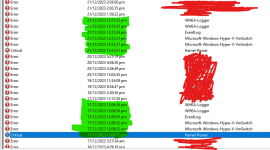
I usually filter like that to check

Use this as an example.
1706939838388.png

Look at the timestamp of when the 'critical occurred', which is kernel power, because when you improper shutdown you surely will trigger that.

Next, look for the timestamps (highlighted in green) that are the same as when the critical appeared. On the right side, you can see the events that are causing the PC to crash are the same and have repeated itself (both highlighted sections).
 

Informant

Senior Member
Joined
Dec 18, 2015
Messages
1,347
Reaction score
598
Can your system survive 15 min of cpu or psu stress test?
15min stress test no issue. except the linpack 16384mb cause bsod. subsequent check again on 8192mb & 16384mb no bsod. morning check liao
 
Last edited:

Informant

Senior Member
Joined
Dec 18, 2015
Messages
1,347
Reaction score
598
I usually filter like that to check

Use this as an example.
View attachment 46482

Look at the timestamp of when the 'critical occurred', which is kernel power, because when you improper shutdown you surely will trigger that.

Next, look for the timestamps (highlighted in green) that are the same as when the critical appeared. On the right side, you can see the events that are causing the PC to crash are the same and have repeated itself (both highlighted sections).

This only trigger by force restart through power button when comp freeze.
9J5KnfZ.png
 
Important Forum Advisory Note
This forum is moderated by volunteer moderators who will react only to members' feedback on posts. Moderators are not employees or representatives of HWZ. Forum members and moderators are responsible for their own posts.

Please refer to our Community Guidelines and Standards, Terms of Service and Member T&Cs for more information.
Top