PC Hang at startup. Please help

CatLuVer

High Supremacy Member
Joined
Nov 28, 2002
Messages
44,137
Reaction score
924
Hi guys, my pc is 4 yrs old and until tuesday i was using it without any problems. But just now when i turn it on got this message:


Then whichever optionsi select it will hang after a few seconds. I chose start 'windows normally' or 'last good known configuration..' Windows will load and it will hange after at 5-10seconds like this picture:


Please help me to solve this problem Thank u very much :o
 

orbvius

Greater Supremacy Member
Joined
May 7, 2004
Messages
79,698
Reaction score
2,428
Create a windows 7 usb drive, insert the drive and choose to boot before your hdd/ssd, then check for the repair option.
 

pierceyip

Arch-Supremacy Member
Joined
Aug 15, 2000
Messages
16,140
Reaction score
0
try reinstall windows first... if still fail then is hardware problem, may be ram, hdd, motherboard or cpu.
 

Louisloo

Senior Member
Joined
Jul 19, 2010
Messages
811
Reaction score
0
Suspect your startup files are corrupted, could be due to bad sectors in your HDD.

As in earlier post, log into SAFE mode and do a checkdisk. It should clear your problem.
 

CatLuVer

High Supremacy Member
Joined
Nov 28, 2002
Messages
44,137
Reaction score
924
try reinstall windows first... if still fail then is hardware problem, may be ram, hdd, motherboard or cpu.
Thks buttie. I think i may need to borrow my fren's win 7 cd.


enter safe mode

Run CMD> sfc/scannow

Suspect your startup files are corrupted, could be due to bad sectors in your HDD.

As in earlier post, log into SAFE mode and do a checkdisk. It should clear your problem.

Hi guys, The pc also hangs when i select safe mode :o
 

CatLuVer

High Supremacy Member
Joined
Nov 28, 2002
Messages
44,137
Reaction score
924
One more thing i noticed. I can still startup to bios, just tat cannot load windows.
 

orbvius

Greater Supremacy Member
Joined
May 7, 2004
Messages
79,698
Reaction score
2,428
paiseh see wrong. just find a windows xp disc to repair.
nah, dont think windows 7 can repair xp.

or find hiren and repair.
 

bhtan83

Senior Member
Joined
Dec 4, 2011
Messages
1,554
Reaction score
0
I suspect it's ur hdd spoil liao. Usually the life span is around 3-5 yrs. So even after u repair it'll Still be the same. Cos it'll still use back the unmarked bad sector area. I suggest dun waste ur time to repair. Just go grab a new ssd & hdd then install ur OS on ssd. from there u can still back up those data u want from the old hdd.

PM me if u need more help. I'll get back to you ASAP when I have the time.
 
Last edited:

BasicOne

Senior Member
Joined
Aug 15, 2010
Messages
1,004
Reaction score
1
I also faced somehow similar problem. Hangs at BIOS or even at start-up, before it can boot into windows.

In the end, found out it is my RAM faulty.
 

CatLuVer

High Supremacy Member
Joined
Nov 28, 2002
Messages
44,137
Reaction score
924
I also faced somehow similar problem. Hangs at BIOS or even at start-up, before it can boot into windows.

In the end, found out it is my RAM faulty.

I can still go bios n nevr hang at all.
 

CatLuVer

High Supremacy Member
Joined
Nov 28, 2002
Messages
44,137
Reaction score
924
I suspect it's ur hdd spoil liao. Usually the life span is around 3-5 yrs. So even after u repair it'll Still be the same. Cos it'll still use back the unmarked bad sector area. I suggest dun waste ur time to repair. Just go grab a new ssd & hdd then install ur OS on ssd. from there u can still back up those data u want from the old hdd.

PM me if u need more help. I'll get back to you ASAP when I have the time.

I stay near sls. I can go buy a new hdd & ssd + Win 7 OS like wat u suggested. Do u think my current rig can support tat? Or just buy a new hdd & Win 7 OS.?

Thks very much
 

poor_poor

Senior Member
Joined
Jul 7, 2012
Messages
1,480
Reaction score
1
I stay near sls. I can go buy a new hdd & ssd + Win 7 OS like wat u suggested. Do u think my current rig can support tat? Or just buy a new hdd & Win 7 OS.?

Thks very much

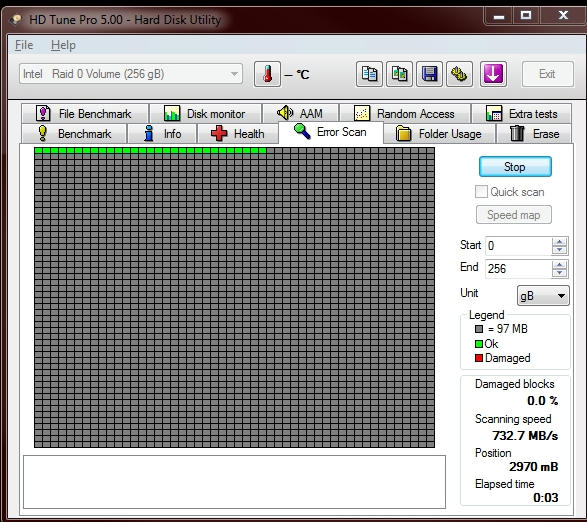
Do you have spare computer?

If yes put your HDD into other PC and run HDtune to scan bad sector

nlmoc1ebd2t8xhf6g.jpg
 
Important Forum Advisory Note
This forum is moderated by volunteer moderators who will react only to members' feedback on posts. Moderators are not employees or representatives of HWZ Forums. Forum members and moderators are responsible for their own posts. Please refer to our Community Guidelines and Standards and Terms and Conditions for more information.
Top