PC - HDR Gaming - Sharing Experience

Yongkit

Supremacy Member
Joined
Oct 9, 2015
Messages
5,775
Reaction score
2,417


The new patch have fixed the HDR slider for some GPU (mostly from Nvidia) however it actually looks the same for me since I play the game though using 7900 xtx.
 

matique

Senior Member
Joined
Sep 25, 2017
Messages
797
Reaction score
786


The new patch have fixed the HDR slider for some GPU (mostly from Nvidia) however it actually looks the same for me since I play the game though using 7900 xtx.


Shame I can't share JXR screenshots here but some scenes do look fantastic. Overall though while i think the hdr in this game is not bad, it's much better in other games.
 

Yongkit

Supremacy Member
Joined
Oct 9, 2015
Messages
5,775
Reaction score
2,417
Shame I can't share JXR screenshots here but some scenes do look fantastic. Overall though while i think the hdr in this game is not bad, it's much better in other games.
You can actually take the in game photoshoot it give quite similar nice picture export
 

Yongkit

Supremacy Member
Joined
Oct 9, 2015
Messages
5,775
Reaction score
2,417


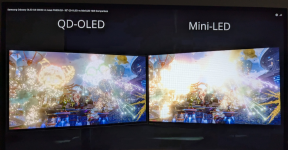
this video is something very good test on your monitor HDR even the video is in SDR presentation as the reviewer running the QD-OLED vs Mini-LED side by side, if you have your monitor HDR setup correctly, you will see more details on the QD-OLED as screenshot below, otherwise very likely you are seeing both having the same fireworks ball on your screen be it SDR mode when you are using OLED.


1000045236.png

you can see this on 0:59 time line for the differences (if any) from your monitor.
 
Last edited:

Yongkit

Supremacy Member
Joined
Oct 9, 2015
Messages
5,775
Reaction score
2,417
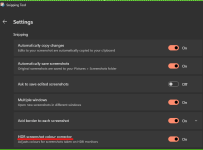
Windows Sniping Tools now come with HDR Screenshot Color Corrector in setting:

1725452296101.png

Screenshot without toggle OFF

HFW-wo HDR.jpg


Screenshot without toggle ON

HFW-w HDR.jpg
 

VoodooKing

Supremacy Member
Joined
Jan 1, 2000
Messages
7,690
Reaction score
33
I'm using 2019's Acer Predator X35. Great HDR for gaming. Just that the back light bleeding is bad in SDR blacks. I've gotten used to it all these years and not planning to change anytime soon until this monitor breaks.
 

Yongkit

Supremacy Member
Joined
Oct 9, 2015
Messages
5,775
Reaction score
2,417
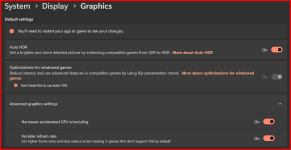
1739890738274.png

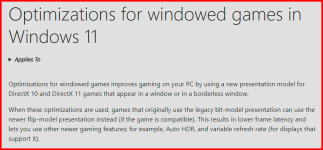
saw these setting only in windows 24H2 updated windows today, will try to see how it perform

1739890802745.png
 

kimsix

Arch-Supremacy Member
Joined
Jan 6, 2009
Messages
18,971
Reaction score
9,036


Mini LED vs OLED in HDR​


i think this not filmed in hdr
Miniled 1000nits will definitely more impact in bright scenes, ff7 the early stage nibelheim when cross the mountain ledge, is bomba in hdr
 

soreloser

Senior Member
Joined
Feb 26, 2024
Messages
609
Reaction score
237
i think this not filmed in hdr
Miniled 1000nits will definitely more impact in bright scenes, ff7 the early stage nibelheim when cross the mountain ledge, is bomba in hdr
Imma be honest, 1000nits feel like a flashbang to me. Personally don't like the HDR mode from AOC q27g3xmn, have to squint my eyes whenever anything bright shows up on screen, getting constantly blinded
 

-Synchronicity-

Senior Member
Joined
Apr 29, 2012
Messages
2,372
Reaction score
165
Imma be honest, 1000nits feel like a flashbang to me. Personally don't like the HDR mode from AOC q27g3xmn, have to squint my eyes whenever anything bright shows up on screen, getting constantly blinded
The xiaomi is a worse offender IMO. The AOC still acceptable in most use cases.
 

kimsix

Arch-Supremacy Member
Joined
Jan 6, 2009
Messages
18,971
Reaction score
9,036
Imma be honest, 1000nits feel like a flashbang to me. Personally don't like the HDR mode from AOC q27g3xmn, have to squint my eyes whenever anything bright shows up on screen, getting constantly blinded

depends on the scenes especially watching in day time. Miniled stronger brightness also boost colors
 

Yongkit

Supremacy Member
Joined
Oct 9, 2015
Messages
5,775
Reaction score
2,417
HDR 10+ Understading the Ecosystem - Apr2025 version pdf edition publish 8-Apr-2025

Apr2025 version white paper published 8-Apr-2025

Part extract read :

The HDR10+ Gaming experience In their constant quest to increase the excitement and immersion of their worlds, game developers have wanted to enhance their content with HDR10+. The result was HDR10+ GAMING, announced in 2022.

Here again, HDR10+ offers a range of powerful benefits: • Simple game development. Thanks to cross compatibility, one game serves all displays.

• A competitive edge. In game play, HDR10+ means more than enhancing the white-knuckle gaming experience. Better grayscale gives players a competitive advantage.

For example, players are better able to see competing race cars in a dark tunnel with intense backlight from a sunlit exit, or better able to see enemies obscured by fog or foliage.

• No added lag. Quick reaction times are key to game play. So players can’t accept any technology that slows down video processing. Rendering HDR10+ content to the specific display performance introduces no additional lag.

• Convenience. There’s no need for players to calibrate game settings according to on-screen test patterns. And the HDR10+ GAMING mode is automatic: enabled by compatible games, devices, and displays; otherwise defaulting to conventional playback. The results have impressed the gaming community.

Przemyslaw Czatrowski, Engineering Director at CD PROJEKT RED stated “Seeing Night City with HDR10+ turned on is a game changer. Utterly beautiful.” HDR10+ GAMING adoption HDR10+ GAMING is now compatible with a growing range of PCs and mobile devices thanks to support from industry giants including Activision, Intel, Electronic Arts, MediaTek, and NVIDIA.

In addition, many games are developed on commercially available gaming engines. One of the biggest is Unreal Engine, for which a plug-in supports HDR10+ GAMING. Electronic Arts recently released Dragon Age: The Veilguard, their first title to offer HDR10+ GAMING functionality, which delivers outstanding high dynamic range performance on compatible PCs and displays.

15 Nearly three dozen products powered by Intel integrated or discrete GPUs have also been certified by the HDR10+ Technologies LLC which will provide users with even more HDR gaming options.

Finally, Samsung Odyssey monitors are certified for HDR10+ GAMING and automatically adjust HDR settings to deliver a premium gaming experience with more accurate color, contrast and brightness.

 
Last edited:
Important Forum Advisory Note
This forum is moderated by volunteer moderators who will react only to members' feedback on posts. Moderators are not employees or representatives of HWZ. Forum members and moderators are responsible for their own posts.

Please refer to our Community Guidelines and Standards, Terms of Service and Member T&Cs for more information.
Top