Question on Asus mesh setup

hairymonster

Senior Member
Joined
Jun 16, 2013
Messages
1,308
Reaction score
61
yes, router (AX55) in DB. Assuming that you mean the managed switch will be at the TV console, with one to the Fiber TV box and one to the XT8?

Capture.png


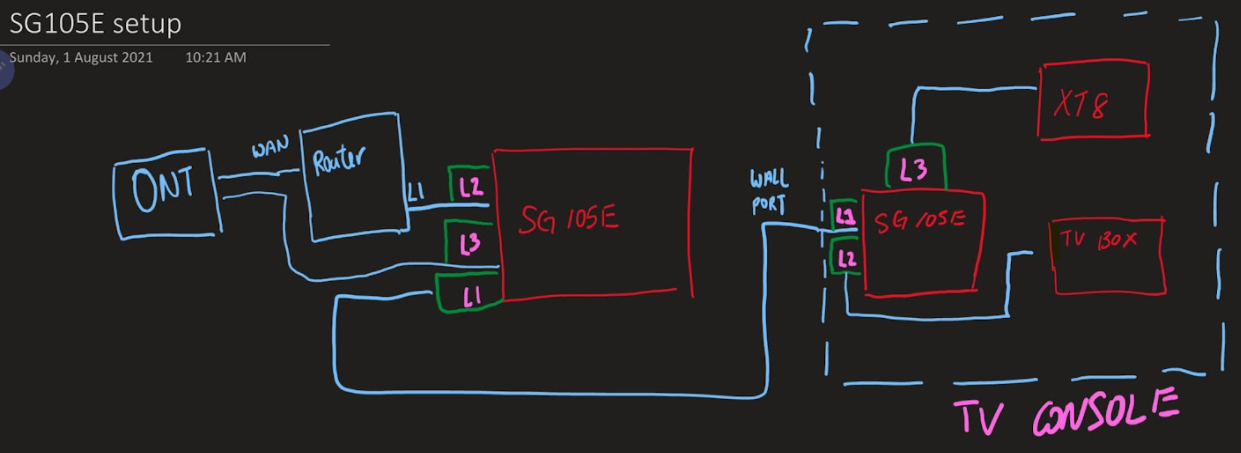
Hello this is the configuration that needs to be done. I will not go into the technicalities. But, i can pass u the configuration files of the 2 SG105E managed switches. You just need to ensure the IP addresses of the 2 switches are within your subnet. Den it be as easy as PnP.
 

Gymrat76

Supremacy Member
Joined
May 8, 2003
Messages
7,851
Reaction score
80
Capture.png


Hello this is the configuration that needs to be done. I will not go into the technicalities. But, i can pass u the configuration files of the 2 SG105E managed switches. You just need to ensure the IP addresses of the 2 switches are within your subnet. Den it be as easy as PnP.

THanks, after thinking about it, I may just run my speakers and TV wirelessly instead of wired so that the living room LAN port will be available for the fiber TV. Will connect the XT8 to another LAN port that's in the dining room where I have my workdesk. Solves the problem and is cost-neutral
 

hairymonster

Senior Member
Joined
Jun 16, 2013
Messages
1,308
Reaction score
61
THanks, after thinking about it, I may just run my speakers and TV wirelessly instead of wired so that the living room LAN port will be available for the fiber TV. Will connect the XT8 to another LAN port that's in the dining room where I have my workdesk. Solves the problem and is cost-neutral
Sure. Should you change your mind. Pm me for the configuration files. 2x Sg105e is about 90 bucks on Shopee. Might be cheaper on 8/8
 

rAcEr

Supremacy Member
Joined
Jan 1, 2000
Messages
5,792
Reaction score
7
Anyone can confirm that xd4 has two Lan ports for every node? Dongknows says no but that was an old review from 2020. Some of the more recent reviews appear to indicate yes.
 

xonix

Arch-Supremacy Member
Joined
Mar 24, 2001
Messages
17,587
Reaction score
1,689
Anyone can confirm that xd4 has two Lan ports for every node? Dongknows says no but that was an old review from 2020. Some of the more recent reviews appear to indicate yes.
XD4 has 2 x LAN ports since product launch.
 

rAcEr

Supremacy Member
Joined
Jan 1, 2000
Messages
5,792
Reaction score
7
I've been doing some reading on the 160nhz band for wifi 6. Am I right to say that for the next 1 to 2 years at least there will not be much practical real world difference in speeds between a wifi 6 router that supports 160mhz vs one that doesn't? Assuming all other specs like ram and cpu are identical.
 

jonleelk

Master Member
Joined
Jan 1, 2000
Messages
4,122
Reaction score
97
THanks, after thinking about it, I may just run my speakers and TV wirelessly instead of wired so that the living room LAN port will be available for the fiber TV. Will connect the XT8 to another LAN port that's in the dining room where I have my workdesk. Solves the problem and is cost-neutral
Starhub fibre TV box must connect directly to the ONT? My father-in-law's place the Linksys router is connected to the ONT, and the starhub TV box is connected to the Linksys router.
 

xonix

Arch-Supremacy Member
Joined
Mar 24, 2001
Messages
17,587
Reaction score
1,689
I've been doing some reading on the 160nhz band for wifi 6. Am I right to say that for the next 1 to 2 years at least there will not be much practical real world difference in speeds between a wifi 6 router that supports 160mhz vs one that doesn't? Assuming all other specs like ram and cpu are identical.
Depends whether if you are going to own more devices that support 160mhz.
For example iPhone: https://support.apple.com/en-gb/guide/deployment-reference-ios/apd1c22e481c/web
 

hairymonster

Senior Member
Joined
Jun 16, 2013
Messages
1,308
Reaction score
61
No leh ... it's the first gen black fibre TV Box. They converted from cable to fibre when Starhub stopped cable TV. Maybe old boxes and new boxes different config.

But strange for Starhub to do this, as most places will only have 1 data point at the TV area.
Are you able to confirm the connections between the ONT and Linksys router?
 

xiaofan

High Supremacy Member
Joined
Sep 16, 2018
Messages
35,549
Reaction score
11,938
I've been doing some reading on the 160nhz band for wifi 6. Am I right to say that for the next 1 to 2 years at least there will not be much practical real world difference in speeds between a wifi 6 router that supports 160mhz vs one that doesn't? Assuming all other specs like ram and cpu are identical.

It depends on your devices. But I will go with a Wifi 6 router which supports 160MHz now.

Personally I see major differences already now.

Main router: Asus RT-AX82U (4 * 4 AX/AC with 160MHz support on the 5GHz band).

My computers:
1) 2017 Acer laptop with upgraded Intel AX200 based no brand adapter: support 2*2 AX 160MHz on the 5GHz band (800-900Mbps)
2) 2019 Dell laptop with Intel AC9560 Adapter: AC adapter with support of 160MHz on the 5GHz band (not AX), very big differences between 80MHz and 160 MHz (reach 900Mbps+, faster than the Acer)
3) Mac Mini M1: 2*2 AX with 80MHz support, wireless speed is a bit worse than the above two (600Mbps+).

I also use the Huawei AX3 Pro (2*2 160MHz support) as the wireless media bridge and it gets very good speed as well for the LAN clients.

I do not have LAN ports in the rooms but with the RT-AX82U I do not have the need to wired the home as of now. Of course LAN ports will be better, but so far so good.

 

xiaofan

High Supremacy Member
Joined
Sep 16, 2018
Messages
35,549
Reaction score
11,938
No leh ... it's the first gen black fibre TV Box. They converted from cable to fibre when Starhub stopped cable TV. Maybe old boxes and new boxes different config.

But strange for Starhub to do this, as most places will only have 1 data point at the TV area.

Two approaches for Fibre TV:

Singtel: using VLAN to sperate IPTV traffic and Internet traffic, the con is that you need to have routers supporting VLAN.

Starhub: using two separate networks for internet and Fibre TV (ONT Port 1 for Internet, ONT Port 2 for Fibre TV), the pro is that you do not need a VLAN capable router for Internet.

Last time lots of people have issues with Singtel due to the VLAN support. Later it becomes less an issue as Asus/Netgear/TP-Link all started to have the Singtel VLAN support (but lousy Google still do not support SIngtel VLAN until now). But Singtel later comes out Singtel ONR to sort out this issue, then it creates a huge issue for people who want to use their own router as the main router. I do not recommend any new users to go with Singtel because of ONR.

Starhub moved on to Starhub TV+ box, which is the right direction but the execution is bad.
 

xiaofan

High Supremacy Member
Joined
Sep 16, 2018
Messages
35,549
Reaction score
11,938
No leh ... it's the first gen black fibre TV Box. They converted from cable to fibre when Starhub stopped cable TV. Maybe old boxes and new boxes different config.

But strange for Starhub to do this, as most places will only have 1 data point at the TV area.

Are you sure the older Fibre TV is connected to the Linksys router? That can not be true. It must be connected to ONT Port 2.

If you need to use single connection, you have to use VLAN capable switch to mix the two, as mentioned in post #41, or the following thread.
Ref: https://forums.hardwarezone.com.sg/threads/starhub-iptv-in-switched-network-help.5143406/page-6
 
Last edited:

hairymonster

Senior Member
Joined
Jun 16, 2013
Messages
1,308
Reaction score
61
Are you sure the older Fibre TV is connected to the Linksys router? That can not be true. It must be connected to ONR Port 2.

If you need to use single connection, you have to use VLAN capable switch to mix the two, as mentioned in post #41, or the following thread.
Ref: https://forums.hardwarezone.com.sg/threads/starhub-iptv-in-switched-network-help.5143406/page-6
May be possible. The Linksys is vlan capable and can separate tv and internet signal from the ONT. I'm curious about the placement of his ont, router and connections between the 2 devices.
 

jonleelk

Master Member
Joined
Jan 1, 2000
Messages
4,122
Reaction score
97
May be possible. The Linksys is vlan capable and can separate tv and internet signal from the ONT. I'm curious about the placement of his ont, router and connections between the 2 devices.
I will check again when I am there the next time. Currently I can only confirm ONT is in the DB riser, router and starhub TV box at the TV console, and unlikely there are 2 network points at the TV console as this is a HDB 2BR BTO.
 

xiaofan

High Supremacy Member
Joined
Sep 16, 2018
Messages
35,549
Reaction score
11,938
May be possible. The Linksys is vlan capable and can separate tv and internet signal from the ONT. I'm curious about the placement of his ont, router and connections between the 2 devices.

Linksys is VLAN capable, and recently added the support of dual WAN because of Starhub TV+ box.

However, for the older Fibre TV box, that needs to be connected to the ONT Port 2.

So even if it is possible to make it (Fibre TV box to the Linksys) work, he needs to have two connection from the ONT to the Linksys (ONT port 1 for Internet, ONT port 2 for Fibre TV). Apparently he has only one connection.
 

rAcEr

Supremacy Member
Joined
Jan 1, 2000
Messages
5,792
Reaction score
7
But honestly can you guys tell the real world difference between eg 300 and 500 mbps for a single device considering that the max bandwidth of 1gbps for most fibre broadband subscriptions at home is shared between 10s of devices? Without using speed test - I'm not sure the additional cost for 160mhz is justified.
 
Important Forum Advisory Note
This forum is moderated by volunteer moderators who will react only to members' feedback on posts. Moderators are not employees or representatives of HWZ Forums. Forum members and moderators are responsible for their own posts. Please refer to our Community Guidelines and Standards and Terms and Conditions for more information.
Top