(SD) MicroSD benchmarks!

yknyong1

Master Member
Joined
Oct 7, 2008
Messages
3,750
Reaction score
0
Hypotechnically and theoratically true. I was one of those until I studied about the slc, mlc, tlc technologies and realized that not all are equal.

Furthermore, if everyone pits theirs is the best, then there must be more to the eye right?

Thus, I started playing with more expensive and testing them and damn, loads of difference in performance with my phones, etc.

And hence, this benchmark :)
SLC still the best
 

jace88

Senior Member
Joined
Feb 7, 2015
Messages
1,374
Reaction score
0
If I want to change from my current 64gb MicroSD in my Surface Pro 4 (Windows 10 tablet) to a 128gb MicroSD - do I need to do anything special or can I just copy paste all the files across using File Explorer? Or do I need to use partition cloning?

(I use my current MicroSD for saving music/videos/downloads and some Steam games)
 

xtramadness

High Supremacy Member
Joined
Mar 4, 2009
Messages
41,675
Reaction score
15
If I want to change from my current 64gb MicroSD in my Surface Pro 4 (Windows 10 tablet) to a 128gb MicroSD - do I need to do anything special or can I just copy paste all the files across using File Explorer? Or do I need to use partition cloning?

(I use my current MicroSD for saving music/videos/downloads and some Steam games)

I have had very weird results doing a 1-1 copy of data into my card. I recommended doing a clone then do hash verification.

Besides, 128gb cards are no where the performance of 64gb yet :(
 

jace88

Senior Member
Joined
Feb 7, 2015
Messages
1,374
Reaction score
0
I have had very weird results doing a 1-1 copy of data into my card. I recommended doing a clone then do hash verification.

Besides, 128gb cards are no where the performance of 64gb yet :(

In my case both cards are Samsung Evo+ cards. I got the 128gb for a reasonably good price during the eBay Australia sales and it actually made me regret buying the 64gb from Challenger in the first place :(
 

xtramadness

High Supremacy Member
Joined
Mar 4, 2009
Messages
41,675
Reaction score
15
In my case both cards are Samsung Evo+ cards. I got the 128gb for a reasonably good price during the eBay Australia sales and it actually made me regret buying the 64gb from Challenger in the first place :(

Less than sgd$60 (128gb)? Lol


Well, making copy to and from microsd for large data yielded weird results (never copy properly) so do a clone with hashing is a safer bet.
 

yknyong1

Master Member
Joined
Oct 7, 2008
Messages
3,750
Reaction score
0
Less than sgd$60 (128gb)? Lol


Well, making copy to and from microsd for large data yielded weird results (never copy properly) so do a clone with hashing is a safer bet.
How come the integrity of the data was not preserved?
 

xtramadness

High Supremacy Member
Joined
Mar 4, 2009
Messages
41,675
Reaction score
15
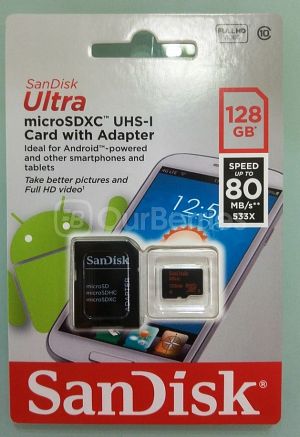
Reviewed: SanDisk Ultra MicroSDXC [128gb] (2015 Model)

Fmoz.jpg


Last year, we reviewed and tested the SanDisk Generation 2 MicroSD card which was the 2014 model. Now, we are back at it again, this time looking at their 2015 model. The key differences here this time, is just the speed bump.

.
.
.

Overall:
6D8fq.jpg

MU2wq.jpg


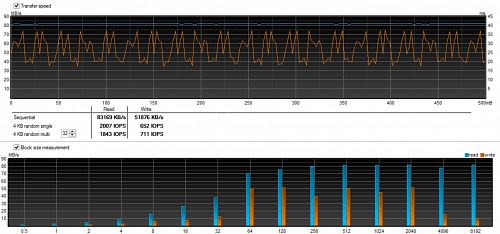
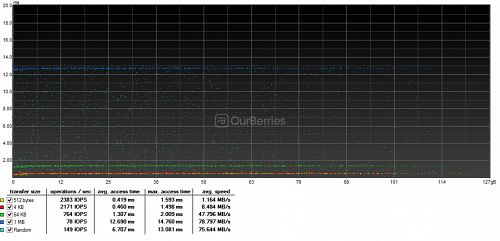
With the read at 74MB/s on H2testW and write at 20MB/s, the card lived up to its rated speeds. On the benchmark graph, however, we see some interesting results over the 500mB burst, where the write was consistently above 30MB/s and read above 80MB/s. This results are further backed up by CrystalDiskMark for the smaller sizes though for the 4GB, it started to slow down. Random speed also increased over the previous generation.

Note: Model reviewed here is SDSQUNC-128G-GN6MA

Read it all here
 
Important Forum Advisory Note
This forum is moderated by volunteer moderators who will react only to members' feedback on posts. Moderators are not employees or representatives of HWZ Forums. Forum members and moderators are responsible for their own posts. Please refer to our Community Guidelines and Standards and Terms and Conditions for more information.
Top