[SIC] Windows 8 for S$18

ahboon83

Member
Joined
Oct 8, 2007
Messages
449
Reaction score
75
Icic...
I quote this text from the webbie:
"If you want a clean install, meaning you want to start completely fresh, you have to restart your computer and boot from the DVD / USB drive. I went through both processes to give a complete overview."

I would have assume your scenario of "activating WIN8 on computer B" akin to clean installation?

But then again, I personally have not gone down the scenario that you've described so I cannot comment much.
But if you are intending to do a clean install on computer B, it seems feasible?
:)

Cheers!

i was thinking whether the Upgrade Assistant got record the comp hardware specifications and tied it to my license key?
that is how Microsoft tracks each license key and the comp it is tied to
 

harky

Great Supremacy Member
Joined
Jan 20, 2002
Messages
61,796
Reaction score
3,603
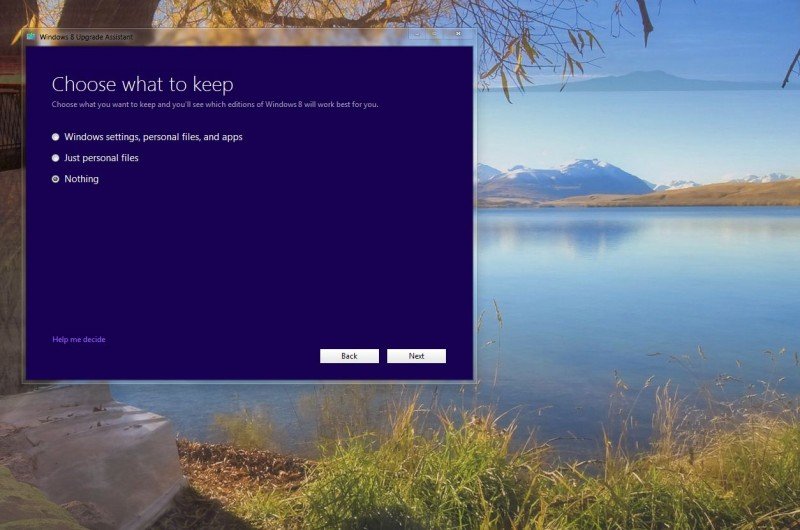
i click nth.....
than they will check the file.. after that than can go purchase

what you guys choose
"keep personal files and apps"
:keep personal files":
or "nothing"

before the checkout... and when installing do they give you the choices again?
 

tytr

Senior Member
Joined
Jan 1, 2000
Messages
2,359
Reaction score
0
Hahahaaa...
Shld be at the last page.
But dun quote me...
Press NEXT carefully, U should not miss the space to throw in the promo code.
Remember to click APPLY hor!
:p

ok swee. nxt qn, sry if asked before is, enter code after credit card details?
 

xiaowhois

Arch-Supremacy Member
Joined
Jun 5, 2005
Messages
15,984
Reaction score
123
For those who did not read the product information,

You must purchase a qualifying Windows 7 PC between 2 June 2012 and 31 January 2013 to be eligible for this offer. The last day to register and order your Windows 8 upgrade is 28 February 2013.

I take it to mean that if you dont install it by 28th Feb, then say bye bye to $18.

download + save product key = safe from byebye to 18bucks?
 

Sheldon99

Supremacy Member
Joined
Jul 2, 2012
Messages
5,958
Reaction score
370
000-800x530.jpg


i'm interested to know what happens if i choose the top 2 options... anyone knows? will i be able to download a clean install iso win8 as well?

if so what's the difference? :S
 

tytr

Senior Member
Joined
Jan 1, 2000
Messages
2,359
Reaction score
0
Wah this one beyond me liao.
Paiseh.

I guess you can only google for other users' experience akin to yours.

Or U can bet 18bucks to see if it works for you.
If can...then HUAT ARH!
If cannot...then upgrade current comp!
:D

All the best dude.

i was thinking whether the Upgrade Assistant got record the comp hardware specifications and tied it to my license key?
that is how Microsoft tracks each license key and the comp it is tied to
 
Last edited:

ahboon83

Member
Joined
Oct 8, 2007
Messages
449
Reaction score
75
was hoping someone can test for me :s13:
i still undecided whether to DIY new comp or continue using current 4 yrs old comp

thanks for the suggestion! haha

Wah this one beyond me liao.
Paiseh.

I guess you can only google for other users' experience akin to yours.

Or U can bet 16bucks to see if it works for you.
If can...then HUAT ARH!
If cannot...then upgrade current comp!
:D

All the best dude.
 

FreddieFreako

Senior Member
Joined
Aug 8, 2005
Messages
1,078
Reaction score
127
Hi folks, I am currently using E8400 processor and Windows XP 32 bits OEM.

Am I eligible for the upgrade?
 

SkyShroud

Arch-Supremacy Member
Joined
Oct 28, 2005
Messages
21,056
Reaction score
1,513
The thing is simple!!!

Microsoft upgrade offer to existing Windows 7! You pay 18 bucks to get full working Windows 8 product key and ISO aka installation disc image.

So, you can either upgrade your windows 7 to windows 8 or do a clean installation, it supports both!

The most important is having the product key, that's all it matters. You can install when you like! The offer ends on feb 2013, but not sure when they will fix this hole which actually meant for new computers.
 

Darknights

Supremacy Member
Joined
May 11, 2006
Messages
6,763
Reaction score
1,433
just to share something with new users of windows 8:

if you think shutting down is a hassle, you can create a short cut, in the location of the item, put in "shutdown /s /t 0" (s for shutdown t for time i.e. 0) without the quotes. Choose an icon for it and pin it to the taskbar.

an example:
jgl478.png
 
Important Forum Advisory Note
This forum is moderated by volunteer moderators who will react only to members' feedback on posts. Moderators are not employees or representatives of HWZ Forums. Forum members and moderators are responsible for their own posts. Please refer to our Community Guidelines and Standards and Terms and Conditions for more information.
Top