SIMBA Fibre Broadband

SPEED

Supremacy Member
Joined
Jan 1, 2000
Messages
28,913
Reaction score
307
my experience on simba:

Does HDB existing built-in lan cables support 10G? Because I use a modem -> switch config and only get about 700mbps down/up transfer rate. Feels like something is missing. My lan port supports up to 2.5G so I thought should see more than that?
Is your lan port on your pc 2.5gbps?
I speedtest from 08/10 1st day till yesterday. Day and night test a few times all can hit 23xxmpbs down and 23xxmbps up. Test a while servers all similar results.
 

thiamhui

Senior Member
Joined
Jan 3, 2001
Messages
819
Reaction score
123
1) I cannot help you on Issue 1 as it is a known SIMBA issue. However, it seems that they are working on it, connection to Singtel servers seem to be improved.

Anyway I do not recomend average users to go with SIMBA as the only ISP because of various issues mentioned before (especially lack of support and some stability issues).

2) As for Isssue 3, usually BTO flat will use CAT6 cable and it should be okay for 10G. However, usually "ONT+Unmanaged Switch+router" configuration will not work. The DHCP sever will get confused if you do this so it may be related to your Issue 2. The right configuration should be "ONT+Router+Unmanaged Switch".

What is your connection scheme? What is the model of the switch and router used?
I have checked on the SpeedTest with Singtel server. No issue up to 2.5Gbps (personal hardware limitation)...
 

xiaofan

High Supremacy Member
Joined
Sep 16, 2018
Messages
37,560
Reaction score
12,805
I have checked on the SpeedTest with Singtel server. No issue up to 2.5Gbps (personal hardware limitation)...

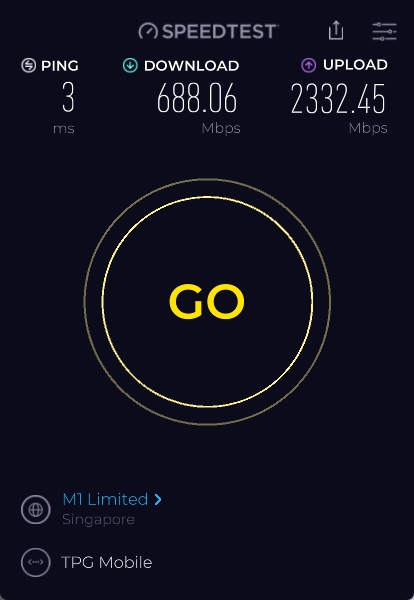
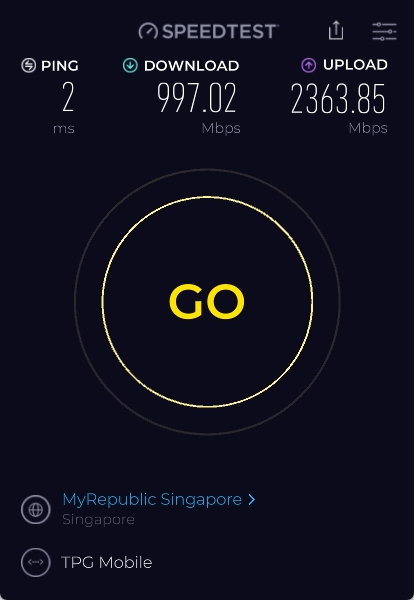
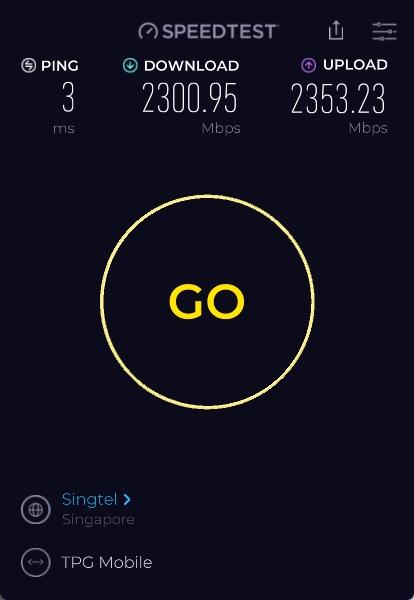
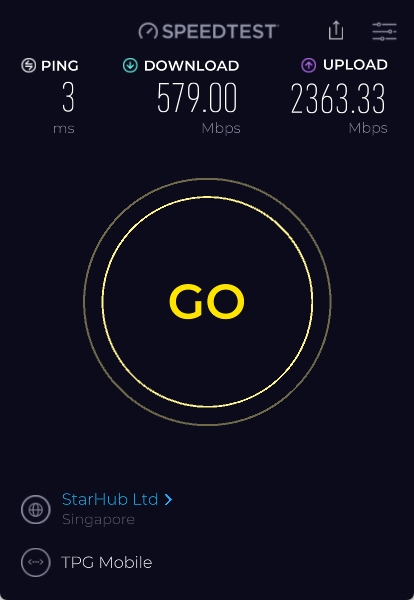
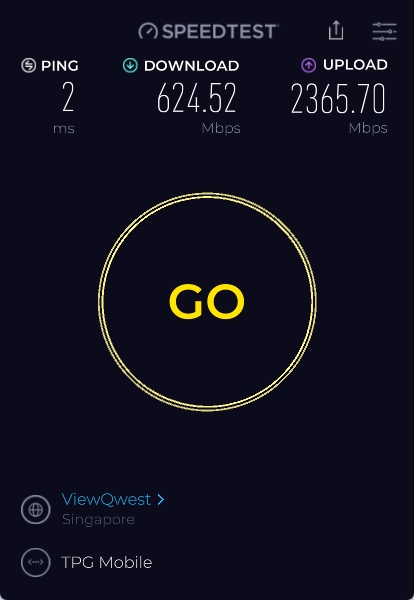
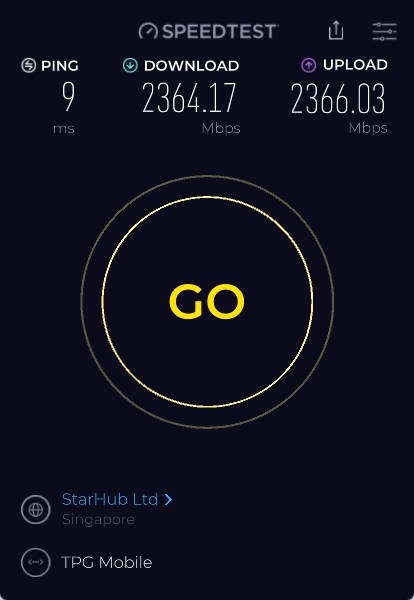
Speed is not the main issue here, but the latency. But anyway, it seems to be improved based on the reports. You may want to post the SpeedTest screenshots against Singtel/Starhub/M1/MRVQ to see if the latency is good or not. Last time SIMBA latency to Singtel and Starhub were bad.
 

xiaofan

High Supremacy Member
Joined
Sep 16, 2018
Messages
37,560
Reaction score
12,805
Even with the improvement, from Singtel to SIMBA the latency is still on the higher side, but the reports here seem to indicate no such issue from SIMBA to Singtel.

The following test results are from OOkla SpeedTest CLI, using my Singtel 5Gbps plan, Linux mini PC (low power Intel N100 CPU based mini PC, running Ubuntu 24.04) with wired connection to Singtel ZTE F8648P ONR.
https://www.speedtest.net/apps/cli

Idle latency from Singtel to other major ISP's speedtest server is about 2-3ms, but 40ms to SIMBA speedtest server.

Bash:
mcuee@miniroute10g:~/build/networking/ookla$ ./speedtest -s 12687

   Speedtest by Ookla

      Server: SIMBA Telecom - Singapore (id: 12687)
         ISP: Singtel Fibre
Idle Latency:    40.81 ms   (jitter: 0.26ms, low: 40.62ms, high: 41.11ms)
    Download:  3796.38 Mbps (data used: 6.4 GB)
                 37.77 ms   (jitter: 0.29ms, low: 37.48ms, high: 47.54ms)
      Upload:  2043.33 Mbps (data used: 3.0 GB)
                 37.35 ms   (jitter: 0.58ms, low: 36.85ms, high: 40.14ms)
 Packet Loss:     0.0%
  Result URL: https://www.speedtest.net/result/c/c95501db-6c16-4a9a-b37c-5b259f1c4e3d

mcuee@miniroute10g:~/build/networking/ookla$ ./speedtest -s 13623

   Speedtest by Ookla

      Server: Singtel - Singapore (id: 13623)
         ISP: Singtel Fibre
Idle Latency:     1.96 ms   (jitter: 0.17ms, low: 1.83ms, high: 2.14ms)
    Download:  5593.18 Mbps (data used: 4.4 GB)
                  1.48 ms   (jitter: 7.07ms, low: 1.01ms, high: 206.54ms)
      Upload:  4983.64 Mbps (data used: 6.3 GB)
                  6.19 ms   (jitter: 0.55ms, low: 1.71ms, high: 13.09ms)
 Packet Loss:     0.0%
  Result URL: https://www.speedtest.net/result/c/57b9a532-6848-45b0-8080-249520020ccd

mcuee@miniroute10g:~/build/networking/ookla$ ./speedtest -s 4235

   Speedtest by Ookla

      Server: StarHub Ltd - Singapore (id: 4235)
         ISP: Singtel Fibre
Idle Latency:     2.59 ms   (jitter: 0.17ms, low: 2.28ms, high: 2.79ms)
    Download:  5191.91 Mbps (data used: 8.6 GB)
                  2.13 ms   (jitter: 0.18ms, low: 1.83ms, high: 3.53ms)
      Upload:  4942.56 Mbps (data used: 6.1 GB)
                  7.28 ms   (jitter: 0.66ms, low: 2.24ms, high: 15.60ms)
 Packet Loss: Not available.
  Result URL: https://www.speedtest.net/result/c/eaaf8f90-5894-40e6-92b1-ade46a7b9419

mcuee@miniroute10g:~/build/networking/ookla$ ./speedtest -s 2054

   Speedtest by Ookla

      Server: ViewQwest - Singapore (id: 2054)
         ISP: Singtel Fibre
Idle Latency:     2.89 ms   (jitter: 0.12ms, low: 2.73ms, high: 3.00ms)
    Download:  5178.64 Mbps (data used: 6.9 GB)
                  2.66 ms   (jitter: 0.22ms, low: 2.31ms, high: 4.54ms)
      Upload:  4942.73 Mbps (data used: 6.0 GB)
                  7.23 ms   (jitter: 0.84ms, low: 2.84ms, high: 15.17ms)
 Packet Loss:     0.0%
  Result URL: https://www.speedtest.net/result/c/0a1a1b30-cdc9-443e-8df4-75018baa8bd2

mcuee@miniroute10g:~/build/networking/ookla$ ./speedtest -s 5935

   Speedtest by Ookla

      Server: MyRepublic Singapore - Singapore (id: 5935)
         ISP: Singtel Fibre
Idle Latency:     2.46 ms   (jitter: 0.09ms, low: 2.40ms, high: 2.58ms)
    Download:  5417.12 Mbps (data used: 6.6 GB)
                  2.03 ms   (jitter: 0.28ms, low: 1.77ms, high: 9.78ms)
      Upload:  4942.09 Mbps (data used: 5.7 GB)
                  6.73 ms   (jitter: 0.61ms, low: 2.21ms, high: 12.81ms)
 Packet Loss:     0.0%
  Result URL: https://www.speedtest.net/result/c/3ef901ed-6adf-4405-8957-b264574c787f

 

thiamhui

Senior Member
Joined
Jan 3, 2001
Messages
819
Reaction score
123
Speed is not the main issue here, but the latency. But anyway, it seems to be improved based on the reports. You may want to post the SpeedTest screenshots against Singtel/Starhub/M1/MRVQ to see if the latency is good or not. Last time SIMBA latency to Singtel and Starhub were bad.
M1.jpg
My-Republic.jpg
Singtel.jpg
Starhub.jpg
View-Qwest.jpg
 

xiaofan

High Supremacy Member
Joined
Sep 16, 2018
Messages
37,560
Reaction score
12,805

Nice, interesting now Singtel SpeedTest server performs the best in terms of download speed.

Good thing is that the latency is better now across the board.

Slower download speed still shows there are bottlenecks somewhere, hopefully SIMBA can further improve the speed to other local ISPs, especially Starhub and M1.
 

SongManKranji

High Honorary Member
Joined
Dec 11, 2001
Messages
185,864
Reaction score
79,319
Nice, interesting now Singtel SpeedTest server performs the best in terms of download speed.
Good thing is that the latency is better now across the board.
Slower download speed still shows there are bottlenecks somewhere, hopefully SIMBA can further improve the speed to other local ISPs, especially Starhub and M1.
am thinking whether I should try whizzcom. 😁 😁


Life is v short. Ai song song kao tuas & Changi.
 

xiaofan

High Supremacy Member
Joined
Sep 16, 2018
Messages
37,560
Reaction score
12,805
am thinking whether I should try whizzcom. 😁 😁

Whizcomms is fine for most of the users, I tend to think WC 2.5Gbps plan is a more suitable plan compare to SIMBA 10Gbps plan, for many average users (who will not care about ONR vs ONT).

The support side is not so good, but I guess no worse than SIMBA.

https://forums.hardwarezone.com.sg/threads/whizcomms-new-fibre-broadband-provider.5494964/page-129
WC is based on Singtel so it should be pretty stable. Your use case seems to be simple so WC should not be an issue.

WC is quite the same as Singtel.
1) Stable
2) Using ONR, power users may not lik to use Singtel/WC due to this fact.
3) Bad latency to some internation locations like EU/US, potential issue for gaming
4) Throttle of BT traffice. I support this policy as it is fairer to other users.

WC's difference from Singtel:
1) Lower cost so the support can not be compared to Singtel.
2) Usually no bundle of wireless router so you may have to install your own router. This is true for the low cost WC 2.5Gbps and 10Gbps plan.
3) No IPv6, which is not an issue for majority of the users (99.9%?). Majority of the Singtel users do not have IPv6 (or do not know how to configure IPv6) anyway.
 

xiaofan

High Supremacy Member
Joined
Sep 16, 2018
Messages
37,560
Reaction score
12,805
https://www.hardwarezone.com.sg/tec...promotion-terms-conditions-singapore-internet

Since the price plan is the same as Simba... You can also try that. Just that after 12 month, WC has an auto renewal to $40 per year.

WC has offered existng users S$24 or S$26 per month for recontract as per the reports, for 2.5Gbps plan.

No ideas what kind of offer they will give to the 10Gbps users since WC 10Gbps plan is new.

BTW, the promotion for both WC 2.5Gbps/10Gbps plan is said to be soon finished for WC, let's see how it goes on 14 Oct 2024.
https://whizcomms.com.sg/tcs-promotion/

All prices are subjected to prevailing GST.
Promotion is valid till 13 October 2024.
Installation of fibre broadband service by 30 November 2024.
Promotion is applicable to new subscribers only.
Subscription discounts are valid for the initial contract period (12 or 24 months). Thereafter, auto-renewal rates (General Broadband T&C Clause 1.8) will apply.

https://whizcomms.com.sg/tcs-broadband/
•10Gbps Broadband will auto-renew at 10Gbps No-Frills Plan – $40/mth.
•2.5Gbps Broadband will auto-renew at 2.5Gbps No-Frills Plan – $32.00/mth.
• Legacy 1Gbps & 300Mbps Broadband will auto-renew at the current subscription price.
 
Last edited:

chromeIT

Member
Joined
Mar 17, 2019
Messages
101
Reaction score
26
Wireguard VPN client --> should be okay.

Wireguard VPN server --> you have a problem here due to CGNAT. If you use IPv6, then the VPN server can only be accessed by people using IPv6. Take note Singtel/Starhub mobile phone users on 4G will not have IPv6, only 5G SA users of ST/SH will have stable IPv6 (5G NSA --> not stable IPv6 or no IPv6). VQ/MR/WC Fibre internet users also do not have IPv6.

Work-around for Wireguard VPN server --> use something like Tailscale or ZeroTier. Or you can get a domain name and use Cloudflare Tunnel.
Thanks for replying. I thought so too. Looks like need to migrate to tailscale for my setup.
 

thiamhui

Senior Member
Joined
Jan 3, 2001
Messages
819
Reaction score
123
Nice, interesting now Singtel SpeedTest server performs the best in terms of download speed.

Good thing is that the latency is better now across the board.

Slower download speed still shows there are bottlenecks somewhere, hopefully SIMBA can further improve the speed to other local ISPs, especially Starhub and M1.
Starhub result this morning. The rest about the same...
Starhub-Morning.jpg
 

slash

Senior Member
Joined
Jan 1, 2000
Messages
840
Reaction score
39
I see some ppl connect directly to ONT... seems like a bad idea. Unless they know exactly what they are doing, with proper port management and firewall in place. Else it's like keeping your door wide open 24/7 to enable easy access for you, but also means other ppl can access easily too...
 

thiamhui

Senior Member
Joined
Jan 3, 2001
Messages
819
Reaction score
123
I see some ppl connect directly to ONT... seems like a bad idea. Unless they know exactly what they are doing, with proper port management and firewall in place. Else it's like keeping your door wide open 24/7 to enable easy access for you, but also means other ppl can access easily too...
Hmm... Can get to "see" users in the same network? :p
 

thiamhui

Senior Member
Joined
Jan 3, 2001
Messages
819
Reaction score
123
Nice, interesting now Singtel SpeedTest server performs the best in terms of download speed.

Good thing is that the latency is better now across the board.

Slower download speed still shows there are bottlenecks somewhere, hopefully SIMBA can further improve the speed to other local ISPs, especially Starhub and M1.
See this can cry...
M1.jpg
 

xiaofan

High Supremacy Member
Joined
Sep 16, 2018
Messages
37,560
Reaction score
12,805
Maybe you can do a traceroute to M1 speedtest server to see what is going on.

M1 SpeedTest server may have some problems today.

M1 SpeedTest server is okay today.

From Singtel to SIMBA SpeedTest server -- it is getting better, wired connection, Linux container, with 2.5G virtual network adapter
Bash:
root@ubuntu2404ct33:~# ./speedtest -s 12687

   Speedtest by Ookla

      Server: SIMBA Telecom - Singapore (id: 12687)
         ISP: Singtel Fibre
Idle Latency:    38.61 ms   (jitter: 0.23ms, low: 38.38ms, high: 38.79ms)
    Download:  2120.99 Mbps (data used: 3.5 GB)
                 37.01 ms   (jitter: 2.17ms, low: 36.19ms, high: 313.55ms)
      Upload:  1922.01 Mbps (data used: 3.4 GB)
                 36.96 ms   (jitter: 0.16ms, low: 36.55ms, high: 37.74ms)
 Packet Loss:     0.0%
  Result URL: https://www.speedtest.net/result/c/28f2c0cd-eccc-47d5-8f2f-ac26086fda8e

28f2c0cd-eccc-47d5-8f2f-ac26086fda8e.png


From Singtel to M1 SpeedTest serer (IPv4 only, IPv6 got known problem) -- it is okay today.

Bash:
root@ubuntu2404ct33:~# ./speedtest -s 7311

   Speedtest by Ookla

      Server: M1 Limited - Singapore (id: 7311)
         ISP: Singtel Fibre
Idle Latency:     3.01 ms   (jitter: 0.07ms, low: 2.88ms, high: 3.05ms)
    Download:  2351.94 Mbps (data used: 1.1 GB)
                  3.80 ms   (jitter: 0.27ms, low: 2.93ms, high: 4.67ms)
      Upload:  2352.94 Mbps (data used: 2.5 GB)
                  4.18 ms   (jitter: 0.60ms, low: 2.45ms, high: 16.15ms)
 Packet Loss: Not available.
  Result URL: https://www.speedtest.net/result/c/a4f1c7a3-bad1-4bb7-8726-cf95b3b872c8

a4f1c7a3-bad1-4bb7-8726-cf95b3b872c8.png
 
Important Forum Advisory Note
This forum is moderated by volunteer moderators who will react only to members' feedback on posts. Moderators are not employees or representatives of HWZ Forums. Forum members and moderators are responsible for their own posts. Please refer to our Community Guidelines and Standards and Terms and Conditions for more information.
Top