

hwzlite
Master Member
- Joined
- Jan 27, 2007
- Messages
- 3,071
- Reaction score
- 3,215
bufferbloat test results
Code:https://www.waveform.com/tools/bufferbloat?test-id=26f6a0c9-34a4-4b61-94f3-b5d186764860
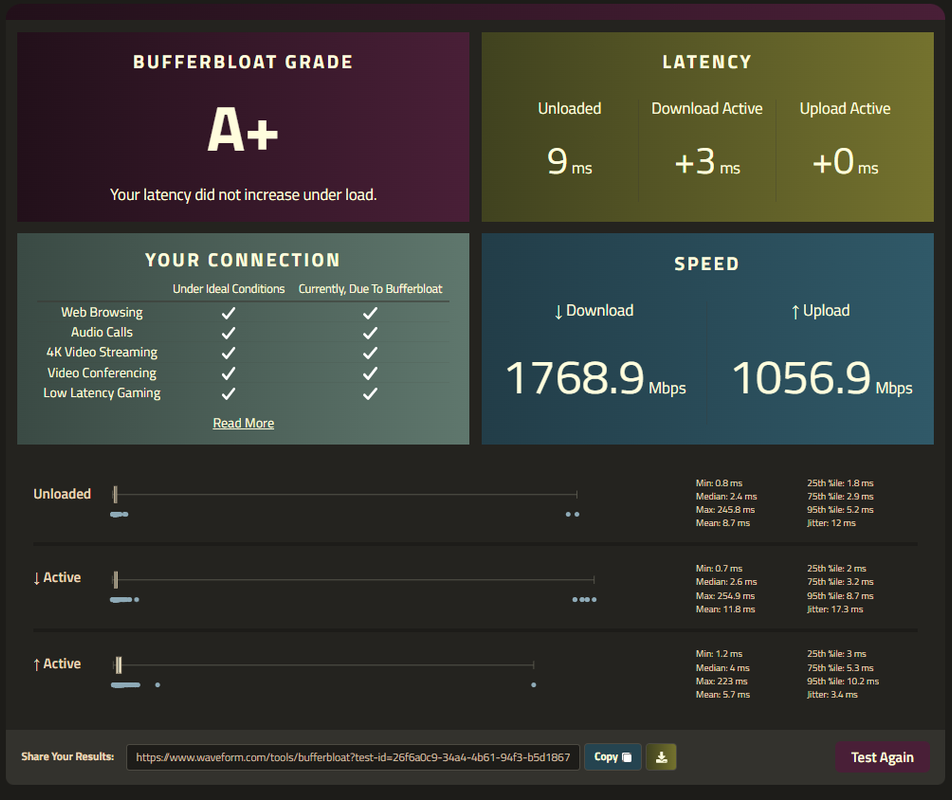
Cool, thx
bufferbloat test results
Code:https://www.waveform.com/tools/bufferbloat?test-id=26f6a0c9-34a4-4b61-94f3-b5d186764860
Cool, thx

actually the ont is owned by m1, so they haave to repair it.Recently I had my ONT die after what seemed like... a decade? i can't even remember, according to M1 its in warranty as long as you are subscribed.
Pretty sure TPG gonna charge as their margins so smol

Yeah I know, it is perfectly fine by me if its their property. Not as if I would be able to do anything with it anywayactually the ont is owned by m1, so they haave to repair it.
I've heard horror stories about Whizcomms/Singtel with Whizcomms in particular constantly getting blocked access to cloudflare sites (which is essentially a lot of the net!) from my friends soooI'm currently on M1 500M, planning to switch to either Simba or Whizcomms.
Which is better?
do you need the extra speeed? if not, better stayI'm currently on M1 500M, planning to switch to either Simba or Whizcomms.
Which is better?
Sadly, Xiaomi 7000/6500 doesn't seem able to support WiFi BE despite hardware built for it.There are other options as well, especially if you do not mind local warantty.
For example, there will be some low cost "China version WiFi 7" routers, with support of MLO/MRU/4096-QAM, but NO 6GHZ support, NO 320MHz channel bandwidth support.
Huawei BE3 Pro (single 2.5G port version): RMB499
Xiaomi 6500 Pro (quad 2.5G ports, good for 2.5G plans): RMB699
Xiaomi 7000 (quad 2.5G ports, good match for 2.5G plans): RMB799
TL-7DR5130 BE5100, RMB 369 (single 2.5G port)
TL-7DR6560 BE6500 (quad 2.5G ports, good match for 2.5G plans), listed price RMB 729, initial batch maybe lower
If you want to be ready for future 10G plans, there are a few options as well.
Xiaomi 10000 triband (dual 10G ports, maybe good for 10G plans): RMB1499
TP-Link TL-7TR13090 BE13000 triband (dual 10G ports, maybe good for 10G plans)
Reference:
https://www.acwifi.net/26083.html
Sadly, Xiaomi 7000/6500 doesn't seem able to support WiFi BE despite hardware built for it.
Xiaomi released BE7000 for that reason.
Really considering buying 7DR5130 for my second AP, my first AP is the Xiaomi AX9000 running off a 2.5gbe (with 10gbe sfp) switch connected to my TPLink 10g sfp+ switch connecting to OPNsense x86 router
Complex 🫠
I thought so, but BE7000 is 100rmb cheaper anyway and supposedly after reading online the original 7000 might not have BE support (i read from acwifi.net)Hmm, I believe Xiaomi BE7000 is the same as Xiaomi 7000. When Xiaomi 7000 was released, the Chinese WiFi 7 standards were not ready so that they could not add the BE name. Now they can after the certification.
So if people buy new Xiaomi 7000 it will bear the Xiaomi BE7000 model number. For existing Xiaomi 7000 owners, they can carry FW upgrade to have the same thing as Xiaomi BE7000.
I believe it is the same for Xiaomi 6500 Pro.
https://www.mi.com/xiaomi-routers/be-7000
https://www.mi.com/xiaomi-routers/6500pro
BTW, Xiaomi 10000 page also shows WiFi 7 log now.
Take note all these Chinse version of WiFi 7 routers do not support 6GHz band.

dont be sad. you can always buy router and handphone that support 6ghz, dont think anyone is going to catch you.I thought so, but BE7000 is 100rmb cheaper anyway and supposedly after reading online the original 7000 might not have BE support (i read from acwifi.net)
Yes of course, china no sarpork 6ghz me jin sad
I jin hiam, want to buy cheap 6ghz routerdont be sad. you can always buy router and handphone that support 6ghz, dont think anyone is going to catch you.
I jin hiam, want to buy cheap 6ghz router
My phone wouldn't support anyway, cos I using cheena set Redmi K60 ProThe cheapest way will be to buy an Intel AX210 wifi card with 6E support and wait for the next Windows 11 big update where they open up 6Ghz for hotspots. The card alone costs under 20 dollars on Aliexpress now, if you want to pay a bit more, you can the latest Intel BE200 for 30 plus where you will get 320 Mhz bandwidth instead of 160 MHz, though not sure if Intel and Windows can support hotspot at 320 MHz.
But Simba needs to be good in the first place right?I tend to think that this good result is mainly due to the good router used (Ubiquiti UDM SE) and less to do with SIMBA itself.
ONT -> UDM SE -> SFP+ 2.5gbe switch to PC
But Simba needs to be good in the first place right?
If ISP is bad, can UDM SE still achieve good results? That would be cheating right?
My phone wouldn't support anyway, cos I using cheena set Redmi K60 Pro
Thank you for the explanation.So far based on the reports in this forum, all ISPs' backends are good enough (at least for 1Gbps and dual 1Gbps plans, so should be good for 2.5Gbps as well, not sure about 10Gbps plans) -- so it depends on the router and devices used for the test, and NOT the ISP.


