Singtel 10Gbps ZTE F8648P superadmin password.

xiaofan

High Supremacy Member
Joined
Sep 16, 2018
Messages
31,423
Reaction score
8,844
My older setup:

6uO8CVY.png


Changes since then:
1) the cheaper Hasivo 2.5G switch (quad 2.5G LAN ports and two SFP+ ports) has been changed to the more expensive Hasivo S600W-4GT-1SX-1XGT-SE (quad 2.5G ports, one 10G RJ45 port, one SFP+ port) to avoid the use of hot SFP+ to 10G RJ45 copper module.

2) I have also added a pure 10G SFP+ switch from Hasivo after the S600W-4GT-1SX-1XGT-SE. This will help to have more 10G capable ports. I have to give up using DAC cable. I have changed to use two 3m Fibre cables and 4 SFP+ Optic modules.
 

LexenZ

Member
Joined
Aug 18, 2008
Messages
235
Reaction score
3
1) Yes, X540-T2 based 10G NIC is better. I would not say the Asus 10G NIC is useless though. It is readil available from local market and may be of lower heat dissipation. It is just the Windows driver may be buggy.

I have two USB 4 Marvell AQC107/AQC113 chipset based 10G NICs and they work fine under Windows, Linux and macOS. Windows speed will be abit lower.

Make sure you only use Windows Defender and not 3rd party Anti-virus program.

2) As of now, MLO is usally slower than 6GHz only SSID. MLO implementation is still quite weak for TP-Link. HB810 is a service provider model so you should lower your expectations when it comes to FW bug fixes or feature enhancement, and you have to lower your expectations of MLO performances as well.

3) You can fix the IP of two HB810 units within the ZTE F8648P ONR Web GUI (192.168.1.254).

Local Network --> LAN --> DHCP Binding

4) I am not an expert in Unifi switches, you can try to ask in the Unifi thread. I think you can try to configure it as a dumb switch first.
1) Thanks for the advice. I have gotten one from aliexpress and praying that works when it arrives.
https://www.aliexpress.com/item/1005006268866821.html?spm=a2g0o.productlist.main.1.60b3567cuM4YE5&algo_pvid=24fbcb49-e319-4ec4-89a1-1d42a07ba832&algo_exp_id=24fbcb49-e319-4ec4-89a1-1d42a07ba832-0&pdp_npi=4@dis!SGD!55.45!13.98!!!293.40!74.00!@2140e03217277805206926932e932a!12000036543249512!sea!SG!0!ABX&curPageLogUid=xVi667ZFeuzq&utparam-url=scene:search|query_from:#nav-store

Noted that i have to disable any anti virus, I do have malwarebytes available. But its a free version it doesn't really block anything and only does scanning.

2) I am still confused why Oppo Find N3 is still not available for WiFi7 even though it is spec-ed for it. Not sure if any users here face the same the issue as me. Someone in the group if you see this message and you are using the same phone as me do let me know how is it fixed for me to be able to see the 6Ghz channel...

3) I did try to fix the IPs with the DHCP binding. Basically i set the main HB810 to be 192.168.1.1 and the slave to 192.168.1.2. However, the IP still seems to be constantly changing. Apologies i am a network noob so i am not sure where i have done wrong. To make matters worse, everytime the router closes or reboots all my IPs are changing.

4) I tried to do your method of ONR > FLEX XG > HB810 & PC. It didn't work at all and the setup broke the entire system and i thought it was ISP issue, turns out that resetting ONR did the trick [that took a whole day i didn't realize to reset the ONR]. I think the FLEX XG itself is an unmanaged switch and doesn't really allow any form of configuration. So what i did was: ONR > HB810 > FLEX XG > PC and this is my current setup.

I do have a lot of issues pending. Mainly i have synology servers but i am unable to set static ips and because the router was turn off and on, the IP address went to grab new ips and i have no idea how to configure them. I came from ASUS configuration before and never i had to deal with all of these ******** when my previous plan was still a ONT > bypass > Router approach.

I am really at a lost now of how to set static ips on either the ZTE or on the HB810. Do you have any guides for setting up static ips on the ONR / HB810?
 

xiaofan

High Supremacy Member
Joined
Sep 16, 2018
Messages
31,423
Reaction score
8,844
3) I did try to fix the IPs with the DHCP binding. Basically i set the main HB810 to be 192.168.1.1 and the slave to 192.168.1.2. However, the IP still seems to be constantly changing. Apologies i am a network noob so i am not sure where i have done wrong. To make matters worse, everytime the router closes or reboots all my IPs are changing.

4) I tried to do your method of ONR > FLEX XG > HB810 & PC. It didn't work at all and the setup broke the entire system and i thought it was ISP issue, turns out that resetting ONR did the trick [that took a whole day i didn't realize to reset the ONR]. I think the FLEX XG itself is an unmanaged switch and doesn't really allow any form of configuration. So what i did was: ONR > HB810 > FLEX XG > PC and this is my current setup.

I do have a lot of issues pending. Mainly i have synology servers but i am unable to set static ips and because the router was turn off and on, the IP address went to grab new ips and i have no idea how to configure them. I came from ASUS configuration before and never i had to deal with all of these ******** when my previous plan was still a ONT > bypass > Router approach.

I am really at a lost now of how to set static ips on either the ZTE or on the HB810. Do you have any guides for setting up static ips on the ONR / HB810?

I am sorry I can not help much except the Static IP thingy. I think it should be simple.

3) Maybe you should post the screenshots to show how you set up static IP on the ZTE ONR. Technically you do not need to do anything on the HB810 in this case.

Just an example of how to configure static IP on the ZTE F8648P ONR.

FadlSxk.png


I do agree the documentation for ZTE F8648 ONR is next to non-existent. It is probably the similar case for HB810 (but I do not have the HB810). However, since you are able to configure Asus router, you should be able to configure both.

BTW, it is also a good idea not to use 192.168.1.1. You may want to start with 192.168.1.2.

Of course there is another way to set static IP on the HB810, but I think that is even more complicated.

4) Ubiquiti USW-Flex-XG is a managed switch and HB810 --> Sorry I can not help much since I am not familiar with Ubiquiti stuff in detail and I do not have the HB810.
https://sg.store.ui.com/sg/en/products/usw-flex-xg


I am not famiar with the Unifi switches. No idea why "ONR > FLEX XG > HB810 & PC" does not work. You may have to ask the question in Ubiquiti thread.
https://forums.hardwarezone.com.sg/threads/new-ubiquiti-setup-still-a-work-in-progress.5680023/

I do not have HB810, you may want to ask in the HB810 thread if you have questions related to HB810.
https://forums.hardwarezone.com.sg/threads/tp-link-hb810-be22000-wifi-7-router-users.7003498/page-7

It is also a bit strange that you have not got Singtel to set up your two HB810s. By right they should have set the HB810 for you (no need static IPv4 in reality), without the Ubiquiti USW-Flex-XG switch.

Something like the following.
Singtel F8648P ONR --> main HB810 in AP mode -- wireless backhaul or wired backhaul --> second HB810
 

LexenZ

Member
Joined
Aug 18, 2008
Messages
235
Reaction score
3
I am sorry I can not help much except the Static IP thingy. I think it should be simple.

3) Maybe you should post the screenshots to show how you set up static IP on the ZTE ONR. Technically you do not need to do anything on the HB810 in this case.

Just an example of how to configure static IP on the ZTE F8648P ONR.

FadlSxk.png


I do agree the documentation for ZTE F8648 ONR is next to non-existent. It is probably the similar case for HB810 (but I do not have the HB810). However, since you are able to configure Asus router, you should be able to configure both.

BTW, it is also a good idea not to use 192.168.1.1. You may want to start with 192.168.1.2.

Of course there is another way to set static IP on the HB810, but I think that is even more complicated.

4) Ubiquiti USW-Flex-XG is a managed switch and HB810 --> Sorry I can not help much since I am not familiar with Ubiquiti stuff in detail and I do not have the HB810.
https://sg.store.ui.com/sg/en/products/usw-flex-xg


I am not famiar with the Unifi switches. No idea why "ONR > FLEX XG > HB810 & PC" does not work. You may have to ask the question in Ubiquiti thread.
https://forums.hardwarezone.com.sg/threads/new-ubiquiti-setup-still-a-work-in-progress.5680023/

I do not have HB810, you may want to ask in the HB810 thread if you have questions related to HB810.
https://forums.hardwarezone.com.sg/threads/tp-link-hb810-be22000-wifi-7-router-users.7003498/page-7

It is also a bit strange that you have not got Singtel to set up your two HB810s. By right they should have set the HB810 for you (no need static IPv4 in reality), without the Ubiquiti USW-Flex-XG switch.

Something like the following.
Singtel F8648P ONR --> main HB810 in AP mode -- wireless backhaul or wired backhaul --> second HB810

3. What you shown is exactly what i did. However, is it because i set the HB810 to router mode? Because after saving the settings from ONR with 192.168.1.2, i used 192.168.1.2 to try to enter HB810 web gui but not responsive.

4. I just realized that my switch requires the use of another hardware [e.g. udm pro etc] to access the main switch function. I will figure out how to do that in the later time for now the dumb switch mode is working as it is.

5. With regards to your last pointer, it was setup in AP mode by default. Afterwards i was tinkering with the settings and somehow by doing the correct function [ONR > FLEX XG > HB810 & PC ] nothing works. Also, when i resetted the ONR, the ip address from my original ip address from singtel was from 2xx to 1xx instead. Hopefully i didn't spoil anything ....
 

xiaofan

High Supremacy Member
Joined
Sep 16, 2018
Messages
31,423
Reaction score
8,844
3. What you shown is exactly what i did. However, is it because i set the HB810 to router mode? Because after saving the settings from ONR with 192.168.1.2, i used 192.168.1.2 to try to enter HB810 web gui but not responsive.

4. I just realized that my switch requires the use of another hardware [e.g. udm pro etc] to access the main switch function. I will figure out how to do that in the later time for now the dumb switch mode is working as it is.

5. With regards to your last pointer, it was setup in AP mode by default. Afterwards i was tinkering with the settings and somehow by doing the correct function [ONR > FLEX XG > HB810 & PC ] nothing works. Also, when i resetted the ONR, the ip address from my original ip address from singtel was from 2xx to 1xx instead. Hopefully i didn't spoil anything ....

You should set up the HB810 in AP mode first.

If you set it up in router mode, you cannot access it from the WAN side (static IP 192.168.1.x which becomes useless). You have to access it from the LAN side (you need to check the default LAN IP address of HB810 and need to avoid the conflict with the ZTE ONR 192.168.1.x).

Since you are not familiar with home networking, you should not set the HB810 in router mode as of now.
 

LexenZ

Member
Joined
Aug 18, 2008
Messages
235
Reaction score
3
You should set up the HB810 in AP mode first.

If you set it up in router mode, you cannot access it from the WAN side (static IP 192.168.1.x which becomes useless). You have to access it from the LAN side (you need to check the default LAN IP address of HB810 and need to avoid the conflict with the ZTE ONR 192.168.1.x).

Since you are not familiar with home networking, you should not set the HB810 in router mode as of now.
I have changed the router mode to AP mode for the HB810.

Ironically, i can no longer access the ZTE web gui [192.168.1.254 by default], and the pre configured [192.168.1.2] HB810 is also not responding....
 

xiaofan

High Supremacy Member
Joined
Sep 16, 2018
Messages
31,423
Reaction score
8,844
I have changed the router mode to AP mode for the HB810.

Ironically, i can no longer access the ZTE web gui [192.168.1.254 by default], and the pre configured [192.168.1.2] HB810 is also not responding....

Sorry but I have no ideas why you will encounter this kind of issues. And I guess I cannot help much and you have to figure out by yourself.

Worst case is to reset the Singtel ONR again. Before that you can try "https:" instead of "http:" to see if that helps.

But all in all, lesson learned is not to go with SIngtel because of the ONR thingy if you have more advanced setups. I am stuck with Singtel unbridged F8648P ONR myself. I am fine with Double NAT setup myself now but it is still not really ideal compared to my previous Singtel 1Gbps plan setup.
 

LexenZ

Member
Joined
Aug 18, 2008
Messages
235
Reaction score
3
Sorry but I have no ideas why you will encounter this kind of issues. And I guess I cannot help much and you have to figure out by yourself.

Worst case is to reset the Singtel ONR again. Before that you can try "https:" instead of "http:" to see if that helps.

But all in all, lesson learned is not to go with SIngtel because of the ONR thingy if you have more advanced setups. I am stuck with Singtel unbridged F8648P ONR myself. I am fine with Double NAT setup myself now but it is still not really ideal compared to my previous Singtel 1Gbps plan setup.
No worries, thanks for trying to suggest the options. Strange that correct methods doesn't seem to work. And incorrect methods are working for me.

In any case, i have reverted back to the router mode. And my setup is as of follows:
ONR > HB810 > FLEX XG [unmanaged] > PC & NAS & Other devices.

Above method "unlocks" all the paths of the connections i require. But again, the moment the ONR/Router reboots i will lose all the relative IPs.

Lesson is definitely well learned.

Just curious, seeing Starhub has the ONT option for the 10gbps plan, if i were to buy my own router from local stores, i will be back to the previous setup of ONT > own router > other devices approach correct? Not sure if the ONT has some other bottlenecks that i am not aware of...
 

xiaofan

High Supremacy Member
Joined
Sep 16, 2018
Messages
31,423
Reaction score
8,844
Just curious, seeing Starhub has the ONT option for the 10gbps plan, if i were to buy my own router from local stores, i will be back to the previous setup of ONT > own router > other devices approach correct? Not sure if the ONT has some other bottlenecks that i am not aware of...

If you go with Starhub ONT option, you have all the freedoms to use your own router to its full abilities.
Starhub XGS-PON ONT -- 10G capable WiFi 7 router -- other devices.

The only thing is that the bundled EB810v is a service provider model just like the HB810. So FW bug fixes and feature enhancement may be slow.
https://forums.hardwarezone.com.sg/threads/tp-link-eb810v-quick-overview.7014586/page-27

But if you use more powerful routers like Asus ROG GT-BE98 or Asus ZenWiFi BQ16, you will be back to your previous approach and familiar Asus Web UI and feature sets. Take note 10G capable WiFi 7 routers are not cheap.

Some other people have good lucks with a bit cheaper router from TP-Link, like Deco BE85.
 

LexenZ

Member
Joined
Aug 18, 2008
Messages
235
Reaction score
3
If you go with Starhub ONT option, you have all the freedoms to use your own router to its full abilities.
Starhub XGS-PON ONT -- 10G capable WiFi 7 router -- other devices.

The only thing is that the bundled EB810v is a service provider model just like the HB810. So FW bug fixes and feature enhancement may be slow.
https://forums.hardwarezone.com.sg/threads/tp-link-eb810v-quick-overview.7014586/page-27

But if you use more powerful routers like Asus ROG GT-BE98 or Asus ZenWiFi BQ16, you will be back to your previous approach and familiar Asus Web UI and feature sets. Take note 10G capable WiFi 7 routers are not cheap.

Some other people have good lucks with a bit cheaper router from TP-Link, like Deco BE85.
Seems that i should have chosen Starhub all along...

Just curious, if i were to choose routers like the Asus ROG GT-BE98 with dual WAN function, the most it can do is only load balancing with Singtel and Starhub correct? But with Singtel's ONR loaded to the WAN of the Asus ROG GT-BE98 does it affect the way i customized the setup? I am sure the Singtel's ONR will definitely restrict something...
 

TanKianW

Supremacy Member
Joined
Apr 21, 2005
Messages
6,666
Reaction score
3,319
Seems that i should have chosen Starhub all along...

Just curious, if i were to choose routers like the Asus ROG GT-BE98 with dual WAN function, the most it can do is only load balancing with Singtel and Starhub correct? But with Singtel's ONR loaded to the WAN of the Asus ROG GT-BE98 does it affect the way i customized the setup? I am sure the Singtel's ONR will definitely restrict something...

You are already using a TPlink router as an AP, maybe you can consider using a software router (Eg. pfsense, OPNsense) running on a mini-pc to run your Multi-WAN setup instead of getting another router from Asus since the wifi not going to mesh with your TPlink AP anyway. I also find enterprise solutions provide more seamless (or smooth) multi-WAN management as compared to most consumer routing solutions out there.

If you are running both ST and SH with your current network setup, you will have one with Double-NAT and another without. As for the restriction on Double-NAT, you can probably read quite a lot from this forum.​
 

LexenZ

Member
Joined
Aug 18, 2008
Messages
235
Reaction score
3
You are already using a TPlink router as an AP, maybe you can consider using a software router (Eg. pfsense, OPNsense) running on a mini-pc to run your Multi-WAN setup instead of getting another router from Asus since the wifi not going to mesh with your TPlink AP anyway. I also find enterprise solutions provide more seamless (or smooth) multi-WAN management as compared to most consumer routing solutions out there.

If you are running both ST and SH with your current network setup, you will have one with Double-NAT and another without. As for the restriction on Double-NAT, you can probably read quite a lot from this forum.​
Hi TanKianW!

Thanks for the suggestion.

However, my point is that the TP routers are not "configurable enough" for me unlike the local store bought routers. For consideration of using a software router running on a mini pc, i don't intend to have so many unnecessary devices and i am not a network "pro" in this sense. My previous setup still has existing asus routers for me to aimesh from a new capable wifi7 router if needed.

While i do wish to have an enterprise solution setup like starting from UDM onwards, the setup forces me to configure and get devices related to unifi only for a seamless solution [waste money part 1]. Then means all my existing networking equipment are deemed useless in a way [waste money part 2]. In my previous existing setup with the ONT > Router approach, the asus router is just the main device to manage all my networks whilst handling wifi as well. I just need that "simplicity" in a way.

Maybe i am just too used to handling the above setup. So that is my probably my own issue 😅.

To your last point with regards to the ST and SH setup, i am just currently on ST 10gbps at the moment but planning to cancel. I will probably go forth with the SH 10gbps ONT approach and getting a new router elsewhere as of my previous setup approach.
 
Last edited:

TanKianW

Supremacy Member
Joined
Apr 21, 2005
Messages
6,666
Reaction score
3,319
Hi TanKianW!

Thanks for the suggestion.

However, my point is that the TP routers are not "configurable enough" for me unlike the local store bought routers. For consideration of using a software router running on a mini pc, i don't intend to have so many unnecessary devices and i am not a network "pro" in this sense. My previous setup still has existing asus routers for me to aimesh from a new capable wifi7 router if needed.

While i do wish to have an enterprise solution setup like starting from UDM onwards, the setup forces me to configure and get devices related to unifi only for a seamless solution [waste money part 1]. Then means all my existing networking equipment are deemed useless in a way [waste money part 2]. In my previous existing setup with the ONT > Router approach, the asus router is just the main device to manage all my networks whilst handling wifi as well. I just need that "simplicity" in a way.

Maybe i am just too used to handling the above setup. So that is my probably my own issue 😅.

To your last point with regards to the ST and SH setup, i am just currently on ST 10gbps at the moment but planning to cancel. I will probably go forth with the SH 10gbps ONT approach and getting a new router elsewhere as of my previous setup approach.

Then I think it is ok to go ahead with your Asus plan for simplicity and save money. (y)
 

xiaofan

High Supremacy Member
Joined
Sep 16, 2018
Messages
31,423
Reaction score
8,844
To your last point with regards to the ST and SH setup, i am just currently on ST 10gbps at the moment but planning to cancel. I will probably go forth with the SH 10gbps ONT approach and getting a new router elsewhere as of my previous setup approach.

Hmm, how do you cancel Singtel 10Gbps plan? It is usually with 24 month contract. If you have ways to cancel, by all means go ahead to cancel and change to Starhub 10Gbps plan with ONT + EB810v (you can sell the EB810v away).

As for Dual WAN with Singtel 10Gbps and Starhub 10Gbps, Asus ROG GT-BE98 is probably not able to do with Dual 10G as it has only two 10G ports. If both ports are used up, then you only have 2.5Gbps ports left. And it is probably not able to deal with Dual WAN Load Balancing and only Dual WAN Failover.
 

xiaofan

High Supremacy Member
Joined
Sep 16, 2018
Messages
31,423
Reaction score
8,844
Interestingly there is still a successful attempt to bridge the ZTE ONR now. Unfortunately it still does not work for me (even after the reboot of the ONR).

I am guessing Singtel is deploying IPv6 and new DHCP servers to different locations. Those with the new DHCP servers on the XGS-PON network will not be able to have two IPv4 addresses issued and that is the reason of losing the internet. Those with the older DHCP servers are allowed to have up to three public IPv4 addresses and therefore no issues. This applies to GPON network (Singtel 1Gbps/2Gbps plan users and even WC 2.5Gbps users).

I may be wrong though. Let's wait for more reports.

From here.
https://forums.hardwarezone.com.sg/threads/fully-utilize-singtel-2gbps-network.7041131/page-4

Still cannot figure out why V2905H not getting WAN IP, but managed to get ZTE F8648P bridged. Hope it can last

Hmm, what is the FW version of your ZTE F8648P?

Older FW version is easy. New FW version ( V2.1.10P5N19) does not seem to work.

If you have the latest FW version as the above, just wondering how you managed to bridge it. Thanks.

The following is what I have.
Hardware Version V2.1
Software Version V2.1.10P5N19

https://forums.hardwarezone.com.sg/...zte-f8648p-superadmin-password.6946718/page-8
XO6h3QT.png

Same fm version, use ONR bridge LAN 5 for 10G port

Unfortunately it is still not working from my side. Same problem, once I bridged Port 5, the router connected to Port 1 and Port 5 will immedaitely lose the internet.

I am guessing Singtel is deploying IPv6 and new DHCP servers to different locations. Those with the new DHCP servers on the XGS-PON network will not be able to have two IPv4 addresses issued and that is the reason of losing the internet.

Those with the older DHCP servers are allowed to have up to three public IPv4 addresses and therefore no issues. This applies to GPON network (Singtel 1Gbps/2Gbps plan users and even WC 2.5Gbps users).

I may be wrong though. Let's wait for more reports.
 

LexenZ

Member
Joined
Aug 18, 2008
Messages
235
Reaction score
3
Hmm, how do you cancel Singtel 10Gbps plan? It is usually with 24 month contract. If you have ways to cancel, by all means go ahead to cancel and change to Starhub 10Gbps plan with ONT + EB810v (you can sell the EB810v away).

As for Dual WAN with Singtel 10Gbps and Starhub 10Gbps, Asus ROG GT-BE98 is probably not able to do with Dual 10G as it has only two 10G ports. If both ports are used up, then you only have 2.5Gbps ports left. And it is probably not able to deal with Dual WAN Load Balancing and only Dual WAN Failover.

Hi Xiaofan,

Apologies for replying back to this.

I was trying to complain back to Singtel on the lack of customability for customers who wish to configure to their own settings. Overall i was denied any form of cancellation and had to incure a $3000 penalty fee. Moving forward it seems like the officer handling the case was not able to help me which is just a luck basis. Therefore i retained the 10gbps contract as it is. To those who have better luck handling with the officer i wish you all the best ahahhaha.

Anywho, I have ditched the setup of using Asus ROG GT-BE98 instead. I was in the Singapore FB Ubiquiti group and someone sold me a UDM Pro for only $200 in full working condition.

My initital test was to see if i can configure to the settings i want without losing any IP address that i have set. And turns out all is according to plan. The double NAT situation doesn't affect me, i just need my stuff not to change IP all the time as i access my servers often with quick access from mapping the network drive.

The unfortunate part is that the HB810 routers are still very finicky and does not really give me the wifi7 that i desire. The connections is also pretty unstable [already changed to APs with the second on a mesh]. But overall i cannot tweak any of the settings from HB810 and every slight change the APs seems to go nuts.

Despite the above, i choose to retain back this setup because since my UDM dream was fulfilled, i immediately ordered the rest of the other components i need for my planned setup as of below:

ONR > UDM PRO
UDM PRO
> Unify 8 Port Aggregation Switch [10gbps SFP]
> NAS 1 [Only 1gbps]
> Printer

Unify 8 Port Aggregation Switch
> Unify pro max 16 POE
>>1x G5 Flex POE camera
>>2.5.Gbps to work laptop [through belkin multimedia hub]
>> PS5
>> Nintendo Switch
> FLEX XG
>> Second PC [Only 1gbps]
> Main PC
> NAS 2 [10gbps capable]
> HB810 [Main] >> to all Wifi Devices

I have seen online that U7 pro max has received plenty of bad feedback due to instability issues and there might be a chance a better version will come out. Thus I am willing to wait for that [An excuse because i have spent a ton on the other required equipment hahahaa].

Overall, i am very happy with the interface from Ubiquiti, i do have friends who recommended Omada instead. I do admit that while Omada hardware is very strong, and the overall cost from my above setup is definitely lower [provided i bought the udm at full price], however, the interface on the Omada really doesn't work for me. Thus i can say i went to the "dark side" on the Ubiquiti chain.

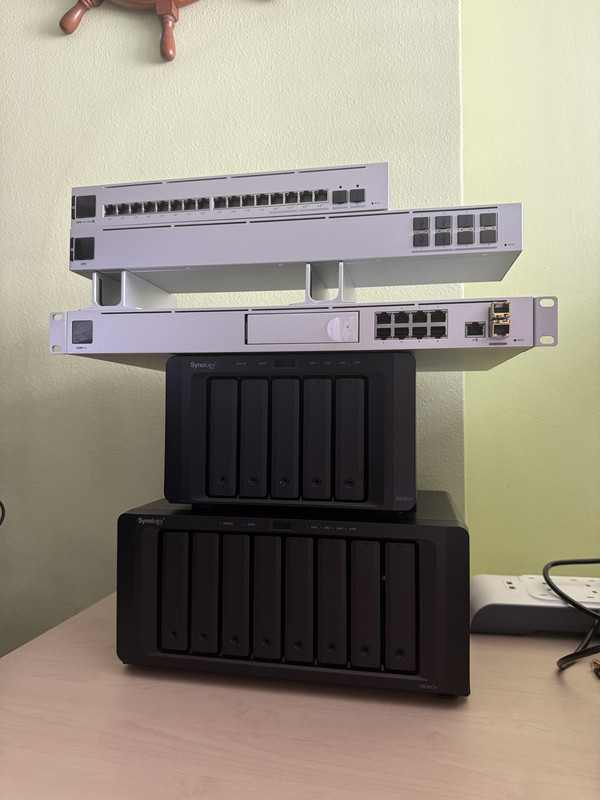
Attached a photo to show my "the interlace" junk setup without any racks hahaha


2024-10-13-14-50-40-1.jpg
 
Last edited:

xiaofan

High Supremacy Member
Joined
Sep 16, 2018
Messages
31,423
Reaction score
8,844
Hi Xiaofan,

Apologies for replying back to this.

I was trying to complain back to Singtel on the lack of customability for customers who wish to configure to their own settings. Overall i was denied any form of cancellation and had to incure a $3000 penalty fee. Moving forward it seems like the officer handling the case was not able to help me which is just a luck basis. Therefore i retained the 10gbps contract as it is. To those who have better luck handling with the officer i wish you all the best ahahhaha.

Anywho, I have ditched the setup of using Asus ROG GT-BE98 instead. I was in the Singapore FB Ubiquiti group and someone sold me a UDM Pro for only $200 in full working condition.

My initital test was to see if i can configure to the settings i want without losing any IP address that i have set. And turns out all is according to plan. The double NAT situation doesn't affect me, i just need my stuff not to change IP all the time as i access my servers often with quick access from mapping the network drive.

The unfortunate part is that the HB810 routers are still very finicky and does not really give me the wifi7 that i desire. The connections is also pretty unstable [already changed to APs with the second on a mesh]. But overall i cannot tweak any of the settings from HB810 and every slight change the APs seems to go nuts.

Despite the above, i choose to retain back this setup because since my UDM dream was fulfilled, i immediately ordered the rest of the other components i need for my planned setup as of below:

ONR > UDM PRO
UDM PRO
> Unify 8 Port Aggregation Switch [10gbps SFP]
> NAS 1 [Only 1gbps]
> Printer

Unify 8 Port Aggregation Switch
> Unify pro max 16 POE
>>1x G5 Flex POE camera
>>2.5.Gbps to work laptop [through belkin multimedia hub]
>> PS5
>> Nintendo Switch
> FLEX XG
>> Second PC [Only 1gbps]
> Main PC
> NAS 2 [10gbps capable]
> HB810 [Main] >> to all Wifi Devices

I have seen online that U7 pro max has received plenty of bad feedback due to instability issues and there might be a chance a better version will come out. Thus I am willing to wait for that [An excuse because i have spent a ton on the other required equipment hahahaa].

Overall, i am very happy with the interface from Ubiquiti, i do have friends who recommended Omada instead. I do admit that while Omada hardware is very strong, and the overall cost from my above setup is definitely lower [provided i bought the udm at full price], however, the interface on the Omada really doesn't work for me. Thus i can say i went to the "dark side" on the Ubiquiti chain.

Attached a photo to show my "the interlace" junk setup without any racks hahaha


2024-10-13-14-50-40-1.jpg


Great sharing. Thanks.

I am using Double NAT myself, after the ONR I have a 2.5G/10G switch. Then I have Asus router and OpenWRT/pfSense virtual router setups (two independant internal networks). Then I use things like DMZ and Port Forwarding and Tailscale/Zerotier to work around the issues with Double NAT.

I have actually created for users who have to use ONR.
https://forums.hardwarezone.com.sg/...nr-replacement-with-onu-or-pon-stick.6938685/

Just one comment, The ONR does support DDNS but you can also use DDNS on your UDM Pro. The WAN public IPv4 address of the Singtel ONR hardly changes but it will change eventually. So you may still want to set up DDNS.
 

poland_ball

Master Member
Joined
Oct 9, 2016
Messages
3,694
Reaction score
827
There is a port forwarding rule on my newly installed ZTE ONR. It's called NatPM1 and forwards WAN 1024 to LAN 30005 of the wireless ap. Anyone knows what it's for and if it's safe to remove this rule?
 

xiaofan

High Supremacy Member
Joined
Sep 16, 2018
Messages
31,423
Reaction score
8,844
There is a port forwarding rule on my newly installed ZTE ONR. It's called NatPM1 and forwards WAN 1024 to LAN 30005 of the wireless ap. Anyone knows what it's for and if it's safe to remove this rule?

I believe that is created when you connect the free SIngtel issued Wireless Router (automatically run in AP mode). You may need to keep it enabled if you need to use the Singtel AP.

If not, you can delete the rule. As for what is the function, I am not so sure.

I have deleted the rule myself since I only tested the Singtel AP for one day and then put it aside.
 
Important Forum Advisory Note
This forum is moderated by volunteer moderators who will react only to members' feedback on posts. Moderators are not employees or representatives of HWZ. Forum members and moderators are responsible for their own posts.

Please refer to our Community Guidelines and Standards, Terms of Service and Member T&Cs for more information.
Top