SingTel 3Gbps, 5Gbps & 10 Gbps Enhanced

xiaofan

High Supremacy Member
Joined
Sep 16, 2018
Messages
32,166
Reaction score
9,306
Hello Master Xiaofan, thank you for the reply. i took up the Singtel 5Ggps offer 2 weeks ago and comes with the Singtel Wifi 6 Router and a pair of Singtel WiFi 6 Mesh Extenders.

The mobile game im playing is honor of kings. I have checked with my friends and none had my issue. At the same time, i did a speed test on both of my phone Andriod(Poco F3) and Iphone 13pro respectively. Both of them showed the below results

At the same time, able to guide me which gaming router i should be getting? Hopefully something that is most bang for bucks(and maybe something furture proof). Or do you think i should upgrade to WiFI 7 instead? It comes with TP-Link HB810 at $16.80/mth.

Thank you once again.

tqBqcIK.jpeg
i6DqVXO.jpeg

Looks like no issues with the Speed but latency is the problem. You may check with your friend to see if they have the similar latency issues or not. 200ms+ latency is probably not good anything gaming. You can also check with your friend what kind of router they are using.

Even though I do not like Singtel provided mesh solution, I am not sure if it is the issue this time. So it is better to optimize the placement first to see if you can have some improvement.

Total latency --> wireless related latence (you can improve this one) + Singtel latency to the server (you can not do much here)

Please post your floor plan with details of the placement of the SIngtel ONR, LAN ports in the rooms if any, the location of the main wireless router (run in AP mode) and two Singtel mesh extenders. Make sure you place the router in a proper place.

SIngtel/Starhub/M1 have some simple guides on router placement. You may want to take a look to optimize the placement of the main router.
https://forums.hardwarezone.com.sg/...home-networking.6653421/page-3#post-149371244

More importantly is how you connect the Singtel Mesh Extender? Are you using wireless backhaul? If you use wireless backhaul (the mesh extender is connected to the main wireless router using wireless), then that can be the major problem.

Do you have LAN ports in the rooms? Singtel provded mesh solution is low end dual band mesh solution and really only suitable for those with LAN ports in the rooms.
 
Last edited:

HyunJin

Member
Joined
May 3, 2004
Messages
448
Reaction score
0
Looks like no issues with the Speed but latency is the problem. You may check with your friend to see if they have the similar latency issues or not. 200ms+ latency is probably not good anything gaming. You can also check with your friend what kind of router they are using.

Even though I do not like Singtel provided mesh solution, I am not sure if it is the issue this time. So it is better to optimize the placement first to see if you can have some improvement.

Total latency --> wireless related latence (you can improve this one) + Singtel latency to the server (you can not do much here)

Please post your floor plan with details of the placement of the SIngtel ONR, LAN ports in the rooms if any, the location of the main wireless router (run in AP mode) and two Singtel mesh extenders. Make sure you place the router in a proper place.

SIngtel/Starhub/M1 have some simple guides on router placement. You may want to take a look to optimize the placement of the main router.
https://forums.hardwarezone.com.sg/...home-networking.6653421/page-3#post-149371244

More importantly is how you connect the Singtel Mesh Extender? Are you using wireless backhaul? If you use wireless backhaul (the mesh extender is connected to the main wireless router using wireless), then that can be the major problem.

Do you have LAN ports in the rooms? Singtel provded mesh solution is low end dual band mesh solution and really only suitable for those with LAN ports in the rooms.
I have verified with my friend, He is using Singtel Mesh Wifi 6. He is experiencing the MS spike like maybe 1 or 0 time per game.

Here is the floor plan of the placement on the ONR and Singtel mesh router and Singtel mesh extender. The Router is in my bedroom next to the living room. All rooms have lan port with Cat 6A cable in it.

The ONR is connected to my Singtel TV, Wifi Mesh Router and Wifi Mesh Extender. All devices are located on top of my table. Also right now im the only one at home and nobody is connected to the wifi except me. Yet i am still facing the same issue. Thank you.


Ackb0u5.png
 

xiaofan

High Supremacy Member
Joined
Sep 16, 2018
Messages
32,166
Reaction score
9,306
I have verified with my friend, He is using Singtel Mesh Wifi 6. He is experiencing the MS spike like maybe 1 or 0 time per game.

Here is the floor plan of the placement on the ONR and Singtel mesh router and Singtel mesh extender. The Router is in my bedroom next to the living room. All rooms have lan port with Cat 6A cable in it.

The ONR is connected to my Singtel TV, Wifi Mesh Router and Wifi Mesh Extender. All devices are located on top of my table. Also right now im the only one at home and nobody is connected to the wifi except me. Yet i am still facing the same issue. Thank you.


Ackb0u5.png

I see. Your placement of the routers looks okay to me.

Where is the ONR located? Is it at the same place as the main wireless router? Or is it located in the DB box? Where is the DB box then?

Due to the use of ONR for Singtel 5Gbps plan, it is tricky to replace your mesh solution with new ones.

Originally I was thinking to replace the main Singtel wireless router with a good one like GT-AX6000, then replace the nodes with RT-AX3000P or better ones like RT-AX82U (depending on budget). But then the main GT-AX6000 router may have to be put in the DB box together with the ONR for AImesh to work. GT-AX600 also needs to be run in router mode for the gaming feature to work which will result in Double NAT.

Hopefully others can chime in as well to help out as well.
 
Last edited:

caesium2108

Senior Member
Joined
Aug 31, 2011
Messages
703
Reaction score
147
1. So you are on the following plan, right?
https://www.singtel.com/personal/products-services/broadband/eform/5gbps
[NEW] 5Gbps Enhanced Mesh Plan WiFi 6 at $61.18/mth (U.P $116.28/mth)
Comes with 1 unit of Singtel WiFi 6 Router and a pair of Singtel WiFi 6 Mesh Extenders

2. I think you do not need to spend much money on the networking side and you can keep a similar setup as your current setup. You may upgrade your PC to have 10G NIC though.

The following is a quick reference for a potential network configuration.

Singtel ZTE F8648P ONR in DB Box
ONR 1G LAN port -- Living room LAN port - Singtel WiFi 6 router -- 1 Lan connection to TV
ONR 10G LAN port -- Computer room LAN port - Desktop PC (upgrade with a 10G NIC)
ONR 1G LAN port -- Master Room LAN port - Singtel Mesh Extender -- TV
ONR 1G LAN port -- Bedroom LAN port -- Singtel Mesh Extender

Please post your floor plan (with details of the LAN ports location and current wireless router placement) to see if you need to change the above configuration.

3. PCI-E 10G Network adapter for desktop is not expensive. 10G NIC for laptop can be a bit more expensive.

PCI-E 10G NIC for desktop
One example for branded 10G NIC, about S$115, there are many cheaper options if you buy from Taobao.
https://www.asus.com/sg/networking-iot-servers/wired-networking/all-series/xg-c100c/
https://dynacoretech.com/parts-and-...-single-rj-45-port-built-in-qos-4711081573197

USB4/TB3 to 10G NIC
More branded option: OWC Thunderbolt TB3 10G Ethernet Adapter
https://www.owc.com/solutions/thunderbolt-3-10g-ethernet-adapter

Cheaper option: IOCrest USB 4 10G Ethernet adapter
http://www.iocrest.com/index.php?id=2414

4. ONT vs ONR
You do not really need to worry much about ONR in this case since you are fine with your existing Singtel 1Gbps mesh plan.
https://forums.hardwarezone.com.sg/...cs-of-home-networking.6653421/#post-138363236

Thank you for your advice, and yes the plan you mentioned is correct!
I am not very sure how to upload my plans here, but i think your instructions are very clear and really appreciate your help! Cheers
 

xiaofan

High Supremacy Member
Joined
Sep 16, 2018
Messages
32,166
Reaction score
9,306
I see. Your placement of the routers looks okay to me.
Where is the ONR located? Is it at the same place as the main wireless router? Or is it located in the DB box? Where is the DB box then?
Due to the use of ONR for Singtel 5Gbps plan, it is tricky to replace your mesh solution with new ones.
Originally I was thinking to replace the main Singtel wireless router with a good one like GT-AX6000, then replace the nodes with RT-AX3000P or better ones like RT-AX82U (depending on budget). But then the main GT-AX6000 router may have to be put in the DB box together with the ONR for AImesh to work. GT-AX600 also needs to be run in router mode for the gaming feature to work which will result in Double NAT.
Hopefully others can chime in as well to help out as well.

I hope others (especially those who play mobile games) to help out since I do not really play mobile games.

Just to troubleshoot the latency caused by the current wireless setup, please carry out OOkla SpeedTest on your mobile phone, using SingTel SpeedTest server. The focus is to check the latency. You can carry out the test a few times to see if the latency number change a lot.

Reference for my results: SingTel 1Gbps plan now, Asus RT-AX86U wireless router, Xiaomi Poco X4 GT with WiFi 6 support, 3m away from the router.
https://www.speedtest.net/result/a/10284915717
Ping value: 4m when idle, 36 ms when downloading, 48ms when uploading.

10284915717.png


Another wireless router in AP mode. pfSense virtual router + ZTE BE7200 Pro+. Same Poco phone at 4m away.
https://www.speedtest.net/zh-Hans/result/a/10284928513
Ping value: 4ms when idle, 22ms when downloading, 44ms when uploading.
10284928513.png
 
Last edited:

xiaofan

High Supremacy Member
Joined
Sep 16, 2018
Messages
32,166
Reaction score
9,306
Indeed.

So I just subscribed to SingTel 5Gbps plan and the installation date will be on 12 August 2024. Let's see how it goes.

I got the same S$49.90 per month pricing for my recontract, same as new user, through the chat with SingTel WhatsApp channel (Home Support team). The staff is very helpful and helped to improve the installation date from 28 August 2024 to 12 August 2024.

Looks SingTel is busy with new Fibre installation, but I believe many of them are for 2Gbps plan upgrade as SingTel gets rid of 1Gbps plan and offers S$39.90 (recontract offer, my offer was S$39.95 per month, or new home offer) or S$42.90 per month (new user offer) pricing for 2Gbps plan.

The appointment with NLT was scheduled on tomorrow 5 August 2024.

But the NLT guys happened to work nearby so they knocked my door and asked if they could do it today. Of course I said yes. The second fibre terminal port is now activated. Signal strength is pretty good at about -14dBm.
 

caesium2108

Senior Member
Joined
Aug 31, 2011
Messages
703
Reaction score
147
1. So you are on the following plan, right?
https://www.singtel.com/personal/products-services/broadband/eform/5gbps
[NEW] 5Gbps Enhanced Mesh Plan WiFi 6 at $61.18/mth (U.P $116.28/mth)
Comes with 1 unit of Singtel WiFi 6 Router and a pair of Singtel WiFi 6 Mesh Extenders

2. I think you do not need to spend much money on the networking side and you can keep a similar setup as your current setup. You may upgrade your PC to have 10G NIC though.

The following is a quick reference for a potential network configuration.

Singtel ZTE F8648P ONR in DB Box
ONR 1G LAN port -- Living room LAN port - Singtel WiFi 6 router -- 1 Lan connection to TV
ONR 10G LAN port -- Computer room LAN port - Desktop PC (upgrade with a 10G NIC)
ONR 1G LAN port -- Master Room LAN port - Singtel Mesh Extender -- TV
ONR 1G LAN port -- Bedroom LAN port -- Singtel Mesh Extender

Please post your floor plan (with details of the LAN ports location and current wireless router placement) to see if you need to change the above configuration.

3. PCI-E 10G Network adapter for desktop is not expensive. 10G NIC for laptop can be a bit more expensive.

PCI-E 10G NIC for desktop
One example for branded 10G NIC, about S$115, there are many cheaper options if you buy from Taobao.
https://www.asus.com/sg/networking-iot-servers/wired-networking/all-series/xg-c100c/
https://dynacoretech.com/parts-and-...-single-rj-45-port-built-in-qos-4711081573197

USB4/TB3 to 10G NIC
More branded option: OWC Thunderbolt TB3 10G Ethernet Adapter
https://www.owc.com/solutions/thunderbolt-3-10g-ethernet-adapter

Cheaper option: IOCrest USB 4 10G Ethernet adapter
http://www.iocrest.com/index.php?id=2414

4. ONT vs ONR
You do not really need to worry much about ONR in this case since you are fine with your existing Singtel 1Gbps mesh plan.
https://forums.hardwarezone.com.sg/...cs-of-home-networking.6653421/#post-138363236
Master xiaofan,

can i just check because singtel will give me 1 router and 2 mesh. Could i get a RT86U asus router as my main and connect to the 2 mesh provided by singtel?
 

nezz78

Junior Member
Joined
Mar 7, 2008
Messages
48
Reaction score
3
Download speed is good but something wrong with the upload. Maybe you want to test again later in the evening.

678260970.png
Hi Master,

The result is even worse! Haha... I am using a 5Gbps ethernet adapter for the download.
https://www.speedtest.net/my-result/d/678305131
Should I restart Singtel ONR?

Updated! I know what happens and can get the normal reading.
https://www.speedtest.net/my-result/d/678488339

I am not the seller. Just to share.
https://www.wisdpi.com/products/wis...atible-on-5g-2-5g-1g-100mbps-ideal-for-gaming
 
Last edited:

fatendestiny

Senior Member
Joined
Jun 4, 2002
Messages
2,290
Reaction score
1
1) Singtel recommended way to use 5Gbps -- that is with HB810.

2) But then they offer cheaper plan without the HB810. Some users may not have 10G capable device but they can still use the 5Gbps plan as an aggregated 5Gbps plan.

3) Example using Asus AImesh
Singtel XGS-PON ONR (in DB box) 10G LAN port -- Asus TUF-AX6000 in AP mode (main AImesh node) in living room (up to 2.5Gbps)

Singtel XGS-PON ONR (in DB box) 1G LAN port -- Asus RT-AX3000P AImesh mesh node in main bedroom (up to 1Gbps)

Singtel XGS-PON ONR (in DB box) 1G LAN port -- Desktop PC in study room (up to 1Gbps)
Hi Xiaofan,

Quoting your example 3, if using Singtel ONR and following connection:
i. Singtel XGS-PON ONR (in DB box) 10G LAN port -- Asus TUF-AX6000 in AP mode (main AImesh node) in living room (up to 2.5Gbps)
ii. Singtel XGS-PON ONR (in DB box) 1G LAN port -- Asus RT-AX3000P AImesh mesh node in main bedroom (up to 1Gbps)
iii. Maybe 1 LAN port to Singtel TV box.

I am currently on Singtel 1gbps plan ONT with 2 x AX-86U units in AiMesh. Plan expired. Looking at Singtel 5 gbps plan or Starhub 5 gbps plan.

Can you advise what is the potential loss in the AiMesh features? (you mentioned "losing majority of its non-wireless firmware features")

Thank you.
 

xiaofan

High Supremacy Member
Joined
Sep 16, 2018
Messages
32,166
Reaction score
9,306
The result is even worse! Haha... I am using a 5Gbps ethernet adapter for the download.
https://www.speedtest.net/my-result/d/678305131
Should I restart Singtel ONR?

Updated! I know what happens and can get the normal reading.
https://www.speedtest.net/my-result/d/678488339

I am not the seller. Just to share.
https://www.wisdpi.com/products/wis...atible-on-5g-2-5g-1g-100mbps-ideal-for-gaming

Nice. Thanks a lot for the updates.

It is good to know that you can use the Realtek RTL8157 based USB 3.2 to 5Gbps adapter to get very good 5Gbps results.

Last time there were quite some USB 3 to 5Gbps adapter but almost all of them were EOLed by the vendor.

678488339.png
 
Last edited:

xiaofan

High Supremacy Member
Joined
Sep 16, 2018
Messages
32,166
Reaction score
9,306
Master xiaofan,

can i just check because singtel will give me 1 router and 2 mesh. Could i get a RT86U asus router as my main and connect to the 2 mesh provided by singtel?

Since you are using Singtel 5Gbps plan which uses ZTE F8648P XGS-PON ONR, you can not use your Asus RT-AX86U as the main router in reality (unless you briddge the ONR) since the ONR will be the main router.

You can use the following way.
Singtel ZTE F8648P ONR in DB

Singtel ZTE F8648P ONR 10G port -- living room LAN port -- Asus RT-AX86U in AP mode (to avoid Double NAT), try to configure the 2.5G port as the WAN port
Singtel ZTE F8648P ONR 1G port -- main bedroom LAN port -- Singtel AX5400 router (automatically run in AP mode)
Singtel ZTE F8648P ONR 1G port --bedroom 1 LAN port -- Singtel WiFi 6 mesh extender
Singtel ZTE F8648P ONR 1G port -- bedroom 2 LAN port -- Singtel WiFi 6 mesh extender
 

KennCh

Junior Member
Joined
Aug 8, 2024
Messages
1
Reaction score
1
Hi guys,

might need some help here, my 5gbps internet speed dropped from 5k+ mbps on the 30th of July to 2k+ mbps and I do not recall making any changes to my desktop or my network. Tried restarting but the speed remain at 2k+. Any help appreciated. Thanks 🙏


16560407619.png
16596381525.png
 

xiaofan

High Supremacy Member
Joined
Sep 16, 2018
Messages
32,166
Reaction score
9,306
Hi guys,

might need some help here, my 5gbps internet speed dropped from 5k+ mbps on the 30th of July to 2k+ mbps and I do not recall making any changes to my desktop or my network. Tried restarting but the speed remain at 2k+. Any help appreciated. Thanks 🙏


16560407619.png
16596381525.png

Just wait a bit to see if the issue goes away or not.

I believe Singtel did not gain many 10Gbps plan users compared to Starhub, so the network may have not been stress tested with high number of subscribers of 10Gbps plan. Now that Singtel may gain quite some customers for the 5Gbps plan, let's see how it goes.

Worse case is that Singtel will suffer the same issue as Starhub/MR, because of backend capacity issues. We have to wait for more reports.

Take note Singtel has not published the expected speed of 5Gbps plan. It published good expected speed for 10Gbps plan but has no updates after Sept 2023.

++++++++++++++++++++++++++++++
https://www.singtel.com/personal/support/broadband/typical-download-speeds

Typical local and international download speeds​

The following is based on more than 600 measured readings for each Fibre Broadband plan across peak and off-peak hours. It is validated from July to September 2023.

Peak hours are generally from 7pm - 1am, while off-peak hours are generally from 1am - 7pm.

Fibre Broadband PlanTypical Local Download Speed for Wired Connection*Typical International Download Speed for Wired Connection*
1Gbps954.20Mbps – 972.59Mbps801.27Mbps – 912.52Mbps
2Gbps Fibre Plan*1769.79Mbps – 1871.24Mbps1556.26Mbps– 1766.13Mbps
10Gbps Fibre Plan8221.50Mbps – 8224.36Mbps1884.30Mbps– 2051.63Mbps

*The typical download speed range is computed to reflect that, at least 90% of the time, a user should experience the lower bound speed or higher.
^Download speeds for 2Gbps Fibre Plan reflects an aggregated speed of 2 speedtest readings done simultaneously on 2 client devices.
 
Last edited:

xiaofan

High Supremacy Member
Joined
Sep 16, 2018
Messages
32,166
Reaction score
9,306
Hi Xiaofan,

Quoting your example 3, if using Singtel ONR and following connection:
i. Singtel XGS-PON ONR (in DB box) 10G LAN port -- Asus TUF-AX6000 in AP mode (main AImesh node) in living room (up to 2.5Gbps)
ii. Singtel XGS-PON ONR (in DB box) 1G LAN port -- Asus RT-AX3000P AImesh mesh node in main bedroom (up to 1Gbps)
iii. Maybe 1 LAN port to Singtel TV box.

I am currently on Singtel 1gbps plan ONT with 2 x AX-86U units in AiMesh. Plan expired. Looking at Singtel 5 gbps plan or Starhub 5 gbps plan.

Can you advise what is the potential loss in the AiMesh features? (you mentioned "losing majority of its non-wireless firmware features")

Thank you.

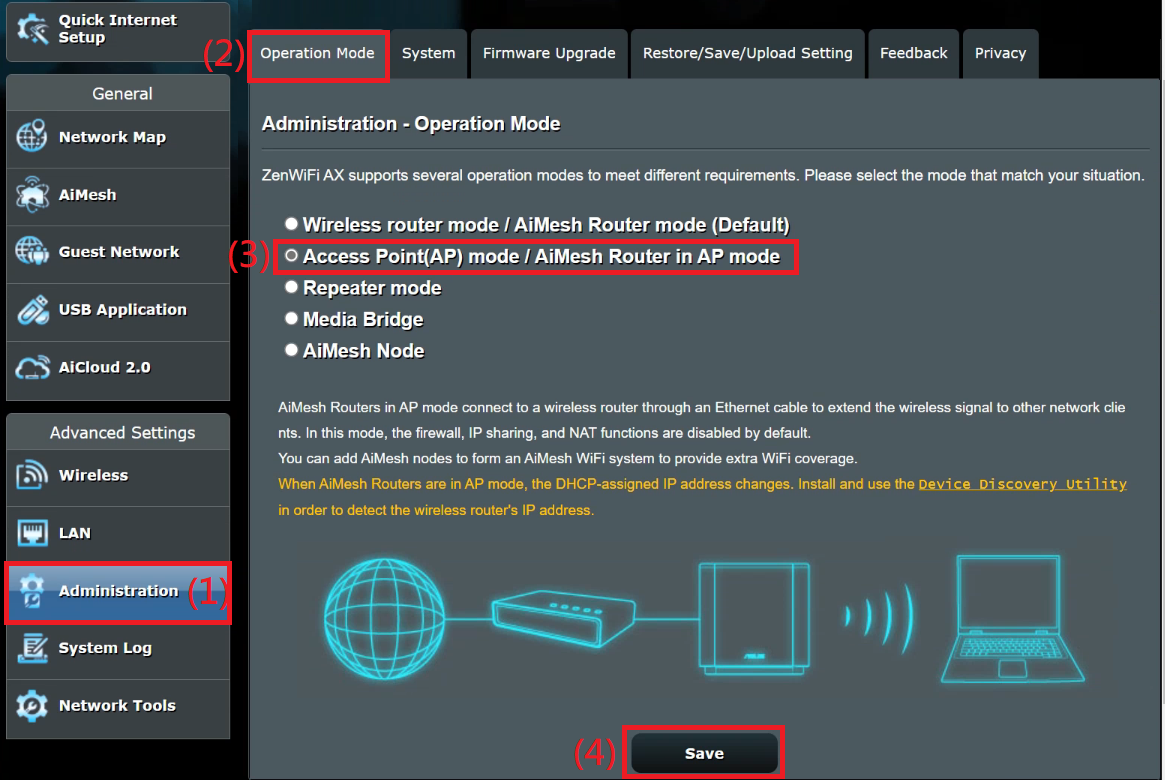
Majority of the FW features (non-wireless) will be lost in AP mode, including AI Protection Pro, QoS, Traffic Analyzer, VPN, Firewall, etc.

Wireless features including AIMesh will still work in AP mode.

Reference: Asus FAQ for AP mode. You can compare the Web UI in AP mode with that in the wireless router mode.
https://www.asus.com/sg/support/faq/1015009/
83cddd43-b0c5-4211-8e0a-44522f0f134f.png


For those who do not have Asus router, you can look at the demo Web UI here.
https://demoui.asus.com/
 
Last edited:

heckz2000

Senior Member
Joined
Jun 17, 2006
Messages
1,396
Reaction score
0
Nice. Thanks a lot for the updates.

It is good to know that you can use the)Realtek RTL8157 based USB 3.2 to 5Gbps adapter to get very good 5Gbps results.

Last time there were quite some USB 3 to 5Gbps adapter but almost all of them were EOLed by the vendor.

678488339.png
Hi boss, what is your setup for 5gb.

Currently on 1gb plan with ONT and Asus AX86U.
I will be upgrading to 5gb enhanced plan at 49.90 too.
NLT coming on 12 Aug while Singtel coming on 19 Aug.
 

xiaofan

High Supremacy Member
Joined
Sep 16, 2018
Messages
32,166
Reaction score
9,306
Hi boss, what is your setup for 5gb.

Currently on 1gb plan with ONT and Asus AX86U.
I will be upgrading to 5gb enhanced plan at 49.90 too.
NLT coming on 12 Aug while Singtel coming on 19 Aug.

What is your budget and planed setup?

I have posted some setup examples in Page 4 and Page 5 in this thread.
 
Last edited:

jeremysv

Master Member
Joined
Sep 17, 2001
Messages
4,058
Reaction score
0
Hi Xiaofan and fellow forummers,

Using the following setup reference from Xiaofan earlier posts
ZTE XGS-PON ONR 10G LAN port 5-- Direct to laptop in living room
ZTE XGS-PON ONR 1G LAN port 1 -- Singtel AX5400 router (automatically run in AP mode)
ZTE XGS-PON ONR 1G LAN port 2 -- wired device
ZTE XGS-PON ONR 1G LAN port 3 -- wired device

Do you think if its possible to request for the ONR bridging on port 5 10G LAN to be done by the Singtel team when they perform the installation?

Any other recommended settings to be config on the Singtel AX5400 router?

I tried to read up but wasn't able to fully understand the benefits of ONR bridging except it's not resulting in a double NAT.


Appreciate the time taken to reply.


Thanks & Regards,

Jeremy
 

xiaofan

High Supremacy Member
Joined
Sep 16, 2018
Messages
32,166
Reaction score
9,306
Singtel installer just came and install the 5Gbps service. He saw my Asus routers and ZTE router. Then he did not bother to install the bundled free Singtel AX5400 wireless router (Arcadyan WG660242-ST) any more.

He just asked me whether I have 10G capable device to try the speedtest. I told him yes. So I used my 2021 Acer laptop (Intel Core i5-1135G7, 16GB/512GB) with IOcrest USB 4 to 10G NIC to carry out two tests. The results are good.

fe00f2e4-a6c8-4a0a-b024-b325e63757fa.png


d56ddbe5-482c-4409-a643-81623f82bf6b.png
 
Last edited:
Important Forum Advisory Note
This forum is moderated by volunteer moderators who will react only to members' feedback on posts. Moderators are not employees or representatives of HWZ. Forum members and moderators are responsible for their own posts.

Please refer to our Community Guidelines and Standards, Terms of Service and Member T&Cs for more information.
Top