[SUMMARY] Gaming Monitor Recommendations

transparos

Senior Member
Joined
Dec 5, 2012
Messages
1,414
Reaction score
226
fan noise is totally not a concern for the aw3423dwf.

only for those first batch of aw3423dw with first day launch firmware. those had a very strong fan curve that make it noisy

for me i only can hear my pc fans. cant even hear the fan on my DWF.
Oh.. because if u see a few post before this, got ppl comment dwf noisy to them. So just wanna get a feel as I also intending to buy one.

Wait for sales and also them to solve the hdr 1st
 

GotBetrayed

Arch-Supremacy Member
Joined
Mar 27, 2013
Messages
13,381
Reaction score
3,133
Oh.. because if u see a few post before this, got ppl comment dwf noisy to them. So just wanna get a feel as I also intending to buy one.

Wait for sales and also them to solve the hdr 1st
The pricing I paid is quite good for QD oled monitor $1310. Can’t hear the fan noise from where I’m seating.
 

watzup_ken

High Supremacy Member
Joined
Nov 21, 2003
Messages
25,672
Reaction score
2,123
Any different or factor between HDR10 / HDR10+ / HDR400 of the three in your opinion?

Is HDR 400 not capable of HDR10?
I am a little confused. I thought HDR10 and 10+ is a type of HDR format. HDR400 is more about brightness of the display. I don't think they are the same metric.
 

Phen8210

High Supremacy Member
Joined
Jul 29, 2011
Messages
28,883
Reaction score
8,214
Any different or factor between HDR10 / HDR10+ / HDR400 of the three in your opinion?

Is HDR 400 not capable of HDR10?

I think the most important for having a good HDR experience is having OLED.

Because HDR just doesn't look clean on an IPS display. On OLED, you can clearly distinguish the gimmick HDR content and real HDR content due to individual pixel lighting.

HDR10/HDR10+ are HDR standards of video, and HDR10+ content allows the video to output higher brightness. Some displays will say HDR10+ certified, I am not exactly sure what requirements need to be met, to be certified, but I would think that it must be decent.

Is HDR 400 not capable of HDR10?

Using HDR400 display to playback HDR10+ content is akin to playing 1080p video on a 480p screen but relative to the quantity of light at the point of the video.
 

Yongkit

Supremacy Member
Joined
Oct 9, 2015
Messages
5,787
Reaction score
2,424
I am a little confused. I thought HDR10 and 10+ is a type of HDR format. HDR400 is more about brightness of the display. I don't think they are the same metric.
that is my understanding too, but instead it sound confuse me too when someone say HDR10 better than HDR400 :unsure:
 

Phen8210

High Supremacy Member
Joined
Jul 29, 2011
Messages
28,883
Reaction score
8,214
that is my understanding too, but instead it sound confuse me too when someone say HDR10 better than HDR400 :unsure:

That's just one part. It's also used as a display certification for displays.

For example, your pixel 7 pro has got a HDR10+ certification as well.

1677077463220.png
 

royfrosty

High Supremacy Member
Joined
Jul 23, 2009
Messages
27,471
Reaction score
1,335
Any different or factor between HDR10 / HDR10+ / HDR400 of the three in your opinion?

Is HDR 400 not capable of HDR10?

I hope I explain correctly. Cause HDR certification is not as simple as it looks.

My understanding is HDR10/10+ is not VESA certified standard for monitors. It is a standard for Format. Like HDR10/10+ or Dolby Vision. HDR10/10+ refers to certain coverage of DCI-P3 space for the content. Dolby Vision is unlikely gonna be fully utilised on a conventional tv other than a cinema screen. Even if phones do have Dolby Vision Format, it is unlikely you get to see every colour gamut space covered.

To get HDR10/10+ format shown right. You need HDR certified display. Which now comes to the VESA certified standards.

HDR400/500/600/1000/1200/1400 all these are VESA certified standard. They need to meet the corresponding nits of brightness and meet certain levels of DCI P3 coverage.

Iirc HDR400 is really basic. The manufacturer just need to meet 400nits of brightness. Can even ignore the colour accuracy. As long as it can display HDR and call it a day. Lol

HDR500 onwards is where things gets serious. In order for the monitor to go brighter. They need local dimming. And it does not mean that you have local dimming you can ignore colour gamut coverage. You still need to fall in line with more than 90% DCI P3 coverage at 500nits.

To me when I first gotten my g3223q. Hdr600 I already felt piercing bright. And this is coming from a not so good HDR monitor lol. There are some monitors that goes HDR1000 with mini leds. And these are the true sunglasses content lol.

But then again, Oled comes in for monitors. It is time to see where the Vesa certification gonna be for all the OLED monitors in the future to come.
 

Yongkit

Supremacy Member
Joined
Oct 9, 2015
Messages
5,787
Reaction score
2,424
I believe the so call TRUE HDR mainly distinguised by "local dimming zone" & "brighness" above SDR standard be it 400(true black)/600/1000 available on the display, it does not really matter OLED or IPS as currently mentioned by all those youtuber or reviewer.

https://displayhdr.org/general/not-...s a performance spec,the GPU and the display.
If I undertand correctly based on the above article in summary:

1. "HDR10" is the standard/protocol used by all HDR devices with at least color bit depth 10 bit

2. Some HDR display devices support more than one protocol (i.e. HDR10+, DolbyVision, and Hybrid Log Gamma (HLG)), but majority HDR capable devices are 99% support HDR10.

3. "HDR 400 / 600 / 1000" means that a display would be able to handle an HDR signal, and some part of the screen would be able to achieve 400 / 600 / 1000 cd/m2 or higher luminance levels.

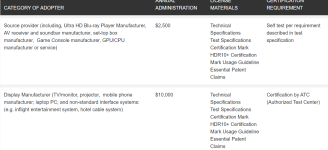
4. VESA "DisplayHDR" is a performance spec that measures different aspects of HDR quality, including luminance, color gamut, bit depth and rise time example with specifc logo below:

1677081431069.png1677081499784.png
1677081585369.png

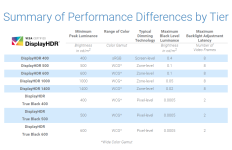
and below was VESA "DisplayHDR" performance standard requirement.

1677081651355.png

For example both Alienware AW3423DW & AW3423DWF OLED monitor are"DisplayHDR 400 True Black" certified with capabilities to display 1000 nits brighness but not to confused with DisplayHDR1000 standard.

Example of "DisplayHDR 1000" would be LG 32GQ950-B NANO IPS 4k monitor.

So basically any monitor display capable of HDR10 are with maximum 10bit color depth, together with minimum brightness of 400 nits & above ( HDR10 can't go past 10-bit color depth): (reference link: https://www.rtings.com/tv/learn/hdr10-vs-dolby-vision) nevertheless do take note this is not taken into considereation of monitor refresh rate.

along the way I believe this HDR term can be really confusing and i hope my understanding above can provide some idea how it come about to HDR certification for monitor.

As such its always best to understand the full specification of the monitor for our next purchase if HDR play an important role for buying decision.

Do correct me if any of my point above is incorrect.

 
Last edited:

hyperfuse

Master Member
Joined
Sep 23, 2019
Messages
4,332
Reaction score
1,813
Yup 1.3k is good price. But while I am waiting for x3d cpu out to build a new rig. So monitor I am buying After that
Capture.jpg


No one can beat my price. hahaha. don't need ask me how. Confidential. =x
 

hyperfuse

Master Member
Joined
Sep 23, 2019
Messages
4,332
Reaction score
1,813
Good to know, think I’m gonna throw away my box lol.
i still keep mine. because i am the type that change monitor pretty often haha..

so if next time there is a 240hz 34inch ultrawide, i might change to that and sell away the DWF
 

GotBetrayed

Arch-Supremacy Member
Joined
Mar 27, 2013
Messages
13,381
Reaction score
3,133
i still keep mine. because i am the type that change monitor pretty often haha..

so if next time there is a 240hz 34inch ultrawide, i might change to that and sell away the DWF
Haha I see. Most likely will be keeping this monitor for at least 2-3 years. See got what in the future then upgrade. Money not easy to earn
 

watzup_ken

High Supremacy Member
Joined
Nov 21, 2003
Messages
25,672
Reaction score
2,123
HDR500 onwards is where things gets serious. In order for the monitor to go brighter. They need local dimming. And it does not mean that you have local dimming you can ignore colour gamut coverage. You still need to fall in line with more than 90% DCI P3 coverage at 500nits.

To me when I first gotten my g3223q. Hdr600 I already felt piercing bright. And this is coming from a not so good HDR monitor lol. There are some monitors that goes HDR1000 with mini leds. And these are the true sunglasses content lol.

But then again, Oled comes in for monitors. It is time to see where the Vesa certification gonna be for all the OLED monitors in the future to come.
I think HDR 500 onwards don't always require local dimming. At least I think there are HDR600 rated monitors out there that are edge lit. Perhaps they deploy some limited numbers of zones, that I am not sure. But at high brightness and no local dimming, black is going to look grey.
 

watzup_ken

High Supremacy Member
Joined
Nov 21, 2003
Messages
25,672
Reaction score
2,123
I believe the so call TRUE HDR mainly distinguised by "local dimming zone" & "brighness" above SDR standard be it 400(true black)/600/1000 available on the display, it does not really matter OLED or IPS as currently mentioned by all those youtuber or reviewer.

https://displayhdr.org/general/not-...s a performance spec,the GPU and the display.
If I undertand correctly based on the above article in summary:

1. "HDR10" is the standard/protocol used by all HDR devices with at least color bit depth 10 bit

2. Some HDR display devices support more than one protocol (i.e. HDR10+, DolbyVision, and Hybrid Log Gamma (HLG)), but majority HDR capable devices are 99% support HDR10.

3. "HDR 400 / 600 / 1000" means that a display would be able to handle an HDR signal, and some part of the screen would be able to achieve 400 / 600 / 1000 cd/m2 or higher luminance levels.

4. VESA "DisplayHDR" is a performance spec that measures different aspects of HDR quality, including luminance, color gamut, bit depth and rise time example with specifc logo below:

View attachment 38292View attachment 38293
View attachment 38294

and below was VESA "DisplayHDR" performance standard requirement.

View attachment 38295

For example both Alienware AW3423DW & AW3423DWF OLED monitor are"DisplayHDR 400 True Black" certified with capabilities to display 1000 nits brighness but not to confused with DisplayHDR1000 standard.

Example of "DisplayHDR 1000" would be LG 32GQ950-B NANO IPS 4k monitor.

So basically any monitor display capable of HDR10 are with maximum 10bit color depth, together with minimum brightness of 400 nits & above ( HDR10 can't go past 10-bit color depth): (reference link: https://www.rtings.com/tv/learn/hdr10-vs-dolby-vision) nevertheless do take note this is not taken into considereation of monitor refresh rate.

along the way I believe this HDR term can be really confusing and i hope my understanding above can provide some idea how it come about to HDR certification for monitor.

As such its always best to understand the full specification of the monitor for our next purchase if HDR play an important role for buying decision.

Do correct me if any of my point above is incorrect.
After awhile, I don't bother myself with all these confusing metrics. :ROFLMAO: There are too many different metrics, and whatever the manufacturer tells you, you need to take with a grain of salt. For example, Samsung advertised their miniLED 49 inch with a whooping HDR2000 , which (1) does not exist, and, (2) the display does not get anywhere near 2000 nits. The InnoCN 27M2V is rated HDR1000, but most reviews point to a peak brightness of about 700+ nits. In any case, 700 nits is already blinding to me. The scene where Kratos walkthrough the portal door for fast travel, there is a momentary white screen which was so bright,it caught me by surprise the first time I played the game on the 27M2V. I cannot imagine how bright it will be with 1000 nits and more for indoor usage.
 

Yongkit

Supremacy Member
Joined
Oct 9, 2015
Messages
5,787
Reaction score
2,424
After awhile, I don't bother myself with all these confusing metrics. :ROFLMAO: There are too many different metrics, and whatever the manufacturer tells you, you need to take with a grain of salt. For example, Samsung advertised their miniLED 49 inch with a whooping HDR2000 , which (1) does not exist, and, (2) the display does not get anywhere near 2000 nits. The InnoCN 27M2V is rated HDR1000, but most reviews point to a peak brightness of about 700+ nits. In any case, 700 nits is already blinding to me. The scene where Kratos walkthrough the portal door for fast travel, there is a momentary white screen which was so bright,it caught me by surprise the first time I played the game on the 27M2V. I cannot imagine how bright it will be with 1000 nits and more for indoor usage.
you need a good sunglasses 😎 I am looking for one too now 🤣
 
Important Forum Advisory Note
This forum is moderated by volunteer moderators who will react only to members' feedback on posts. Moderators are not employees or representatives of HWZ. Forum members and moderators are responsible for their own posts.

Please refer to our Community Guidelines and Standards, Terms of Service and Member T&Cs for more information.
Top