

Thunderbolt 4 vs USB4

stanlawj

Arch-Supremacy Member
Joined
Jul 11, 2021
Messages
10,003
Reaction score
5,395
I'm putting these findings online to save you time. I got stuck with a laptop and Ipad with no HDMI output, and went through helluva lot of trouble figuring out the messy state of USB4 and TB4 now.
USB4 is also now becoming more prevalent, due to the introduction of Qualcomm Snapdragon X Elite laptops that only support USB4.

I was confused regarding Thunderbolt 4 and USB4, since both support 40Gbps. What are the differences? I thought USB4 is inferior, but actually, it isn't, depending on the use case.

0. Thunderbolt 4 host laptops also support USB4 but not USB3.2x2 (20Gbps), but USB4 host laptops do not support Thunderbolt 4, only supports Thunderbolt 3 or lower including USB3.2x2 (20Gbps).

1. Thunderbolt 4 device/cable that is certified can be checked here, so you can weed out fake brands. USB4 is not certified, hence cheaper but you'll have a harder time weeding out fakes (i.e. not performant ones). Manufacturers can claim USB4 but support only a subset of features (check the label fineprints, and reviews. Good example: claim to be USB4 port on laptop, but does not support TB3, only USB3.2x2).

2. Thunderbolt 4 supports multimonitors and multimonitor through daisy-chaining. USB4 20Gbps support single display stream, USB4 40Gbps supports dual display streams, all cannot daisy chain. But if the label is just USB4, you have no idea what speed it is, and hence you need to really test it out by connecting a monitor to know. But if the USB4 controller does support displayport tunneling, the DP version can* reach up to 2.1 (*manufacturer needs to explicitly state it), whereas Thunderbolt 4 only supports maximum DP2.0. But again, USB4 can claim any DP version, and you still have to test it to find out.

3. Thunderbolt 4 supports peer-to-peer networking with a single TB4 cable. USB4 does not. (Nobody needs this)
Intel Thunderbolt Share: https://www.intel.com/content/www/u...c-to-pc-with-thunderbolt-share.html#gs.ao15b1
Mac's Thunderbolt Bridge:
https://www.macworld.com/article/2334829/intel-thunderbolt-share-app-mac-sharing-mode.html

4. Thunderbolt 4 supports daisy-chaining up to 6 devices. USB4 does not. (Few need this, maybe road warriors. Most laptops have 2 TB4 ports, hence just use the other TB4 port).

So in the end, looks like USB4 is the winner in price to performance, if you can avoid wasting money on fakes by checking actual reviews first. TB4 has a lot more features, but do they matter to you? The price of Thunderbolt 4 docks and hubs is double to triple the price of USB4 docks or hubs.

https://en.wikipedia.org/wiki/USB4
https://en.wikipedia.org/wiki/Thunderbolt_(interface)

Do you really need the full TB4 or USB4? To be honest, I am now just using a USB3.2 Gen2 hub with DP1.4 tunneling (Ugreen 15978) for external display 4k30 support and 1Gbps networking, no fast external SSD storage required.
 
Last edited:
stanlawj

Arch-Supremacy Member
Joined
Jul 11, 2021
Messages
10,003
Reaction score
5,395
Master list of USB4 & TB4 docks/hubs is here:
https://dancharblog.wordpress.com/2024/01/01/usb4-tb4-docks/


Brand-name USB4 hub or docks available on the market now:
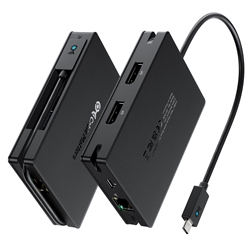
So far, I only found two valid USB4 hub: Cablematters, Ugreen. But only Cablematters is available, whereas the Ugreen USB4 hub cannot be bought from anywhere. So I will omit the Ugreen one.

Cablematters USB4 hub (attached cable)
1577.webp

https://www.cablematters.com/pc-1577-180-usb4-mini-dock-with-dual-displayport.aspx
https://www.cablematters.com/pc-1641-180-usb4-mini-dock-with-dual-hdmi.aspx

USB4 docks do exist, for example:
Plugable USB4 dock (detachable cable, very expensive, priced like a true TB4 dock although it isn't TB4):
1_ori_dfa77d71-ee4c-4605-a721-7ed7fbd2f662.jpg

https://plugable.com/products/ud-4vpd
Review:
https://dancharblog.wordpress.com/2023/11/01/plugable-ud-4vpd-usb4-desktop-dock-review/

(You can find TB4 docks like Club-3D CSV-1582 at the same price).
 
Last edited:

ragnarok95

Senior Moderator
Senior Moderator
Joined
Mar 9, 2004
Messages
125,155
Reaction score
6,386
TB4/USB4 cables under 1m, usually are passive cable but they can do 40Gbps. Anywhere from 0.8M to 2m and you see a certified TB4/USB4 mean it's a active cable.
 

keenklee

Arch-Supremacy Member
Joined
Sep 9, 2000
Messages
19,365
Reaction score
6,773
I'm putting these findings online to save you time. I got stuck with a laptop and Ipad with no HDMI output, and went through helluva lot of trouble figuring out the messy state of USB4 and TB4 now.
USB4 is also now becoming more prevalent, due to the introduction of Qualcomm Snapdragon X Elite laptops that only support USB4.

I was confused regarding Thunderbolt 4 and USB4, since both support 40Gbps. What are the differences? I thought USB4 is inferior, but actually, it isn't, depending on the use case.

1. Thunderbolt 4 device/cable that is certified can be checked here, so you can weed out fake brands. USB4 is not certified, hence cheaper but you'll have a harder time weeding out fakes (i.e. not performant ones). Manufacturers can claim USB4 but support only a subset of features (check the label fineprints, and reviews).

2. Thunderbolt 4 supports multimonitors and multimonitor through daisy-chaining. USB4 20Gbps support single display stream, USB4 40Gbps supports dual display streams, all cannot daisy chain. But if the label is just USB4, you have no idea what speed it is, and hence you need to really test it out by connecting a monitor to know. But if the USB4 controller does support displayport tunneling, the DP version can* reach up to 2.1 (*manufacturer needs to explicitly state it), whereas Thunderbolt 4 only supports maximum DP2.0. But again, USB4 can claim any DP version, and you still have to test it to find out.

3. Thunderbolt 4 supports peer-to-peer networking with a single TB4 cable. USB4 does not. (Nobody needs this)
Intel Thunderbolt Share: https://www.intel.com/content/www/u...c-to-pc-with-thunderbolt-share.html#gs.ao15b1
Mac's Thunderbolt Bridge:
https://www.macworld.com/article/2334829/intel-thunderbolt-share-app-mac-sharing-mode.html

4. Thunderbolt 4 supports daisy-chaining up to 6 devices. USB4 does not. (Few need this, maybe road warriors. Most laptops have 2 TB4 ports, hence just use the other TB4 port).

So in the end, looks like USB4 is the winner in price to performance, if you can avoid wasting money on fakes by checking actual reviews first. TB4 has a lot more features, but do they matter to you? The price of Thunderbolt 4 docks and hubs is double to triple the price of USB4 docks or hubs.

https://en.wikipedia.org/wiki/USB4
https://en.wikipedia.org/wiki/Thunderbolt_(interface)

Do you really need the full TB4 or USB4? To be honest, I am now just using a USB3.2 Gen2 hub with DP1.4 tunneling (Ugreen 15978) for external display 4k30 support and 1Gbps networking, no fast external SSD storage required.
IMHO.
I am not bothered by it because I have no devices that need those speed yet.
I am connected to a simple UGREEN ‎90568 Hub ( not dock ) to support Gb ethernet and HDMI. My laptop got HDMI as well but I require 2 display.
 

stanlawj

Arch-Supremacy Member
Joined
Jul 11, 2021
Messages
10,003
Reaction score
5,395
IMHO.
I am not bothered by it because I have no devices that need those speed yet.
I am connected to a simple UGREEN ‎90568 Hub ( not dock ) to support Gb ethernet and HDMI. My laptop got HDMI as well but I require 2 display.
It matters for those who use external SSD storage as working drive, instead of using the internal SSD. Some ppl save money by buying the smallest internal storage especially on Apple devices and working off external SSD storage. Also some ppl's project is too large to fit into the internal SSD storage.

Which leads to the following conclusion? For external storage SSD, buy USB4 Thunderbolt 3 storage devices. This is supported by both USB4 and Thunderbolt 4 host laptops.
Someone can correct me if I am wrong.
 
Last edited:

keenklee

Arch-Supremacy Member
Joined
Sep 9, 2000
Messages
19,365
Reaction score
6,773
It matters for those who use external SSD storage as working drive, instead of using the internal SSD. Some ppl save money by buying the smallest internal storage especially on Apple devices and working off external SSD storage. Also some ppl's project is too large to fit into the internal SSD storage.

Which leads to the following conclusion? For external storage SSD, buy USB4 Thunderbolt 3 storage devices. This is supported by both USB4 and Thunderbolt 4 host laptops.
Someone can correct me if I am wrong.
IMHO.
I asked AI, between USB4 and Thunderbolt 4,

USB 4 minimum speed is 20Gbps and maximum speed is 40Gbps where as TB4 both are 40Gbps
Dual monitor support is optional for USB4 but required on TB4.
Docking station support is optional for USB4 but required on TB4.

I will buy TB4 instead. However it all boils down to price vs performance.
Like some folks like to use NAS on 1Gbe - I prefer use HDD Docks - faster transfer and because some data are not too critical.
 

stanlawj

Arch-Supremacy Member
Joined
Jul 11, 2021
Messages
10,003
Reaction score
5,395
IMHO.
I asked AI, between USB4 and Thunderbolt 4,

USB 4 minimum speed is 20Gbps and maximum speed is 40Gbps where as TB4 both are 40Gbps
Dual monitor support is optional for USB4 but required on TB4.
Docking station support is optional for USB4 but required on TB4.

I will buy TB4 instead. However it all boils down to price vs performance.
Like some folks like to use NAS on 1Gbe - I prefer use HDD Docks - faster transfer and because some data are not too critical.
TB4 devices are not supported by USB4-only hosts, eg Qualcomm and AMD laptops.
 

xiaofan

High Supremacy Member
Joined
Sep 16, 2018
Messages
35,611
Reaction score
11,978
It matters for those who use external SSD storage as working drive, instead of using the internal SSD. Some ppl save money by buying the smallest internal storage especially on Apple devices and working off external SSD storage. Also some ppl's project is too large to fit into the internal SSD storage.

Which leads to the following conclusion? For external storage SSD, buy USB4 Thunderbolt 3 storage devices. This is supported by both USB4 and Thunderbolt 4 host laptops.
Someone can correct me if I am wrong.

I think this is correct.
https://www.anandtech.com/show/21187/adata-owc-stardom-usb4-external-ssd-enclosures

We will start to see cheaper USB 4.0 SSDs and enclosures.
 

xiaofan

High Supremacy Member
Joined
Sep 16, 2018
Messages
35,611
Reaction score
11,978
This one from Ugreen claims to be a USB 4.0 dock but I think it is not really true USB 4.0 dock. It does support one 8K 60Hz display though. But the USB ports on the dock are only rated at USB 3.2 10Gbps. Price is not expensive at RMB 379 (without USB PD) and 399 (with USB PD 100W)

【淘宝】https://m.tb.cn/h.g60SiKsjceapmCO?tk=4Hc83awblim CZ0016 「绿联USB4拓展坞扩展8k60hz投屏HDMI转换器转接头4k144显示器投影仪typec雷电配件适用笔记本电脑手机」
点击链接直接打开 或者 淘宝搜索直接打开

Ugreen TB4 dock is much more expensive at RMB 1899.

【淘宝】https://m.tb.cn/h.g60RYrMlZ4alk06?tk=K7sl3awYGiW CZ3460 「绿联雷电4桌面拓展坞Typec转HDMI投屏DP显示器扩展四屏异显转接USB分线器网口多接口功能配件适用电脑笔记本」
点击链接直接打开 或者 淘宝搜索直接打开
 

xiaofan

High Supremacy Member
Joined
Sep 16, 2018
Messages
35,611
Reaction score
11,978

xiaofan

High Supremacy Member
Joined
Sep 16, 2018
Messages
35,611
Reaction score
11,978
One thing I will be of great interests is cheaper USB 4.0 to 5Gbps and 10Gbps network adapters, because the offering of 5Gbps/10Gbps plans. Those who use laptop, Mac and Mini PCs may not have the option to add a PCI-E bases 5G/10G NIC.

There were some USB 3 to 5Gbps network adapters but most of them have been EOLed.

For 10Gbps, current offers are mostly TB3 to 10G adapters and they are usually expensive.
 

trenzterra

Arch-Supremacy Member
Joined
Sep 18, 2002
Messages
20,628
Reaction score
516
USB 4 should be compatible with TB4 devices... Not just TB3

actually P2P networking could be useful... Back when USB was only 480mbps I used to transfer stuff between computers using a gbe cable haha
 

xiaofan

High Supremacy Member
Joined
Sep 16, 2018
Messages
35,611
Reaction score
11,978
USB 4 should be compatible with TB4 devices... Not just TB3

actually P2P networking could be useful... Back when USB was only 480mbps I used to transfer stuff between computers using a gbe cable haha

I think it is the other way around. As mentioned earlier by stanlawj: TB4 devices are not supported by USB4 only hosts, like the Qualcomm laptops and some AMD laptops.
TB4 devices are not supported by USB4-only hosts, eg Qualcomm and AMD laptops.

TB4 host is compatible with TB3 and USB4 devices.

USB 4 host may or may not be compatible with TB4/TB3 devices.

As for TB4-to-TB4 networking, I think it is useful for some use cases.
 

stanlawj

Arch-Supremacy Member
Joined
Jul 11, 2021
Messages
10,003
Reaction score
5,395
USB 4 should be compatible with TB4 devices... Not just TB3

actually P2P networking could be useful... Back when USB was only 480mbps I used to transfer stuff between computers using a gbe cable haha
USB4 hosts doesn't guarantee anything. It's not certified. It's just a claim.
You have to check and verify through reviews or hands-on testing of the laptop.

Some USB4 host (laptop) ports supports Thunderbolt, by right at least TB3, which means attached TB4 devices will fall back to TB3, but since it is not certified, you still do not know if it is implemented with that TB support. Just wait for laptop & hub/dock reviewers to check and test all the USB4 ports to verify the Thunderbolt spec and throughput. Even in USB3.2 Gen 2 hub reviews, there are many complaints about hubs not meeting the USB3.2 gen 2 speeds.

Example Framework AMD laptop with USB4: https://community.frame.work/t/usb4-and-thunderbolt-on-amd/30771
 
Last edited:
Important Forum Advisory Note
This forum is moderated by volunteer moderators who will react only to members' feedback on posts. Moderators are not employees or representatives of HWZ Forums. Forum members and moderators are responsible for their own posts. Please refer to our Community Guidelines and Standards and Terms and Conditions for more information.
Top