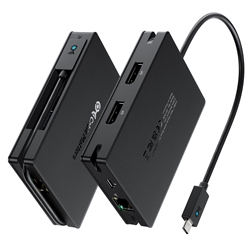
I'm putting these findings online to save you time. I got stuck with a laptop and Ipad with no HDMI output, and went through helluva lot of trouble figuring out the messy state of USB4 and TB4 now.
USB4 is also now becoming more prevalent, due to the introduction of Qualcomm Snapdragon X Elite laptops that only support USB4.
I was confused regarding Thunderbolt 4 and USB4, since both support 40Gbps. What are the differences? I thought USB4 is inferior, but actually, it isn't, depending on the use case.
0. Thunderbolt 4 host laptops also support USB4 but not USB3.2x2 (20Gbps), but USB4 host laptops do not support Thunderbolt 4, only supports Thunderbolt 3 or lower including USB3.2x2 (20Gbps).
1. Thunderbolt 4 device/cable that is certified can be checked here, so you can weed out fake brands. USB4 is not certified, hence cheaper but you'll have a harder time weeding out fakes (i.e. not performant ones). Manufacturers can claim USB4 but support only a subset of features (check the label fineprints, and reviews. Good example: claim to be USB4 port on laptop, but does not support TB3, only USB3.2x2).
2. Thunderbolt 4 supports multimonitors and multimonitor through daisy-chaining. USB4 20Gbps support single display stream, USB4 40Gbps supports dual display streams, all cannot daisy chain. But if the label is just USB4, you have no idea what speed it is, and hence you need to really test it out by connecting a monitor to know. But if the USB4 controller does support displayport tunneling, the DP version can* reach up to 2.1 (*manufacturer needs to explicitly state it), whereas Thunderbolt 4 only supports maximum DP2.0. But again, USB4 can claim any DP version, and you still have to test it to find out.
3. Thunderbolt 4 supports peer-to-peer networking with a single TB4 cable. USB4 does not. (Nobody needs this)
Intel Thunderbolt Share: https://www.intel.com/content/www/u...c-to-pc-with-thunderbolt-share.html#gs.ao15b1
Mac's Thunderbolt Bridge:
https://www.macworld.com/article/2334829/intel-thunderbolt-share-app-mac-sharing-mode.html
4. Thunderbolt 4 supports daisy-chaining up to 6 devices. USB4 does not. (Few need this, maybe road warriors. Most laptops have 2 TB4 ports, hence just use the other TB4 port).
So in the end, looks like USB4 is the winner in price to performance, if you can avoid wasting money on fakes by checking actual reviews first. TB4 has a lot more features, but do they matter to you? The price of Thunderbolt 4 docks and hubs is double to triple the price of USB4 docks or hubs.
https://en.wikipedia.org/wiki/USB4
https://en.wikipedia.org/wiki/Thunderbolt_(interface)
Do you really need the full TB4 or USB4? To be honest, I am now just using a USB3.2 Gen2 hub with DP1.4 tunneling (Ugreen 15978) for external display 4k30 support and 1Gbps networking, no fast external SSD storage required.
USB4 is also now becoming more prevalent, due to the introduction of Qualcomm Snapdragon X Elite laptops that only support USB4.
I was confused regarding Thunderbolt 4 and USB4, since both support 40Gbps. What are the differences? I thought USB4 is inferior, but actually, it isn't, depending on the use case.
0. Thunderbolt 4 host laptops also support USB4 but not USB3.2x2 (20Gbps), but USB4 host laptops do not support Thunderbolt 4, only supports Thunderbolt 3 or lower including USB3.2x2 (20Gbps).
1. Thunderbolt 4 device/cable that is certified can be checked here, so you can weed out fake brands. USB4 is not certified, hence cheaper but you'll have a harder time weeding out fakes (i.e. not performant ones). Manufacturers can claim USB4 but support only a subset of features (check the label fineprints, and reviews. Good example: claim to be USB4 port on laptop, but does not support TB3, only USB3.2x2).
2. Thunderbolt 4 supports multimonitors and multimonitor through daisy-chaining. USB4 20Gbps support single display stream, USB4 40Gbps supports dual display streams, all cannot daisy chain. But if the label is just USB4, you have no idea what speed it is, and hence you need to really test it out by connecting a monitor to know. But if the USB4 controller does support displayport tunneling, the DP version can* reach up to 2.1 (*manufacturer needs to explicitly state it), whereas Thunderbolt 4 only supports maximum DP2.0. But again, USB4 can claim any DP version, and you still have to test it to find out.
3. Thunderbolt 4 supports peer-to-peer networking with a single TB4 cable. USB4 does not. (Nobody needs this)
Intel Thunderbolt Share: https://www.intel.com/content/www/u...c-to-pc-with-thunderbolt-share.html#gs.ao15b1
Mac's Thunderbolt Bridge:
https://www.macworld.com/article/2334829/intel-thunderbolt-share-app-mac-sharing-mode.html
4. Thunderbolt 4 supports daisy-chaining up to 6 devices. USB4 does not. (Few need this, maybe road warriors. Most laptops have 2 TB4 ports, hence just use the other TB4 port).
So in the end, looks like USB4 is the winner in price to performance, if you can avoid wasting money on fakes by checking actual reviews first. TB4 has a lot more features, but do they matter to you? The price of Thunderbolt 4 docks and hubs is double to triple the price of USB4 docks or hubs.
https://en.wikipedia.org/wiki/USB4
https://en.wikipedia.org/wiki/Thunderbolt_(interface)
Do you really need the full TB4 or USB4? To be honest, I am now just using a USB3.2 Gen2 hub with DP1.4 tunneling (Ugreen 15978) for external display 4k30 support and 1Gbps networking, no fast external SSD storage required.
Last edited: