TP-Link EB810v - Quick overview

xiaofan

High Supremacy Member
Joined
Sep 16, 2018
Messages
32,267
Reaction score
9,356
I’m getting a second 810v for my bedroom with a lan port. Can the ONT support the wired backhaul through the lan point at the DBbox?

No. ONT has only single 10G LAN port working.

ONT - EB810v in DB box, second EB810 in the bedroom.
 

gavthang

Member
Joined
Feb 4, 2008
Messages
312
Reaction score
8
Finally got the device password... may i know how to setup the remote management of my home network? I can login to my home network when i am at home within the wifi coverage. I can't login when i at in office... Please advise on the setup for remote access. Thanks in advance.
 

mac34mac

Junior Member
Joined
Nov 23, 2010
Messages
76
Reaction score
9
Is the new firmware available for real? Or it's another hoax again? :ROFLMAO:
I still don't see any new firmware available on my EB810v.
 

sean29

Senior Member
Joined
Jun 13, 2011
Messages
535
Reaction score
156
Is the new firmware available for real? Or it's another hoax again? :ROFLMAO:
I still don't see any new firmware available on my EB810v.
It's real, it bricked my router. Grr... Switched back to my trusted Google wifi while waiting for starhub to send tech over.
 

mac34mac

Junior Member
Joined
Nov 23, 2010
Messages
76
Reaction score
9
Looks like you have no LAN ports in the rooms and you are using wireless backhaul. TP-Link Archer BE230 is a low end dual band EasyMesh node and it is a poor addition to the EB810v, if you need to use wireless backhaul. But if you have LAN ports in the rooms, then maybe there are better setup using Ethernet Backhaul to suit your needs.

Anyway, since you have already bought the Archer BE230, please post the floor plan (with details of the locations of the ONT, main EB810v and Archer BE230, as well as LAN ports in the rooms if any) to see how to optimize the placement of the main EB810v and the Archer BE230 node.

In general, the mesh node needs to have good connection to the main nodes, two walls in between the main node and the mesh node is a NO-NO. Best is to have line of sight with no walls in between. Depending on the situation, you may be okay with one wall in between the main node and mesh node.

Often people think that it is good to put the wireless mesh node (or repeater) to the room with weak signal, that is usually the worst choice.

More about TP-Link EasyMesh
https://dongknows.com/tp-link-easymesh-wi-fi-system-review/

More about Mesh system in general
https://dongknows.com/mesh-wi-fi-system-explained/

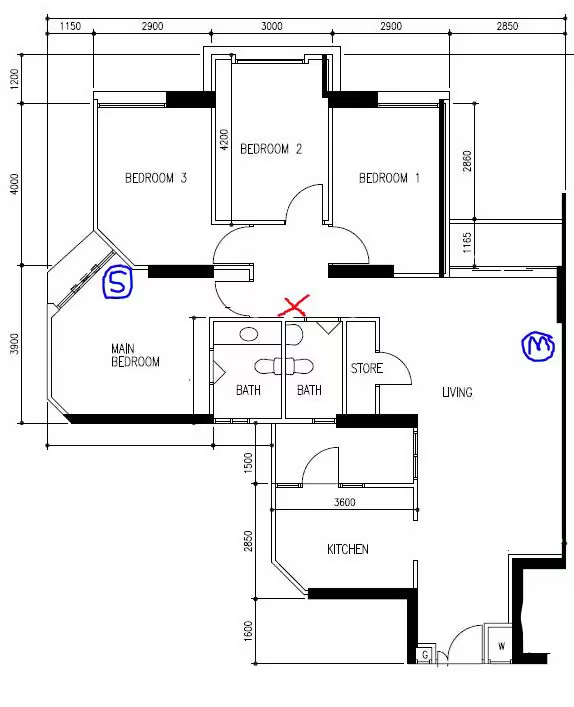
Hi @xiaofan , Thanks for the reply. Here I post the floor plan. Main EB810v and ONT are the M location. I have LAN port at S location hence I put BE230 there. I'm using ethernet backhaul. With this setup I have good coverage at most location except Bedroom 2 where totally can't connect to WIFI at EB810v, it can barely connect to 5Ghz band on Be230. Another problem is I use guest WIFI for IoT device, so IoT device in Bedroom 2 can't connect to Guest wifi on EB810v.
I'm thinking to put a TP-Link Wifi Range extender at X location. As this location has line of sight with EB810v. Will it work with EB810v? Any low cost TP-Link Wifi Range extender to recommend?
Another option is to put a cheap wifi router (maybe Archer AX72) at location X. But I can only use wireless backhaul for easymesh as there is no LAN port there.
What is your suggestion?
 
Last edited:

xiaofan

High Supremacy Member
Joined
Sep 16, 2018
Messages
32,267
Reaction score
9,356
Hi
@xiaofan
, Thanks for the reply. Here I post the floor plan. Main EB810v and ONT are the M location. I have LAN port at S location hence I put BE230 there. I'm using ethernet backhaul. With this setup I have good coverage at most location except Bedroom 2 where totally can't connect to WIFI at EB810v, it can barely connect to 5Ghz band on Be230. Another problem is I use guest WIFI for IoT device, so IoT device in Bedroom 2 can't connect to Guest wifi on EB810v.
I'm thinking to put a TP-Link Wifi Range extender at X location. As this location has line of sight with EB810v. Will it work with EB810v? Any low cost TP-Link Wifi Range extender to recommend?
Another option is to put a cheap wifi router (maybe Archer AX72) at location X. But I can only use wireless backhaul for easymesh as there is no LAN port there.
What is your suggestion?
temp-Image-N3-Wx-Zf.avif

Just use the Archer AX72 then. It is about S$80 BNIB from Carousell and better than all the TP-Link Range Extenders.
 

zapmonster

Junior Member
Joined
Mar 4, 2005
Messages
22
Reaction score
0
Hi,

TIA for the reply.

1. Can the tp-link eb810v ethernet backhauled with a BE230? All my devices are non-wifi7 currently. so just a cheap way to extend the coverage for short term first.
 

mac34mac

Junior Member
Joined
Nov 23, 2010
Messages
76
Reaction score
9
Just use the Archer AX72 then. It is about S$80 BNIB from Carousell and better than all the TP-Link Range Extenders.
Thanks for the reply. I actually prefer to use Range Extender as it won't take up space on that location. Also based on what I found on TP-Link website, Range Extender support Guest Wifi too.
 

mac34mac

Junior Member
Joined
Nov 23, 2010
Messages
76
Reaction score
9
Hi,

TIA for the reply.

1. Can the tp-link eb810v ethernet backhauled with a BE230? All my devices are non-wifi7 currently. so just a cheap way to extend the coverage for short term first.
Yes it can. I'm using ethernet backhaul on these 2 devices.
But please be aware that TP-link easymesh is still a half baked solution with some limitations. You can refer to the previous few posts from xiaofan.

https://forums.hardwarezone.com.sg/threads/tp-link-eb810v-quick-overview.7014586/post-153735276
 

kimsix

Arch-Supremacy Member
Joined
Jan 6, 2009
Messages
19,136
Reaction score
9,185
How is it that everyone got firmware update but nothing on my EB810v? Do I need to restart?

seems phased roll outs, why SH should yolo release the OTA.

Someone reported it brick their router, won’t be surprised SH now pause rollout!
 

sean29

Senior Member
Joined
Jun 13, 2011
Messages
535
Reaction score
156
So mine was confirmed bricked by the hub trooper. Replaced with a new unit, let's see how stable this new unit is now.
 
Important Forum Advisory Note
This forum is moderated by volunteer moderators who will react only to members' feedback on posts. Moderators are not employees or representatives of HWZ. Forum members and moderators are responsible for their own posts.

Please refer to our Community Guidelines and Standards, Terms of Service and Member T&Cs for more information.
Top