Wall mount / bracket question

kediraksith

Banned
Joined
Dec 24, 2004
Messages
12,280
Reaction score
605
okay this is a little urgent as tomorrow im off, i would like someone to help me buy mount and help me mount my 32 inch TV in my room... possible in such short notice? just PM me your price bah, we arrange from there....
 

Inzaghi09

Senior Member
Joined
Mar 28, 2001
Messages
603
Reaction score
0
Wall mount (swivel)

hi.. not sure if this is the right section to post this...

i've got a samsung 40" lcd tv recently, planning to do wall mount, but i'd prefer to have a mount that allows me to swivel the tv... anyone has any idea where i can get those and how much will it cost?

i saw one at challenger but its selling at $199, seems kinda exp to me... anyone who can provide me with any suggestions?

thanks! :D
 

junhize

Member
Joined
Jul 28, 2005
Messages
355
Reaction score
0
Tilting Wall mounting bracket

Anyone noes where can I get those tilting wallmount at good price which includes installation? Passby Sim Lim last week and saw a shop selling wallmount but didn't have time to ask them whether the price include mounting
 

josesong

Senior Member
Joined
Sep 1, 2008
Messages
806
Reaction score
4
Hi guy wat If u mount the tv to the wall but not in the stud isit ok? Btw my tv is 32 inch thanks
 
Last edited:

josesong

Senior Member
Joined
Sep 1, 2008
Messages
806
Reaction score
4
Oh thanks sorry about it, i explain it again, i have already mount the wall bracket and hang my 32 inch on the wall, just tat because when i read the forum right they say need to find the studs on the wall then drill to it and for my i did not do so, so is it ok ? thanks
 

josesong

Senior Member
Joined
Sep 1, 2008
Messages
806
Reaction score
4
hahas quite hard to explian... erm i have wall mount the bracket and the tv onto the wall. but i did not locate the stud or wood in the wall when i drill. is it safe ?
 

dkuan88

Senior Member
Joined
Jan 9, 2002
Messages
627
Reaction score
0
hahas quite hard to explian... erm i have wall mount the bracket and the tv onto the wall. but i did not locate the stud or wood in the wall when i drill. is it safe ?

Do you mean u did not insert the stud in the hole & screw directly into the wall?

Or yrs is a wooden feature wall & you mount on the thinner portion?

In such case it may loosen after sometime due to cleaning or adjusting the tilting angle.

Better play safe & do it properly.
 

josesong

Senior Member
Joined
Sep 1, 2008
Messages
806
Reaction score
4
Erm I did put the metal stud in the wall... Cause I read the how to guide on the 1page they say need to locate the studs in the wall... But I did put the metal stud in the wall then I screw in it thx
 

faruk55

Master Member
Joined
Aug 22, 2001
Messages
3,864
Reaction score
0
Have you ever done such drilling and screwing before? If not.. better seek someone who has some experience in this field before yout tv comes tumbling down.
 

simic

Member
Joined
Mar 14, 2001
Messages
448
Reaction score
0
stud is only for those installation onto soft partition board, the kind u find in your office.

if you mount directly onto the soft board, the tv will fall out, hence, you need to find the studs, i.e. the strong parts with reinforcement.

if you are doing it at home, most likely its concert wall or brick wall. anywhere also can.
 

josesong

Senior Member
Joined
Sep 1, 2008
Messages
806
Reaction score
4
Hi the stud is it the metal piece tat u need to put in the wall and then when u screw on it the stud will expand and fit onto the wall ? thanks
 

Al-Jay

Senior Member
Joined
Dec 6, 2007
Messages
2,169
Reaction score
0
Hi the stud is it the metal piece tat u need to put in the wall and then when u screw on it the stud will expand and fit onto the wall ? thanks
There is a stud finder device in the market that detect stud in the wall. It basically try to detect metal on the spot that one is interested to drill into.

Without the finder, sometimes, u might hit a stud. And u cannot drill further.

The metal or plastic hole expander: Metal for heavy object like tv, baby yao lan, boxing bag. Plastics expander for photo frame, book shelf, etc.
 
Last edited:

josesong

Senior Member
Joined
Sep 1, 2008
Messages
806
Reaction score
4
Hi so if I nv found the stud in the wall and I use the metal expander provided by sanus also can right?
 

BlueDragon82

Junior Member
Joined
Dec 24, 2001
Messages
62
Reaction score
0
LCD TV wall mount brackets

Hi

I would like to know those free LCD TV wall mount brackets given by shop that you purchase from fair or sales they are not flexible ?
Meaning you can't move up , down and 360 degree left and right "?
Any options to upgrade ?
Any pictures to share ?
 

petetherock

Moderator
Moderator
Joined
Jan 7, 2007
Messages
10,148
Reaction score
1,107
Mounting it yourself

http://www.audioholics.com/tweaks/do-it-yourself-diy-topics/hdtv-installation

Step 1: Determine where to drill the holes
The idea here is you don't want to see the drywall holes after the job is done. Use a stud finder to ensure you are drilling into drywall and not a stud. I drilled the top hole behind where the TV was to be installed as close to the wall connections as possible. I then lined up where the second hole was to be drilled which was a few feet below the top of the dresser. It's important to vertically line these holes as closely as possible to ensure the easiest cable routing. Once these positions are marked off, drill the holes. You can finish off the job by inserting 2" grommet holes in them for a cleaner install and to ensure less chances of drywall chipping or flaking over time. Since these holes are not accessible in my situation and the cables won't be moving, I elected not to take this added step.

Step 2: Determine the necessary cable lengths
The component cable from the wallplate to my display needed to be only one foot long. Since my FIOS box was 3 feet below the TV, I figured I needed roughly 2.5 times that length to provide enough slack to route the cabling behind the drywall. I needed custom cable lengths to really ensure a clean install. Make sure you don't skimp on cable length here as it's never a good idea to keep cables under tension that are too short for the job. I used all Planet Waves DIY self terminating cables. I can't recommend these cables highly enough not just because they are easy to cut to desired length and terminate, but because they work well and are very flexible and easy to route behind drywall or tight spaces. When routing the HDMI cable, be extra careful to not bend the cable or damage the connector during the routing. I used Cables to Go Sonicwave HDMI cable which comes with a protective covering shell on each connector which is a great idea to leave on while running the cable through the drywall.

Step 3: Run your cables
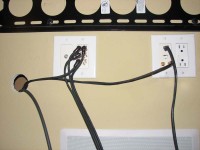
Before giving into the urge of running your FIOS box power cable through the drywall, I am obligated to point out that it’s a safety violation. It is recommended that you instead route the FIOS power cable to another outlet location near the floor using an extension cord if necessary. I ran each cable through the drywall one at a time with a finger in the bottom hole to catch the falling cable. After all of the cables were routed, I made my connections to the wall plate and FIOS box. I used bread ties to group the cables and provide strain relief.
If the holes in the wall bother you, you can either use grommet holes like I recommended earlier, or re-install the drywall pieces you cut out by slicing them to make room for the cables and then using drywall spackle to rejoin the pieces back to the wall. You can finish off by using some touch up paint to better conceal the repair though unless you have people looking behind your dresser or TV, they will never notice these holes.

Step 4: Hang your HDTV
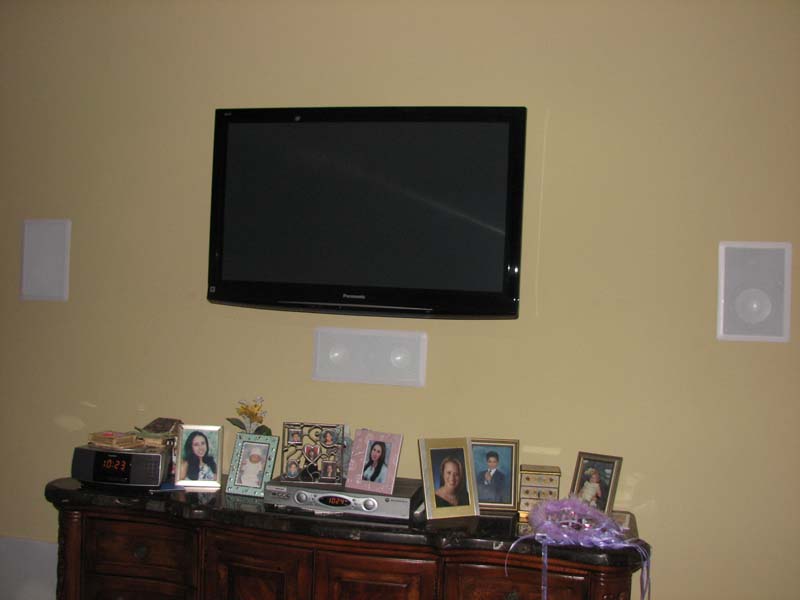
Personally I like to use swivel mounts not only because they provide more flexible viewing options but also because you can pivot the TV up while making all of your A/V connections. I used a few more bread ties to secure the heavy power cord from my Panasonic Plasma to ensure it would never come loose and dangle below the display.
So there you have it. A clean HDTV install with no visible cables, or box speakers or subwoofers in the room. The wife is happy with the aesthetics and I am thrilled with the sonics and video aspects of the system. Now if only we could both stay awake to watch a full featured film lying down in bed.

 
Important Forum Advisory Note
This forum is moderated by volunteer moderators who will react only to members' feedback on posts. Moderators are not employees or representatives of HWZ Forums. Forum members and moderators are responsible for their own posts. Please refer to our Community Guidelines and Standards and Terms and Conditions for more information.
Top