
Xiaomi Android TV Box discussion II [consolidated]

Status
Not open for further replies.

pcuser123

Master Member
Joined
Dec 21, 2007
Messages
3,845
Reaction score
454
I wanted to leave VPN as "always on" so I no need to always turn it on/off when streaming.

You can always set up 2 routers, one as the usual main router and the other, connected as a sub to the main router or secondary router permanently connected to VPN. This way it will not interfere with the normal function of your NAS and the TV box etc can be connected permanently to VPN..
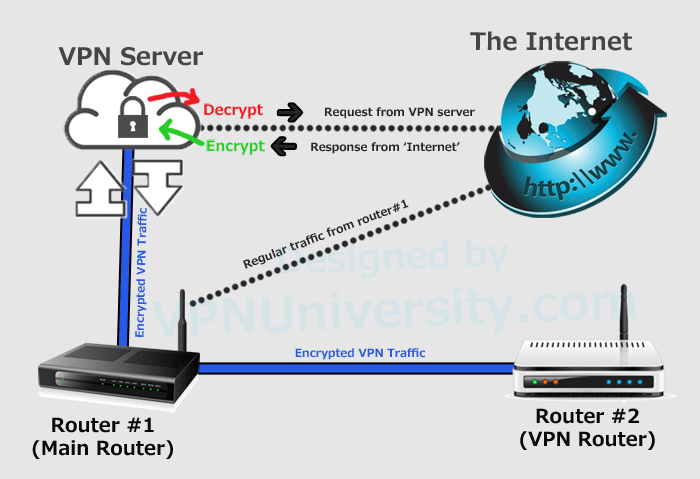
Dual-router-diagram.png

https://www.vpnuniversity.com/routers/setup-two-routers-with-dedicated-vpn-router
 
Last edited:

pcuser123

Master Member
Joined
Dec 21, 2007
Messages
3,845
Reaction score
454
I'm Keen to buy a MDZ-22-AB. Is it advisable to get warranty or non warranty sets? Please recommend where to buy from in SG? Prefer to buy directly rather than online. Please also advise what's a reasonable price to pay for warranty, non warranty sets? Thanks all.

Sent from Nextbit ROBIN using GAGT

Better get it directly from Xiaomi Global store

https://www.lazada.sg/products/2018..._0&laz_token=a8f9b46c0eecdb7529767019175fd104

Although it is priced at $83/- and offered only 6 months' international seller warranty, it also offers a 5% discount during the promotion. So the set actually cost around $78/=.. Most importantly, one will have a peace of mind as it is directly from Xiaomi Global Store.
 

xiaofan

High Supremacy Member
Joined
Sep 16, 2018
Messages
32,146
Reaction score
9,299
Better get it directly from Xiaomi Global store

https://www.lazada.sg/products/2018..._0&laz_token=a8f9b46c0eecdb7529767019175fd104

Although it is priced at $83/- and offered only 6 months' international seller warranty, it also offers a 5% discount during the promotion. So the set actually cost around $78/=.. Most importantly, one will have a peace of mind as it is directly from Xiaomi Global Store.

This is not the official Xiaomi Store.

Xiaomi Lazada Store is just called Xiaomi, it has "LazMall" and "Flagship Store" label.

This "Xiaomi Global Store" used to be called "Xiaomi Online" and it is a good store to buy Mi Box S and older Mi Box Global version. It has promotions from time to time as well.

But it is not an official Xiaomi Store. If you check the question answers you can see the answers are provided by "Xiaomi Online".

Mi Box S is at S$83 with 5% discount. 6 months seller warranty.
But sometimes the cost goes down to S$75 with S$5 coupon.
https://s.lazada.sg/s.e2in

Mi Box Global version is at S$66 with 5% off voucher which is a good buy. But no warranty if you care about that.
https://s.lazada.sg/s.eWBv

Edit to add: now this "Xiaomi Global Store" also has "LazMall" and "Flagship Store" label, maybe they do have some relationship with official Xiaomi company.
 
Last edited:

pcuser123

Master Member
Joined
Dec 21, 2007
Messages
3,845
Reaction score
454
This is not the official Xiaomi Store.

Xiaomi Lazada Store is just called Xiaomi, it has "LazMall" and "Flagship Store" label.

This "Xiaomi Global Store" used to be called "Xiaomi Online" and it is a good store to buy Mi Box S and older Mi Box Global version. It has promotions from time to time as well.

But it is not an official Xiaomi Store. If you check the question answers you can see the answers are provided by "Xiaomi Online".

Mi Box S is at S$83 with 5% discount. 6 months seller warranty.
But sometimes the cost goes down to S$75 with S$5 coupon.
https://s.lazada.sg/s.e2in

Mi Box Global version is at S$66 with 5% off voucher which is a good buy. But no warranty if you care about that.
https://s.lazada.sg/s.eWBv

Edit to add: now this "Xiaomi Global Store" also has "LazMall" and "Flagship Store" label, maybe they do have some relationship with official Xiaomi company.

The "Xiaomi Online Store" is still around.. there is also one called "Mi Global Store". They are all stationed in Shenzheng under different company names and privately owned, authorised to sell Xiaomi Products.. As to why it is not called "Mi Global Store" and called "Xiaomi Global Store", something to ask them..but if they can put in under "flagshp", it must have the authorisation.. Anyway, this store in Lazada has over 1,000 transaction and about 90% positive..
Presently, the market is short of Mibox S and many are selling at higher price even in Carousell.
 

xiaofan

High Supremacy Member
Joined
Sep 16, 2018
Messages
32,146
Reaction score
9,299
Thank you, I've tried that but also face the same issue. I believe it is Toggle "cast" not properly developed. After casting, after the Toggle page, it will just be a black screen and it will just show loading on the phone. Hopefully Toggle will come out with an android tv version. :s13:

Report says that you can side load the Toggle app on Nvidia Shield TV. So you may want to try it on Mi Box S as well.

https://forums.hardwarezone.com.sg/home-theatre-audiophiles-13/nvidia-shield-tv-5066924-52.html

In the next page of that thread it is also mentioned some difference between Mi Box and Nvidia Shield TV.

https://forums.hardwarezone.com.sg/home-theatre-audiophiles-13/nvidia-shield-tv-5066924-53.html

- Unable to chromecast to Mibox in standby mode, Shield is ok.

This issue is still present in Mi Box S.
https://www.techhive.com/article/3319662/xiaomi-mi-box-s-review.html

The Mi Box S has a major problem with its Chromecast implementation, though: When the box is asleep, it becomes unavailable for casting. If you want to launch a video from your phone, you must first grab the Mi Box’s remote and turn the device on, which defeats the purpose of using your phone as the remote in the first place.
 
Last edited:

pcuser123

Master Member
Joined
Dec 21, 2007
Messages
3,845
Reaction score
454
...
Mi Box Global version is at S$66 with 5% off voucher which is a good buy. But no warranty if you care about that.
https://s.lazada.sg/s.eWBv

There isn't great deal of difference between the S version (MDZ-22-AB) and the Global Version (MDZ-16-AB) except that the 22-AB is a newer version that comes with Android TV 8.1 and bluetooth 4.1. The 16-AB is a older version that comes with Android TV 6.0 which can be upgraded to 8.0. It has only bluetooth 4.0. Someone tried side loaded to 8.1 on 16-AB but found it not stable. If you have already have the 16-AB, not much point upgrade to 22-AB.. but if you are buying new, good to go for 22-AB version just for a few dollars more..
 

xiaofan

High Supremacy Member
Joined
Sep 16, 2018
Messages
32,146
Reaction score
9,299
There isn't great deal of difference between the S version (MDZ-22-AB) and the Global Version (MDZ-16-AB) except that the 22-AB is a newer version that comes with Android TV 8.1 and bluetooth 4.1. The 16-AB is a older version that comes with Android TV 6.0 which can be upgraded to 8.0. It has only bluetooth 4.0. Someone tried side loaded to 8.1 on 16-AB but found it not stable. If you have already have the 16-AB, not much point upgrade to 22-AB.. but if you are buying new, good to go for 22-AB version just for a few dollars more..

I agree that there are no real benefits for existing users to upgrade from MDZ-16-AB to MDZ-22-AB.

As for new users, then it is up to individual to decide the cost difference of S$17 (or S$16.15) and 6 months of seller warranty are worth paying. Personally I agree with you to pay a bit more for the new model. But I understand that others may go for the lower cost MDZ-16-AB.
 

gregory_choo

Arch-Supremacy Member
Joined
Nov 7, 2007
Messages
10,512
Reaction score
1,984
I agree that there are no real benefits for existing users to upgrade from MDZ-16-AB to MDZ-22-AB.

As for new users, then it is up to individual to decide the cost difference of S$17 (or S$16.15) and 6 months of seller warranty are worth paying. Personally I agree with you to pay a bit more for the new model. But I understand that others may go for the lower cost MDZ-16-AB.

Xiaomi brought down the speed of SOC from 2.0GHz to 1.5GHz.

So if you want faster response, get the older model, i.e. MDZ-16-AB.

Most likely xiaomi thinks that 1.5GHz is good enough for most people.
 

xiaofan

High Supremacy Member
Joined
Sep 16, 2018
Messages
32,146
Reaction score
9,299
Xiaomi brought down the speed of SOC from 2.0GHz to 1.5GHz.

So if you want faster response, get the older model, i.e. MDZ-16-AB.

Most likely xiaomi thinks that 1.5GHz is good enough for most people.

Interesting.
MDZ-16-AB spec does say up to 2.0GHz.
https://www.mi.com/global/mibox/

MDZ-22-AB spec does not mention CPU frequency.
https://www.mi.com/us/mi-box-s/specs/
But various websites do mention 1.5GHz.

Have you run CPU-Z or AIDA64 to confirm the 2.0GHz frequency in the MDZ-16-AB? I read in some sites saying S905X is usually running at 1.5GHz and not 2.0GHz due to thermal concerns.
 
Last edited:

gregory_choo

Arch-Supremacy Member
Joined
Nov 7, 2007
Messages
10,512
Reaction score
1,984
Interesting.
MDZ-16-AB spec does say up to 2.0GHz.
https://www.mi.com/global/mibox/

MDZ-22-AB spec does not mention CPU frequency.
https://www.mi.com/us/mi-box-s/specs/
But various websites do mention 1.5GHz.

Have you run CPU-Z or AIDA64 to confirm the 2.0GHz frequency in the MDZ-16-AB? I read in some sites saying S905X is usually running at 1.5GHz and not 2.0GHz due to thermal concerns.

yes, my mdz-16-ab's top speed is 2.0GHz. mibox3 is using a special version of s905x.

aututu score is 38000 , 6000 higher than mibox s.
 

xiaofan

High Supremacy Member
Joined
Sep 16, 2018
Messages
32,146
Reaction score
9,299
yes, my mdz-16-ab's top speed is 2.0GHz. mibox3 is using a special version of s905x.

aututu score is 38000 , 6000 higher than mibox s.

Thanks. I also found early reviews showing the CPU frequency is fact up to 2GHz in the MDZ-16-AB, matching Xiaomi website.

When you say 38,000 Antutu score, is that with Android 6.0 or with Android 8.0? It could be Oreo upgrade slows down MDZ-16-AB.

Chigz Tech chart also shows MDZ-16-AB Oreo has a bit higher Antutu score of 35670 vs 34581 of Mi Box S but the difference is not big. MDZ-22-AB has actually higher multi core Geekbench score of 1800 vs 1759 of MDZ-16-AB. So I feel a bit strange when I saw your number.
http://bit.ly/2l5j54G

I also checked the Antutu score of another review of Mi Box S from TV Box Stop and it is at 34905, similar to Chigz Tech report. The Geekbench score is also higher than 1800.
Ref:
https://youtu.be/NQaLj4d7170

Edit to add:
Another ref for the older review of MDZ-16-AB. Indeed the CPU is clocked at 2GHz but the Antutu score is at 36151, higher than the Oreo version but still much less than 38000.
https://www.cnx-software.com/2017/02/12/xiaomi-mi-box-us-android-tv-tv-box-review/

So all in all you are right the older MDZ-16-AB is a bit faster due to higher CPU frequency, but the overall performance difference is not that big.
 
Last edited:

xiaofan

High Supremacy Member
Joined
Sep 16, 2018
Messages
32,146
Reaction score
9,299

pcuser123

Master Member
Joined
Dec 21, 2007
Messages
3,845
Reaction score
454
You can try to use Toggle and cast to TV. But there are reports of Toggle not working with Mi Box S built-in Chromecast function, even though it works fine with Standalone dongle.

You can get a DVB-T2 Tuner and Antenna as well if your main goal is local TV channels.
Ref: https://forums.hardwarezone.com.sg/...dvb-t2-consolidated-thread-vi-5968170-15.html

I am still waiting for my MiBox S to come.. if Toggle cannot work on Mibox S, it may be because Toggle does not have an APK version that can work on Android TV.. If that is the case, all Android TVs including LG, Sony and other that works on Android TV will have trouble.. not to mention those Chinese TVs and TV boxes that does not have Android TV OS..

The other workaround is to use Cloud TV although it may not give full support all the time.. can also try KODI as someone has an addon for mediacorp.. just google, "kodi mediacorp addon"
 

xiaofan

High Supremacy Member
Joined
Sep 16, 2018
Messages
32,146
Reaction score
9,299
I am still waiting for my MiBox S to come.. if Toggle cannot work on Mibox S, it may be because Toggle does not have an APK version that can work on Android TV.. If that is the case, all Android TVs including LG, Sony and other that works on Android TV will have trouble.. not to mention those Chinese TVs and TV boxes that does not have Android TV OS..

The other workaround is to use Cloud TV although it may not give full support all the time.. can also try KODI as someone has an addon for mediacorp.. just google, "kodi mediacorp addon"

Due to change in Toggle, Kodi SG!TV addon and Cloud TV free version no longer work.

You can try to sideload the Mobile Version of Toggle apk to see if that works. Previous report.mentioned in the Nvidia Shield TV thread says it could work. You can try that.

For my generic Android TV boxes running mobile version of Android, Toggle does work despite some warning messages. But there are reports that Toggle does not work on some boxes.

LG (Web OS) and Samsung smart TV (Turn) are not using Android, they have working Toggle apps.
 
Last edited:

pcuser123

Master Member
Joined
Dec 21, 2007
Messages
3,845
Reaction score
454
Due to change in Toggle, Kodi SG!TV addon and Cloud TV free version no longer work.

You can try to sideload the Mobile Version of Toggle apk to see if that works. Previous report.mentioned in the Nvidia Shield TV thread says it could work. You can try that.

For my generic Android TV boxes running mobile version of Android, Toggle does work despite some warning messages. But there are reports that Toggle does not work on some boxes.

LG (Web OS) and Samsung smart TV (Turn) are not using Android, they have working Toggle apps.

Cloud TV definitely work as it is not on toggle.. Just tried it on my MiTV running patchwall OS..will try it on KODI when I have the time..
 

xiaofan

High Supremacy Member
Joined
Sep 16, 2018
Messages
32,146
Reaction score
9,299
Cloud TV definitely work as it is not on toggle.. Just tried it on my MiTV running patchwall OS..will try it on KODI when I have the time..

Cloud TV paid version and mod version are said to work. The free version did not work last time I tried it. But it could change as well since I have not tried it for a while. If it works, that is good to know.
 

pcuser123

Master Member
Joined
Dec 21, 2007
Messages
3,845
Reaction score
454
Cloud TV paid version and mod version are said to work. The free version did not work last time I tried it. But it could change as well since I have not tried it for a while. If it works, that is good to know.

I am using the free version. you can try it again
 

pcuser123

Master Member
Joined
Dec 21, 2007
Messages
3,845
Reaction score
454
I am using the free version. you can try it again

Must add that not all channels, only channel 8, CNA, Channel 5 and U Channel.. Channel 8 seem to working all the time, not the other channels...If you use a hacked version, can watch free but they will block it every now and then..
 

xiaofan

High Supremacy Member
Joined
Sep 16, 2018
Messages
32,146
Reaction score
9,299
Must add that not all channels, only channel 8, CNA, Channel 5 and U Channel.. Channel 8 seem to working all the time, not the other channels...If you use a hacked version, can watch free but they will block it every now and then..

Thanks for the info. Then this is the same as some links floating on the web. Basically it is said that Toggle has implemented some encryption features on the HD version but SD version links are still available. Toggle puts limitations on these links to mostly local content only. So often CH5 will not work when broadcasting western content. CHU will not work when showing Korean dramas, etc.

Edit to add: just tried and indeed the free version is at least partially working now. CH8 and CNA are working now. CHU is not working now. CH5 is also not working now.
 
Last edited:
Status
Not open for further replies.
Important Forum Advisory Note
This forum is moderated by volunteer moderators who will react only to members' feedback on posts. Moderators are not employees or representatives of HWZ. Forum members and moderators are responsible for their own posts.

Please refer to our Community Guidelines and Standards, Terms of Service and Member T&Cs for more information.
Top