Xiaomi Box Android TV Box

Status
Not open for further replies.

whoooo

Supremacy Member
Joined
Jun 1, 2004
Messages
6,285
Reaction score
233
Tried that but didn't work.
The only configuration that works for me is turning on hardware decoding but uncheck all 3 options under it.
Even turning off software decoding doesn't work. Strange...

And when it work, high bitrate mkv file will stutters.

I am pretty sure the xiaomi box 3 has much better hardware than the raspberry Pi. Hopefully some patches come out soon to utilise the full power of the mi box3.

Try Gotham 13.1 seem that the code was patch and I got no problem with Libstagefright enable but do crash to Dashboard when NediaCodec is check
 

restore_xp

Junior Member
Joined
Jun 13, 2005
Messages
70
Reaction score
6
strange pro by right already support 4k TV.. sorry if this sound rude maybe u run antutu to check if you got the real pro? where u bought it from?

Confirm is xiaomi pro becos no lan port. Able to set the box res 4k2k but screen flicker. All my tv hdmi ports are ver 2.0 but xiaomi is only 1.4
 

Blindaim

Master Member
Joined
Aug 27, 2007
Messages
4,580
Reaction score
970
Confirm is xiaomi pro becos no lan port. Able to set the box res 4k2k but screen flicker. All my tv hdmi ports are ver 2.0 but xiaomi is only 1.4

What hz or fps did you choose? HDMI 1.4 only support 4k @30fps
 

restore_xp

Junior Member
Joined
Jun 13, 2005
Messages
70
Reaction score
6
What hz or fps did you choose? HDMI 1.4 only support 4k @30fps
I had used both 24hz and 30hz with the original xiaomi cable and belkin, both also flicker. Will try out with the hdmi2.0 cable that I had order on ebay once it arrived
 
Last edited:

lingcw

Senior Member
Joined
Apr 22, 2000
Messages
1,684
Reaction score
0
Try Gotham 13.1 seem that the code was patch and I got no problem with Libstagefright enable but do crash to Dashboard when NediaCodec is check

I already stumbled on this solution... but still, thanks for sharing.
A note to those who want to try this, make sure you reboot your XBMC after applying this setting.

Anyway, the high bitrate mkv seems to play smooth now. Hurray!
 

gregory_choo

Arch-Supremacy Member
Joined
Nov 7, 2007
Messages
10,521
Reaction score
1,987
I already stumbled on this solution... but still, thanks for sharing.
A note to those who want to try this, make sure you reboot your XBMC after applying this setting.

Anyway, the high bitrate mkv seems to play smooth now. Hurray!

Interesting.

What is the resolution for your high bitrate mkv? how about the FPS achieved?

These info can be viewed by airmouse keyboard or by connect a usb keyboard to the box. Press "o" while playing video will bring up these parameter.

what are the figure for drop frame, skip frame, resolution, fps?
 

Kiddream

Master Member
Joined
Feb 21, 2004
Messages
2,864
Reaction score
139
Hi all, saw the Mibox Pro selling for $129 on qoo10. That's an option to add $10 to change the menu from Chinese to English. Is this necessary or we can do it ourselves?
 

Salapi

Arch-Supremacy Member
Joined
Nov 20, 2008
Messages
20,242
Reaction score
0
Hi all, saw the Mibox Pro selling for $129 on qoo10. That's an option to add $10 to change the menu from Chinese to English. Is this necessary or we can do it ourselves?

i think it's just changing the language setting only? :crazy:
 

Kiddream

Master Member
Joined
Feb 21, 2004
Messages
2,864
Reaction score
139
Or does it mean flashing another firmware? Also, it says that the box comes jail broken out of the box. Is it the same as root? Abit confused here.
 

whoooo

Supremacy Member
Joined
Jun 1, 2004
Messages
6,285
Reaction score
233
Or does it mean flashing another firmware? Also, it says that the box comes jail broken out of the box. Is it the same as root? Abit confused here.

Just seller hyping. Install tuzi launcher to get english menu other than xbmc all other app will be in Chinese. Dont get con by yjr seller
 

lingcw

Senior Member
Joined
Apr 22, 2000
Messages
1,684
Reaction score
0
Interesting.

What is the resolution for your high bitrate mkv? how about the FPS achieved?

These info can be viewed by airmouse keyboard or by connect a usb keyboard to the box. Press "o" while playing video will bring up these parameter.

what are the figure for drop frame, skip frame, resolution, fps?

I left the Mibox3 at my gf place to let her watch world cup.
Will check during the weekend when I am there.

Btw, there is an iOS xbmc remote app. It comes with a keyboard mode.
Any idea if pressing 'o' on this soft keyboard will bring up the parameters you mention above?
My gf don't have a usb keyboard.
 

gooojeeee

Senior Member
Joined
Jul 12, 2012
Messages
1,987
Reaction score
0
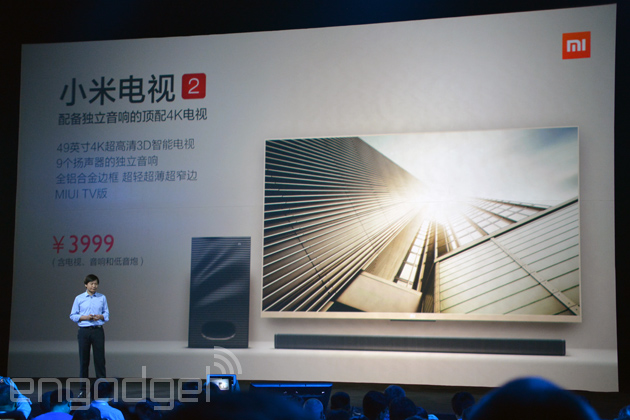
good price and spec
xiaomi-mi-tv-2-2014.jpg
 
Status
Not open for further replies.
Important Forum Advisory Note
This forum is moderated by volunteer moderators who will react only to members' feedback on posts. Moderators are not employees or representatives of HWZ. Forum members and moderators are responsible for their own posts.

Please refer to our Community Guidelines and Standards, Terms of Service and Member T&Cs for more information.
Top