Xiaomi Mi Max - Part 2

kelvinti

Arch-Supremacy Member
Joined
Jan 5, 2009
Messages
23,271
Reaction score
2,435
Dragonguy, can we do the reverse? From global rom to Eu rom via the updater option too? Or we really do the unlock and follow the flashing?

Sent from Xiaomi MI MAX using GAGT

Let me answer you on behalf on dragonboy if you don't mind I kepoh...:D

Cannot!

EU rom and Global rom uses different Recovery images. You cannot "cross" update in this way!

Rom Update via Updater must stay within the "same family of rom"!

EU rom and Global rom are 2 different families.

It is just like between Global rom and China rom, as well as between Stable rom and Developer rom.
 

DRAGONGUY

Senior Member
Joined
Jan 1, 2000
Messages
1,798
Reaction score
0
Let me answer you on behalf on dragonboy if you don't mind I kepoh...:D

Cannot!

EU rom and Global rom uses different Recovery images. You cannot "cross" update in this way!

Rom Update via Updater must stay within the "same family of rom"!

EU rom and Global rom are 2 different families.

It is just like between Global rom and China rom, as well as between Stable rom and Developer rom.

Thanks! Saved me typing. :s13:

Yes, bro kelvinti is right. Stick with the same family of roms, cannot mix and match.

However, last time in the earlier part possible with official global beta and stable, but i guess now not possible due to different version of Android.
 

acura_ra

Member
Joined
Jun 17, 2008
Messages
494
Reaction score
145
Finally got my mi max!

The rom is: MIUI Global 8.0 | Stable | 8.0.3.0 (MBDMIDG). is this global rom? Thanks!
 

kelvinti

Arch-Supremacy Member
Joined
Jan 5, 2009
Messages
23,271
Reaction score
2,435
Ok it says i can update to MIUI V8.2.1.0 MBDMIDL. I guess its correct?

Welcome to the family! :) Your is 32 or 64 or 128?

AT the moment. 32 can go up to 8.2.3.0. 64/128 can go up to 8.2.1.0 only.
 
Last edited:

kelvinti

Arch-Supremacy Member
Joined
Jan 5, 2009
Messages
23,271
Reaction score
2,435
ok thanks. was considering eu ROM.

No need to consider liao! :s22:

EU rom 8.2.2.0 is no horse run de...;)

Flashing eu rom via twrp recovery right on the Mi Max itself is super fast some more (less than 2 minutes), unlike flashing official rom via miFlash via PC which is damn slow.
 
Last edited:

pokipoki08

Master Member
Joined
Aug 29, 2008
Messages
3,932
Reaction score
1,712
Xiaomi will next week begin its annual Mi Fan Festival. The festival is actually Xiaomi’s way of marking its anniversary. This year will be the 7th edition of the event and like others expect lots of price slashes.
source

Anything similar for the local scene? Mi official store? Did the sale occur locally last year?

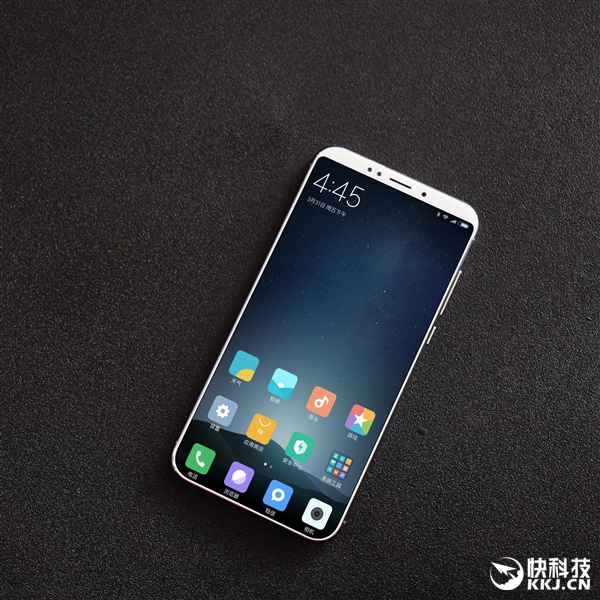
Here's the new Mi 6! Bezel-less.

Xiaomi-Mi-6-Image-01.jpg
 

tingcher

Junior Member
Joined
Dec 28, 2007
Messages
13
Reaction score
3
*Good evening gentlemen,

Just hoot two 128gb for my parents from Lazada with outdated global rom and hitting update could only bring it to 8.1.6 thus i decide to manually update it to the latest. Some questions on updating it as per guide on en.miui.com

Had me wander why are there three ways to update. I assume if one doesn't work, there is always another two more to try.

1. System update
It is straight forward. Download the recovery rom into phone storage and use the built in updater apps. Did this for the first set.

On the second set, feeling a little adventurous, i tried other ways to update.

2. Recovery update.
Same as above but rename the recovery rom to update.zip but when I try booting into recovery, either by hard button or thru the updater menu, instead of the guided Mi Recovery, mine show a picture of a phone, a cable and a text show "pcsuite.mi.com"

I did a quick search on Google and most said that the recovery is missing and need to unlock the bootloader and put recovery in.

Since the guide didn't mention about this, is my set abnormal since it is missing recovery?

Anyway, i run a check on MIUI forum on how to do that and i face a galore of countless thread which i am lost in it.

Any kind soul can post a good link on how to put recovery into 128GB Mi Max?

3. Fastboot.
Seem straight forward, install Miflash, answer many yes during installation, download/unzip fastboot rom rather than recovery rom ( i think many might assume that fastboot and recovery rom are the same as the guide didn't explicitly point out that they are different ), boot into fastboot by holding vol - and power button at the same time, fire up Miflash, browse to the fastboot rom, refresh, update and an error pop up on mine.

Again, quick search on Google on the suggest that i have to boot into EDL by holding Vol + and - with power instead. It work.

Again, since the guide didn't mention about this, is my set abnormal since it can't be flash using the usual fastboot?

Appreciate any kind soul that would help on my curiosity.

 

DRAGONGUY

Senior Member
Joined
Jan 1, 2000
Messages
1,798
Reaction score
0
*Good evening gentlemen,

Just hoot two 128gb for my parents from Lazada with outdated global rom and hitting update could only bring it to 8.1.6 thus i decide to manually update it to the latest. Some questions on updating it as per guide on en.miui.com

Had me wander why are there three ways to update. I assume if one doesn't work, there is always another two more to try.

1. System update
It is straight forward. Download the recovery rom into phone storage and use the built in updater apps. Did this for the first set.

On the second set, feeling a little adventurous, i tried other ways to update.

2. Recovery update.
Same as above but rename the recovery rom to update.zip but when I try booting into recovery, either by hard button or thru the updater menu, instead of the guided Mi Recovery, mine show a picture of a phone, a cable and a text show "pcsuite.mi.com"

I did a quick search on Google and most said that the recovery is missing and need to unlock the bootloader and put recovery in.

Since the guide didn't mention about this, is my set abnormal since it is missing recovery?

Anyway, i run a check on MIUI forum on how to do that and i face a galore of countless thread which i am lost in it.

Any kind soul can post a good link on how to put recovery into 128GB Mi Max?

3. Fastboot.
Seem straight forward, install Miflash, answer many yes during installation, download/unzip fastboot rom rather than recovery rom ( i think many might assume that fastboot and recovery rom are the same as the guide didn't explicitly point out that they are different ), boot into fastboot by holding vol - and power button at the same time, fire up Miflash, browse to the fastboot rom, refresh, update and an error pop up on mine.

Again, quick search on Google on the suggest that i have to boot into EDL by holding Vol + and - with power instead. It work.

Again, since the guide didn't mention about this, is my set abnormal since it can't be flash using the usual fastboot?

Appreciate any kind soul that would help on my curiosity.

Some simple answers to no. 2 and no. 3

2. Mi Max don't have recovery (aka vol + and power). In fact i think xiaomi remove the recovery in many devices quite long ago. You can install twrp if you wish to.

3. For fastboot it is vol + and power. It will show you the bunny.

Hint: you might want to read back few pages back to get yourself some ideas.
 

kelvinti

Arch-Supremacy Member
Joined
Jan 5, 2009
Messages
23,271
Reaction score
2,435
*Good evening gentlemen,

Just hoot two 128gb for my parents from Lazada with outdated global rom and hitting update could only bring it to 8.1.6 thus i decide to manually update it to the latest. Some questions on updating it as per guide on en.miui.com

Had me wander why are there three ways to update. I assume if one doesn't work, there is always another two more to try.

1. System update
It is straight forward. Download the recovery rom into phone storage and use the built in updater apps. Did this for the first set.

On the second set, feeling a little adventurous, i tried other ways to update.

2. Recovery update.
Same as above but rename the recovery rom to update.zip but when I try booting into recovery, either by hard button or thru the updater menu, instead of the guided Mi Recovery, mine show a picture of a phone, a cable and a text show "pcsuite.mi.com"

I did a quick search on Google and most said that the recovery is missing and need to unlock the bootloader and put recovery in.

Since the guide didn't mention about this, is my set abnormal since it is missing recovery?

Anyway, i run a check on MIUI forum on how to do that and i face a galore of countless thread which i am lost in it.

Any kind soul can post a good link on how to put recovery into 128GB Mi Max?

3. Fastboot.
Seem straight forward, install Miflash, answer many yes during installation, download/unzip fastboot rom rather than recovery rom ( i think many might assume that fastboot and recovery rom are the same as the guide didn't explicitly point out that they are different ), boot into fastboot by holding vol - and power button at the same time, fire up Miflash, browse to the fastboot rom, refresh, update and an error pop up on mine.

Again, quick search on Google on the suggest that i have to boot into EDL by holding Vol + and - with power instead. It work.

Again, since the guide didn't mention about this, is my set abnormal since it can't be flash using the usual fastboot?

Appreciate any kind soul that would help on my curiosity.

Some simple answers to no. 2 and no. 3

2. Mi Max don't have recovery (aka vol + and power). In fact i think xiaomi remove the recovery in many devices quite long ago. You can install twrp if you wish to.

3. For fastboot it is vol + and power. It will show you the bunny.

Hint: you might want to read back few pages back to get yourself some ideas.

Adding on to what bro Dragonboy has said and the methods 1, 2, 3 that you had used:

1. System update:

< Are you referring to "Choose update package" with the downloaded Recovery zip rom? In fact, when one mentions System Update, it is referring to 2 methods. One is via OTA, and the other is referring to "Choose update package" using the downloaded Recover zip rom. >


2. Recovery update.

< The guide is somewhat, confused! There is no Recovery update in Mi Max. Thus, this method failed! Actually, it is referring to one of the method in System Update of "Choose update package"! >.


3. Fastboot.

< The name of the method is also confusing! It should be called EDL. You should be entering EDL mode, not Fastboot mode in order to use miFlash with the the downloaded Fastboot ROM >

< To enter EDL mode. Press and Hold Vol+ / Vol- / Power at the same time. Connect to pc. Release all keys once you hear the first vibration or beep! The display should be a total blank! No picture, no bunny or "FASTBOOT" word or any naked girl picture on it. >
 
Last edited:

TheOutsider

Senior Member
Joined
Aug 30, 2014
Messages
898
Reaction score
117
Oh Ya. For advance user with StarHub. The VoLTE is enabled in the eu rom. :)


is it rooted? I mean the EU rom.

Besides that... Can confirm that the VoLTE is working? Mine on lineage ROM and MIUI Global can't get the VoLTE working. On Lineage can enable. On MIUI Global can't even see the setting. Am with SingTel though.
 

kelvinti

Arch-Supremacy Member
Joined
Jan 5, 2009
Messages
23,271
Reaction score
2,435
is it rooted? I mean the EU rom.

Besides that... Can confirm that the VoLTE is working? Mine on lineage ROM and MIUI Global can't get the VoLTE working. On Lineage can enable. On MIUI Global can't even see the setting. Am with SingTel though.

All eu rom are not rooted. You only need a Unlocked Bootloader to install its TWRP and then flash the eu rom.

As for the VoLTE thingy...See attached:

I'm calling another StarHub mobile number. The data bar on the top changed to between "H+" and "H". However, there is a "Telephone+HD" logo just beside the word; Singapore under the WOW's profile picture.

So, I'm not too sure what is what too! :s13: May be the Telephone+HD logo is for cosmetic representation only! Even after I had dis-select the VoLTE in setting, that Telephone+HD logo is still presents.

The official Global roms do not have VoLTE setting build-in.

 
Last edited:

Oinkize

Arch-Supremacy Member
Joined
May 22, 2009
Messages
11,956
Reaction score
197
All eu rom are not rooted. You only need a Unlocked Bootloader to install its TWRP and then flash the eu rom.

As for the VoLTE thingy...See attached:

I'm calling another StarHub mobile number. The data bar on the top changed to between "H+" and "H". However, there is a "Telephone+HD" logo just beside the word; Singapore under the WOW's profile picture.

So, I'm not too sure what is what too! :s13: May be the Telephone+HD logo is for cosmetic representation only! Even after I had dis-select the VoLTE in setting, that Telephone+HD logo is still presents.


This means that volte is not working. Your phone is supposed to be on 4g even when on voice call.
 

ngbc

Master Member
Joined
Jan 1, 2000
Messages
3,605
Reaction score
218
No need to consider liao! :s22:

EU rom 8.2.2.0 is no horse run de...;)

Flashing eu rom via twrp recovery right on the Mi Max itself is super fast some more (less than 2 minutes), unlike flashing official rom via miFlash via PC which is damn slow.

Kelvin. can post the link on how to flash eu rom on 64GB Mi Max?
 

kelvinti

Arch-Supremacy Member
Joined
Jan 5, 2009
Messages
23,271
Reaction score
2,435
Kelvin. can post the link on how to flash eu rom on 64GB Mi Max?

Ahh! Let me see...

Piaseh! Actually, I don't have any link to a detail guide. I have my own written guide which I picked it up from here and there as well as from bro dragonboy.. Lol..

Let see what I can do tomorrow or other TWRP experts can contribute first.

Anyway, it is pretty easy and straightforward one. Almost all process are done on the phone itself including the installation of the rom. Much easier than miflash process that required connection between phone and pc. :)
 
Last edited:

cokiee

Senior Member
Joined
Sep 6, 2012
Messages
1,158
Reaction score
0
3. Fastboot.
Seem straight forward, install Miflash, answer many yes during installation, download/unzip fastboot rom rather than recovery rom ( i think many might assume that fastboot and recovery rom are the same as the guide didn't explicitly point out that they are different ), boot into fastboot by holding vol - and power button at the same time, fire up Miflash, browse to the fastboot rom, refresh, update and an error pop up on mine.

Again, quick search on Google on the suggest that i have to boot into EDL by holding Vol + and - with power instead. It work.

Again, since the guide didn't mention about this, is my set abnormal since it can't be flash using the usual fastboot?

Appreciate any kind soul that would help on my curiosity.

Importantly, don't panic.

Yes like dragon and kelvin said, this is a bit of a misnomer - you're actually supposed to boot into EDL before flashing the rom, rather than fastboot. i.e., vol up + vol down + power button, release once you feel the vibration. Screen will be completely blank (but you'll be able to power it up again if you hold the power button).

Once in EDL, plug your phone into the computer. I recommend using the provided cable (for superstitious reasons :s13:) AFTER you have turned on your miflash.

Once the miflash program reads your phone (you'll see a COM04 or COM10 as the device name - if it shows 'XX' instead of numbers after 'COM' then it's wrong), you can then point the miflash program to your rom.

Let us know again if you run into problems?
 
Important Forum Advisory Note
This forum is moderated by volunteer moderators who will react only to members' feedback on posts. Moderators are not employees or representatives of HWZ Forums. Forum members and moderators are responsible for their own posts. Please refer to our Community Guidelines and Standards and Terms and Conditions for more information.
Top