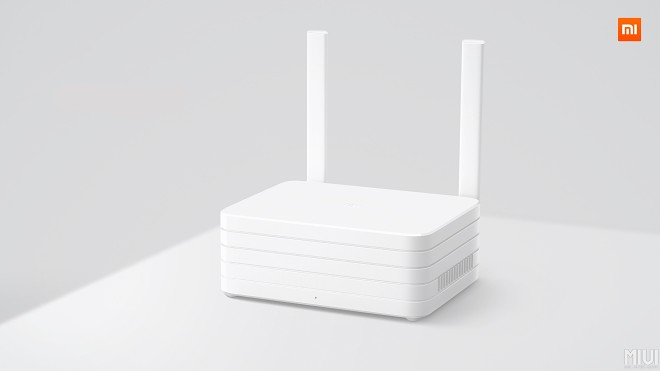
Xiaomi's Routers!

renfred89

Arch-Supremacy Member
Joined
Nov 11, 2007
Messages
17,512
Reaction score
19
Hi bros,

I am currently on VQ 600mb plan. Connected to my desktop from the xiaomi router 2 1tb setup like this -

Using cat 6:
zhone ont gb port > xiaomi router wan port

cat 5e:
xiaomi router gb port > desktop gb port.

If I'm directly using the zhone router, I'm getting the correct speed for both down/up (500+mbps/500+mbps)

If I use the router gb port to my desktop, I'm getting a capped 100mbps for upload.

Any bros can figure why this is so?

Note that I tested all on speedtest.net local servers & confirmed that QOS is turned off for the xiaomi router.

Which model is ur smallrice router? I rmb got one model is only fast-ethernet.. hahas
 

gregory_choo

Arch-Supremacy Member
Joined
Nov 7, 2007
Messages
10,551
Reaction score
2,053
Hi bros,

I am currently on VQ 600mb plan. Connected to my desktop from the xiaomi router 2 1tb setup like this -

Using cat 6:
zhone ont gb port > xiaomi router wan port

cat 5e:
xiaomi router gb port > desktop gb port.

If I'm directly using the zhone router, I'm getting the correct speed for both down/up (500+mbps/500+mbps)

If I use the router gb port to my desktop, I'm getting a capped 100mbps for upload.

Any bros can figure why this is so?

Note that I tested all on speedtest.net local servers & confirmed that QOS is turned off for the xiaomi router.

Most likely the model you bought has only 100Mbps ethernet. However, wireless speed is a few hundred Mbps.

But in real life, there is no diff between 100Mbps and your ISP plan of 600Mbps, because besides ookla servers, no other servers give up high speed. For normal usage, you are considered lucky if the servers give you 50Mbps.
 
Last edited:

-Synchronicity-

Senior Member
Joined
Apr 29, 2012
Messages
2,438
Reaction score
193
Most likely the model you bought has only 100Mbps ethernet. However, wireless speed is a few hundred Mbps.

But in real life, there is no diff between 100Mbps and your ISP plan of 600Mbps, because besides ookla servers, no other servers give up high speed. For normal usage, you are considered lucky if the servers give you 50Mbps.

Bro,

Thanks for the reply. The router I'm using is the one with 1tb hdd so pretty sure it's gb port. Furthermore, I'm hitting 500mbps on downloads so....
 

i1magic

Arch-Supremacy Member
Joined
Dec 11, 2002
Messages
22,366
Reaction score
117
I got Note 4 and I will be getting the Mi Router 2 1TB soon. Will test and post review here.

I just got my hands on the Mi Router 2 1TB today.

gsmarena_001.jpg


Finally setup everything liao and got a few question.

1. Does it support IPV6? If yes, how to setup IPV6?
2. Anybody here using this with the Xiaomi Yi Camera?
 

i1magic

Arch-Supremacy Member
Joined
Dec 11, 2002
Messages
22,366
Reaction score
117
Hi bros,

I am currently on VQ 600mb plan. Connected to my desktop from the xiaomi router 2 1tb setup like this -

Using cat 6:
zhone ont gb port > xiaomi router wan port

cat 5e:
xiaomi router gb port > desktop gb port.

If I'm directly using the zhone router, I'm getting the correct speed for both down/up (500+mbps/500+mbps)

If I use the router gb port to my desktop, I'm getting a capped 100mbps for upload.

Any bros can figure why this is so?

Note that I tested all on speedtest.net local servers & confirmed that QOS is turned off for the xiaomi router.

Please check whether is your PC connecting to the Mi Router 2 1TB at Gigabit. Not all cable allow you to achieve Gigabit.
 

-Synchronicity-

Senior Member
Joined
Apr 29, 2012
Messages
2,438
Reaction score
193
Confirm getting GB on pc. That's what it shows on the network adaptor details.

Anyway I've solved the issue. The culprit was the damn traffic shaping software which comes with my motherboard(asrock). Uninstalled that crap and I'm getting the correct speed now.

Thanks for the input bros.
 

i1magic

Arch-Supremacy Member
Joined
Dec 11, 2002
Messages
22,366
Reaction score
117
Confirm getting GB on pc. That's what it shows on the network adaptor details.

Anyway I've solved the issue. The culprit was the damn traffic shaping software which comes with my motherboard(asrock). Uninstalled that crap and I'm getting the correct speed now.

Thanks for the input bros.

Glad that you found the problem.

Anybody knows whether does this Mi Router 2 1TB supports IPV6? Also, anybody here uses this with the Xiaomi Yi Camera?
 

Just Me

Arch-Supremacy Member
Joined
Jan 1, 2000
Messages
14,249
Reaction score
41
I just got my hands on the Mi Router 2 1TB today.

gsmarena_001.jpg


Finally setup everything liao and got a few question.

1. Does it support IPV6? If yes, how to setup IPV6?
2. Anybody here using this with the Xiaomi Yi Camera?

More keen in finding out if mp4,Nov,avi, rmvb etc downloaded to the router hdd can be streamed directly to iOS/Android devices using their software
 

i1magic

Arch-Supremacy Member
Joined
Dec 11, 2002
Messages
22,366
Reaction score
117
More keen in finding out if mp4,Nov,avi, rmvb etc downloaded to the router hdd can be streamed directly to iOS/Android devices using their software

Via Wifi or over mobile phone network?
 

gregory_choo

Arch-Supremacy Member
Joined
Nov 7, 2007
Messages
10,551
Reaction score
2,053
More keen in finding out if mp4,Nov,avi, rmvb etc downloaded to the router hdd can be streamed directly to iOS/Android devices using their software

on android devices, can use es explorer to browse and play directly.
 

i1magic

Arch-Supremacy Member
Joined
Dec 11, 2002
Messages
22,366
Reaction score
117
More keen in finding out if mp4,Nov,avi, rmvb etc downloaded to the router hdd can be streamed directly to iOS/Android devices using their software

Think you can turn on the DLNA on the Mi Router and you should be able to watch from Homegroup.
 

i1magic

Arch-Supremacy Member
Joined
Dec 11, 2002
Messages
22,366
Reaction score
117
More keen in finding out if mp4,Nov,avi, rmvb etc downloaded to the router hdd can be streamed directly to iOS/Android devices using their software

So far from what I tested, for Android can.
 

i1magic

Arch-Supremacy Member
Joined
Dec 11, 2002
Messages
22,366
Reaction score
117
I just got my hands on the Mi Router 2 1TB today.

gsmarena_001.jpg


Finally setup everything liao and got a few question.

1. Does it support IPV6? If yes, how to setup IPV6?
2. Anybody here using this with the Xiaomi Yi Camera?

Anybody else got this also? Anybody using this with MiTV?
 

i1magic

Arch-Supremacy Member
Joined
Dec 11, 2002
Messages
22,366
Reaction score
117
Anybody else got this also? Anybody using this with MiTV?

I am. They will self detect and you can see the router icon in ur TV menu to playback any videos you have from there.

Yah I know. Can you try this? Create a folder on the harddisk in your Mi Router name say "Movies". Then can you check whether can you see this "Movies" folder from your Mi TV?

I tried but cannot. Mi TV only can see folders with name in Chinese.
 

i1magic

Arch-Supremacy Member
Joined
Dec 11, 2002
Messages
22,366
Reaction score
117
More keen in finding out if mp4,Nov,avi, rmvb etc downloaded to the router hdd can be streamed directly to iOS/Android devices using their software

Via Wifi or over mobile phone network?

Over wifi of course. Unless our lame telcos offer unlimited data :p

Confirm can lah. Like normal sharing. But I never watch movies on my phone at home. I always watch on my PC or TV.
 

Just Me

Arch-Supremacy Member
Joined
Jan 1, 2000
Messages
14,249
Reaction score
41
Confirm can lah. Like normal sharing. But I never watch movies on my phone at home. I always watch on my PC or TV.

It's more convenient and cheaper than buying a NAS to do the job though.
 
Important Forum Advisory Note
This forum is moderated by volunteer moderators who will react only to members' feedback on posts. Moderators are not employees or representatives of HWZ Forums. Forum members and moderators are responsible for their own posts. Please refer to our Community Guidelines and Standards and Terms and Conditions for more information.
Top