Advancer
Banned
- Joined
- Oct 14, 2001
- Messages
- 4,909
- Reaction score
- 1,329
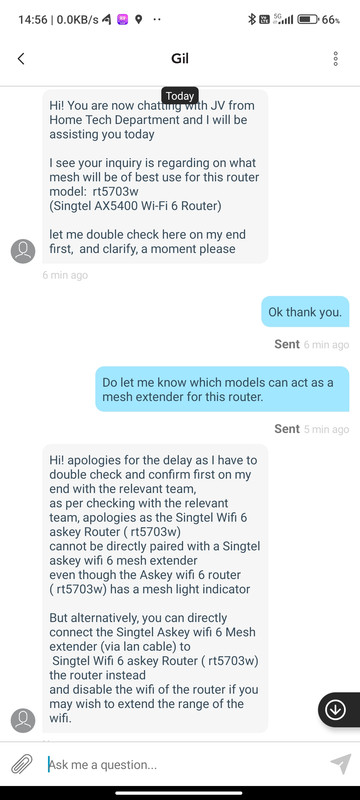
I got the below info from a colleague, but i can't verify the link.
To turn your Singtel Wi-Fi 6 Router RT5703W into a mesh router, you would typically need additional compatible hardware. Mesh networks require multiple routers or access points to work together to provide seamless Wi-Fi coverage throughout your home or office.
Here are the general steps to set up a mesh network using your Singtel Wi-Fi 6 Router RT5703W as one of the nodes:
1. Purchase Compatible Mesh Hardware: You’ll need to purchase additional mesh nodes or routers that are compatible with your Singtel router. These nodes should support mesh networking protocols such as Wi-Fi EasyMesh or a proprietary mesh system specific to your router brand.
2. Connect the Mesh Nodes:
• Follow the setup instructions provided with your additional mesh hardware.
• Typically, you would connect one of the mesh nodes to your Singtel router using an Ethernet cable.
3. Configure the Mesh Network:
• Access the web interface of your Singtel Wi-Fi 6 Router RT5703W. You can usually do this by entering the router’s IP address in a web browser (e.g., 192.168.1.1) and logging in with the router’s admin credentials.
4. Enable Mesh Features:
• Look for settings related to mesh networking or extending the network in the router’s web interface.
• Enable the mesh features and follow the on-screen instructions to add the new mesh nodes to your network.
5. Follow Manufacturer Instructions:
• Refer to the documentation provided with your Singtel router and the additional mesh hardware for specific setup steps and compatibility information.
6. Test and Optimize:
• After setting up the mesh network, test the Wi-Fi coverage in various areas of your home or office to ensure it’s improved.
• You may need to fine-tune settings or relocate mesh nodes for optimal coverage.
Please note that the specific steps and features can vary depending on the router’s firmware and the brand of the mesh hardware you’re using. Ensure that your Singtel router and the additional mesh nodes are compatible and that you follow the manufacturer’s instructions for setup.
If you encounter any issues or need further assistance, it’s a good idea to reach out to Singtel’s customer support or consult the user manual for your specific router model.
To turn your Singtel Wi-Fi 6 Router RT5703W into a mesh router, you would typically need additional compatible hardware. Mesh networks require multiple routers or access points to work together to provide seamless Wi-Fi coverage throughout your home or office.
Here are the general steps to set up a mesh network using your Singtel Wi-Fi 6 Router RT5703W as one of the nodes:
1. Purchase Compatible Mesh Hardware: You’ll need to purchase additional mesh nodes or routers that are compatible with your Singtel router. These nodes should support mesh networking protocols such as Wi-Fi EasyMesh or a proprietary mesh system specific to your router brand.
2. Connect the Mesh Nodes:
• Follow the setup instructions provided with your additional mesh hardware.
• Typically, you would connect one of the mesh nodes to your Singtel router using an Ethernet cable.
3. Configure the Mesh Network:
• Access the web interface of your Singtel Wi-Fi 6 Router RT5703W. You can usually do this by entering the router’s IP address in a web browser (e.g., 192.168.1.1) and logging in with the router’s admin credentials.
4. Enable Mesh Features:
• Look for settings related to mesh networking or extending the network in the router’s web interface.
• Enable the mesh features and follow the on-screen instructions to add the new mesh nodes to your network.
5. Follow Manufacturer Instructions:
• Refer to the documentation provided with your Singtel router and the additional mesh hardware for specific setup steps and compatibility information.
6. Test and Optimize:
• After setting up the mesh network, test the Wi-Fi coverage in various areas of your home or office to ensure it’s improved.
• You may need to fine-tune settings or relocate mesh nodes for optimal coverage.
Please note that the specific steps and features can vary depending on the router’s firmware and the brand of the mesh hardware you’re using. Ensure that your Singtel router and the additional mesh nodes are compatible and that you follow the manufacturer’s instructions for setup.
If you encounter any issues or need further assistance, it’s a good idea to reach out to Singtel’s customer support or consult the user manual for your specific router model.