SIMBA Fibre Broadband

xiaofan

High Supremacy Member
Joined
Sep 16, 2018
Messages
37,560
Reaction score
12,805
Saw this model selling for only $80. https://sg.shp.ee/W5gtNCi

From comfast , wifi 7 ,
Is it a router? Can buy?
First time seeing it

WIFi 7 USB adapter.

I will say this is not a good one because of the lousy RealTek chipset. I have another cheaper version from COMFAST but with the same chipset. It is not very good -- sometimes it will disappear from the Windows laptop or desktop. Not working under Linux either.

On the other hand, as of now, you do not have many choices when it comes to USB WiFi 7 adapter. COMFAST and FENVI are the two early vendors to come out such USB WiFi 7 adapters. I have both COMFAST and FENVI version from Taobao.
 

xiaofan

High Supremacy Member
Joined
Sep 16, 2018
Messages
37,560
Reaction score
12,805
anyway i tried archer AX72, apparently the range is there but still no connection in the master bedroom; toilet

any better recommendation if i want to resolve this?

Please post your floor plan with details of the location of your Fibre Terminal Point, placement of the wireless router and LAN ports locations in the rooms if any.

Some floor plans make it very difficult or even impossible for single consumer wireless router to provide good WiFi coverage to the full flat, no matter how expensive or how powerful is the router.
 

kurt_629

Master Member
Joined
Nov 14, 2001
Messages
2,785
Reaction score
858
Please post your floor plan with details of the location of your Fibre Terminal Point, placement of the wireless router and LAN ports locations in the rooms if any.

Some floor plans make it very difficult or even impossible for single consumer wireless router to provide good WiFi coverage to the full flat, no matter how expensive or how powerful is the router.
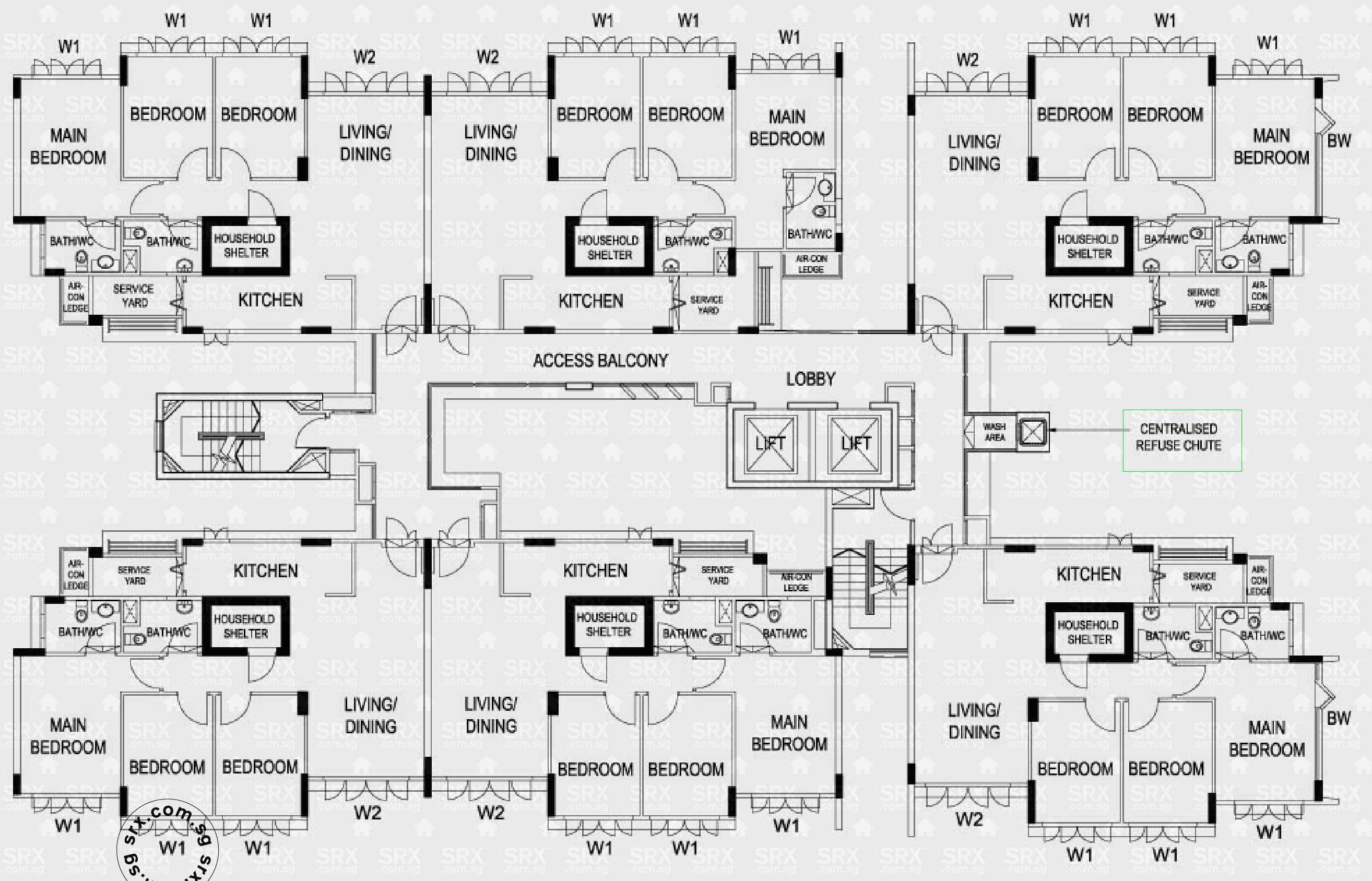
floor_plan_0.jpg


looking at left bottom unit.
- fiber terminal at main door
- router, TV box at living room , LAN, near window
- all rooms do have LAN port
- streaming, internet only. no gaming
- poor connectivity at main bedroom and toilet.
- thanks to cheap mobile plan, can resolved easily, just turn on data.
- was contemplating if the Asus Tuf Be6500 will be a good solution to resolve the poor connectivity
- just exploring options and learning purposes :)
 

xiaofan

High Supremacy Member
Joined
Sep 16, 2018
Messages
37,560
Reaction score
12,805
floor_plan_0.jpg


looking at left bottom unit.
- fiber terminal at main door
- router, TV box at living room , LAN, near window
- all rooms do have LAN port
- streaming, internet only. no gaming
- poor connectivity at main bedroom and toilet.
- thanks to cheap mobile plan, can resolved easily, just turn on data.
- was contemplating if the Asus Tuf Be6500 will be a good solution to resolve the poor connectivity
- just exploring options and learning purposes :)

The floor plan is a good example where one single router can not cover the full flat due to the location of the household shelter --> many HDB BTO flats seem to have such issue. Household shelter in the middle of the flat is very good at blocking the WiFi signals.

Two nodes solution may be possible, main node in the Fibre Terminal Point / ONT area, second node in the main bedroom.

You can carry out an experiment with your current TP-Link Archer AX72 and Asus RT-AX55, use the TP-Link Archer AX72 as the main router in the ONT area, I assume patch panel is also there. Then use the Asus RT-AX55 in AP mode in main bedroom. I believe the wireless coverage will be greatly improved.

If that works you can purchase TUF-BE6500 as the main router and then RT-AX55 as mesh node. You can also get another TUF-BE6500 or TUF-BE3600 as mesh node to replace RT-AX55 if desired.
 

thiamhui

Senior Member
Joined
Jan 3, 2001
Messages
819
Reaction score
123
floor_plan_0.jpg


looking at left bottom unit.
- fiber terminal at main door
- router, TV box at living room , LAN, near window
- all rooms do have LAN port
- streaming, internet only. no gaming
- poor connectivity at main bedroom and toilet.
- thanks to cheap mobile plan, can resolved easily, just turn on data.
- was contemplating if the Asus Tuf Be6500 will be a good solution to resolve the poor connectivity
- just exploring options and learning purposes :)

The floor plan is a good example where one single router can not cover the full flat due to the location of the household shelter --> many HDB BTO flats seem to have such issue. Household shelter in the middle of the flat is very good at blocking the WiFi signals.

Two nodes solution may be possible, main node in the Fibre Terminal Point / ONT area, second node in the main bedroom.

You can carry out an experiment with your current TP-Link Archer AX72 and Asus RT-AX55, use the TP-Link Archer AX72 as the main router in the ONT area, I assume patch panel is also there. Then use the Asus RT-AX55 in AP mode in main bedroom. I believe the wireless coverage will be greatly improved.

If that works you can purchase TUF-BE6500 as the main router and then RT-AX55 as mesh node. You can also get another TUF-BE6500 or TUF-BE3600 as mesh node to replace RT-AX55 if desired.
Since all rooms are having LAN port, isn't it better to use them as Ethernet Backhaul? Or in this case, using one of the router as Access Point?
 

kurt_629

Master Member
Joined
Nov 14, 2001
Messages
2,785
Reaction score
858
Thank you for sharing.

I read that wifi 7 router are stronger, with multi beam technology, wall penetrate etc.
Like damn good.
And when you go to their product list, you could also filter the router based on your range requirements, like 3 bed rooms etc.

China voltage is 220v while sg is 230v, will this be a concern for router?
 

xiaofan

High Supremacy Member
Joined
Sep 16, 2018
Messages
37,560
Reaction score
12,805
Thank you for sharing.

I read that wifi 7 router are stronger, with multi beam technology, wall penetrate etc.
Like damn good.
And when you go to their product list, you could also filter the router based on your range requirements, like 3 bed rooms etc.

China voltage is 220v while sg is 230v, will this be a concern for router?

No issues with the voltage.

Wireless coverage is quite specific to each floor plan and each individual's different situation. The coverage claims on the wireless router product's packaing are almost impossible in typical SIngapore household.
 

xiaofan

High Supremacy Member
Joined
Sep 16, 2018
Messages
37,560
Reaction score
12,805
Since all rooms are having LAN port, isn't it better to use them as Ethernet Backhaul? Or in this case, using one of the router as Access Point?

Not so sure what you mean here.

Mesh does not mean wireless backhaul. It can be either Ethernet Backhaul or Wireless Backhaul.

I understand some people have the notion that mesh means wireless backhaul, that is totally outdated when we are talking about consumer mesh offerings.

Reference:
https://dongknows.com/mesh-wi-fi-system-explained/
 

ykeen

Moderator
Moderator
Joined
Jul 31, 2000
Messages
4,636
Reaction score
128
I understand some people have the notion that mesh means wireless backhaul, that is totally outdated when we are talking about consumer mesh offerings.

Reference:
https://dongknows.com/mesh-wi-fi-system-explained/

Thanks for explaining!
I had the same assumption - if it's not explicitly stated, I assume mesh means wireless backhaul.

It's great to see how tech advancements have changed this narrative, what good times to live in.

Guess I'm still in old-school era thinking about mesh, but still good to explicitly include wired backhaul for sake of clarity... since we may not know you meant that he could take advantage of LAN ports in each room todo wired backhaul...
 

slash

Senior Member
Joined
Jan 1, 2000
Messages
840
Reaction score
39
Since there are lan ports everywhere, shouldn't be a problem using APs or MESH.

Just think of where you need the best signal to be ...
 

ykeen

Moderator
Moderator
Joined
Jul 31, 2000
Messages
4,636
Reaction score
128
Thank you for sharing.

I read that wifi 7 router are stronger, with multi beam technology, wall penetrate etc.
Like damn good.
And when you go to their product list, you could also filter the router based on your range requirements, like 3 bed rooms etc.

China voltage is 220v while sg is 230v, will this be a concern for router?

Generally consumers think "what is the best (wifi) router" to get, but a single WiFi router/AP usually don't offer good performance in Singapore environment due to all the thick concrete walls. So usually we would need to split the WiFi to a few AP/mesh to get better WiFi performance throught the house.

similar to what xiaofan posted for the reference https://dongknows.com/mesh-wi-fi-system-explained/
There is no such thing as the "best" routers for a particular Internet service provider or type—Fiber-optic, Cable, or whatever.

So you should research into at least a router (main/living room) + AP/mesh (master BR) kind of setup, as this would also usually be "cheaper" than buying a monster wifi router which still don't perform well across all the concrete walls from the living room or main door DB.
 

xiaofan

High Supremacy Member
Joined
Sep 16, 2018
Messages
37,560
Reaction score
12,805
I was setting up pfSense and IPv6 suddenly stop working while I was playing around with the settings.

Took me few evenings to get it back working again. 🤦‍♂️

Just want to confirm if SIMBA gives /64 IPv6 prefix delegation or anything better like /60 or even /56. Thanks.

Reference:
https://forums.hardwarezone.com.sg/threads/ipv6-discussions.6976522/

Fibre ISP IPv6 support matrix
ISPIPv6 SupportDetails/Notes
Singtel6rd tunnel, limited rollout for DHCPv6 PD6rd: /128 for WAN interface, routed /64 prefix for LAN interface
DHCPv6 PD: /128 for WAN interface, routed /56 prefix for LAN interface

6rd tunnel config
StarhubDHCPv6 PD/128 for WAN interface, routed /64 prefix for LAN interface
M1DHCPv6 PD/128 for WAN interface, routed /64 prefix for LAN interface

Supports DNS64/NAT64
DNS64 prefix:
2401:7400:8000:0:3:0::/96
2401:7400:8000:0:4:0::/96
MyRepublicNoNo lol
ViewqwestNoUsed to support static IPv6 prefixes upon request but seem to have stopped doing so since 2016. See comment by Jonathan Tan.

On their XGS-PON network with no static IP add on, WAN interface was able to get IA-NA for a /128 on the WAN interface, but no IA-PD for prefixes. No routes out using the WAN interface's /128 IPv6 address, so it's essentially non-functional at this point in time.
IPv6 via SLACC seem to have been turned off again as off 2024-08-10.

No IPv6 support with static IP addon.
WhizcommNoAssigned 2405:d180::/32 but no IPv6 prefixes announced under AS135600.
SimbaDHCPv6 PDSimba may be routing /56 prefixes to their end users.

Need more testing with regards to routed prefix size, but preliminary findings suggests Simba Fibre does support IPv6 in some capacity, at least on their 10Gbps plans.

Said to be supported on 2.5Gbps plans as well.

Prefix delegation notes
/48: Great, follows best practices
/56: Acceptable, not great, but at least it still follows best practices
/64: Doesn't follow best practices. Only allows for a single LAN segment to be IPv6 enabled
Ref: https://www.ripe.net/publications/docs/ripe-690

Mobile ISP IPv6 support matrix
ISPIPv6 SupportDetails/Notes
SingtelYes*End point receives a routed /64 prefix

*Enabled on 5G standalone networks only.

iOS carrier profile enables IPv6 by default (Checked on iPhone 13 iOS 17.5.1, carrier bundle 58.0)

Post #17 by bert64
StarhubYes*End point receives a routed /64 prefix

*Enabled on 5G standalone networks only.

Caveats:
- On 5G SA network only.
- iOS carrier profile only enables IPv4 by default (Checked on iPhone 13 iOS 17.5.1, carrier bundle 58.0). You'd need to enable IPv6 using a custom APN config profile.
- On Android, you'd need to enable IPv6 in APN settings.
M1YesEnd point receives a routed /64 prefix

Supports DNS64/NAT64

Supported NVMO: Circles
SimbaYesEnd point receives a routed /64 prefix

Caveats:
- Unsolicited inbound traffic blocked
- Enabling IPv6 support on iOS requires installing a custom configuration profile with cellular APN configurations

Information collated in this post is non-exhaustive, do comment in this thread if you have new information.

Last edited on 15 September 2024
 

thiamhui

Senior Member
Joined
Jan 3, 2001
Messages
819
Reaction score
123

xiaofan

High Supremacy Member
Joined
Sep 16, 2018
Messages
37,560
Reaction score
12,805
I finally got IPv6 to work with /64.

But I'm seeing "Delegated Prefix: WAN/0 (2400:79e0:20:90::/61)/64" under DHCPv6 Server. Any idea if there's any mistake in my settings?

Hmm, not so sure about this one.

Maybe @Mach3.2 or @bert64 can help here.

I am guessing that you can get /61 instead. Does that work with your pfSense or TP-Link Omada router installation? Previously you mentioned that you could get /56 as quoted by @Mach3.2 in his summary table in the IPv6 thread.

Yeah!!! My SIMBA Broadband is working!!!

The appointment is supposed to be tomorrow morning. Now the question is, will the NLT pple still turn up???

I'm currently getting 2.5Gbps due to my Hardwares limitation.
https://www.speedtest.net/my-result/d/33cbb20b-68ce-4a75-8871-a822ea340530

For IPv6, I set the Prefix Delegation Size to 56 and it works.
 
Last edited:

thiamhui

Senior Member
Joined
Jan 3, 2001
Messages
819
Reaction score
123
Hmm, not so sure about this one.

Maybe @Mach3.2 or @bert64 can help here.

I am guessing that you can get /61 instead. Does that work with your pfSense or TP-Link Omada router installation? Previously you mentioned that you could get /56 as quoted by @Mach3.2 in his summary table in the IPv6 thread.
Previously I was using Omada ER707-M2. I was able to get IPv6 when I set it to /56. So I assume that it works. :p

Now I have switched to pfSense.

Update :
/56 doesn't work.

/61 is working. Delegated Prefix become "WAN/0 (2400:79e0:20:90::/64)/64".

So should I set as /61 or /64?
 
Last edited:

bert64

Senior Member
Joined
Jan 20, 2020
Messages
1,027
Reaction score
539
Previously I was using Omada ER707-M2. I was able to get IPv6 when I set it to /56. So I assume that it works. :p

Now I have switched to pfSense.

Update :
/56 doesn't work.

/61 is working. Delegated Prefix become "WAN/0 (2400:79e0:20:90::/64)/64".

So should I set as /61 or /64?
You should read the logs, and see what the DHCPv6 server actually delegates you. You can also try with prefix hint turned off to just receive whatever the default size is.
In general if you set the delegation hint to something larger than the server is willing to give, it will either fail completely or give you a smaller delegation - and this will show up in the logs.

Ideally as per the RIRs the recommendation is /56 for consumers and /48 for business users, but a lot of ISPs try to be stingy for no good reason. In other countries there are also some consumer ISPs which will delegate you a static /48.

Your LAN will always be /64, but if your delegation is longer it means that you can create more networks (eg a guest network etc) each with their own /64.

A delegation of /61 would let you use 8x /64 prefixes for your own networks. With pfsense when you configure your LAN and other interfaces you would then enter "IPv6 prefix ID" with a value between 0 and 7 to choose which /64 out of the /61 to use.

The recommendation of /56 allows you to create 256 networks, and while you may think this is overkill the whole idea of IPv6 is to fix address shortages for good, not kick the can down the road. There are MANY good reasons to have isolated networks at home (guests, wfh, iot, tenants renting a room etc).

If you are looking under "DHCPv6 server" settings, this is for downstream prefix delegation. That is assuming you received a delegation of /56 from the ISP, you could chain another router behind your pfsense box and sub delegate a /60 to the router for example. This allows you to have multiple routers chained together, automatically configured based on prefix delegation and without the headaches of NAT.
Where this would be useful eg if you're renting a room to someone, you can allow the tenant to have their own router under their control which is separate from your own equipment.

If you're only receiving a delegation of /64 then that's the absolute bare minimum which only allows you to create a single LAN. You will not be able to do downstream delegation to another router at all.
 
Last edited:

lvjtoday

Junior Member
Joined
Nov 11, 2024
Messages
3
Reaction score
2
ISP's in Singapore haven't even tried to do IPv6 well. The largest prefix that Singtel has is a /32, which is the same size as the largest one Simba has. That leaves them with aroud 16 million /56's. a /32 is the length of an address any apnic member above the lowest tier gets. They are doing the bare minimum in terms of addressing.
Largest prefixes:
Singtel: /32
Simba: /32
M1: /28
Starhub: /30
 
Important Forum Advisory Note
This forum is moderated by volunteer moderators who will react only to members' feedback on posts. Moderators are not employees or representatives of HWZ Forums. Forum members and moderators are responsible for their own posts. Please refer to our Community Guidelines and Standards and Terms and Conditions for more information.
Top