

seller4
Arch-Supremacy Member
- Joined
- Sep 1, 2004
- Messages
- 15,755
- Reaction score
- 41
Haha .some people got golden mountain silver mountain at home mah... haha..
Haha .some people got golden mountain silver mountain at home mah... haha..

Bor lah.. Sell Asus just use money buy Linksys lor...
Not rich just that I don't drink don't gamble don't play woman... Only buy gaudge to reduce stress...

Good morning everyone,
I need help with setting up Static IP on my RT-AC87U router.
I have configure the below settings, but unable to surf web site and I have to switch to Automatic IP
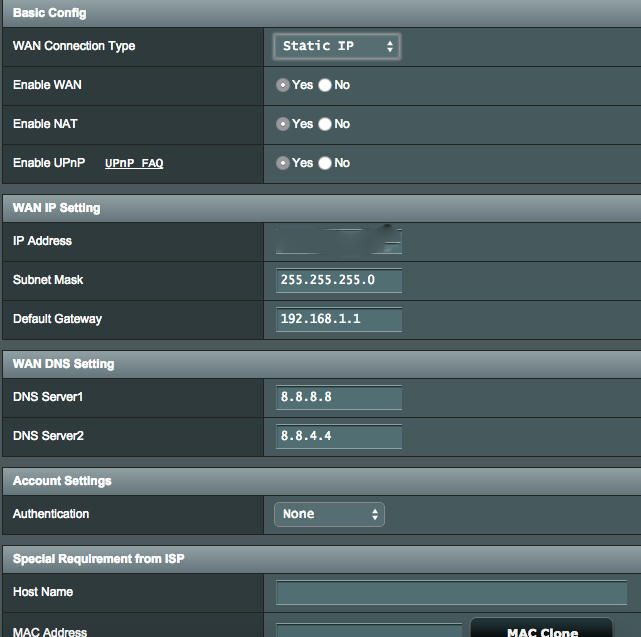
For ASUS or Linksys?
Does ur isp offer static ip service?

Your WAN Default Gateway doesn't look right.Yes under M1

Yes under M1
Hi all, till today Asus yet to resolve and improve AC87U ?
Really disappointed with Asus... .keep releasing router with problems.. AC 87U worst. overheating and firmware issues .
now my RT-AC3200 also problematic (claim tri-band smart connect which don't work ...
Wasted $ & time on Asus routers.
Overpriced and yet cannot perform as spec.
good coy should properly develop and test new product first.
Hi experts - I have a WD "Mybook duo" 4TB which comes with USB only.
I tried connecting to the RT-AC87U but is unable to get it to work
1) USB2 port -> NAS is detected but shows "unmounted"
2) USB port -> router does not detect anything
I have since tried NTFS, exFAT, Mac Journal, etc, and RAID O,1, JBOD -- all to no avail.
I also tried connect single HDD and memory card readers - they work fine.
I am a little disappointed. Anyone have similar issues or have solutions?

Good morning everyone,
I need help with setting up Static IP on my RT-AC87U router.
I have configure the below settings, but unable to surf web site and I have to switch to Automatic IP

Good morning everyone,
I need help with setting up Static IP on my RT-AC87U router.
I have configure the below settings, but unable to surf web site and I have to switch to Automatic IP
Yeah, 5Ghz BF still broken, at least for iDevices. They keep dropping connection, probably in low power state. It especially affects sleep mode, but can happen at other times too. With 5Ghz BF off all is good. My router and AP have been up for 10 days now and 20 devices are flawlessly roaming from AP to router, 2.4 to 5GhzDo you all try enable beamforming for all channel ???? Any issue ??.
 .
.Yeah, 5Ghz BF still broken, at least for iDevices. They keep dropping connection, probably in low power state. It especially affects sleep mode, but can happen at other times too. With 5Ghz BF off all is good. My router and AP have been up for 10 days now and 20 devices are flawlessly roaming from AP to router, 2.4 to 5Ghz
JK has said and I've confirmed with a binary file compare, the beta and the release are identical.Any difference for firmware 4950 between the official and the beta?
I am still on beta, iphone 6 + seem to DC during sleep mode.
My BF is off
... Mind you, if you read back, I had odd problems on the beta that I can only put down to the router not fully resetting. Reapplying the official release over the beta and doing all the hard reset stuff again fixed it. So it is worth a go.
