9700K Temps

Encrypted11

Supremacy Member
Joined
Jun 9, 2012
Messages
5,937
Reaction score
271
1-6.jpg

1-7.png


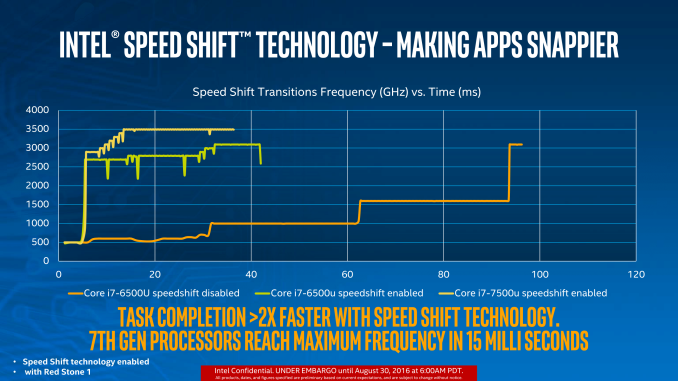
Hardware p states are very fast (speedshift) compared to conventional EIST. And modern cpus are deigned with dynamic voltage and frequency scaling.

And page 72 of the 8th/9th gen data sheet (as with ealier cpus) mentions the following, a notice for CPUs already running stock

Caution: Long term reliability cannot be assured unless all the low power states are enabled

fnwB0QS.png


The more ideal way if you want to keep power management at its minimal is to enable all c states and SST as per normal and relegate the control to OS. From there you can toggle between Ultimate performance plan and balanced (c states enabled) so you don't have to enter BIOS to change the power management. On Ultimate Perf you'd still get dynamic voltages scaling.

For 8 cores on per core active ratio for example 52,52,51,50,50,50,50,50. You'd require speedshift and balanced plan to make it work properly. Helps deliver stronger single thread bursts as well. In Raja@asus's oc guide (more recently toppc lin (msi)) he mentions how sometimes all core ocs can hamper your st perf abit.
 
Last edited:

Nights

Master Member
Joined
Jan 1, 2000
Messages
2,509
Reaction score
4
Stay on the OC frequency, unless you play with P-state. But it's a bit difficult to learn which value to key in.

My 1700 is 3.9ghz stable all core all time, but temp remain low 30s until there's load. Gaming about 50-60 deg C only. Max temp at high 60s peaking at 70s.

Sent from OnePlus ONEPLUS A3003 using GAGT

I also truly advocate staying on the OC frequency all the time. It does not mean it will run hot all the time. I run it this way for full stability and playing with P-states is a lengthy process and I have seen some games stutter due to the variant clocking up and down. Almost all overclocking guides disables all p-states and other power saving features when testing or reviewing.

Since my PC when switched on is on full attack more for gaming, this works for me. I shutdown my PC once I am done. I have been doing this since my 6700k and have no issues whatsoever. Remember, that your power plan in windows is also set to performance mode when overclocking too.

Thanks for the info guys :)
 

LiLAsN

Master Member
Joined
Dec 14, 2008
Messages
2,700
Reaction score
510
I’m also interested in Z390 + i7-9700K build. When you guys OC, does the PC stay in the OC speed or it will throttle down when surfing internet & YouTube? I don’t want to PC to stay hot all the time.

This one is easy. If you are using Asus, under the Extreme Tweaker column, just scroll down after you input whatever Overclocking numbers you are interested in but under CPU Core/Cache Voltage, change it to Adaptive.
Then it will show a plus sign.
Below it under Additional Turbo Mode CPU Core Voltage, put maybe 1.3.


Then in Windows, make sure Balanced profile is selected for Power. Or in High Performance under Advanced Settings, you can set the min Processor State to 5%.

Once you do this, it will allow the CPU to turbo up to 1.3V but also change the frequency it is running on depending on the task. So It can go all the way up to 5.1GHz (if you choose that for OC) or go as low as 800 MHz.
 

singupingu

Supremacy Member
Joined
Jan 19, 2016
Messages
6,939
Reaction score
3
Any further inputs with regards to the 9700K temps that I am getting?
Coz gigabyte board. Their default vcore are higher than other boards. So that's why yours is so toasty.

Go into bios, reduce core voltage below 1.3V. See if it helps. Lower until your stress test crash. Then increase 1 or 2 notch up for stability.

Sent from OnePlus ONEPLUS A3003 using GAGT
 

neobear224

Senior Member
Joined
May 15, 2010
Messages
1,529
Reaction score
55
My 9700K (stock) runs up to 73 Deg C when playing Witcher 3 on max.

Cooled by an NZXT Kraken X62.

Is that too high? Any point in changing the thermal compound?

My old 2500K never hit >70 Deg even when aircooled so this is surprising.

Exactly the same temps (around there) with my i7 4790k when liquid cooled (AIO)
 

FinalTidus

High Supremacy Member
Joined
Dec 8, 2004
Messages
35,138
Reaction score
1,245
Wow thats quite toasty.

My de-lidded i5-8600k @ 5ghz reaches around mid 50s when gaming and low 70s with during Prime95 AVX stress test.
 

InvincibleTofu

Master Member
Joined
Mar 29, 2005
Messages
3,286
Reaction score
18
Coz gigabyte board. Their default vcore are higher than other boards. So that's why yours is so toasty.

Go into bios, reduce core voltage below 1.3V. See if it helps. Lower until your stress test crash. Then increase 1 or 2 notch up for stability.

Sent from OnePlus ONEPLUS A3003 using GAGT
WtF! You're right. I am manually tweaking vCore and the difference in temps is huge. Up to almost 20 Deg.

Any ideas on what to put for VCCSA and VCCIO?

Also do I need to adjust load line calibration?

Edit: OK I have one core that keeps failing. Does it mean that the silicon lottery for that core is bad and it needs more power to keep working?
 
Last edited:

InvincibleTofu

Master Member
Joined
Mar 29, 2005
Messages
3,286
Reaction score
18
UrGh.

@ stock Core 0 to 6 are stable @ 1.275 vCore, but Core 7 is only stable at 1.305

Can RMA the chip?
 

watzup_ken

High Supremacy Member
Joined
Nov 21, 2003
Messages
25,671
Reaction score
2,123
The temps are a side effect of the high clockspeed. The high end K series are certainly approaching the feasible limit of Intel's 14nm. Pushing it any higher will require a steep increase in power requirement, which I believe is already very high in the 9xxx series even though they still advertised it as a 95W processor.
 

singupingu

Supremacy Member
Joined
Jan 19, 2016
Messages
6,939
Reaction score
3
WtF! You're right. I am manually tweaking vCore and the difference in temps is huge. Up to almost 20 Deg.

Any ideas on what to put for VCCSA and VCCIO?

Also do I need to adjust load line calibration?

Edit: OK I have one core that keeps failing. Does it mean that the silicon lottery for that core is bad and it needs more power to keep working?
Read motherboard manual what each voltage does hahaha. I never use gigabyte board much, so I'm not sure what each function does lol

Load line calibration (LLC) put middle usual. Like out of 5 level, use level 3.

If core starting failing, I would up the vrm voltage a bit. To 1.15 or 1.2V and see if it is okay. Could increase LLC level as well if you're still at default level 1.

Sent from OnePlus ONEPLUS A3003 using GAGT
 

elmariachi

Supremacy Member
Joined
May 30, 2005
Messages
6,339
Reaction score
1,489
az78u8.jpg


Here are my temps just after gaming for 2 hours.
 
Last edited:

elmariachi

Supremacy Member
Joined
May 30, 2005
Messages
6,339
Reaction score
1,489
Easily draw 150W when Prime95 is running.

Hai. Any idea if I can RMA my bad chip?

How are you reading your power draw?
I really do not think there is anything wrong with your chip.
I am using 1.325V stable across all 8 cores with LLC at Turbo.
Did you change your LLC setting? A must if overclocking.
 
Last edited:

InvincibleTofu

Master Member
Joined
Mar 29, 2005
Messages
3,286
Reaction score
18
Quick Stress Test

2i9s4cn.jpg
The issue is basically temperatures of Core #7 at stock.

With "Auto" vCore, Core #7 is stable with AVX workloads (Prime95 FFT test) but temps go all the way up into the 90s! I hit 97 before I decided to stop the test.

This is after resitting the Kraken x62 and using the Kryonaut paste applied per the de8bauer YouTube video.

Manually limiting vCore and retesting AVX workloads reveal that Cores 0 to 6 are stable at 1.275V (stock) but Core 7 is only stable at 1.310V (stock). This means package temperatures go from low 70s with 1.275vCore to mid 80s with 1.310vCore.

At those vCore levels for stock, overclocking isn't even a consideration since I likely won't be able to push 5 GHz with an acceptable vCore and acceptable temperature.

I'll test with screenshots later.
 
Important Forum Advisory Note
This forum is moderated by volunteer moderators who will react only to members' feedback on posts. Moderators are not employees or representatives of HWZ Forums. Forum members and moderators are responsible for their own posts. Please refer to our Community Guidelines and Standards and Terms and Conditions for more information.
Top