

InvincibleTofu
Master Member
- Joined
- Mar 29, 2005
- Messages
- 3,286
- Reaction score
- 17
Can't wait to get off work to tweak it.
Did you change your thermal paste?
Did you change your thermal paste?

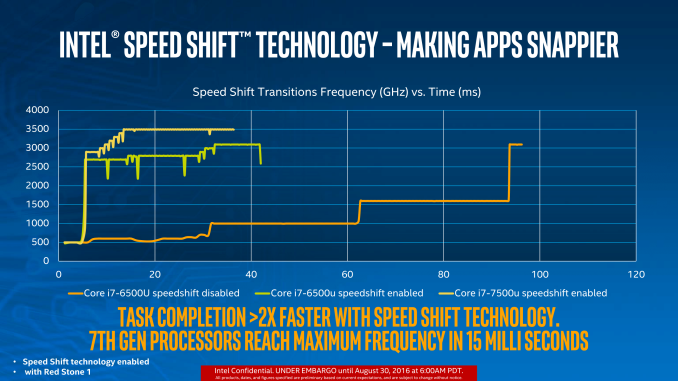

Stay on the OC frequency, unless you play with P-state. But it's a bit difficult to learn which value to key in.
My 1700 is 3.9ghz stable all core all time, but temp remain low 30s until there's load. Gaming about 50-60 deg C only. Max temp at high 60s peaking at 70s.
Sent from OnePlus ONEPLUS A3003 using GAGT
I also truly advocate staying on the OC frequency all the time. It does not mean it will run hot all the time. I run it this way for full stability and playing with P-states is a lengthy process and I have seen some games stutter due to the variant clocking up and down. Almost all overclocking guides disables all p-states and other power saving features when testing or reviewing.
Since my PC when switched on is on full attack more for gaming, this works for me. I shutdown my PC once I am done. I have been doing this since my 6700k and have no issues whatsoever. Remember, that your power plan in windows is also set to performance mode when overclocking too.


I’m also interested in Z390 + i7-9700K build. When you guys OC, does the PC stay in the OC speed or it will throttle down when surfing internet & YouTube? I don’t want to PC to stay hot all the time.

Coz gigabyte board. Their default vcore are higher than other boards. So that's why yours is so toasty.Any further inputs with regards to the 9700K temps that I am getting?
My 9700K (stock) runs up to 73 Deg C when playing Witcher 3 on max.
Cooled by an NZXT Kraken X62.
Is that too high? Any point in changing the thermal compound?
My old 2500K never hit >70 Deg even when aircooled so this is surprising.

WtF! You're right. I am manually tweaking vCore and the difference in temps is huge. Up to almost 20 Deg.Coz gigabyte board. Their default vcore are higher than other boards. So that's why yours is so toasty.
Go into bios, reduce core voltage below 1.3V. See if it helps. Lower until your stress test crash. Then increase 1 or 2 notch up for stability.
Sent from OnePlus ONEPLUS A3003 using GAGT


Easily draw 150W when Prime95 is running.
Hai. Any idea if I can RMA my bad chip?
Read motherboard manual what each voltage does hahaha. I never use gigabyte board much, so I'm not sure what each function does lolWtF! You're right. I am manually tweaking vCore and the difference in temps is huge. Up to almost 20 Deg.
Any ideas on what to put for VCCSA and VCCIO?
Also do I need to adjust load line calibration?
Edit: OK I have one core that keeps failing. Does it mean that the silicon lottery for that core is bad and it needs more power to keep working?


Easily draw 150W when Prime95 is running.
Hai. Any idea if I can RMA my bad chip?

The issue is basically temperatures of Core #7 at stock.Quick Stress Test

iirc, Intel will refer you back to retailer cos it will talk to you only if it is past 30 days post purchase.I just send Intel an email for RMA.
Hope for good news. LoL.
