Cheapest 2TB NVMe SSD

wwenze

Greater Supremacy Member
Joined
Dec 2, 2002
Messages
86,761
Reaction score
30,363
really? sauce?

Sauce = Mathematics and understanding of the storage device
yZDzmT8Rs63XZzf7N8B2UV-650-80.png
 

wwenze

Greater Supremacy Member
Joined
Dec 2, 2002
Messages
86,761
Reaction score
30,363
Glad you answered your own question and then more.

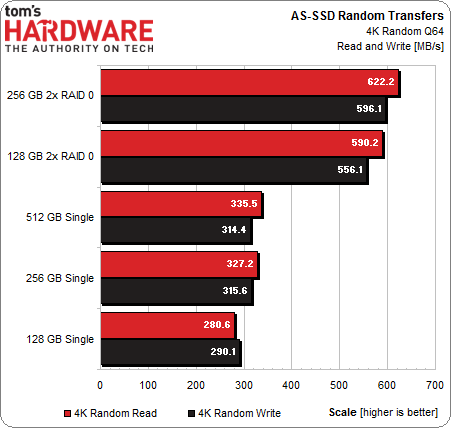
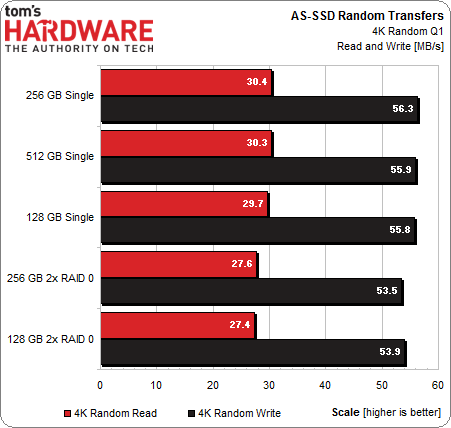
Yup, the key here is queue depth.

But to explain why performance drops in QD1: Because 4k is a very small data read. One storage unit (or page, or superpage... whatever term is getting used) within the drive is 4k at least, usually way, way bigger. Therefore, when you are trying to read a 4k file, the drive only needs to read one unit. Even if you have multiple drives, it is still one unit. In fact, the additional address translation (i.e. digging up which drive holds the data) is the one that causes latency to be higher. Yupz, when we do 4k, we're really measuring latency, not throughput.

Higher queue depths essentially allows the drive to behave more like a sequential read in terms of performance, since read requests are queue but can actually be carried out in parallel, assuming you keep the queue filled.
 

Koenig168

Arch-Supremacy Member
Joined
Nov 4, 2007
Messages
10,058
Reaction score
1,758
Glad you answered your own question and then more.

Yup, the key here is queue depth.

But to explain why performance drops in QD1: Because 4k is a very small data read. One storage unit (or page, or superpage... whatever term is getting used) within the drive is 4k at least, usually way, way bigger. Therefore, when you are trying to read a 4k file, the drive only needs to read one unit. Even if you have multiple drives, it is still one unit. In fact, the additional address translation (i.e. digging up which drive holds the data) is the one that causes latency to be higher. Yupz, when we do 4k, we're really measuring latency, not throughput.

Higher queue depths essentially allows the drive to behave more like a sequential read in terms of performance, since read requests are queue but can actually be carried out in parallel, assuming you keep the queue filled.

The issue is why Noirkw's random read/write numbers are off. CDM has two set of numbers, one for Q32 and the other for Q1. The Q1 numbers are understandable because at a single queue depth, you are basically limited by controller access speed. It is the other set of numbers at 32 queue depth that was surprisingly low as compared to single SSD.
 

wwenze

Greater Supremacy Member
Joined
Dec 2, 2002
Messages
86,761
Reaction score
30,363
One easy explanation is because the drive's superpage size is as big or bigger than 32 * 4k

Example: 16kB page * 4 planes * 4 channels

Don't even need that many to hit 32x 4k

I mean... there's the graph above, right? Basically you see the throughput still increasing with QD, that means at that point, you are still not fully utilizing the throughput of the single drive yet, so adding more drives in parallel won't help.

So simply based on the fact that even at QD32 the speed is less than sequential...

One additional implication with write speed is... probably the drive is also waiting more for the entire buffer to fill up before they can program a page.
 
Last edited:

Koenig168

Arch-Supremacy Member
Joined
Nov 4, 2007
Messages
10,058
Reaction score
1,758
One easy explanation is because the drive's superpage size is as big or bigger than 32 * 4k

Example: 16kB page * 4 planes * 4 channels

Don't even need that many to hit 32x 4k

I mean... there's the graph above, right? Basically you see the throughput still increasing with QD, that means at that point, you are still not fully utilizing the throughput of the single drive yet, so adding more drives in parallel won't help.

So simply based on the fact that even at QD32 the speed is less than sequential...

One additional implication with write speed is... probably the drive is also waiting more for the entire buffer to fill up before they can program a page.

getting a bit too technical for me :s13:
 

hafiz116

Senior Member
Joined
Sep 27, 2008
Messages
1,151
Reaction score
0
Mind sharing as well? TIA~ :)

After I did some additional checks the price was not that attractive so I cancelled the order.

I don’t have any parts for my next build yet so don’t mind holding off. Waiting to get my hands on an NZXT H1 case before I’ll start getting stuff.
 

EV1L

Supremacy Member
Joined
Sep 4, 2000
Messages
8,595
Reaction score
37
I see that quite a few of the members here recommended this model
https://www.amazon.sg/Western-Digit...11&ascsubtag=77da13fc5af64e93980d72c451b44f0f

I was initially gonna buy the ADATA XPG 8200 Pro 1TB for my laptop as i am using the same one for my desktop now but the local price is quite high at $259 +/-.

Wanna ask members here that the WD Black can run hot so can it still be used in a laptop. I am waiting for my LG GRAM 14 2020 to arrive next week and wanna upgrade the SSD.

Thank you.
 

xtractor

Master Member
Joined
Sep 14, 2008
Messages
4,674
Reaction score
978
I see that quite a few of the members here recommended this model
https://www.amazon.sg/Western-Digit...11&ascsubtag=77da13fc5af64e93980d72c451b44f0f

I was initially gonna buy the ADATA XPG 8200 Pro 1TB for my laptop as i am using the same one for my desktop now but the local price is quite high at $259 +/-.

Wanna ask members here that the WD Black can run hot so can it still be used in a laptop. I am waiting for my LG GRAM 14 2020 to arrive next week and wanna upgrade the SSD.

Thank you.

Bought WD Black $186 (on sale) for my brother laptop and he never complain anything.thinking to buy evo 860 for him but he is using old laptop so i went on with WD Black instead.so far he still running it with no issue of overheating

u can check out this offer too
Sabrent Rocket Q 1TB @ Amazon include with amazon coupon S$14.24 =$187 with shipping
https://www.amazon.com/Sabrent-Rock...coding=UTF8&psc=1&refRID=S15QNZW7KHSDMRC2E7WR

or
Silicon Power 1TB NVMe M.2=$185
=$202 with shipping
https://www.amazon.com/Silicon-Powe...coding=UTF8&psc=1&refRID=NT599CV34ERGRD56CKCK

if u Prime subscriber the shipping is free
 

Koenig168

Arch-Supremacy Member
Joined
Nov 4, 2007
Messages
10,058
Reaction score
1,758
...

Wanna ask members here that the WD Black can run hot so can it still be used in a laptop. I am waiting for my LG GRAM 14 2020 to arrive next week and wanna upgrade the SSD.

Thank you.

WD Black is the most power efficient PCIe 3.0 SSD around so it will run the coolest.
 

clay9477

Senior Member
Joined
Sep 24, 2011
Messages
925
Reaction score
3
Ironically the funniest part is most complaints for NVME temp come from people who switched out the stock SSD on Mac.
Mac cooling ain't great to begin with lol

Also bare in mind, 2.5 Inch SSD has the external casing to dissipate heat using the case as a heat sink.

If getting NVME and not getting any good airflow especially laptops, try to get low profile heatsinks. One thin layer of metal is better than nothing.
 

EV1L

Supremacy Member
Joined
Sep 4, 2000
Messages
8,595
Reaction score
37
Bought WD Black $186 (on sale) for my brother laptop and he never complain anything.thinking to buy evo 860 for him but he is using old laptop so i went on with WD Black instead.so far he still running it with no issue of overheating

u can check out this offer too
Sabrent Rocket Q 1TB @ Amazon include with amazon coupon S$14.24 =$187 with shipping
https://www.amazon.com/Sabrent-Rock...coding=UTF8&psc=1&refRID=S15QNZW7KHSDMRC2E7WR

or
Silicon Power 1TB NVMe M.2=$185
=$202 with shipping
https://www.amazon.com/Silicon-Powe...coding=UTF8&psc=1&refRID=NT599CV34ERGRD56CKCK

if u Prime subscriber the shipping is free

Wow, you just open up more choices for me. Haha, The Sabrent brand is unheard off to me but when i googled for reviews, its seems to be highly recommended. Thank you thank you.
 

EV1L

Supremacy Member
Joined
Sep 4, 2000
Messages
8,595
Reaction score
37
WD Black is the most power efficient PCIe 3.0 SSD around so it will run the coolest.

Thank you for your assurance. At first, i was a little worried about the thermals as this SSD doesn't comes with at least a thin heatsink.
 

easyxiaobin

Member
Joined
Apr 13, 2018
Messages
353
Reaction score
0
Thank you for your assurance. At first, i was a little worried about the thermals as this SSD doesn't comes with at least a thin heatsink.

if u are worry about temp on m.2, i recommend u "Jonsbo Ssd Aluminum Heatsink Cooler For M.2 2280 Solid State Hard Disk Radiator".

Can find in shopee or lazada for ard 6 to 7, very efficient if ur place hav no air con and worried about temp getting too high
 
Important Forum Advisory Note
This forum is moderated by volunteer moderators who will react only to members' feedback on posts. Moderators are not employees or representatives of HWZ Forums. Forum members and moderators are responsible for their own posts. Please refer to our Community Guidelines and Standards and Terms and Conditions for more information.
Top