DIY PC Rig Recommendations For 2026

snowydust

Senior Member
Joined
May 13, 2005
Messages
1,200
Reaction score
12
Hi all,

Last Dec i posted in the forum regarding issues with my motherboard, it somehow manages to work until now (there seems to be some other issues, like dying HDD). Hence, I am considering getting a new rig. Thanks in advance for advice and recommendations.

Usage: Casual photo editing via Lightroom, Stream videos, Play Light Games, i.e. JRPG via Steam

CPU + MBoard: MSI B760M Mortar DDR5 + i5-13600K (given I don't intend to replace my GTX1060 atm, i think good to have IGU just in case)
Ram: G.SKILL RIPJAWS S5 5600Mhz CL36 32gb
Primary Storage (OS): WD SN850x 1TB
Secondary Storage: Reused existing Samsung Evo 860 m2
Backup Storage: Existing WD 3TB Green HDD
GPU: Reusing GTX1060 but open to suggestion for upgrade
PSU: Bought the MSI MPG A750GF last Dec, BNIB
CPU Cooler: ID-Cooling SE-226 XT (am using this for my current rig, may get a new one since i understand i5 13th gen might be running hotter, so likely get the recommended Thermalright Peerless Assassin 120 SE Cool?
Case: Asus AP-201 (i like the size though unsure of the airflow, currently using Fractal Design Meshify Mini C)

Current Monitor: BenQ SW240 (1920 x 1200)

Budget: $1,500 to $2,000 (need to factor in OS and other software, and also if getting a GPU)
 
Last edited:
Siyu

Senior Member
Joined
Feb 9, 2003
Messages
2,114
Reaction score
17
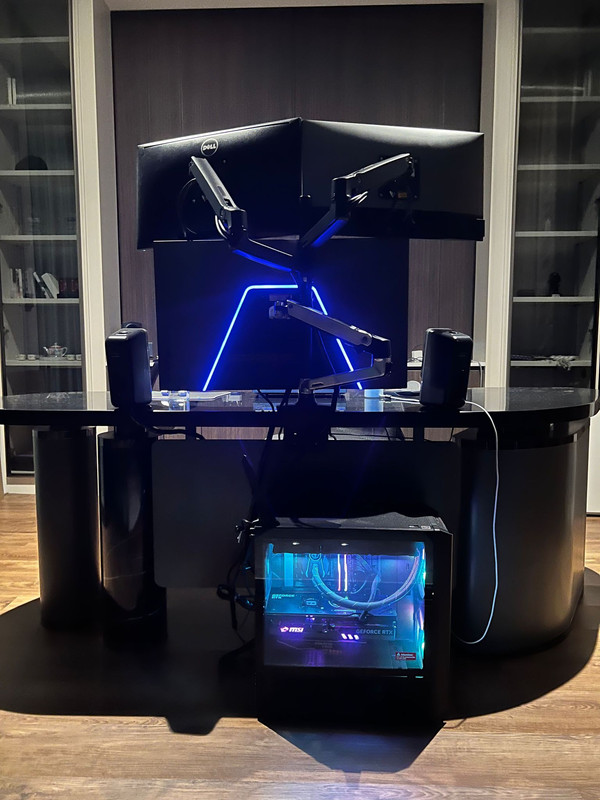
AMD Ryzen 9 7900X
Gigabyte B650 Aorus Elite AX
G.skill Trident Z5 DDR5-6000 2X16GB CL32
WD SN850X 2TB no heatsink
MSI TRIO X RTX 4080
MSI A850G PCIE5 850W
Lian Li Lancool 216 Black
Arctic Liquid Freezer II 360 ARGB
Ergotron extra arm
G3223Q - refurbished unit
Total above is around SGD 4,325
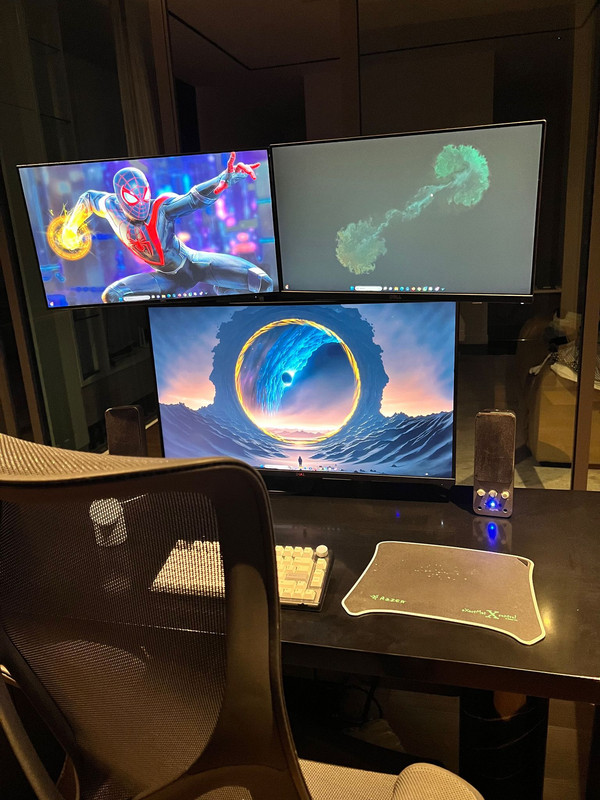
I did re-use 2 Dell monitors, 1 x HDD and 1 x old SSD + speakers.

Many thanks to Kai and NR on the recommendation and my friend Nunn who fixed it up with his staff.


tang_tang

Senior Member
Joined
Jun 13, 2005
Messages
673
Reaction score
18
I just got a PC from Invader on 14Jul23. I took the Master MK2 package $1088

- AMD RYZEN 5 5600X 3.7GHz 6CORE/12THREAD
- ASUS PRIME B550M-A WIFI II AX ARGB
- KINGSTON FURY BEAST RGB 3600MHz 16GB(8GBx2) CL17
- ASUS TUF GAMING RTX3060Ti O8G GAMING OC
- ADATA LEGEND 850 1TB GEN4 NVME M.2 SSD
- SILVERSTONE ET650-650W V1.4 80+ BRONZE
- COOLER MASTER CMP 320 CASING (3 ARGB FANS)

I did some upgrading and changes by whatapps them $1393:

Upgrade MotherBoard: Asus Tuf Gaming B550M-Plus Wifi II Motherboard
Upgrade Ram: Kingston Fury Beast RGB 3600Mhz (2x8Gb) Total: 32Gb (4x 8gb)
Upgrade PSU to Asus rog strix 750w 80+ gold full modular
Add on Cooler Master Hyper 212 Halo Black CPU Air Cooler
Add Rear Fan: CoolerMaster MF120 Halo Black Argb
Add Top Fan: CoolerMaster CF120 RGB case fan
Add on Tecware flex sleeved extension cables (Black and White)

That person promised to send me a pic before sending out the PC when i ordered. He didn’t do it as he say they already packed the PC liao and told me anything wrong just whatapps them.

At 12.30pm, i received my PC from Invader. They send me a wrong GPU ASUS RTX 3060TI dual fan( NOT Tuf) and a bigger case COOLER MASTER CMP 520 (NOT 320). I whatapps them and only replied at 3pm. He ask if i can accept the wrong case and take it as a free upgrade and will change the GPU.

Around 6.20pm, Invader’s technician came and took back the PC. I accepted the wrong casing.

At 8.30pm, I texted them and they say looking for driver now to deliver the PC.

At 10.30pm, I asked for update and they no longer replied me. I waited till 11.50pm it finally came, the 3rd party delivery man just left the PC outside the gate and ran off.

I find it funny as they can get all the stuff that I wanted to upgrade and change correctly but the items suppose to be in the package they give wrongly.

Took a day off.. happy happy wan to setup and play my new PC.. end up in a whole day waiting game. I am still great that at least they are willing to amend the mistakes and took the trouble to exchange the wrong stuffs. Not a smooth buying experience from them and good luck if you are buying a PC from them.
 
Last edited:

Zophar

Senior Member
Joined
May 5, 2003
Messages
1,386
Reaction score
9
Hi, I am looking at getting a PC from aftershock.
Configurations as below:
AMD Ryzen 5 7600X Processor
AFTERSHOCK M42 Frost Cooling
Gigabyte A620M H + AX WiFi
XFX RX 7900XT Speedster Merc 310 20GB
16GB Patriot SL Sig DDR5 5600MHz (8x2)
1TB Lexar NM790 Gen4 SSD
800W FSP Hydro Pro 80+ Bronze

Cost $1720.
Is the bundle value for money? or which setup would you recommend for value around this price?

*edit. use for playing games like Diablo
 

NightRaven49

Master Member
Joined
May 17, 2019
Messages
3,744
Reaction score
1,583
Now for fans/looks suggestion on the 216, shud i add bottom intake fans? Do i need to remove both plates if only use 1 bottom fan?
mounting fans on the bottom doesnt seem like it will help.
I am considering getting a new rig. Thanks in advance for advice and recommendations.

Usage: Light photo editing via Lightroom, Stream videos, Play Light Games, i.e. JRPG via Steam

CPU + MBoard: MSI B760M Mortar DDR5 + i5-13600K (given I don't intend to replace my GTX1060 atm, i think good to have IGU just in case)
Ram: G.SKILL RIPJAWS S5 5600Mhz CL36 32gb
Primary Storage (OS): WD SN850x 1TB
Secondary Storage: Reused existing Samsung Evo 860 m2
Backup Storage: Existing WD 3TB Green HDD
GPU: Reusing GTX1060 but open to suggestion for upgrade
PSU: Bought the MSI MPG A750GF last Dec, BNIB
CPU Cooler: ID-Cooling SE-226 XT (am using this for my current rig, may get a new one since i understand i5 13th gen might be running hotter, so likely get the recommended Thermalright Peerless Assassin 120 SE Cool?
Case: Asus AP-201 (i like the size though unsure of the thermal, currently using Fractal Design Meshify Mini C)
looks good. no point to upgrade gpu if u find its current performance satisfactory. cooler same thing, just run ur existing one first and see if noise and thermals are ok to u, if not then upgrade. ap201 is a good case, the mesh panels should help with airflow and it can accommodate the pa120 non se if needed.
Hi, I am looking at getting a PC from aftershock.
Configurations as below:
AMD Ryzen 5 7600X Processor
AFTERSHOCK M42 Frost Cooling
Gigabyte A620M H + AX WiFi
XFX RX 7900XT Speedster Merc 310 20GB
16GB Patriot SL Sig DDR5 5600MHz (8x2)
1TB Lexar NM790 Gen4 SSD
800W FSP Hydro Pro 80+ Bronze

Cost $1720.
Is the bundle value for money? or which setup would you recommend for value around this price?

*edit. use for playing games like Diablo
very cheap for a current gen system, especially when a 7900xt already costs at minimum 1.2k around most places, but there is also very evident cost cutting around the mobo, ram and psu. if ur just gaming it should be fine, though for d4 it is very overkill, but it should serve u well even for 4k gaming well into the future. I would also be slightly hesitant of aftershocks support, but given the price I think can close one eye.
 

Chilton

Junior Member
Joined
Jul 15, 2023
Messages
1
Reaction score
0
Hi, I’m looking at this prebuilt from Invader. Daily user with light gaming sessions on triple A games, budget is around 1k.

Would you all have any other recommendations on prebuilt from what they have?
Also, Any recommendations on what I should change? PSU perhaps?

Specifications:
- IM5600X3060TI-WG10
- AMD RYZEN 5 5600X 3.7GHz 6CORE/12THREAD
- ASUS PRIME B550M-A WIFI II AX ARGB
- KINGSTON FURY BEAST RGB 3600MHz 16GB(8GBx2) CL17
- ASUS DUAL RTX3060Ti 8G V2 TWIN FAN GDDR6X
- ADATA LEGEND 850 1TB GEN4 NVME M.2 SSD
- SILVERSTONE ET650-650W V1.4 80+ BRONZE
- COOLER MASTER CMP 320 CASING (3 ARGB FANS)
 

snowydust

Senior Member
Joined
May 13, 2005
Messages
1,200
Reaction score
12
Btw, is Windows 11 recommended now or better to stick with Windows 10 for the time being for home use?
 

hyperfuse

Master Member
Joined
Sep 23, 2019
Messages
4,380
Reaction score
1,848
hi all.

i just installed my 7800x3d cpu chip to one of the most affordable B650m boards, the asrock riptide. first time install and boot up. all good,

install applications etc all working fine.

so i bought gskill trident Z 6000mhz rams with CL30 timings ( i googled and that was what the sweet spot is)
it is actually an XMP rated ram and not EXPO but was told that it doesnt matter.

i went into asrock bios, it detected the XMP profile on the asrock b650 board and i turn it on, restart and it booted up fine.

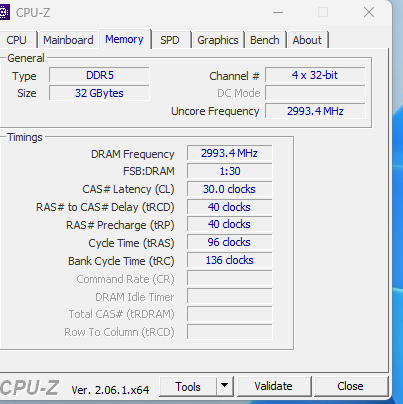
i went to download CPU-Z and saw this under the memory tab.
1.png


This is supposed to be correct yea? DRAM frequency will show about 3000 mhz because it will cut by half of the 6000mhz freq right? sorry i abit noob in this.

The CL timings shown are from the default XMP profile.

Also, previously there were mentions that boot up was slow for ddr5 systems on AM5 platform, mine boot up pretty fast though on this cheap asrock board. probably 20 secs or less.
 

hyperfuse

Master Member
Joined
Sep 23, 2019
Messages
4,380
Reaction score
1,848
Whats-App-Image-2023-07-15-at-18-01-15.jpg


So finally project done.

Removed all my existing internal computer parts.

Swap out to 7800x3d + asrock riptide b650m, ddr5 6000mhz ram, 4070 ti and using the SK Hynix P41 platinum ssd from Amazon~

Boots up pretty fast. Cable management too lazy to do.
 
Last edited:

danisafi

Junior Member
Joined
Jul 15, 2023
Messages
1
Reaction score
1
Hi, I’m looking at this prebuilt from Invader. Daily user with light gaming sessions on triple A games, budget is around 1k.

Would you all have any other recommendations on prebuilt from what they have?
Also, Any recommendations on what I should change? PSU perhaps?

Specifications:
- IM5600X3060TI-WG10
- AMD RYZEN 5 5600X 3.7GHz 6CORE/12THREAD
- ASUS PRIME B550M-A WIFI II AX ARGB
- KINGSTON FURY BEAST RGB 3600MHz 16GB(8GBx2) CL17
- ASUS DUAL RTX3060Ti 8G V2 TWIN FAN GDDR6X
- ADATA LEGEND 850 1TB GEN4 NVME M.2 SSD
- SILVERSTONE ET650-650W V1.4 80+ BRONZE
- COOLER MASTER CMP 320 CASING (3 ARGB FANS)
Seems like a very decent build with the current configuration. Maybe getting a 750W Gold PSU will be fine but the current PSU can support future upgrades with up to 4070Ti as well so I'd reckon you're fine.
 

Solid_snape

Member
Joined
Oct 5, 2015
Messages
227
Reaction score
33
Btw, is Windows 11 recommended now or better to stick with Windows 10 for the time being for home use?
A lot of negative feedback regarding windows 11: ads in the menu, choppy performance etc. not to mention the traditional alternate windows version curse where every other version is bad (XP - Vista - 7 - 8 - 10 - 11)

I’d stick to windows 10 if I can.
 

hyperfuse

Master Member
Joined
Sep 23, 2019
Messages
4,380
Reaction score
1,848
A lot of negative feedback regarding windows 11: ads in the menu, choppy performance etc. not to mention the traditional alternate windows version curse where every other version is bad (XP - Vista - 7 - 8 - 10 - 11)

I’d stick to windows 10 if I can.
For those who have hdr monitors such as the qd oled ultrawides, win 11 has better HDR implementation.
 

NightRaven49

Master Member
Joined
May 17, 2019
Messages
3,744
Reaction score
1,583
Hi, I’m looking at this prebuilt from Invader. Daily user with light gaming sessions on triple A games, budget is around 1k.

Would you all have any other recommendations on prebuilt from what they have?
Also, Any recommendations on what I should change? PSU perhaps?

Specifications:
- IM5600X3060TI-WG10
- AMD RYZEN 5 5600X 3.7GHz 6CORE/12THREAD
- ASUS PRIME B550M-A WIFI II AX ARGB
- KINGSTON FURY BEAST RGB 3600MHz 16GB(8GBx2) CL17
- ASUS DUAL RTX3060Ti 8G V2 TWIN FAN GDDR6X
- ADATA LEGEND 850 1TB GEN4 NVME M.2 SSD
- SILVERSTONE ET650-650W V1.4 80+ BRONZE
- COOLER MASTER CMP 320 CASING (3 ARGB FANS)
yeah psu upgrade enough.
Btw, is Windows 11 recommended now or better to stick with Windows 10 for the time being for home use?
since u are going intel, windows 11 is better.
i went to download CPU-Z and saw this under the memory tab.
1.png


This is supposed to be correct yea? DRAM frequency will show about 3000 mhz because it will cut by half of the 6000mhz freq right? sorry i abit noob in this.

The CL timings shown are from the default XMP profile.
slight single digit variation from 3000mhz is normal, even my ddr4 kit isn't exactly 1800mhz. another way to check is on task manager, should show exact 6000mhz. good to know u have xmp working well on am5.
 

hyperfuse

Master Member
Joined
Sep 23, 2019
Messages
4,380
Reaction score
1,848
yeah psu upgrade enough.

since u are going intel, windows 11 is better.

slight single digit variation from 3000mhz is normal, even my ddr4 kit isn't exactly 1800mhz. another way to check is on task manager, should show exact 6000mhz. good to know u have xmp working well on am5.
What about undervolting on 7800x3d?

A friend encouraged me to undervolt for better Temps and performance.

So I tried. Using curve optimizer and I just set all cores to negative 30.

Not sure whether it does help but after reboot, it's stable
 

gibson

Master Member
Joined
Aug 22, 2000
Messages
4,294
Reaction score
1
Attempting to assemble a new PC after my old one has last more than 10 years...
Mostly used for photo editing, non-graphics intensive games e.g. FM and the usual browsing, netflix, etc...
Idea is to make it last as long as possible again

Specs:
Deciding between these 2 combinations but personal preference to stick with Intel
1. 13400K + MSI PRO B660M-A WIFI D4
2. 13600KF + MSI MAG B760M MORTAR WIFI D4
- Zotac Gaming RTX3060 Twin Edge 12GB GDDR6
- KINGSTON FURY BEAST Black 3600MHz CDL17/CL18 KIT 32GB
- Cooler Master MWE Gold V2 650W 80+ Gold Modular
- WD Black SN770 5150MB/s Gen4 Nvme M.2 1TB
- Toshiba P300 6TB (Dynacore charging $2 more vs 4TB)

Intending to reuse my old Sharkoon T28 case.
Any need to move to DDR5 Mobo and RAM?

Looking for any advise from the pros here. :D
 

deepblue_82

Arch-Supremacy Member
Joined
Oct 23, 2007
Messages
20,254
Reaction score
2,578
Attempting to assemble a new PC after my old one has last more than 10 years...
Mostly used for photo editing, non-graphics intensive games e.g. FM and the usual browsing, netflix, etc...
Idea is to make it last as long as possible again

Specs:
Deciding between these 2 combinations but personal preference to stick with Intel
1. 13400K + MSI PRO B660M-A WIFI D4
2. 13600KF + MSI MAG B760M MORTAR WIFI D4
- Zotac Gaming RTX3060 Twin Edge 12GB GDDR6
- KINGSTON FURY BEAST Black 3600MHz CDL17/CL18 KIT 32GB
- Cooler Master MWE Gold V2 650W 80+ Gold Modular
- WD Black SN770 5150MB/s Gen4 Nvme M.2 1TB
- Toshiba P300 6TB (Dynacore charging $2 more vs 4TB)

Intending to reuse my old Sharkoon T28 case.
Any need to move to DDR5 Mobo and RAM?

Looking for any advise from the pros here. :D
if u are looking just for photo edit and fm i think ddr4 is ok. but if u are looking as long as possible then u can go for ddr5
i heard toons said there is no more 3060 12gb... u can go for amd 6700
better to go for wd 850x 2tb
 

NightRaven49

Master Member
Joined
May 17, 2019
Messages
3,744
Reaction score
1,583
What about undervolting on 7800x3d?

A friend encouraged me to undervolt for better Temps and performance.

So I tried. Using curve optimizer and I just set all cores to negative 30.

Not sure whether it does help but after reboot, it's stable
yep, lower voltage means lower power consumption and in turn lower temperatures. in some instances, ur parts may be able to take advantage of the lower temps to boost higher for better performance. but ofc should test for stability, can run cinebench or play a few games and see if got any crash. u can also verify the lower power consumption and temps at the same time.
Deciding between these 2 combinations but personal preference to stick with Intel
1. 13400K + MSI PRO B660M-A WIFI D4
2. 13600KF + MSI MAG B760M MORTAR WIFI D4
id opt for the 13600k for the current gen performance; 13400 does not offer much of an increase over last gen and is very poorly priced locally which means u can get a ryzen 7600 (which offers better photoshop performance) + b650 for the same price. on a minor note, 13400k does not exist, 13600k is the lowest end k sku for 13th gen.
- Zotac Gaming RTX3060 Twin Edge 12GB GDDR6
tiagong sls no stock already, maybe can try luck on online etailers. but even considering prices there (>$410), i might opt for a rx7600 under $400 for on average ~15% more performance. there can be a case made for the 12gb of vram and 5y zotac warranty (with registration) though.
Any need to move to DDR5 Mobo and RAM?
if u have the budget sure, since ddr4 tends to hold back 13th gen quite a bit. it would also certainly help in keeping ur system up to date as long as possible. reasonably fast ddr5 is quite affordable nowadays (maybe $20 more than ddr4 for 32gb kits), though ddr5 board selection among bX60 boards locally is quite limited.
 

cutthroat

Senior Member
Joined
Dec 27, 2012
Messages
1,722
Reaction score
43
Was looking at intel DDR5 Wifi boards and am a little undecided between MSI Pro Z790P DDR5 and MSI MAG Z790 Tomahawk DDR5. Will be running i5 13600KF and 7900XTX. Is the $70 price difference(dynacore) justified for the Tomahawk?
 
Important Forum Advisory Note
This forum is moderated by volunteer moderators who will react only to members' feedback on posts. Moderators are not employees or representatives of HWZ Forums. Forum members and moderators are responsible for their own posts. Please refer to our Community Guidelines and Standards and Terms and Conditions for more information.
Top