HDB dream internet setup

hawthorne

Arch-Supremacy Member
Joined
May 9, 2006
Messages
11,706
Reaction score
210
Most famous is the Ookla speedtest.

Do check on this iPerf app as it seem that it never updated for several years.
I have 2 PCs that has very similar specs, same Mobo but one is i5, another one is i7. Both Kaby Lake.

When running ookla speedtest, the i5 one gave a throughout of ~900mbps. The i7 PC only got throughput of ~600mbps.

However, when I copy files from my NAS to both PCs, I can get ~900mbps.

This makes me doubt the accuracy of speed test
 

eric3743

Supremacy Member
Joined
Jun 26, 2016
Messages
6,092
Reaction score
1
I have 2 PCs that has very similar specs, same Mobo but one is i5, another one is i7. Both Kaby Lake.

When running ookla speedtest, the i5 one gave a throughout of ~900mbps. The i7 PC only got throughput of ~600mbps.

However, when I copy files from my NAS to both PCs, I can get ~900mbps.

This makes me doubt the accuracy of speed test


Speedtest result is never accurate as it depend on many others as in time, place, location, etc.
Ookla will first lookout for the best server at that moment before the test.
Ookla speedtest is exit your ISP and their routes vary accordingly.

As i use Starhub fibre broadband, i use Starhub Local Speedtest.
In this way, it do show a constant result throughout all time periods.
Likewise when using Ookla for handsets, i marked only one server.
And sometimes i repeat once or twice to get the accuracy, after each test.

For 1Gbps plan, above 600+Mbps is acceptable.
In my case, download is 600+Mbps and upload at around 800+Mbps, constant.
Never hit the 900Mbps yet, so not sure why but it does not matter.
What it matter is that the connection is stable and stay above 600+Mbps while on speedtest result show.

Furthermore on the issue regarding to the internal NAS files copying.
Internal connection is not relevant to external connection as in speed.
As connection is between 2 computers and doing file transferring, there is nothing that slow this process.
Computer hardware on the Local Area Connection adapter status show 1Gbps so the moving of files at that speed is expected.
It has nothing to do with external as you mentioned on the i7 PC speed.
:):s12::D
 

hawthorne

Arch-Supremacy Member
Joined
May 9, 2006
Messages
11,706
Reaction score
210
Furthermore on the issue regarding to the internal NAS files copying.
Internal connection is not relevant to external connection as in speed.
As connection is between 2 computers and doing file transferring, there is nothing that slow this process.
Computer hardware on the Local Area Connection adapter status show 1Gbps so the moving of files at that speed is expected.
It has nothing to do with external as you mentioned on the i7 PC speed.
:):s12::D

Ya I understand. I'm running the local file copy to ensure that the difference is not due to the infrastructure within my home. i5 is direct to router with a 1m long Cat6 cables. i7 is connected to a Cat6 faceplate, through a patch panel and is ~20m away from the router
 

eric3743

Supremacy Member
Joined
Jun 26, 2016
Messages
6,092
Reaction score
1
Ya I understand. I'm running the local file copy to ensure that the difference is not due to the infrastructure within my home. i5 is direct to router with a 1m long Cat6 cables. i7 is connected to a Cat6 faceplate, through a patch panel and is ~20m away from the router
Cables and its length may not have any effect on connection speed.
It is the way how the Router handle this connection speed does.

This is what i was told when i bought a powered hub and to decide as auto or managed switch.
Auto mean the hub will decide which port to provide faster or slower speed.
For example, streaming do not require fast speed whereas downloading huge file(s) do so.
In managed hub, software can adjust to give which port more as in 500Mbps with the rest distribute accordingly, say for 1Gbps.

So in the end, should the network is heavy, then this may also affect in connection speed.
I like to download videos, as huge file example.
When i start on 1 video, it may take 20 minutes.
For to download another while the first is still in progress, then the 1st video download timing extend to 30+ minutes.
More videos downloading, all the timing so will affected.
Hence i limit to 3 videos at a time.
Connection is shared, as this show quite clearly.

Regards.:)

Sent from Samsung SM-G935F using GAGT
 

localITguy

Suspended
Joined
Dec 13, 2013
Messages
17,789
Reaction score
1,674
guys, is this the right way to connect?

TP>ONT>Router(Disable DHCP,Nat)>Patch Panel? (assuming all rooms will be wired)
rooms>LAN Cable<Router(AP)>PC?

my wifi coverage is weak i need 2 routers

Thanks,
 

renfred89

Arch-Supremacy Member
Joined
Nov 11, 2007
Messages
17,512
Reaction score
19
guys, is this the right way to connect?

TP>ONT>Router(Disable DHCP,Nat)>Patch Panel? (assuming all rooms will be wired)
rooms>LAN Cable<Router(AP)>PC?

my wifi coverage is weak i need 2 routers

Thanks,

Why do you want to disable DHCP and NAT at router level? It would work at all for your setup..

It makes more sense if you disable DHCP on your router running as an AP instead.
 

eric3743

Supremacy Member
Joined
Jun 26, 2016
Messages
6,092
Reaction score
1
guys, is this the right way to connect?

TP>ONT>Router(Disable DHCP,Nat)>Patch Panel? (assuming all rooms will be wired)
rooms>LAN Cable<Router(AP)>PC?

my wifi coverage is weak i need 2 routers

Thanks,


This is my setup.

TP > ONT > main Router (default settings) -->> LAN cables towards:

my room Data Point -->> [ optional: powered HUB or ignore ] -->> Router WAN port (default settings)

Hence room Router act independently as a network itself, with wireless SSID.
When connect to room Router WAN port, it can use the Router LAN ports -->> PC

To make any changes to the room Router, follow this steps:
0. Ensure that the Router is Factory Reset, refer to last para on this; before connect via LAN cable from Data Point to room Router WAN Port.
1. Go to download this "Home WiFi Alert" app and install.
2. Open the Home WiFi Alert app and do enable Location.
3. Once the 2 ticks is marked, click on the "SCAN NETWORK"
4. It will display the "Access Point (192.168.100.1)" IP address depend on the Router, as mine is DLink DIR-868L for both Main and room Routers.
5. Connect via LAN cable from PC to Router LAN port.
6. Open browser and input the IP Address as stated.
7. Make your changes in the settings of the Router.


So far, i have no issue and on whether connect PC via powered Hub or Router do work the same as in connection speed.
Handsets connection via Router wireless SSID, connection speed is fine around 400 ~ 500+ Mbps for S6, S7 & S7 Edge.
For the next room, connection could be about 300Mbps if the wall is BTO type (thick).

Just ensure if to have Factory Reset the room Router to avoid conflict in IP, if any.
Router do able to maintain any previous IP is applicable or used before as main Router connected to ONT.

Regards.

 
Last edited:

Mng85

Senior Member
Joined
Jul 24, 2003
Messages
1,953
Reaction score
0
I think your layout not too bad... You can either setup a AP at either Point X1 or X2.

Should give you a good coverage. within your house.

M73erVn.jpg


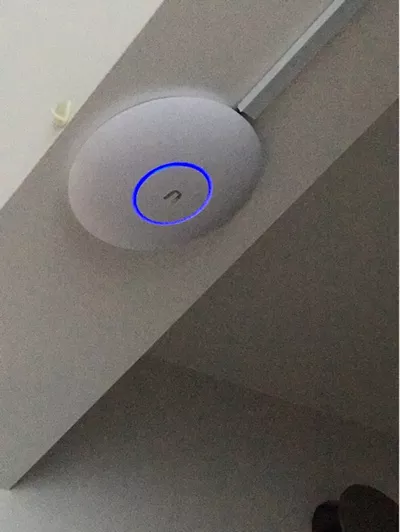
Can consider Ubiquiti UAP-AC-PRO. (The AP do not have Web interface, you need to install a controller on your MAC/Windows/Smartphone to configure).

pretty easy to configure and had a strong wifi coverage. Since you are renovating can run a cable and mount the AP up.


a1791d27-ffc7-4a92-b39a-c75cafa97f60.s_400-w-fs_s.jpg.webp

https://www.ubnt.com/unifi/unifi-ap-ac-pro/


*I am not sell the AP or the link this is only for an idea the cost of the AP.

http://www.lazada.sg/ubiquiti-uap-a....brand-24628.0.0.eR1T2A&ff=1&sc=MTRg&rb=24628


http://list.qoo10.sg/item/UBIQUITI-UBIQUITI-UNIFI-AP-AC-PRO-UAP-AC-PRO/486578586


https://shop.winpro.com.sg/products/unifi-ap-ac-pro

did u use yr mobile phone or pc to set up?

i might not have time to play with it with a pc so if the mobile app is good enough i might consider to get one.
 

Apex

Master Member
Joined
Jan 1, 2000
Messages
2,508
Reaction score
251
did u use yr mobile phone or pc to set up?

i might not have time to play with it with a pc so if the mobile app is good enough i might consider to get one.


Basic configuration mobile is good enough.

Unfortunately I helped a friend to setup via mobile (last year). At that time the mobile app is good enough for configure the AP UP and running.


As for my home I still using PC as the controller. The PC has more information. Anyway you only need to controller during configure, change config and firmware update.
 

terry1

Senior Member
Joined
Nov 22, 2005
Messages
565
Reaction score
1
Basically i don't think these devices could be of any help

when you outgrow the speed, you would upgrade from cat 5 to 5e to 6 to 7 and then to fibre. and in the end you would wish that somebody would have told you to lay fibre right at the beginning of the setup.

you are going through what we have gone through :D
 

eric3743

Supremacy Member
Joined
Jun 26, 2016
Messages
6,092
Reaction score
1
when you outgrow the speed, you would upgrade from cat 5 to 5e to 6 to 7 and then to fibre. and in the end you would wish that somebody would have told you to lay fibre right at the beginning of the setup.

you are going through what we have gone through :D


Actually i am referring to your post regarding the Converter.
There is no need to have such converter as there are already powered hub available.
I bought a powered 8-ports Gigabit hub costing $45.
My new BTO flat is wired to all rooms with Data Point.
As i have tested on using cables Cat-5E & Cat-6 & Cat-7, there is no differences.

By getting a $20 converter could be pointless as connection speed may not be stable.
Anyway this 1Gbps could be stay for quite a few years to come, especially for home users.:):s12:
 

Mng85

Senior Member
Joined
Jul 24, 2003
Messages
1,953
Reaction score
0
Basic configuration mobile is good enough.

Unfortunately I helped a friend to setup via mobile (last year). At that time the mobile app is good enough for configure the AP UP and running.


As for my home I still using PC as the controller. The PC has more information. Anyway you only need to controller during configure, change config and firmware update.

PC connect via wifi?
 

Apex

Master Member
Joined
Jan 1, 2000
Messages
2,508
Reaction score
251
PC connect via wifi?

if you are using the PC to configure the AP.

Plug the AP to your current network,

The software will search and discover the AP and guide you to setup the 1st time login username and password.

The PC can be on WIFI or wire as long as PC and AP are on the SAME network.


- If you have firewall install on your PC, you must disable, otherwise you may not be able to discover the AP.
 

localITguy

Suspended
Joined
Dec 13, 2013
Messages
17,789
Reaction score
1,674
any cheap router to share that supports Gigabit speeds? (LAN) (Main router)

i am using my ac88u as my 2nd router, as the ONT will be inside a cabinet so putting the ac88u as the main would be a waste
 

-Grift-

Senior Member
Joined
Apr 4, 2015
Messages
980
Reaction score
17
any cheap router to share that supports Gigabit speeds? (LAN) (Main router)

i am using my ac88u as my 2nd router, as the ONT will be inside a cabinet so putting the ac88u as the main would be a waste

N56U

10char
 

Mng85

Senior Member
Joined
Jul 24, 2003
Messages
1,953
Reaction score
0
if you are using the PC to configure the AP.

Plug the AP to your current network,

The software will search and discover the AP and guide you to setup the 1st time login username and password.

The PC can be on WIFI or wire as long as PC and AP are on the SAME network.


- If you have firewall install on your PC, you must disable, otherwise you may not be able to discover the AP.

thanks for the advice bro. last question... do you think this ap has better coverage and reach vs asus ac68? this is my main criteria...
 
Important Forum Advisory Note
This forum is moderated by volunteer moderators who will react only to members' feedback on posts. Moderators are not employees or representatives of HWZ Forums. Forum members and moderators are responsible for their own posts. Please refer to our Community Guidelines and Standards and Terms and Conditions for more information.
Top