Hello from Team OCBC

Status
Not open for further replies.

OCBC Bank

Suspended
Joined
Sep 13, 2013
Messages
6,960
Reaction score
118
For 360 account the interest is based on monthly average at the end of the month means if I have 150k till mid of the month and I withdraw all 150 left $0 till end of the month I will still get the full 75k bonus interest?

Hi B1ackb0x,

Bonus interest is calculated based on the average daily balance in your account.

You may refer to the 'interest calculator' for an illustration:
https://www.ocbc.com/personal-banking/deposits/360-savings-account

^XF
 

OCBC Bank

Suspended
Joined
Sep 13, 2013
Messages
6,960
Reaction score
118
For 360 account the interest is based on monthly average at the end of the month means if I have 150k till mid of the month and I withdraw all 150 left $0 till end of the month I will still get the full 75k bonus interest?

The example doesn't have the scenario I quoted.

Hi there,

Bonus interest is given on the first S$75,000 of the account's average daily balance. It is calculated at the end of each calendar month based on the monthly average balance (MAB).

To get the account's monthly average balance, add up the end day balances, then divide it by the number of days in a month.

For eg. (Please note that this is just an indication)

February has 28 days.

End day balance on each day:

Day 1 to 14 - $150,000
Day 15 - 28 - $0

Monthly average balance = 2,100,000 / 28 = $75,000

Even though your account balance is $0 for the last couple of days in the month, you will still be given bonus interest based on your average balance, which in this case would be $75,000.

^DG
 
Last edited:

B1ackb0x

Senior Member
Joined
May 27, 2004
Messages
647
Reaction score
1
Hi there,

Bonus interest is given on the first S$75,000 of the account's average daily balance. It is calculated at the end of each calendar month based on the monthly average balance (MAB).

To get the account's monthly average balance, you will need to add up the end day balances, and then divide it by the number of days in a month.

For eg. (Please note that this is just an indication)

February has 28 days.

End day balance on each day:

Day 1 to 14 - $150,000
Day 15 - 28 - $0

Monthly average balance = 2,100,000 / 28 = $75,000

Even though your account balance is $0 for the last couple of days in the month, you will still be given bonus interest based on your average balance, which in this case would be $75,000.

^DG

Thanks for the clarification.
 

IndianChief

Banned
Joined
Dec 9, 2015
Messages
25,482
Reaction score
8,357
Stupid OCBC

Always cutting 360 interst rate and still dare to call to ask me keep my money and invest in their investment products, when I transfer money to other bank
 

OCBC Bank

Suspended
Joined
Sep 13, 2013
Messages
6,960
Reaction score
118
Stupid OCBC

Always cutting 360 interst rate and still dare to call to ask me keep my money and invest in their investment products, when I transfer money to other bank

Thank you for the feedback.
If there is anything that we are able to assist with, do drop us a private message, or share here.

^DG
 

skthk21

Senior Member
Joined
Jan 24, 2008
Messages
623
Reaction score
20
Hi there need late fee waiver as wanted to pay cash at suntec branch but found closed. Straight pay thru dbs internet banking but incurred late fee. Pls help.
 

OCBC Bank

Suspended
Joined
Sep 13, 2013
Messages
6,960
Reaction score
118
Hi there need late fee waiver as wanted to pay cash at suntec branch but found closed. Straight pay thru dbs internet banking but incurred late fee. Pls help.

Hi skthk21,

May we know if you have tried the waiver feature on the OCBC mobile banking app?

Once you're logged in, tap the 2 lines on the top left. Select 'Card services' > 'Request for credit card waiver'. The outcome will be known immediately.

Alternatively, you may also access the waiver feature via internet banking. Once logged into internet banking, look under ‘Customer Service > Cards > Credit Card Fee Waiver’.

Or, if you are looking to appeal for any unsuccessful waiver requests instead, please share your mobile number with us via PM. We will call and see if an appeal can be made (subject to the bank's review and approval). Thank you.

^XF
 

haidoz

Arch-Supremacy Member
Joined
Mar 3, 2005
Messages
12,907
Reaction score
0
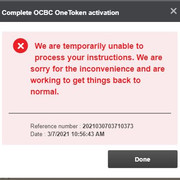
Hi I'm trying to add a new payee but the following error comes up after keying in my oneToken 6-digit OTP. I have already activated my oneToken on my mobile app too.

ocbc-error.jpg
 
Last edited:

OCBC Bank

Suspended
Joined
Sep 13, 2013
Messages
6,960
Reaction score
118
Hi I'm trying to add a new payee but the following error comes up after keying in my oneToken 6-digit OTP. I have already activated my oneToken on my mobile app too.

ocbc-error.jpg

Hi haidoz,

Are you still having issues with this?

^DG
 

OCBC Bank

Suspended
Joined
Sep 13, 2013
Messages
6,960
Reaction score
118
hi ocbc, i have a monthly savings account with ~$500 inside. I do this to keep my account alive with OCBC so that its easier if I need to perform any service in the future.

my question is as I don't plan to deposit or withdraw any funds, what will happen if no activity is performed for >1 year? I think that is considered dormant account?

if my account is tagged as dormant, is there a fee to reactivate it? do i have to come down to a branch physically to reactivate it?

i would like to know the consequences, if its too troublesome, i will just shut it down

Hi moolala,

You do not need to pay a fee to reactivate a dormant account.

If your account is tagged to Internet Banking, you will be able to reactivate your account online.

Otherwise, you can visit our branches to make a cash deposit into the account to reactivate it.

For the Monthly Savings account, a minimum average daily balance of $500 for the month is required. Do ensure that this is met, or else a monthly service fee of $2 will be levied.

Accounts will turn dormant if there are no transactions made in a year.

^DG
 

bojo387

Member
Joined
Feb 16, 2009
Messages
116
Reaction score
10
What's wrong with the OCBC app on Android? Can't login regardless if biometric, access code/pin, nor Singpass mobile. This was after the recent Android 11 update on my Samsung Galaxy S20 Ultra 5G.
 

bojo387

Member
Joined
Feb 16, 2009
Messages
116
Reaction score
10
What's wrong with the OCBC app on Android? Can't login regardless if biometric, access code/pin, nor Singpass mobile. This was after the recent Android 11 update on my Samsung Galaxy S20 Ultra 5G.


Got this response from DG and it worked for me:

"Please try deleting and reinstalling the mobile banking app.

If you are still seeing security risks prompts after deleting & reinstalling the app, please try the following:

Go to Settings > App Info > OCBC Bank and select the “Force Stop” option.

Go to the data storage menu, and select the options to “Clear Data” and “Clear Cache”

Go to “Permissions”, and allow permissions for “Camera”, “Contacts”, “Location”, “Microphone”, “Phone” and “Storage”

Under the “Advanced” section, allow the option for “Display over other apps”.

^DG"
 

OCBC Bank

Suspended
Joined
Sep 13, 2013
Messages
6,960
Reaction score
118
Hello, yes still having this same issue as of a minute ago.

What's wrong with the OCBC app on Android? Can't login regardless if biometric, access code/pin, nor Singpass mobile. This was after the recent Android 11 update on my Samsung Galaxy S20 Ultra 5G.

Thanks for listing the troubleshoot guide

If you're still encountering errors after the troubleshoot steps, can you drop us a PM? We'll be glad to look into it for you

^Sh
 

OCBC Bank

Suspended
Joined
Sep 13, 2013
Messages
6,960
Reaction score
118
Hi Ocbc, I am facing the same issue also. I can't log in even after re-installing the app.

I'm facing the same problem as well.


Gotcha!

Can you try these steps first?


1. Delete and reinstall the mobile banking app.

2. If you are still seeing security risks prompts after deleting & reinstalling the app, please try the following:

Go to Settings > App Info > OCBC Bank and select the “Force Stop” option.

Go to the data storage menu, and select the options to “Clear Data” and “Clear Cache”

Go to “Permissions”, and allow permissions for “Camera”, “Contacts”, “Location”, “Microphone”, “Phone” and “Storage”

Under the “Advanced” section, allow the option for “Display over other apps

^Sh
 

Extech

Senior Member
Joined
Sep 3, 2017
Messages
1,473
Reaction score
94
Hello OCBC,

Ever since your branch in Sun Plaza closed down, my mum keep complaining to me very hard to update her bank book. As such, I would like to request for the bank book updating ATM to be placed at Sembawang MRT. Thank you
 
Status
Not open for further replies.
Important Forum Advisory Note
This forum is moderated by volunteer moderators who will react only to members' feedback on posts. Moderators are not employees or representatives of HWZ Forums. Forum members and moderators are responsible for their own posts. Please refer to our Community Guidelines and Standards and Terms and Conditions for more information.
Top