M.2 NVMe storage Recommendation

deepblue_82

Arch-Supremacy Member
Joined
Oct 23, 2007
Messages
20,161
Reaction score
2,545
i have done my research on the drives but i have not brought them yet.. as i am still finding other parts of the pc..

but price wise i would say for a gen 4 the wd 850x is better then 980 and cheaper then 990
this is for main drive... at least 1 tb to install windows and office and your other main stuff

for 2nd drive or game drive unless u playing competitive, i would say P3 1tb price point.

of coz if u have money to spend then u can just for 990 pro
 

12122012

Senior Member
Joined
Oct 5, 2009
Messages
952
Reaction score
28
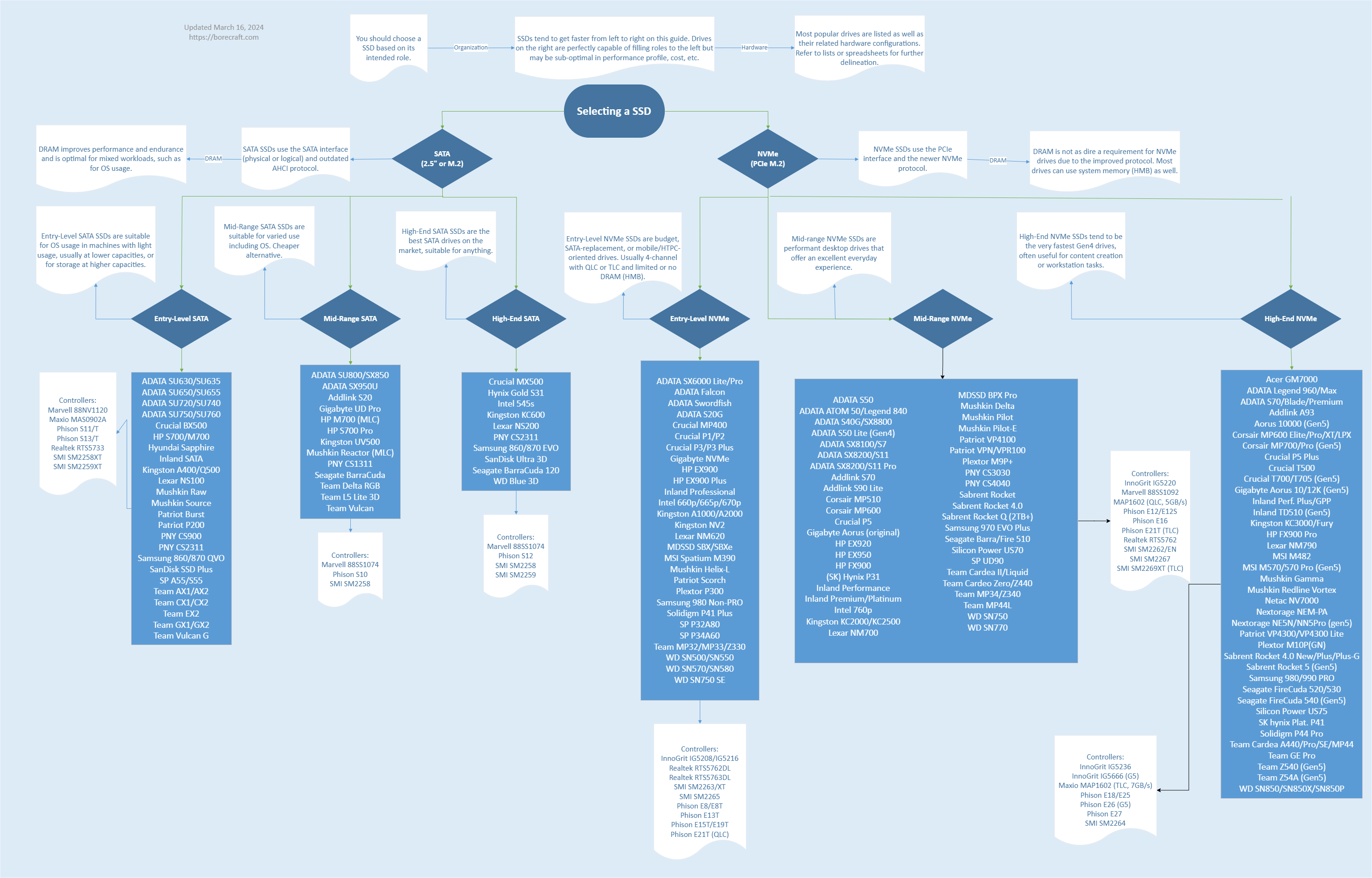
SSD_Buying_Guide.png
 

harky

Great Supremacy Member
Joined
Jan 20, 2002
Messages
61,745
Reaction score
3,584
Kioxia an underrated SSD brand. Been using it for both my servers, NAS and workstation, no issues.

Since most of my servers using their U.2 drives, i trust their enterprise SSD than consumer SSD out there when running critical applications. Fact is, speed is not everything. No point having such a speedy drive that cannot even hold its data for long.​
Kioxia nt cheap also la
 

transparos

Senior Member
Joined
Dec 5, 2012
Messages
1,414
Reaction score
226
My 6 years old sata ssd samsung is still working. But getting the sn850x for my new rig, Samsung cost more and recently have problem with their 990 and 980 series
 

Qubicfactor

Supremacy Member
Joined
Mar 26, 2003
Messages
7,694
Reaction score
690
Kioxia an underrated SSD brand. Been using it for both my servers, NAS and workstation, no issues.

Since most of my servers using their U.2 drives, i trust their enterprise SSD than consumer SSD out there when running critical applications. Fact is, speed is not everything. No point having such a speedy drive that cannot even hold its data for long.​
Ex Toshiba/OCZ :o
 

harky

Great Supremacy Member
Joined
Jan 20, 2002
Messages
61,745
Reaction score
3,584
My 6 years old sata ssd samsung is still working. But getting the sn850x for my new rig, Samsung cost more and recently have problem with their 990 and 980 series
2tb nt cheap wo........
 

Phen8210

High Supremacy Member
Joined
Jul 29, 2011
Messages
29,034
Reaction score
8,286
Hmm..

Kioxia consumer variants also use phison reference model, which is likely to be the same as the other 10 drives out there.

In reality, there's like only 6 SSD. WD, Samsung, Micron, Phison, SMI, Innogrit. Maybe I have missed out on some.. like marvel?

Many brands are using reference designs from Phison, SMI, and Innogrit and then simply reselling them. There are a few cases where they might make a little change, but the majority are not like that.

That being said, 90% of products that follow reference design are already largely predetermined.

Furthermore, there are companies specializing in building and selling SSDs using reference designs from vendors such as the ones mentioned. These companies will often source the necessary components, assemble the drives, and then sell them to other companies and let them 'rebrand' the drives.

Isn't it weird to say that one is better than the other? :)
 

LiLAsN

Master Member
Joined
Dec 14, 2008
Messages
2,700
Reaction score
510
last time is no1.... now dunnoe liao. :censored:


15KT1al.png

IGiLNpR.png

MAsbkf4.png
The amount of misinformation here is shocking to say the least.
1) Why would the Samsung Magician software refuse to update the firmware? There's no reason to. The only time this happens is when you put the NVMe SSD in an External NVMe SSD Enclosure USB drive. For firmware updates, you need to insert the drive directly into your motherboard. This is for security reasons.

2) There is no need to be so drastic as to backup every night. It is a good practice and ensures your files are safe. But the drive itself is fine. It was just a bad firmware and that firmware has been fixed the moment you update. So it will act and perform just like your older drives.

3) Is this from using the bad firmware? Because I too am not looking forward to remembering all of my games that was installed on the PS5, then having to unplug the drive, insert the drive to my computer, maybe having to reformat for Windows and Samsung Magician to pick the drive up and then update the firmware. And if it was reformatted, reinstall all the games that was deleted from the drive back in the PS5. But because I do not use my PS5 much, I haven't done so. Going to have a look at this when there's a need to use the PS5. Not looking forward to it though. Perfectly understandable for not going with another Samsung drive after this. Imagine getting burned of over hundred or even thousand of dollars from this incident. That is why I am taking this time to try out other drives again as a result. Just not looking forward to have more bloatware on the computer from installing SSD drives from other brands. That was the only reason I stuck to one.
 

deepblue_82

Arch-Supremacy Member
Joined
Oct 23, 2007
Messages
20,161
Reaction score
2,545
My 6 years old sata ssd samsung is still working. But getting the sn850x for my new rig, Samsung cost more and recently have problem with their 990 and 980 series
my Plextor 128gb M5 Pro used for 10 year.
this is the 10th year still working fine..
 

86technie

High Supremacy Member
Joined
Jun 8, 2006
Messages
40,428
Reaction score
5,990
2tb nt cheap wo........
Usually SSD most get around 500gb - 1tb for boot drive and programs that need fast data read speed.
Bigger than 1TB, recommend go fir hard disk.
Hard disk is slower but cheaper compare with SSD.
Samsung price I shared, Challenger is also selling the promo price.
Just get 970 evo plus gen 3, some will say gen 3 is slower.
But than do you need gen 4? Unless you are doing video editing or heavy file transfer than gen 4 will benefit.
Day to day usage and gaming between gen 3 and 4 you won't notice a difference.
For games running on gen 4 doesn't mean more FPS.
Prices of other Samsung SSD best visit a Challenger store.
I don't want to share here else I be flag as sales post.
 

ragnarok95

Senior Moderator
Senior Moderator
Joined
Mar 9, 2004
Messages
125,302
Reaction score
6,569
More and more people are moving towards NVme storage hence they would spend money on a 2TB and just install inside the motherboard without extra cables. It makes your rig look neater. This case it doesn't really matter if its gen3 in a gen4 slot anyway. But most people who want to go above 2TB they will still consider a HDD because it is still the cheaper option out there.
 

harky

Great Supremacy Member
Joined
Jan 20, 2002
Messages
61,745
Reaction score
3,584
Usually SSD most get around 500gb - 1tb for boot drive and programs that need fast data read speed.
Bigger than 1TB, recommend go fir hard disk.
Hard disk is slower but cheaper compare with SSD.
Samsung price I shared, Challenger is also selling the promo price.
Just get 970 evo plus gen 3, some will say gen 3 is slower.
But than do you need gen 4? Unless you are doing video editing or heavy file transfer than gen 4 will benefit.
Day to day usage and gaming between gen 3 and 4 you won't notice a difference.
For games running on gen 4 doesn't mean more FPS.
Prices of other Samsung SSD best visit a Challenger store.
I don't want to share here else I be flag as sales post.
tot of getting to use on main drive - os, software.. 1tb also can.. but i tot 2tb will be better... just wonder worth a nt
 

86technie

High Supremacy Member
Joined
Jun 8, 2006
Messages
40,428
Reaction score
5,990
tot of getting to use on main drive - os, software.. 1tb also can.. but i tot 2tb will be better... just wonder worth a nt

You have to decide but take note SSD by right you can't use all it's available disk space.
As it will affect it's health and the SSD health will degrade over time.
At least 20% of health so for example 1TB that means usage must not exceed around 700 - 800GB.

Most users will opt for dual drive, one SSD for OS or with software.
Second storage either SSD or hard disk for data etc.
Take note some HDD if above 2TB, the spindle speed is 5400rpm.

For 2TB hard disk I will recommend Seagate Barracuda which spins at 7200rpm
with read/write speed of 210mb/s.
Price for Samsung 970 EVO Plus 1TB is $129, 2TB is $239. (Price is from Challenger)

HDD wise Seagate Hard disk 2TB is $78.
 
Last edited:

deepblue_82

Arch-Supremacy Member
Joined
Oct 23, 2007
Messages
20,161
Reaction score
2,545
You have to decide but take note SSD by right you can't use all it's available disk space.
As it will affect it's health and the SSD health will degrade over time.
At least 20% of health so for example 1TB that means usage must not exceed around 700 - 800GB.

Most users will opt for dual drive, one SSD for OS or with software.
Second storage either SSD or hard disk for data etc.
Take note some HDD if above 2TB, the spindle speed is 5400rpm.

For 2TB hard disk I will recommend Seagate Barracuda which spins at 7200rpm
with read/write speed of 210mb/s.
Price for Samsung 970 EVO Plus 1TB is $129, 2TB is $239. (Price is from Challenger)

HDD wise Seagate Har disk 2TB is $78.
yes...................
 

TanKianW

Supremacy Member
Joined
Apr 21, 2005
Messages
6,906
Reaction score
3,615
I do agreed realiability is more important.

based on your experience which of your nvme ssd receive more regular firmware update/support to improve its reliability for long term usage?

Based on my experience, I will still recommend Kioxia U.2 drive for reliability. Either a CD7 or CD8. :LOL:

That is the reason I am still using U.2 drives for production workload or running node clusters. Never on consumer M.2 which is too unreliable with limited IOPs.​
 

Yongkit

Supremacy Member
Joined
Oct 9, 2015
Messages
5,912
Reaction score
2,498

Based on my experience, I will still recommend Kioxia U.2 drive for reliability. Either a CD7 or CD8. :LOL:

That is the reason I am still using U.2 drives for production workload or running node clusters. Never on consumer M.2 which is too unreliable with limited IOPs.​
Many thanks for sharing.

As for IOPs this is always overlook metric when choosing nvme drive for normal consumer.
 

86technie

High Supremacy Member
Joined
Jun 8, 2006
Messages
40,428
Reaction score
5,990
Mid-Range is ok right?? high-end seen abit ex

i see the shopeee one.. some is seller warranty.. can buy a nt hehe

I suggest for you, check SIm Lim Square price.
See which one suits your budget than relying on that chart.
Very weird why HP SSD are included, generally avoid OEM
SSD.

Which is why to me that chart isn't accurate, some SSD I will
avoid like HP and Lexar.
Go for reliable brand like Samsung, WD etc.
 

TanKianW

Supremacy Member
Joined
Apr 21, 2005
Messages
6,906
Reaction score
3,615
Many thanks for sharing.

As for IOPs this is always overlook metric when choosing nvme drive for normal consumer.

Just to add. "Sustained" and "Consistent" is the key. Not just based on the numbers on the spec sheet.

Actually, it took SSD quite some time to be implemented (mainstream) on production servers running mission critical workloads. The reason being though it is fast, it is not "reliable enough" (imagine you are in the middle of a bank transfer, when Eg. Samsung Pro choked due to its firmware), therefore mainly just as a cache/fetch.

Thankfully, a lot of innovations have happened in the enterprise storage (SSD) space since, making them "production ready" and reliable enough to be a storage commodity. However, many of these innovations have not trickled down to consumer SSDs....yet. My best guess is consumers are more fault-tolerant, unlike servers! :ROFLMAO:​
 
Important Forum Advisory Note
This forum is moderated by volunteer moderators who will react only to members' feedback on posts. Moderators are not employees or representatives of HWZ Forums. Forum members and moderators are responsible for their own posts. Please refer to our Community Guidelines and Standards and Terms and Conditions for more information.
Top