

You are using an out of date browser. It may not display this or other websites correctly.
You should upgrade or use an alternative browser.
You should upgrade or use an alternative browser.
NEW PC... need advice
- Thread starter hardindex
- Start date
More options
Who Replied?
hardindex
Banned
- Joined
- Dec 20, 2010
- Messages
- 17,924
- Reaction score
- 11,109
erm 73~80
if u just turn on computer, then the temperature already so high.... then your thermal issue or cpu cooler.
i not intel user but technically i look at idle temp..... then max temp during usage. So if abnormal, then thermal issue etc. For amd idle 38~52


was running some applications. Now closed them returned to 44... not thermal paste problem right? i thinking just buy a new CPU cooler to push it down.
hardindex
Banned
- Joined
- Dec 20, 2010
- Messages
- 17,924
- Reaction score
- 11,109
logistic problem, was getting a i5, but shipping disappear so i get i7 repurchase at some discount13700kf is a strong cpu but why pair with a ddr4 b series board ?
you can save money by going for a lower tier cpu to get better cooling

Average
Banned
- Joined
- Apr 14, 2012
- Messages
- 28,980
- Reaction score
- 279
moi ish 43deg celchecking my cpu temp nao

ouroboroso
Supremacy Member
- Joined
- Jan 1, 2000
- Messages
- 7,779
- Reaction score
- 7,140
was running some applications. Now closed them returned to 44... not thermal paste problem right? i thinking just buy a new CPU cooler to push it down.
If the CPU is already hitting 73c at 12% load, it's likely going to throttle often. But no issue if you are not bothered about performance...

lazyclimb
Supremacy Member
- Joined
- Nov 5, 2009
- Messages
- 8,016
- Reaction score
- 4,486
13gen usually run hot. mine is i5 with z690 ddr4. get good cpu fan like peerless assassin
Should i be worried with temperature? I don't even dare to switch on XMP for ram? I upgrade CPU cuz of repurchase and delivery problem, was getting a cheaper CPU with cheap CPU fan....
wongminmin
High Supremacy Member
- Joined
- Nov 10, 2014
- Messages
- 34,598
- Reaction score
- 18,826
should be. not sure what cpu cooler u using.
was running some applications. Now closed them returned to 44... not thermal paste problem right? i thinking just buy a new CPU cooler to push it down.
The diff between good and bad cpu cooler when under load.....can be between 5~15. So if u get a good 1....maybe can push down another 5~15 degree during load.
Other factors like casing temperature/room temperature may also affect your cpu temp.
if possible, get from those existing 13700KF users as reference....before u decide to get new cpu cooler.

titusilvering
Banned
- Joined
- May 16, 2010
- Messages
- 41,699
- Reaction score
- 19,592
If overheat the comp will shutdown or reboot one la. If nothing happen mai kiasi
Should i be worried with temperature? I don't even dare to switch on XMP for ram? I upgrade CPU cuz of repurchase and delivery problem, was getting a cheaper CPU with cheap CPU fan....

Always check the basics
1. Thermo paste put properly? Got remove the plastic packaging?
2. Fans intake vs exhaust? Remember power supply also got fan? Your cpu got fan, your gpu got fan. try to draw out simple diagram on paper (ie. simplest setup is fan intake> exhaust, avoid blowing against the exhaust point and dead corners)
3. if all okay then maybe CPU is faulty, change CPU itself
1. Thermo paste put properly? Got remove the plastic packaging?
2. Fans intake vs exhaust? Remember power supply also got fan? Your cpu got fan, your gpu got fan. try to draw out simple diagram on paper (ie. simplest setup is fan intake> exhaust, avoid blowing against the exhaust point and dead corners)
3. if all okay then maybe CPU is faulty, change CPU itself

tank_t
Banned
- Joined
- Sep 1, 2006
- Messages
- 60,322
- Reaction score
- 12,190
u need to purge the hot air out. cos without air circulation the chasis will get warmer then if the PC place next to u will feel like having an oven. also if dont purge the hot air out, the ram gets warm easier.no chassis fan just CPU fan
gpu and cpu can ram up to above 70 degrees your internal chasis will be ~60 degree this will affect your ram tempreture. heat need to escape then = cooling.
1) install case fan, esp on the rear and top.
2) put a table fan blow the hot air away from you. if got ceiling or aircon better.
moi cpu idle temp.
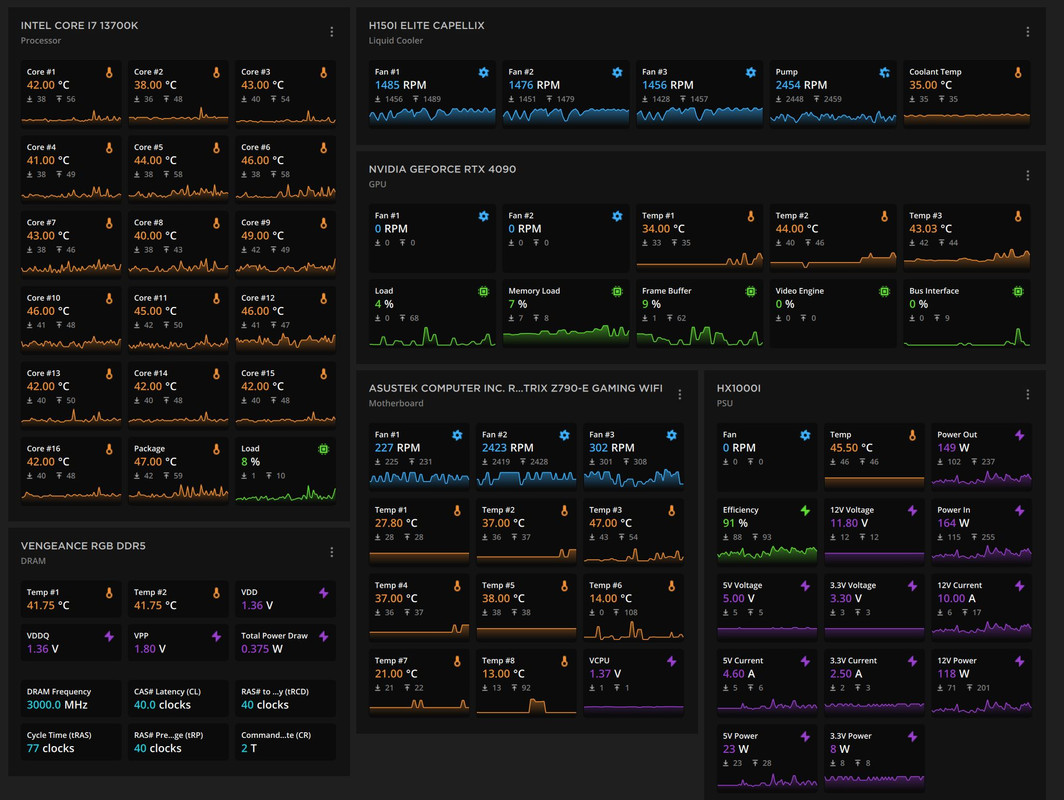
Last edited:

andyhtc
Suspended
- Joined
- Aug 7, 2016
- Messages
- 20,855
- Reaction score
- 11,037
If overheat the comp will shutdown or reboot one la. If nothing happen mai kiasi
Other components such as resistors and capacitors on the motherboard will fail early.
I read that older processors will also slow down due to wear and tear.


coyote
Greater Supremacy Member
- Joined
- Sep 20, 2000
- Messages
- 85,430
- Reaction score
- 28,654
Should i be worried with temperature? I don't even dare to switch on XMP for ram? I upgrade CPU cuz of repurchase and delivery problem, was getting a cheaper CPU with cheap CPU fan....
Where did it show the temperature of your cpu?

NeonX
Arch-Supremacy Member
- Joined
- Jan 1, 2000
- Messages
- 14,895
- Reaction score
- 1,449
5.3 is boost clock i think, not OC. I'm on 280mm aio itx build, when gaming i'm in 70+ 80sI7 , 13th gen need at least 240mm close loop cooling. And with that its possible to hit 85 degrees when gaming. If u use air cooling better turn off the overclocking feature on the mother board. Based on spec this cpu should be doing 4.9ghz for performance core. 5.3 looks like overclocking to me.

hardindex
Banned
- Joined
- Dec 20, 2010
- Messages
- 17,924
- Reaction score
- 11,109
can advice on ram? I didn't activate XMP, so its running at 2133, the ram are 3600 ones, i set multipler to 32 for 3200MHz without XMP?If the CPU is already hitting 73c at 12% load, it's likely going to throttle often. But no issue if you are not bothered about performance...

Last edited:


kage
Arch-Supremacy Member
- Joined
- Jan 1, 2000
- Messages
- 22,927
- Reaction score
- 10,316
Cannot saved money on CPU fan, heat will destroy ur system components slowly and surely
Must put chassis fans to draw in cool air, and another to draw out hot air, else it will be like an oven circulating hot air inside the casing
Must put chassis fans to draw in cool air, and another to draw out hot air, else it will be like an oven circulating hot air inside the casing
Last edited:
standarture
Great Supremacy Member
- Joined
- Feb 28, 2009
- Messages
- 62,826
- Reaction score
- 19,426
Confirm is thermal paste issue la
Important Forum Advisory Note
This forum is moderated by volunteer moderators who will react only to members' feedback on posts. Moderators are not employees or representatives of HWZ Forums. Forum members and moderators are responsible for their own posts.
Please refer to our Community Guidelines and Standards and Terms and Conditions for more information.
