NEW PC... need advice

hardindex

Banned
Joined
Dec 20, 2010
Messages
17,967
Reaction score
11,129
dun need liquid cooler lah..
just a good cpu fan + thermal paste will do...
actually stock cpu fan is good enough..

yah and many chassis fan to draw out hot air
i install software, can goes to 90 cpu only 20%++ load.... KNN sibei scary :cry:
 

tank_t

Banned
Joined
Sep 1, 2006
Messages
60,431
Reaction score
12,222
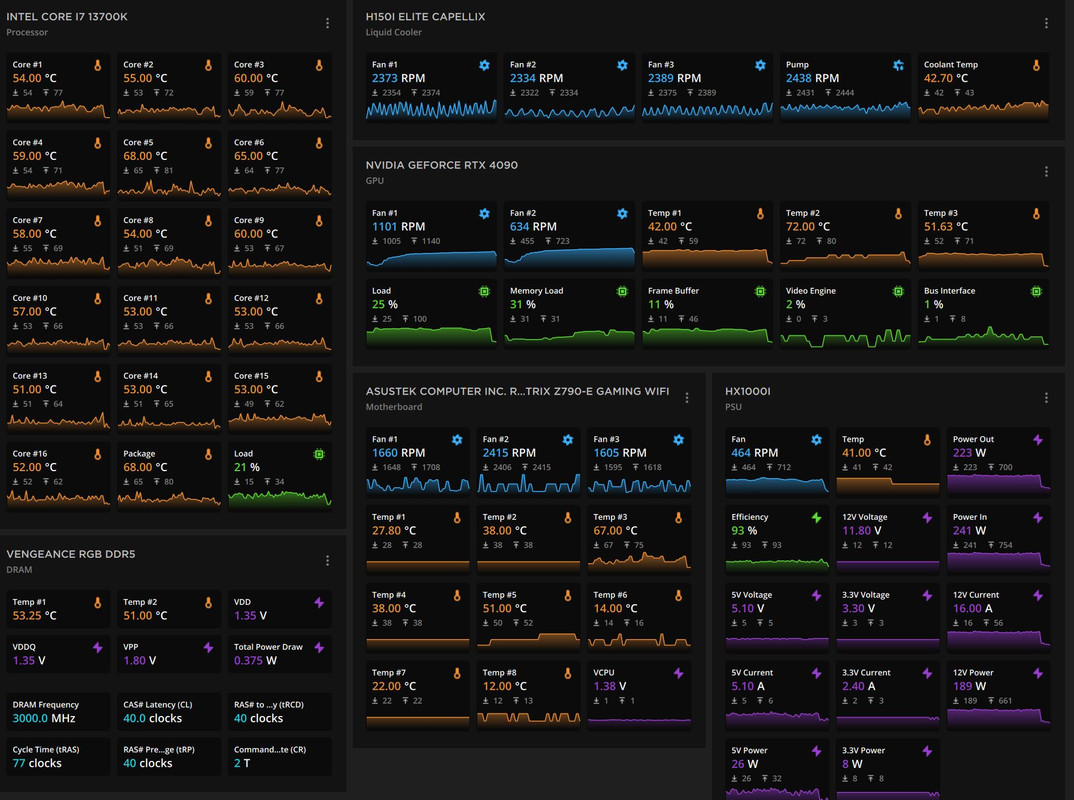
moi pc at load

BG3-load.jpg
 

BlackWing1977

Honorary Member
Joined
Mar 1, 2006
Messages
103,322
Reaction score
38,896
X14AXzS.png


Should i be worried with temperature? I don't even dare to switch on XMP for ram? I upgrade CPU cuz of repurchase and delivery problem, was getting a cheaper CPU with cheap CPU fan....
Intel CPU is like this one.. you need AIO to tame it.. for your model, best is 360mm AIO... I mean some Air Cooler might work.... but probably throttle quite easily so performance not as good as on AIO.
 

BlackWing1977

Honorary Member
Joined
Mar 1, 2006
Messages
103,322
Reaction score
38,896
look like your 1 is 4 pipping, i normally get at least 6 pipping cpu cooler.
Then u need 1 exhaust case fan behind.
then ur top case fan may have conflict with the cpu fan.... if put wrong direction.

we will try to control the temperature limit.... not wait until bsod.... by then, already damaged the components. :censored:

For me lah, i will put top fan as 1 inlet fan and 1 exhaust fan
this-is-my-current-fan-setup-should-i-change-the-direction-v0-f2ihwcdb703a1.jpg
I also wonder if my setup will interfere... I got 3 default ARGB fans from Lianli in the LANCOOL III casing in the front, 1 x 140mm fan in the exhaust.... all came with the casing, then I added Artic P12 Slim x 3 to the bottom as intake, then Antec Storm T3 140mm x 3 at the top as exhaust... CPU cooler using BeQuiet Dark Rock Pro 4, CPU is AMD 7800X3D.
 

ouroboroso

Supremacy Member
Joined
Jan 1, 2000
Messages
7,821
Reaction score
7,203
can advice on ram? I didn't activate XMP, so its running at 2133, the ram are 3600 ones, i set multipler to 32 for 3200MHz without XMP?
j53v9Kf.png

Based on what I gathered online, your Corsair RAM kit achieves 3600MHz when overclocked.

There are two options based on your set-up:

1. if you can manually set the multiplier to 36 (using 100MHz RAM base clock rate) and then tweak the voltage settings (step-by-step undervolt with each reboot until system fails to boot, then use that as the setting for further testing after boot). I think your system will have stability issues if you don't undervolt.

2. turn on XMP and select the 3200 profile (which corresponds to the actual clock rate of your RAM). XMP will then optimise the multiplier for you over a few reboots. Downside is that XMP does not always manage to get a stable voltage/multiplier combination.

Either way, if your system is unable to boot, then you'll need to clear the CMOS and re-configure any custom settings you may have made.

Alternatively, sticking to 2133 MHz is safe (but non-optimal) if you're just using simple Office applications and web browsing.
 

BlackWing1977

Honorary Member
Joined
Mar 1, 2006
Messages
103,322
Reaction score
38,896
erm 73~80

if u just turn on computer, then the temperature already so high.... then your thermal issue or cpu cooler. :unsure:

i not intel user but technically i look at idle temp..... then max temp during usage. So if abnormal, then thermal issue etc. For amd idle 38~52
From TS replies... it is his setup and his chassis.... got no case fans leh... :ROFLMAO:
 

BlackWing1977

Honorary Member
Joined
Mar 1, 2006
Messages
103,322
Reaction score
38,896
no brand one, just 4 copper pipes :cry:. Its was for a cheaper CPU, i read online anything work if not overclocking so testing it now
Technically will work but it will thermal throttle easily... one cheap way to solve this is add some case fans equal intake and exhaust, then change the cooler to something a bit better like cheap thermalright peerless assassin but of course a AIO would be optimal. What is your casing name?? Can help you check the product webpage to see what kind of cooling options is available lor.
 
Last edited:

zueinder

Supremacy Member
Joined
Nov 19, 2009
Messages
8,086
Reaction score
4,865
got, but think badly done cuz i need reposition cooler... then place again without wiping it away. The CPU fan also very cheap.... so not sure if paste again ok or not

no chassis fan just CPU fan

i use tissue to check, its blow-in corectly. thanks, i check these now

At this point, TS is either trolling or this is some joke thread. No chassis fans, cheapo CPU fan, cheapo motherboard, high-end cpu, high end gpu. Basically the equivalent of putting a racecar engine onto a clothes hanger frame. In case anyone still being misled, don't waste your time to troubleshoot le. The problem is very clear, install chassis fans.
 

BlackWing1977

Honorary Member
Joined
Mar 1, 2006
Messages
103,322
Reaction score
38,896
At this point, TS is either trolling or this is some joke thread. No chassis fans, cheapo CPU fan, cheapo motherboard, high-end cpu, high end gpu. Basically the equivalent of putting a racecar engine onto a clothes hanger frame. In case anyone still being misled, don't waste your time to troubleshoot le. The problem is very clear, install chassis fans.
And change the CPU cooler also....
 

BlackWing1977

Honorary Member
Joined
Mar 1, 2006
Messages
103,322
Reaction score
38,896

Akky85

Arch-Supremacy Member
Joined
Oct 14, 2010
Messages
17,582
Reaction score
7,497
When it comes to fans, even if the com is not for gaming, i also will recommend 360AIO at the very mini. Then change the fans to those with at least 2000rpm.

You can never have enough of fans. Only exception is when u are going for a smaller size and a 360 is impossible or very difficult to fit it in. Which is also why i never recommend small form CPU.
 
Important Forum Advisory Note
This forum is moderated by volunteer moderators who will react only to members' feedback on posts. Moderators are not employees or representatives of HWZ Forums. Forum members and moderators are responsible for their own posts. Please refer to our Community Guidelines and Standards and Terms and Conditions for more information.
Top