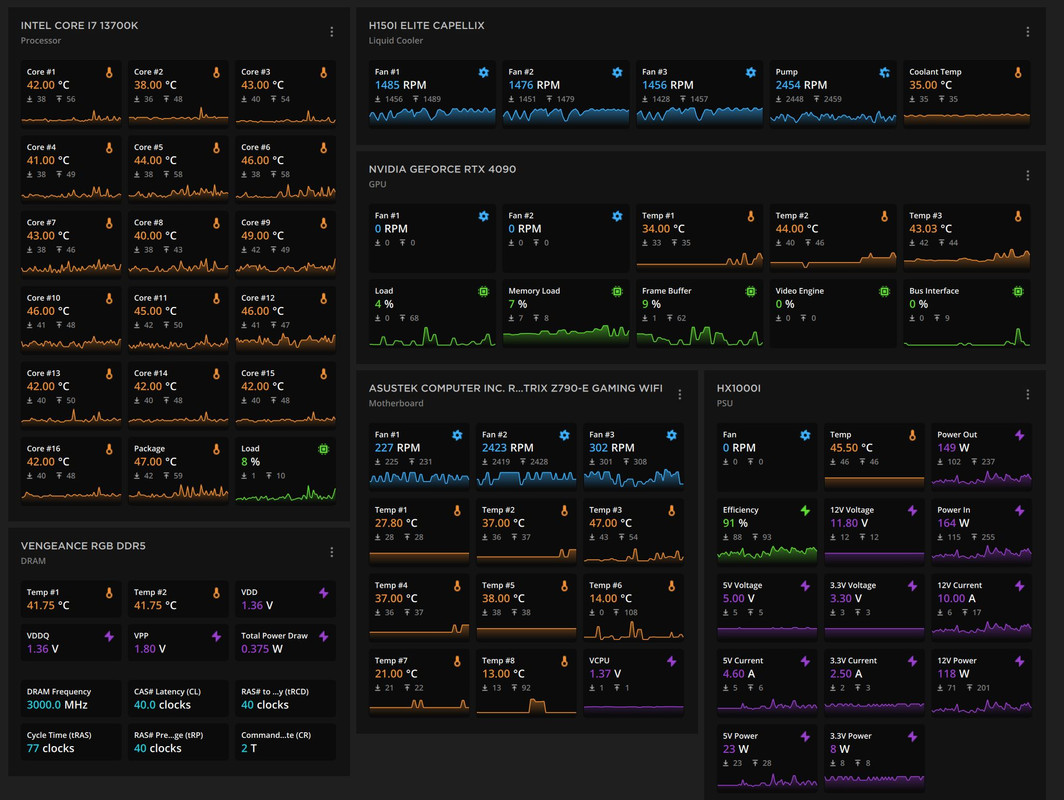
NEW PC... need advice

hardindex

Banned
Joined
Dec 20, 2010
Messages
17,970
Reaction score
11,126
u need to purge the hot air out. cos without air circulation the chasis will get warmer then if the PC place next to u will feel like having an oven. also if dont purge the hot air out, the ram gets warm easier.

gpu and cpu can ram up to above 70 degrees your internal chasis will be ~60 degree this will affect your ram tempreture. heat need to escape then = cooling.

1) install case fan, esp on the rear and top.
2) put a table fan blow the hot air away from you. if got ceiling or aircon better.

moi cpu idle temp.

cpu-idle-temps.jpg
I found this intel utility, the intel turbo boost is new to me and enable by default. Look like from time to time the CPU will boost and stop when throttle.... Running test on CPU, to confirm its authentic. Think i disable in bios later till i get new cooling
9E43kqv.png
 

omelet

Senior Member
Joined
Dec 9, 2006
Messages
2,251
Reaction score
346
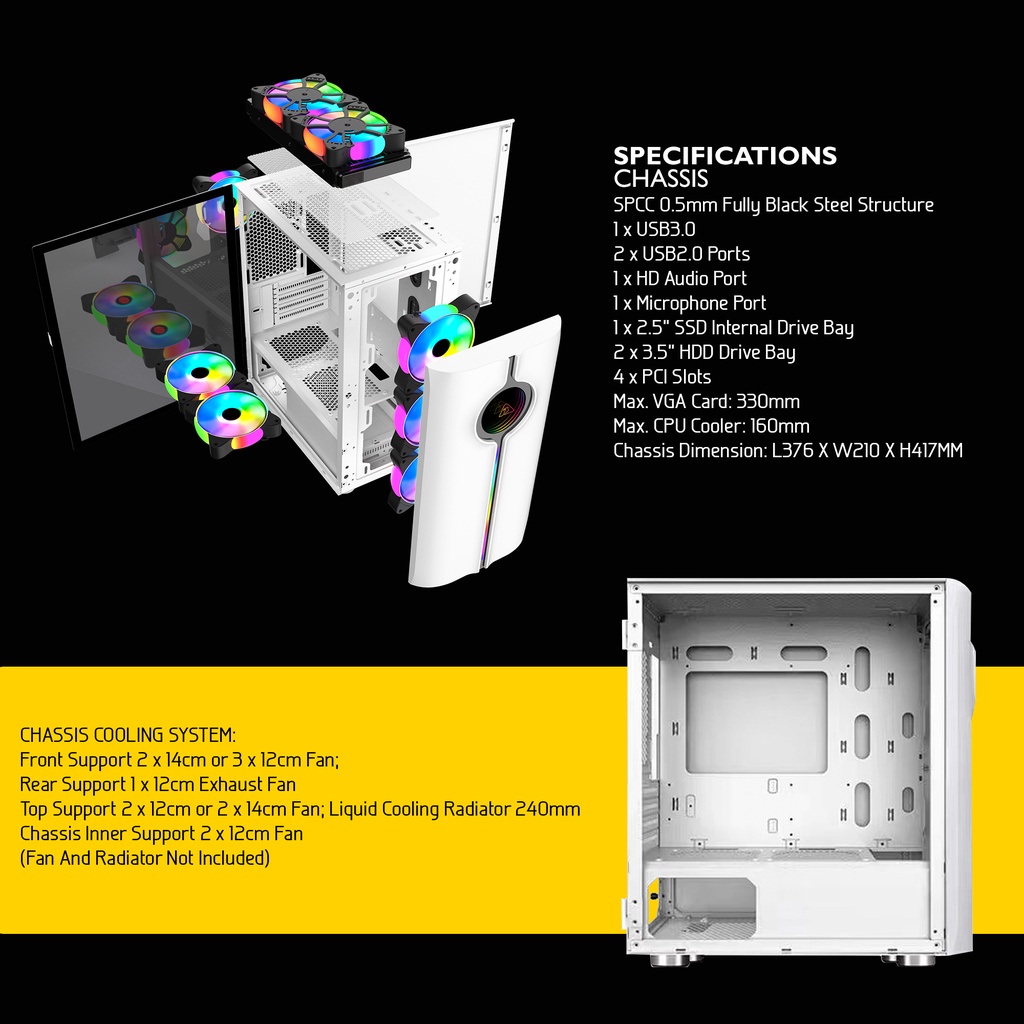
I checked spec for this chassis only can fit one 240 AIO, then read people advice getting 360 AIO for this CPU. So kinda lost what to buy. i waited for all the stuff to be delivered then decide what to do. Hence my current situation :ROFLMAO:

a09f4d7782f7229ba8a7dc929640b83b

This is your case? You may be able to put the 360 AIO in the front instead. But this case don't look like got good air flow though so not worth doing. The front is blocked, no point putting fans/AIO in front.

I suggest changing to a different case. But if you don't want to, then I have a few suggestion:
1) Add intake fans at the top and exhaust fan at the rear.
or
2) Add rear as intake, top exhaust, change direction of your CPU fan. (Might become more dusty since no dust filter at the back)
or
3) Follow the picture get a 240 AIO mount at the top. If top intake, then the rear exhaust, if rear intake then top exhaust.

You don't need to use AIO if you don't want to, it is totally doable on air cooling. But you will need a good air cooler and a case with very good air flow.
 

hardindex

Banned
Joined
Dec 20, 2010
Messages
17,970
Reaction score
11,126
This is your case? You may be able to put the 360 AIO in the front instead. But this case don't look like got good air flow though so not worth doing. The front is blocked, no point putting fans/AIO in front.

I suggest changing to a different case. But if you don't want to, then I have a few suggestion:
1) Add intake fans at the top and exhaust fan at the rear.
or
2) Add rear as intake, top exhaust, change direction of your CPU fan. (Might become more dusty since no dust filter at the back)
or
3) Follow the picture get a 240 AIO mount at the top. If top intake, then the rear exhaust, if rear intake then top exhaust.

You don't need to use AIO if you don't want to, it is totally doable on air cooling. But you will need a good air cooler and a case with very good air flow.
I watched some video on it. I think better to follow the recommended one, later cannot fit have to put the fans outside chassis.


the front i used the space to put SATA HDD, i managed to secure 2 by screw using fans spot :ROFLMAO: Think one dead already, only 1 working
 

hardindex

Banned
Joined
Dec 20, 2010
Messages
17,970
Reaction score
11,126
81tF6WTCsXL._AC_SL1500_.jpg


EZDIY-FAB White Moonlight 120mm RGB Case Fan with Fan Hub X and Remote,Motherboard Aura SYNC,Speed Control,Addressable Fan for PC Case-6 Pack (Amazon SG, search for it there.)​


For case fans can consider something cheap to go with your white casing... S$76.89 for all 6 fans with ARGB controller and remote control. Since your chassis maximum also 6 x 120mm fans nia.
I'm new to ARGB fans didn't get controller... Need controller to work?! cannot plug the ARGB directly to MB? i bent a pin on D_LED2 trying to install :cry:
 

RedEyesFan

Arch-Supremacy Member
Joined
Jan 23, 2010
Messages
20,203
Reaction score
3,969
LBmfOSv.png


was running some applications. Now closed them returned to 44... not thermal paste problem right? i thinking just buy a new CPU cooler to push it down.
Go power option, reduce max processor to 50 %
 

hardindex

Banned
Joined
Dec 20, 2010
Messages
17,970
Reaction score
11,126
q7ZGdsP.jpg


Installed AIO 240.. did a 5min stress test on CPU. What is current throttled? :confused:
 

BlackWing1977

Honorary Member
Joined
Mar 1, 2006
Messages
102,365
Reaction score
38,279
I'm new to ARGB fans didn't get controller... Need controller to work?! cannot plug the ARGB directly to MB? i bent a pin on D_LED2 trying to install :cry:
I think can but this one I link came with the controller if I am not wrong.
 

hardindex

Banned
Joined
Dec 20, 2010
Messages
17,970
Reaction score
11,126
I think can but this one I link came with the controller if I am not wrong.
tPQtzeh.jpg


i watch youtube, they all have controller. Got old motherboard but still work with controller. I haven't see any ARGB fan work without controller. MB only 1 can use 1,3,4 pin can plug the fans, but i bent pin 1 already :ROFLMAO: Should just get normal fans
 

BlackWing1977

Honorary Member
Joined
Mar 1, 2006
Messages
102,365
Reaction score
38,279
tPQtzeh.jpg


i watch youtube, they all have controller. Got old motherboard but still work with controller. I haven't see any ARGB fan work without controller. MB only 1 can use 1,3,4 pin can plug the fans, but i bent pin 1 already :ROFLMAO: Should just get normal fans
My problem is the LianLi front 3 fans on my LANCOOL III casing.. cannot find the cable to connect to the ARGB on my motherboard... but instead it is controlled by the 2 buttons on the casing itself. :ROFLMAO:


Read liao even more confusing.. but then not an issue.. I dun really turn them on anyway.
 

Nefalrin

Banned
Joined
Dec 4, 2018
Messages
4,460
Reaction score
2,200
X14AXzS.png


Should i be worried with temperature? I don't even dare to switch on XMP for ram? I upgrade CPU cuz of repurchase and delivery problem, was getting a cheaper CPU with cheap CPU fan....
Should be your antivirus.
There is one time my antivirus lock on to a file for false scanning then cause CPU to be hot.

Uninstall it or reinstall it will fix the heat problem.

Normal temperature for hardware is about 40 to 45 degree celsius.

It is software problem. CPU usage does not need to go to 100% to be hot.
 
Last edited:

Kunkka

Great Supremacy Member
Joined
Sep 12, 2013
Messages
67,560
Reaction score
22,438
My problem is the LianLi front 3 fans on my LANCOOL III casing.. cannot find the cable to connect to the ARGB on my motherboard... but instead it is controlled by the 2 buttons on the casing itself. :ROFLMAO:


Read liao even more confusing.. but then not an issue.. I dun really turn them on anyway.

There is a converter that come with the case. I have it
 

BlackWing1977

Honorary Member
Joined
Mar 1, 2006
Messages
102,365
Reaction score
38,279
There is a converter that come with the case. I have it
UCGq6bJ.png


I dun see that thing leh, what I saw is something that cannot be plug in. :sick: Not that it is an issue.. but maybe when I am free then go dig out the accessories.. but I remember got screws.. :sick:

Yours was with the accessories or already pre-connected to the casing already. The cables was routed properly so I kinda left it alone dun want to go mess with it.
 
Important Forum Advisory Note
This forum is moderated by volunteer moderators who will react only to members' feedback on posts. Moderators are not employees or representatives of HWZ Forums. Forum members and moderators are responsible for their own posts. Please refer to our Community Guidelines and Standards and Terms and Conditions for more information.
Top