[SIC] Really good Ryzen mini PC

lycanboy

Arch-Supremacy Member
Joined
Jan 7, 2005
Messages
24,720
Reaction score
6,043
it has metal lid and base, plastic palm rest, just like acer swift.

open up and see if adapter is removable. if yes get intel ax210. the built in one is a bit slow
Thanks a lot! I will go open it up
 

cochran

Arch-Supremacy Member
Joined
Sep 2, 2000
Messages
15,993
Reaction score
84
yes i get 17fps when charging. 27~32 fps on battery

Thanks. So your set is the same issue too. No way to resolve it right?

How about is the GPU ram able to increase in the bios?

FYI. I have added AX210 into the TBao X10. The laptop antenna wire connector is different. U will need to get internal antenna to place inside the laptop and do ur own routing. I just stick them one near the Sata M2 port there and another near to the fan there.

Also tried connect one NVME drive to the extra sata M2 port and it do not detect the drive.... So only sata M2.
 

ghgan1

Senior Member
Joined
Aug 29, 2003
Messages
735
Reaction score
144
Try this driver. Might help you solve the problem
No need liao, just realised the trackpad setting is a bit different and just need to go control panel and change the trackpad setting. And use double driver to backup the laptop driver in case need to reinstall window.
 

cochran

Arch-Supremacy Member
Joined
Sep 2, 2000
Messages
15,993
Reaction score
84
actually the trackpad driver. I just install all amd driver from amd.com then the trackpad will be up and working liao. Jus when install new windows have to use a mouse to do it until AMD driver all installed.
 

yusoffb01

Arch-Supremacy Member
Joined
Jun 17, 2008
Messages
16,814
Reaction score
1,769
Thanks. So your set is the same issue too. No way to resolve it right?

How about is the GPU ram able to increase in the bios?

FYI. I have added AX210 into the TBao X10. The laptop antenna wire connector is different. U will need to get internal antenna to place inside the laptop and do ur own routing. I just stick them one near the Sata M2 port there and another near to the fan there.

Also tried connect one NVME drive to the extra sata M2 port and it do not detect the drive.... So only sata M2.
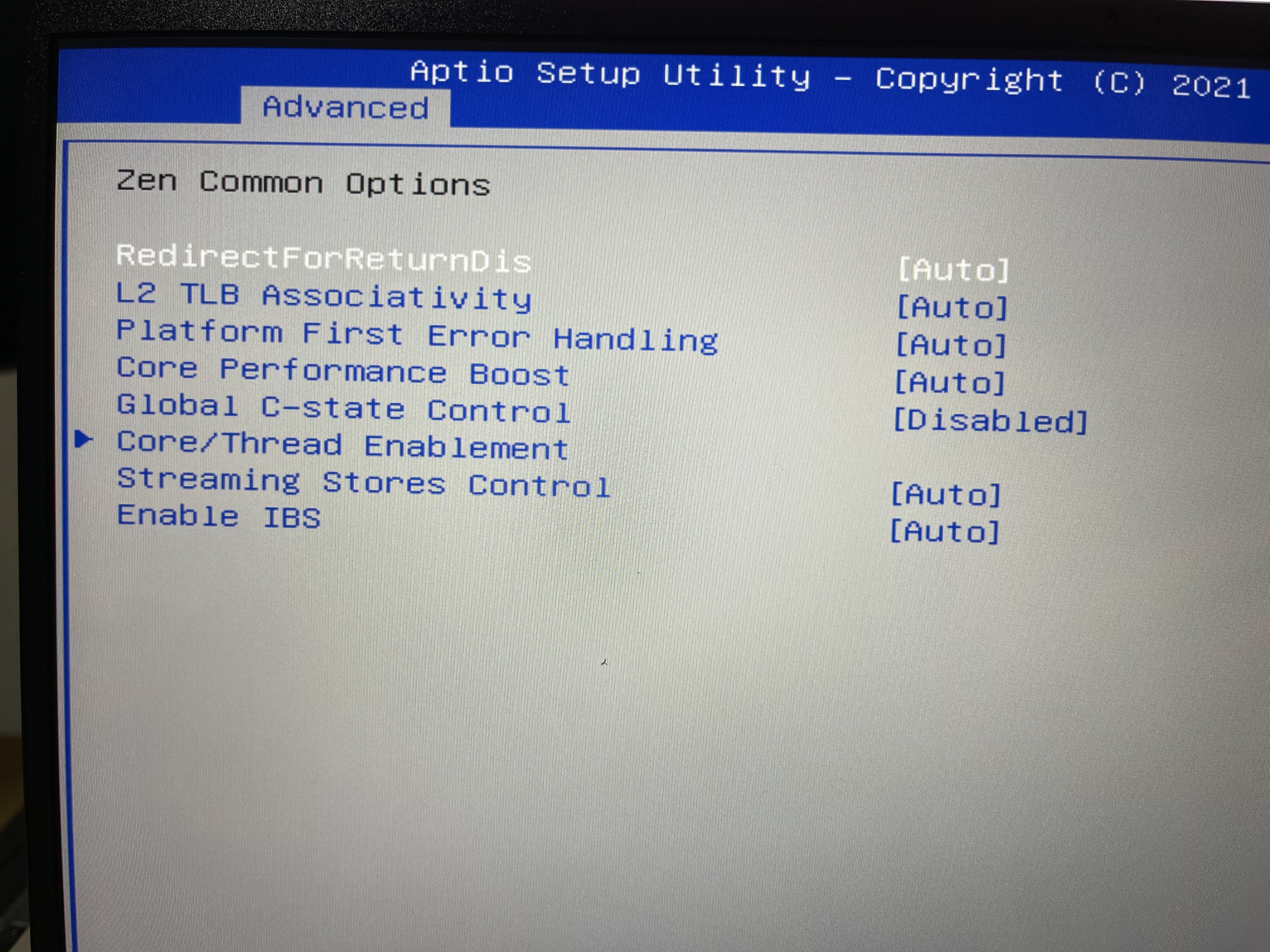
i think i figured out. in bios under amd cbs, enable cstate. then in advanced power options > processor power management > min processor state change to 100%

Now i see fps can go up to 32 when charging
 

cochran

Arch-Supremacy Member
Joined
Sep 2, 2000
Messages
15,993
Reaction score
84
i think i figured out. in bios under amd cbs, enable cstate. then in advanced power options > processor power management > min processor state change to 100%

Now i see fps can go up to 32 when charging

Thank you for finding out.

In the bios inside AMD CBS there are:
Inside Zen common option. Enable the "Gloval C-State Control"?
Then
Inside DF Common option. Enable the "DF C-State Control"?

The Advance power options u mean is to set inside window power options as in the photo?

Thank you.


IMG-4115.jpg


IMG-4116.jpg


IMG-4117.jpg

Any item can increase the GPU ram amount?

Thank you.
 
Last edited:

watzup_ken

High Supremacy Member
Joined
Nov 21, 2003
Messages
25,671
Reaction score
2,122
Are you running into issues launching games, thus, you want to increase the allocated GPU memory? The way iGPU works is that it will automatically go out to the system ram if it needs more resources (assuming you have enough RAM). So there is no difference between having default 256mb vs 2GB of allocated ram when you are gaming. The only thing is that some games will run a check on your GPU, and will throw out an error of insufficient VRAM, if it detects anything less than 2GB.
 

Red_herring

Senior Member
Joined
Jan 1, 2000
Messages
1,972
Reaction score
20
any good itx mobo for ryzen 5 2600 CPU? i downgrading my mAtx to ITX
make sure you check the manufacturer's website first whether the mobo will support 2000 series cpu. I know that the few b550 / a520 itx that i was looking at don't support 2000 series cpu. so you may be limited by the older gens b450 / x470 or the latest x570.
 

NightRaven49

Master Member
Joined
May 17, 2019
Messages
3,741
Reaction score
1,577
I know that the few b550 / a520 itx that i was looking at don't support 2000 series cpu. so you may be limited by the older gens b450 / x470 or the latest x570.
not necessarily true. ive managed to boot an athlon 200ge on a b550 board, and there have been reports that even 1st gen works though official support is not listed. cant vouch for a520 though.
 

yusoffb01

Arch-Supremacy Member
Joined
Jun 17, 2008
Messages
16,814
Reaction score
1,769
not necessarily true. ive managed to boot an athlon 200ge on a b550 board, and there have been reports that even 1st gen works though official support is not listed. cant vouch for a520 though.
it depends on bios version. since am4 supports so many different generation, on newer bios older processor support is removed to make room for newer cpu
 

watzup_ken

High Supremacy Member
Joined
Nov 21, 2003
Messages
25,671
Reaction score
2,122
it depends on bios version. since am4 supports so many different generation, on newer bios older processor support is removed to make room for newer cpu
This is correct. So I guess the best way is to validate with the distributor. From the few instances of me buying motherboards locally, I noticed that BIOS would have been updated by the distributors to support the latest CPU if the BIOS exists from the motherboard manufacturer.
 

Slowdown

Master Member
Joined
Apr 18, 2003
Messages
3,619
Reaction score
894
not necessarily true. ive managed to boot an athlon 200ge on a b550 board, and there have been reports that even 1st gen works though official support is not listed. cant vouch for a520 though.
It makes me wonder if my ASRock B550M ITX AC Motherboard will work with athlon 3000G. I have another two CPU to match and try. Ryzen 2400G and 3300X. As my Athlon is not installed in any build I will try it out.
 

thisislife

Senior Member
Joined
Jun 7, 2007
Messages
949
Reaction score
69
make sure you check the manufacturer's website first whether the mobo will support 2000 series cpu. I know that the few b550 / a520 itx that i was looking at don't support 2000 series cpu. so you may be limited by the older gens b450 / x470 or the latest x570.
so the more modern ITX mobo support 3000 series?
 

Slowdown

Master Member
Joined
Apr 18, 2003
Messages
3,619
Reaction score
894
It makes me wonder if my ASRock B550M ITX AC Motherboard will work with athlon 3000G. I have another two CPU to match and try. Ryzen 2400G and 3300X. As my Athlon is not installed in any build I will try it out.
My experiment with Athlon 3000g failed. Can go into BIOS but cannot detect SSD.
 
Important Forum Advisory Note
This forum is moderated by volunteer moderators who will react only to members' feedback on posts. Moderators are not employees or representatives of HWZ Forums. Forum members and moderators are responsible for their own posts. Please refer to our Community Guidelines and Standards and Terms and Conditions for more information.
Top