SIMBA Fibre Broadband

HiHelloBye

Senior Member
Joined
Oct 8, 2010
Messages
1,448
Reaction score
462
not bad on starhub i get worse than that.
using SH's 10Gbps Fibre Plan...

Code:
C:\Windows\System32>ping 135.125.188.130

Pinging 135.125.188.130 with 32 bytes of data:
Reply from 135.125.188.130: bytes=32 time=180ms TTL=47
Reply from 135.125.188.130: bytes=32 time=181ms TTL=47
Reply from 135.125.188.130: bytes=32 time=180ms TTL=47

Ping statistics for 135.125.188.130:
    Packets: Sent = 4, Received = 4, Lost = 0 (0% loss),
Approximate round trip times in milli-seconds:
    Minimum = 180ms, Maximum = 181ms, Average = 180ms

C:\Windows\System32>ping 52.119.197.147

Pinging 52.119.197.147 with 32 bytes of data:
Reply from 52.119.197.147: bytes=32 time=232ms TTL=234

Ping statistics for 52.119.197.147:
    Packets: Sent = 4, Received = 4, Lost = 0 (0% loss),
Approximate round trip times in milli-seconds:
    Minimum = 232ms, Maximum = 232ms, Average = 232ms
 

chewst7873

Junior Member
Joined
Jan 20, 2023
Messages
6
Reaction score
0
Is there any compatibility issue with LAN 8 cables and SIMBA broadband?
My SIMBA broadband was activated on 1 April and I connected and set up on 2 April. I noted instability as the TP link BE805 router’s led flashed red from time to time during which the tether app and my phone show no internet connection. I tried all means as advised by SIMBA and from what I learned from this forum but problem persisted. I finally nailed it down to the 5m UGreen LAN 8 cable that I was connecting the router to the data point outlet. Having replaced this LAN 8 cable with the original LAN 6 cable that came with the router, this seems to have stabilised the last 2 days although led red still flash briefly once while.
I wonder if there is any compatibility issue with LAN 8 cables which I would think should work better with 10Gbps and longer lengths to facilitate optimal router placement.
As of now, I noted slow loading of site pages including you tube etc, sometimes with the circling icon.
When using Speedtest app, it takes a long time to connect ( with circling icon) before I can click “Go” to start the test. However once started, the download and upload speeds seem ok.
Can experts help with some comments/ experience sharing?
 

SPEED

Supremacy Member
Joined
Jan 1, 2000
Messages
28,901
Reaction score
295
Is there any compatibility issue with LAN 8 cables and SIMBA broadband?
My SIMBA broadband was activated on 1 April and I connected and set up on 2 April. I noted instability as the TP link BE805 router’s led flashed red from time to time during which the tether app and my phone show no internet connection. I tried all means as advised by SIMBA and from what I learned from this forum but problem persisted. I finally nailed it down to the 5m UGreen LAN 8 cable that I was connecting the router to the data point outlet. Having replaced this LAN 8 cable with the original LAN 6 cable that came with the router, this seems to have stabilised the last 2 days although led red still flash briefly once while.
I wonder if there is any compatibility issue with LAN 8 cables which I would think should work better with 10Gbps and longer lengths to facilitate optimal router placement.
As of now, I noted slow loading of site pages including you tube etc, sometimes with the circling icon.
When using Speedtest app, it takes a long time to connect ( with circling icon) before I can click “Go” to start the test. However once started, the download and upload speeds seem ok.
Can experts help with some comments/ experience sharing?
could be just cable itself is faulty ?
 

chewst7873

Junior Member
Joined
Jan 20, 2023
Messages
6
Reaction score
0
Just bought the new cable last week from Amazon. From reliable brand and seems good quality construction. Thought the LAN 8 will help to future proof usage.
 

Cyborg

Supremacy Member
Joined
Jan 1, 2000
Messages
8,071
Reaction score
2,211
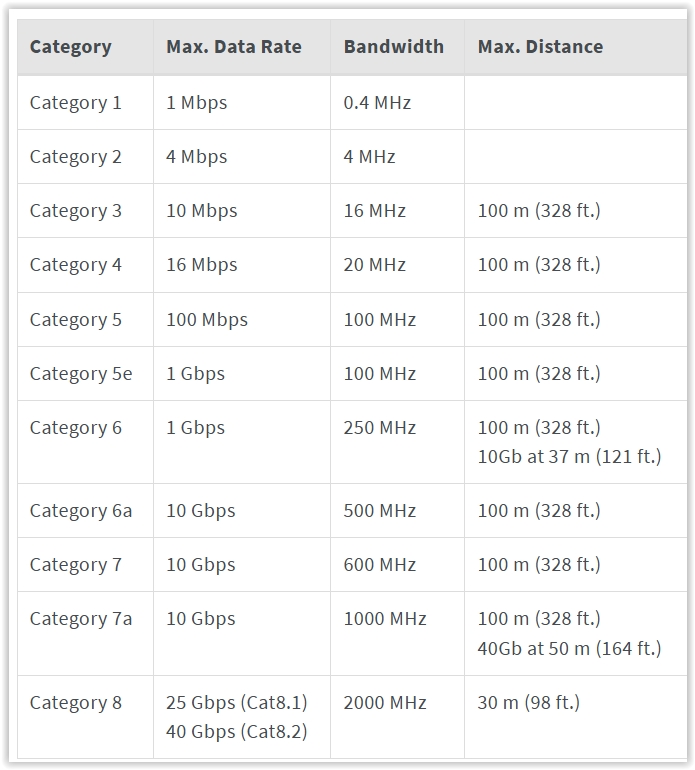
Ethernet Cable Categories

Quote:
Screen-Shot-04-07-25-at-11-34-AM.jpg
 

SkyShroud

Arch-Supremacy Member
Joined
Oct 28, 2005
Messages
21,056
Reaction score
1,513
Is there any compatibility issue with LAN 8 cables and SIMBA broadband?
My SIMBA broadband was activated on 1 April and I connected and set up on 2 April. I noted instability as the TP link BE805 router’s led flashed red from time to time during which the tether app and my phone show no internet connection. I tried all means as advised by SIMBA and from what I learned from this forum but problem persisted. I finally nailed it down to the 5m UGreen LAN 8 cable that I was connecting the router to the data point outlet. Having replaced this LAN 8 cable with the original LAN 6 cable that came with the router, this seems to have stabilised the last 2 days although led red still flash briefly once while.
I wonder if there is any compatibility issue with LAN 8 cables which I would think should work better with 10Gbps and longer lengths to facilitate optimal router placement.
As of now, I noted slow loading of site pages including you tube etc, sometimes with the circling icon.
When using Speedtest app, it takes a long time to connect ( with circling icon) before I can click “Go” to start the test. However once started, the download and upload speeds seem ok.
Can experts help with some comments/ experience sharing?

Cat 6 cable by design is commonly unshielded thus easy to bend and because it is easy to bend, not uncommon for you to bend too much and break the coppers within it. Cat 6a and above are all shielded, because you need to shield it with extra foil(s) to reliably transfer 10Gbps over larger distance. It is because they are shielded, it is also make it harder to bend thus more unlikely to bend it to the point of breaking the coppers within it.
 

Singaporeans First

Senior Member
Joined
May 26, 2014
Messages
2,314
Reaction score
63
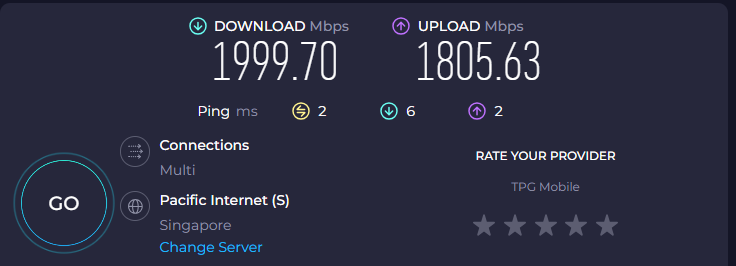
Just upgraded to SIMBA 10GB.

Why i am getting these speed.

Screenshot-2025-04-08-121807.png


Connect the ONT to BE550 via Cat 7 Cable.

BE550 to PC via CAT 6 LAN Cable.
 
Important Forum Advisory Note
This forum is moderated by volunteer moderators who will react only to members' feedback on posts. Moderators are not employees or representatives of HWZ Forums. Forum members and moderators are responsible for their own posts. Please refer to our Community Guidelines and Standards and Terms and Conditions for more information.
Top