TP-Link EB810v - Quick overview

sKeLeToN

Supremacy Member
Joined
Jan 11, 2004
Messages
6,463
Reaction score
59
Yes, it is quite usable for average users.

Recommendation is to go with ONT+EB810v if you want to get more out of the SH 5Gbps plan or 10Gbps plan. But if your use cases are simple, even the cheaper Nokia ONR option can be considered.

And actually it is good that you wait. Previously SH had congested issues during peak time. The issue has been resolved.

If you do not need EPL or Homehub+ bundle, Starhub 5Gbps plan is more worth than 10Gbps plan.
Yes, i do need the Homehu+ bundle that's why only looking specifically at this package.....

Now my other consideration is how many nodes to get....my current set up is the linksys MX4000 with 2 nodes, but i'm still getting weak signal in my *ahem* bedroom and kitchen toilet (being furthest from the node)....i already placed the 2nd node in in the middle of my house (the main node being at the main door area due to where the ONT is installed) but it doesn't seem to make any improvements.

So now i'm thinking whether to get 3 nodes this time round - but it really sounds stupid. I'm living in a mere 4-rm HDB flat, albeit the old layout which is elongated kind (imagine long rectangular kitchen), but i can't seem to get decent signal. So that's why i'm wondering if getting a 3rd node and put in my bedroom will solve the issue...

If i don't get a 3rd node, the other option is the one you mentioned - to get the Archer AX72 and add it to the mesh network....afraid itz too chim for me to set up. :o
 

xiaofan

High Supremacy Member
Joined
Sep 16, 2018
Messages
35,543
Reaction score
11,933
Yes, i do need the Homehu+ bundle that's why only looking specifically at this package.....

Now my other consideration is how many nodes to get....my current set up is the linksys MX4000 with 2 nodes, but i'm still getting weak signal in my *ahem* bedroom and kitchen toilet (being furthest from the node)....i already placed the 2nd node in in the middle of my house (the main node being at the main door area due to where the ONT is installed) but it doesn't seem to make any improvements.

So now i'm thinking whether to get 3 nodes this time round - but it really sounds stupid. I'm living in a mere 4-rm HDB flat, albeit the old layout which is elongated kind (imagine long rectangular kitchen), but i can't seem to get decent signal. So that's why i'm wondering if getting a 3rd node and put in my bedroom will solve the issue...

If i don't get a 3rd node, the other option is the one you mentioned - to get the Archer AX72 and add it to the mesh network....afraid itz too chim for me to set up. :o

Better to get two nodes of EB810v from Starhub first to see how it works.

You may want to post the floor plan to see if you can optimize the layout. Do you have LAN ports in the rooms? Please post the details of the location of the FTP, ONT, current two nodes of Linksys MX4200 and room LAN ports location.

It is not stupid to use three nodes on the 4-room flat, espcially if you have no room LAN ports in the rooms.
 

Henry Ng

Arch-Supremacy Member
Joined
Aug 9, 2011
Messages
17,189
Reaction score
1,010
Where do you set auto negotiation to 10G? I don't see it in Advanced config of EB810v router?
The auto negotiation setting is on your LAN card. This is a LAN card auto negotiation issue. Go to device manager > Network to change the setting of the LAN card. It is under Advanced > Link Speed of the LAN card. Now SH no longer enable remote access to our router so now no more complaint on this.
 
Last edited:

MArVeLIciOUS888

Junior Member
Joined
Jul 5, 2013
Messages
38
Reaction score
11
Hi Guys,

I am having broadband service issues this week and I would like to know if others are also experiencing the same problems.

My 10gb plan was not active from 8pm Mon 30-Sep till about 1am Tue 1-Oct. I called 1633 and did everything they told me (off ONT, unplug / replug fibre cable, on ONT) and they said need to arrange for technician to come to my house to take a look.

Next morning 6am Tue 1-Oct, service was active and it was OK till late night. I proceeded to cancel the appointment.

At 3pm Wed 2-Oct, my wife called me to say service was not active again. There is no service till now 4pm Thu 3-Oct. Spoke to Starhub's tech support while I'm not home and they can't really help. And I have done those steps multiple times but service is still not active.

I told Starhub that when the problem happened, I also checked DownDetector and saw that there were many reports of internet failures (peak at 700+ on Monday). But it seems like Starhub doesn't recognise DownDetector reports.

1. Has anyone been having problems too? I'm in a HDB estate at Sin Ming Avenue, if this info is of help. This increase in report surely mean that there is a problem with Starhub's end, either their infra, cables etc.

2. I also suspect that the ONT might be faulty. Normally, there will be 4 green lights on the ONT (power, link, auth, LAN1). There was a period where only the first and last (power, LAN1) was lit. Now there is only a solid orange light for power. Is this an indication that the ONT is not working properly? I spoke to 3 different tech support guys and they could not explain what the single solid orange light means. One guy said that there was no incoming signal (duh) and another said need to test with a new ONT.

Anyone had similar problems before?
Just to update for those who have or will experience the same problem......

Starhub technician came to my unit just now, and yes it is an ONT problem. He said this is the second instance that he has come across this issue - Power light is solid orange and all other lights are off. Replaced with a new one.

I checked and the faulty ONT was manufactured in 2024.
 

xiaofan

High Supremacy Member
Joined
Sep 16, 2018
Messages
35,543
Reaction score
11,933
Just to update for those who have or will experience the same problem......

Starhub technician came to my unit just now, and yes it is an ONT problem. He said this is the second instance that he has come across this issue - Power light is solid orange and all other lights are off. Replaced with a new one.

I checked and the faulty ONT was manufactured in 2024.

There are reports of Nokia ONT/ONR quality issues previously as well from Starhub 10Gbps users.

I tend to think Nokia China (Nokia Shanghai Bell) produces lower quality ONT/ONR compared to Huawei and ZTE, even all of them are made in China.

But this is just my personal opinion...
 

sKeLeToN

Supremacy Member
Joined
Jan 11, 2004
Messages
6,463
Reaction score
59
Better to get two nodes of EB810v from Starhub first to see how it works.

You may want to post the floor plan to see if you can optimize the layout. Do you have LAN ports in the rooms? Please post the details of the location of the FTP, ONT, current two nodes of Linksys MX4200 and room LAN ports location.

It is not stupid to use three nodes on the 4-room flat, espcially if you have no room LAN ports in the rooms.
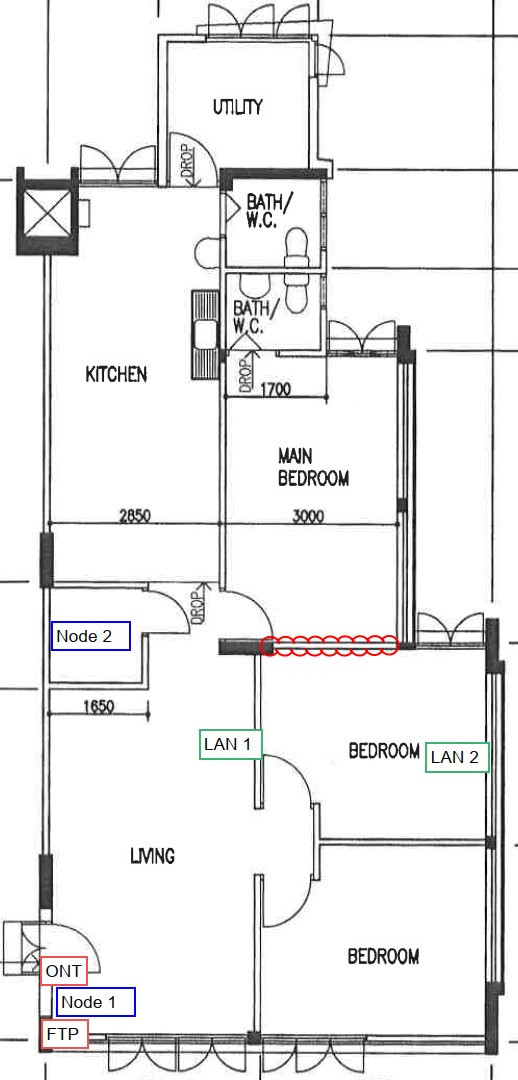
Managed to find the original floor plan when i first bought the house....

https://freeimage.host/i/db6kYmB

I've hacked down the wall i marked in red so can ignore that wall - itz one big masterbed room now. LAN 2 area is our work/ study area.

Node 2 appears to be in the storeroom, but i've also tore that down such that it becomes an open dining area...

I've been reading a bit on ethernet backhaul but dun really understand how it works....
 

Henry Ng

Arch-Supremacy Member
Joined
Aug 9, 2011
Messages
17,189
Reaction score
1,010
There are reports of Nokia ONT/ONR quality issues previously as well from Starhub 10Gbps users.

I tend to think Nokia China (Nokia Shanghai Bell) produces lower quality ONT/ONR compared to Huawei and ZTE, even all of them are made in China.

But this is just my personal opinion...
I agreed with you that Huawei and ZTE are better than Nokia for sure. Seldom hear ONT spoilt.
 

kppfzj

Junior Member
Joined
Jul 7, 2024
Messages
7
Reaction score
1
Archer router in AP mode:


Whether you can get seamless routing is another story, you have to test your device to see if it is okay or not to use single SSID. If not you have to set up different SSID. However, I tend to think it will work with single SSID.

You may want to post the floor plan with details of the locations of the ONT, EB810v and the intended location of the Archer C64, as well as the LAN ports locations. Placement is important to have better roaming performance, even if you use EasyMesh.

That being said, I strongly recommend you to ditch Archer C64 and get another EB810v if you are not tech savvy.


I tried using ap mode. At first was okay it switch between routers perfectly. Now my issue is that when switching to the second Ap it would cut off.
And I would have to join network from the main router as it won't join from the Ap
 

SojIrOu

Member
Joined
May 23, 2005
Messages
183
Reaction score
70
Just an update to share my experience with the EB810v and running WiFi 7 clients (previously only had 6E so never noticed this problem).

I was noticing my iPhone 16 Pro Max having poor coverage and speeds then I realized I was always connected to the main unit MLO network only. After digging a little online, it seems that this is a problem for at least half a year with no updates in sight.

My recommendation is not to use MLO for your WiFi 7 devices as you effectively cannot roam across the different points due to some limitation of EasyMesh and lack of updates.

Really regret getting this EB810v and too late for me to go back to my Decos as I've just sold them. Guess I will be setting up Ubiquiti access points for my other house as well.
 

Lonelyoldman80

Senior Member
Joined
Mar 19, 2024
Messages
736
Reaction score
708
Just an update to share my experience with the EB810v and running WiFi 7 clients (previously only had 6E so never noticed this problem).

I was noticing my iPhone 16 Pro Max having poor coverage and speeds then I realized I was always connected to the main unit MLO network only. After digging a little online, it seems that this is a problem for at least half a year with no updates in sight.

My recommendation is not to use MLO for your WiFi 7 devices as you effectively cannot roam across the different points due to some limitation of EasyMesh and lack of updates.

Really regret getting this EB810v and too late for me to go back to my Decos as I've just sold them. Guess I will be setting up Ubiquiti access points for my other house as well.
I also have this problem always connect to MLO and the 6e always missing ..not sure what's wrong with this router
 

SojIrOu

Member
Joined
May 23, 2005
Messages
183
Reaction score
70
Try just using a separate SSID for 5GHz and 6GHz and only connect your device to those. It generally works fine when on single band SSID.
 

xiaofan

High Supremacy Member
Joined
Sep 16, 2018
Messages
35,543
Reaction score
11,933
I tried using ap mode. At first was okay it switch between routers perfectly. Now my issue is that when switching to the second Ap it would cut off.
And I would have to join network from the main router as it won't join from the Ap

I guess you just need to forget about the low end WiFi 5 only Archer C64. It is really not a good match with EB810v. Bite the bullet and get another EB810v to form a mesh.
 

xiaofan

High Supremacy Member
Joined
Sep 16, 2018
Messages
35,543
Reaction score
11,933
Just an update to share my experience with the EB810v and running WiFi 7 clients (previously only had 6E so never noticed this problem).

I was noticing my iPhone 16 Pro Max having poor coverage and speeds then I realized I was always connected to the main unit MLO network only. After digging a little online, it seems that this is a problem for at least half a year with no updates in sight.

My recommendation is not to use MLO for your WiFi 7 devices as you effectively cannot roam across the different points due to some limitation of EasyMesh and lack of updates.

Really regret getting this EB810v and too late for me to go back to my Decos as I've just sold them. Guess I will be setting up Ubiquiti access points for my other house as well.

Maybe both EB810v and iPhone 16 Pro Max are to blame.

I know that EB810v has its own issue and may well be the main culprit here, but iPhone in general does not have very good WiFi support either. iPhone 16 Pro (or Pro Max) does not support 320MHz channel bandwidth. And it does not seem to support 4096 QAM as well. Kind of fake WiFi 7 support.

I tend to believe iPhone 16 support of MLO is poor as well. This is not a unique problem to iPhone though, same for Windows. Android flagship phones may be a bit better. And router side support is also not good. For now we can basically not pin too much hope on MLO. Need to wait a while to have better router FW and device FW as well as OS support.
 

xiaofan

High Supremacy Member
Joined
Sep 16, 2018
Messages
35,543
Reaction score
11,933
Managed to find the original floor plan when i first bought the house....

https://freeimage.host/i/db6kYmB

I've hacked down the wall i marked in red so can ignore that wall - itz one big masterbed room now. LAN 2 area is our work/ study area.

Node 2 appears to be in the storeroom, but i've also tore that down such that it becomes an open dining area...

I've been reading a bit on ethernet backhaul but dun really understand how it works....

You can use your existing Linksys Velop MX4200 (triband AX4200) to move Node 2 to LAN 1 location to see if that helps on the . Ethernet backhaul is much better than wireless backhaul in general.

Still with your floor plan, maybe three nodes is needed to have good wireless for father toilet, because LAN 1 and LAN 2 locations are not so good.

What is the black colour thingy to the left of the red line?

Maybe pulling an Ethernet cable from FTP to the kitchen area (or from LAN 1 to kitchen or main bedroom) is a cheaper solution than going with three nodes.

db6kYmB.jpg
 

sKeLeToN

Supremacy Member
Joined
Jan 11, 2004
Messages
6,463
Reaction score
59
You can use your existing Linksys Velop MX4200 (triband AX4200) to move Node 2 to LAN 1 location to see if that helps on the . Ethernet backhaul is much better than wireless backhaul in general.

Still with your floor plan, maybe three nodes is needed to have good wireless for father toilet, because LAN 1 and LAN 2 locations are not so good.

What is the black colour thingy to the left of the red line?

Maybe pulling an Ethernet cable from FTP to the kitchen area (or from LAN 1 to kitchen or main bedroom) is a cheaper solution than going with three nodes.

db6kYmB.jpg
Ok let me make sure i understood this correctly.....

Firstly, i'm not using any switch, so my current set up is FTP -> ONT -> Node 1...then i use the LAN ports from my Node 1 to pull 2 ethernet cables to LAN 1 and 2....

So if i were to move Node 2 to LAN 1 location, i just have to connect an ethernet cable from LAN 1 port to the WAN port on my Node 2 to activate the ethernet backhaul?

I did have this idea you shared with me in mind, but dunno how and whether the ethernet backhaul will work in this config....

Much appreciate your inputs!

p/s: the black color thingy beside the left of red line is a wall....
 

xiaofan

High Supremacy Member
Joined
Sep 16, 2018
Messages
35,543
Reaction score
11,933
Ok let me make sure i understood this correctly.....

Firstly, i'm not using any switch, so my current set up is FTP -> ONT -> Node 1...then i use the LAN ports from my Node 1 to pull 2 ethernet cables to LAN 1 and 2....

So if i were to move Node 2 to LAN 1 location, i just have to connect an ethernet cable from LAN 1 port to the WAN port on my Node 2 to activate the ethernet backhaul?

I did have this idea you shared with me in mind, but dunno how and whether the ethernet backhaul will work in this config....

Much appreciate your inputs!

p/s: the black color thingy beside the left of red line is a wall....

I assume your LAN 1 and LAN 2 ports are physically present, right? And you have already pulled Ethernet cables from Node 1 to LAN 1 and LAN 2, right?

FTP --> ONT --> Node 1
Node 1 LAN port 1 --> existing Ethernet cable --> LAN 1 --> Node 2 WAN port
Node 1 LAN port 2 --> existing Ethernet cable --> LAN 2

You may want to read the following article from Dongknows about the general consumer mesh system, including Ethernet Backhaul and Wireless Backhaul.
https://dongknows.com/mesh-wi-fi-system-explained/

That wall may block the WiFi from the Node 2 (if put to LAN 1 location).
 
Last edited:

sKeLeToN

Supremacy Member
Joined
Jan 11, 2004
Messages
6,463
Reaction score
59
I assume your LAN 1 and LAN 2 ports are physically present, right? And you have already pulled Ethernet cables from Node 1 to LAN 1 and LAN 2, right?

FTP --> ONT --> Node 1
Node 1 LAN port 1 --> existing Ethernet cable --> LAN 1 --> Node 2 WAN port
Node 1 LAN port 2 --> existing Ethernet cable --> LAN 2

You may want to read the following article from Dongknows about the general consumer mesh system, including Ethernet Backhaul and Wireless Backhaul.
https://dongknows.com/mesh-wi-fi-system-explained/

That wall may block the WiFi from the Node 2 (if put to LAN 2 location).
Yes, you understood my current set up correctly....ok will give this config a shot and see if it improves the overall connection stability....

anyways, pulling another Ethernet cable to the kitchen area is not possible....so assuming if i went for a 3 node option, where should i place my 3rd node? I assume it would be somewhere in the kitchen right?
 

xiaofan

High Supremacy Member
Joined
Sep 16, 2018
Messages
35,543
Reaction score
11,933
Yes, you understood my current set up correctly....ok will give this config a shot and see if it improves the overall connection stability....

anyways, pulling another Ethernet cable to the kitchen area is not possible....so assuming if i went for a 3 node option, where should i place my 3rd node? I assume it would be somewhere in the kitchen right?

1. Yes I think that is the right option. You can of course experiment with the location to see where is the best location for the third node.

2. But I will suggest to get two units first to see how it goes first. It could be that two nodes is already good enough for your use case. You can carry out experiments to put node 2 in different location to see if it is already good enough.
1) Node 2 placed in LAN 1 location (Ethernet backhaul)
2) Node 2 placed in LAN 2 location (Ethernet backhaul) -- by right this may be worse than Option 1).
3) Node 2 placed in current location (Wireless backhaul)
4) Node 2 placed further up in the kitchen (Wireless backhaul)

3. If all the options are not good, then go ahead with 3-nodes solution.
 

Henry Ng

Arch-Supremacy Member
Joined
Aug 9, 2011
Messages
17,189
Reaction score
1,010
May be LAN 1 location put the node 2 at a higher position. It may work fine as the node is high high there so the wifi signal will flow downwards.
 
Important Forum Advisory Note
This forum is moderated by volunteer moderators who will react only to members' feedback on posts. Moderators are not employees or representatives of HWZ Forums. Forum members and moderators are responsible for their own posts. Please refer to our Community Guidelines and Standards and Terms and Conditions for more information.
Top