TP-Link EB810v - Quick overview

xiaofan

High Supremacy Member
Joined
Sep 16, 2018
Messages
34,927
Reaction score
11,626
my Eb810v from starhub last time keep having 2.4Ghz dropping off issue, causing my cameras at home to malfunction. Tried many methods and SH finally agree to swap a new one for me. Now the new Eb810v no issues with 2.4ghz dropping, but now 5ghz dropping intermittently, disrupted one of my online meetings yesterday. Haiz...is this Eb810v really messed up or does the issue lie with starhub?

That should not happen.

Make sure you have sufficient ventilation for the EB810v as it has a very powerful CPU and dual 10G ports.
 

xiaofan

High Supremacy Member
Joined
Sep 16, 2018
Messages
34,927
Reaction score
11,626
And I don't know why there's absolutely no way of changing the 5ghz channel and channel width of the Eb810v. Now it's stuck at channel 44 and width 160mhz. If you try to change it to any other, it will revert back to this

Unfortunately this seems to be reported by other users as well. You may have to feedback to Starhub to get Starhub/TP-Link to fix the issue. They seem to be slow in fixing the issues of EB810v.

Interestingly I do not see all the issues mentioned here in HB710, which has lower end HW specifications (no 2.5G ports, lower end CPU, lower wireless coverage). At S$192, it is a cost effective 10G capable WiFi 7 router for Starhub users.
 

nick22

Member
Joined
Nov 13, 2008
Messages
110
Reaction score
0
Hi newbie here, i have recently sign up with SH for the 10gbps fibre broadband and opt for this TP link EB810V model. I’m currently staying in a 3room & my question is do i still an extension for better coverage or just this 1 router will do? The device will be place in my living room.
 
Last edited:

xiaofan

High Supremacy Member
Joined
Sep 16, 2018
Messages
34,927
Reaction score
11,626
Hi newbie here, i have recently sign up with SH for the 10gbps fibre broadband and opt for this TP link EB810V model. I’m currently staying in a 3room & my question is do i still an extension for better coverage or just this 1 router will do? The device will be place in my living room.

Maybe you want to post the floor plan with the details like the FTP location room LAN ports location if any, and the intended placement location of the EB810v.

Some floor plans are more difficult than the others, for example with household shelter close to the centre of the flat.

Placement is also important. Ideally you want to put the router close to the centre of the flat.
 

kindredSG

Member
Joined
Jun 3, 2024
Messages
194
Reaction score
196
Hi newbie here, i have recently sign up with SH for the 10gbps fibre broadband and opt for this TP link EB810V model. I’m currently staying in a 3room & my question is do i still an extension for better coverage or just this 1 router will do? The device will be place in my living room.
I find it fine (decent speeds) when placed in my living room and it has to go through a wall to clients. When it was in my distribution board cupboard and had to go through a couple of walls and further distance, it was slower and would drop out occasionally.

So it depends more (generally for all wifi really) on where the 3 rooms are in relation to the unit and how many walls and distance between it and clients etc - the more central (less physical barriers) the better.
 

Sendoh82

Arch-Supremacy Member
Joined
Nov 30, 2000
Messages
19,896
Reaction score
31
Sigh my one also gana the smart devices connection dropping off intermittently.

using broadlink de smart bulb, previously using all no problem now change new bulbs then connections keep dropping off end up my google home cannot control all the bulbs only one or two on and off.

so bros complain to starhub to ask them come do replacement?
 

xiaofan

High Supremacy Member
Joined
Sep 16, 2018
Messages
34,927
Reaction score
11,626
Sigh my one also gana the smart devices connection dropping off intermittently.

using broadlink de smart bulb, previously using all no problem now change new bulbs then connections keep dropping off end up my google home cannot control all the bulbs only one or two on and off.

so bros complain to starhub to ask them come do replacement?

You can try Guest Network on 2.4GHz to see if that sort out the issue or not.

This does not only happen to Starhub issued EB810v or even TP-Link routers (no matter it is consumer models or service provider models). M1 users using Asus ZenWiFi BT10 also report the same issues.

Easier solution is to add an old router as an AP to use with your smart devices.

Personally I am not into smart devices or IoT stuff. But I use an Asus RT-AX86U to serve a few legacy 2.4Ghz devices with its 2.4GHz SSID.
 

Sendoh82

Arch-Supremacy Member
Joined
Nov 30, 2000
Messages
19,896
Reaction score
31
You can try Guest Network on 2.4GHz to see if that sort out the issue or not.

This does not only happen to Starhub issued EB810v or even TP-Link routers (no matter it is consumer models or service provider models). M1 users using Asus ZenWiFi BT10 also report the same issues.

Easier solution is to add an old router as an AP to use with your smart devices.

Personally I am not into smart devices or IoT stuff. But I use an Asus RT-AX86U to serve a few legacy 2.4Ghz devices with its 2.4GHz SSID.

Thanks for the prompt reply, use guest network also cannot..

now i thinking to see bros here got any one using smart bulb which can work with this router or not then buy new one to use.. too bad broadlink one cannot
 

Singapura32

Junior Member
Joined
Mar 2, 2025
Messages
1
Reaction score
1
It seems the Starhub-issued EB810v has an open Telnet port 23. Does anyone know the default password? There is no user name, and the router "admin" password (used to access web interface) doesn't work there, as well as the usual suspects (admin, 1234 etc.).

Fortunately the port doesn't seem to be accessible from the WAN, this would be a significant security issue, however curious to know why SH/TPL are still using obsolete telnet.
 

xiaofan

High Supremacy Member
Joined
Sep 16, 2018
Messages
34,927
Reaction score
11,626
It seems the Starhub-issued EB810v has an open Telnet port 23. Does anyone know the default password? There is no user name, and the router "admin" password (used to access web interface) doesn't work there, as well as the usual suspects (admin, 1234 etc.).

Fortunately the port doesn't seem to be accessible from the WAN, this would be a significant security issue, however curious to know why SH/TPL are still using obsolete telnet.

It is still better to feedback to Starhub/TP-Link to close the port.

Reference -- similar issue for another TP-Link router --> TP-Link says that they will fix the issue in future FW update.

https://community.tp-link.com/en/home/forum/topic/713152

Hi, thanks for posting question and feedback here.

Please do not worry, this will not affect the normal usage and network safety.

To avoid unnecessary worries, the port for Telnet Service will be turned off by default in the future firmware iteration.

Thank you and best regards.
 

Foxshox

Master Member
Joined
Sep 9, 2001
Messages
4,975
Reaction score
13
Anyone experiencing wifi dropouts on the EB810v around 1-2mins only during sudden heavy rains?
 

lightbringer88

Junior Member
Joined
Jul 28, 2012
Messages
17
Reaction score
3
So SH finally installed 10Gbps for me, and I have HB710 on each floor except the basement where an EB810v serves as the main router that uplinks to the HB710s through patch hub.

Speeds are a lot faster on the 6Ghz network, reaching 1.5Gbps easily. However, it seems strange as my Samsung Tab S9 does not register it as WiFi 7 and rather WiFi 6E instead, which makes sense in retrospect as I should be getting closer to 2 Gbps or higher as I am right next to the AP. Is there a setting I need to enable? Or is the MLO network (disabled by default, Hub trooper told me not to use it as it is still not functional) the REAL “WiFi 7” network?
 

xiaofan

High Supremacy Member
Joined
Sep 16, 2018
Messages
34,927
Reaction score
11,626
So SH finally installed 10Gbps for me, and I have HB710 on each floor except the basement where an EB810v serves as the main router that uplinks to the HB710s through patch hub.

Speeds are a lot faster on the 6Ghz network, reaching 1.5Gbps easily. However, it seems strange as my Samsung Tab S9 does not register it as WiFi 7 and rather WiFi 6E instead, which makes sense in retrospect as I should be getting closer to 2 Gbps or higher as I am right next to the AP. Is there a setting I need to enable? Or is the MLO network (disabled by default, Hub trooper told me not to use it as it is still not functional) the REAL “WiFi 7” network?

As per the spec, Samsung Tab S9 does not support WiFi 7 and only WiFi 6E. You can see the spec does not mention 802.11be (WiFi 7), only 802.11 ax on all three bands (WiFi 6E).

https://www.samsung.com/sg/tablets/galaxy-tab-s/galaxy-tab-s9-wi-fi-graphite-128gb-sm-x710nzaaxsp/
  • Wi-Fi
    802.11 a/b/g/n/ac/ax 2.4G+5GHz+6GHz, HE160, MIMO, 1024-QAM
 

lightbringer88

Junior Member
Joined
Jul 28, 2012
Messages
17
Reaction score
3
As per the spec, Samsung Tab S9 does not support WiFi 7 and only WiFi 6E. You can see the spec does not mention 802.11be (WiFi 7), only 802.11 ax on all three bands (WiFi 6E).

https://www.samsung.com/sg/tablets/galaxy-tab-s/galaxy-tab-s9-wi-fi-graphite-128gb-sm-x710nzaaxsp/
  • Wi-Fi
    802.11 a/b/g/n/ac/ax 2.4G+5GHz+6GHz, HE160, MIMO, 1024-QAM
I know it *released* with only WiFi 6E, but several users online reported that a major update (6.1) last year gave their S9 WiFi 7 (evidenced by the 7 in their WiFi logo at the top when connected) capability.


Samsung also advertises it with WiFi 7 capability on Amazon. According to CPU Z, i have the same Snapdragon 8 Gen 2 processor (and not Exynos) as the US models too.

https://a.co/d/1J6kl4P
 

xiaofan

High Supremacy Member
Joined
Sep 16, 2018
Messages
34,927
Reaction score
11,626
I know it *released* with only WiFi 6E, but several users online reported that a major update (6.1) last year gave their S9 WiFi 7 (evidenced by the 7 in their WiFi logo at the top when connected) capability.
...
Samsung also advertises it with WiFi 7 capability on Amazon. According to CPU Z, i have the same Snapdragon 8 Gen 2 processor (and not Exynos) as the US models too.

https://a.co/d/1J6kl4P

Whether they suppport WiFi 7 in Singapore is another story. You may want to check with Samsung Singapore.
 

Colaice

Junior Member
Joined
Aug 31, 2024
Messages
21
Reaction score
3
IMG-1288.jpg
IMG-1289.jpg
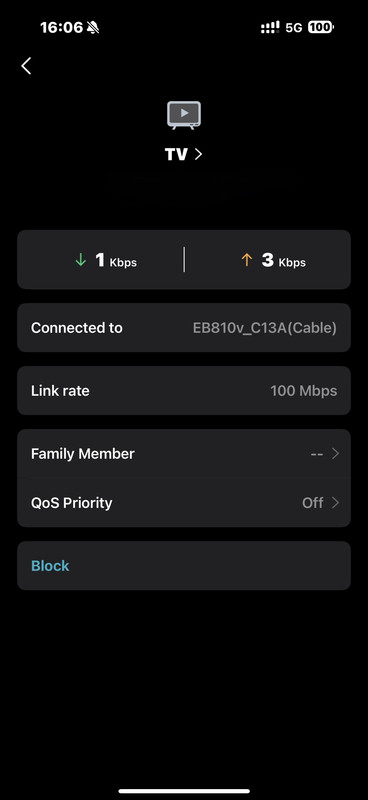
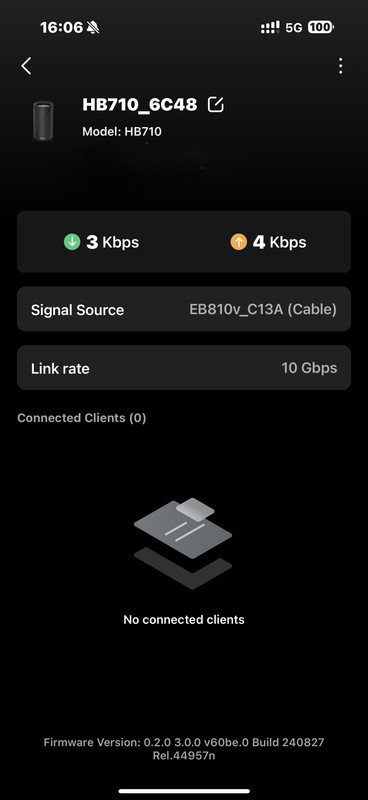
Hi, want to check I connect my tv with EV810B, but the link rate 100mpbs only, is that lan cable problem?
 

flyfly08

Junior Member
Joined
Sep 23, 2008
Messages
41
Reaction score
0
When my laptop connect 2.4Ghz wifi, internet super slow. anyone else facing same issue?

Firmware version: 0.14.0 3.0.0 v608b.0 Build 240709 Rel.56868n
Hardware Version: EB810v v1.0 00000000
 

Colaice

Junior Member
Joined
Aug 31, 2024
Messages
21
Reaction score
3
When my laptop connect 2.4Ghz wifi, internet super slow. anyone else facing same issue?

Firmware version: 0.14.0 3.0.0 v608b.0 Build 240709 Rel.56868n
Hardware Version: EB810v v1.0 00000000
Me too. Always take longer time to connect the 2.4Ghz wifi
 
Important Forum Advisory Note
This forum is moderated by volunteer moderators who will react only to members' feedback on posts. Moderators are not employees or representatives of HWZ Forums. Forum members and moderators are responsible for their own posts. Please refer to our Community Guidelines and Standards and Terms and Conditions for more information.
Top